Unicode Support in PDF Documents
Special Characters in PDF Documents
Font encoding to use special characters (such as î and š) in your PDF documents can be set using a configuration property:
nm.pdfrenderer.encoding = Identity-H
It is important to note that the potential values for this configuration property are not aligned with the usual names of encodings.
Set this value either in the Content settings or the Server settings. The supported encoding values are:
- Identity-H (Default value; Unicode encoding for horizontal writing)
- Identity-V (Unicode encoding for vertical writing)
- Cp1252
- Cp1250
- Cp1257
Note: Starting with Appway 7, the default value is set to Identity-H.
The encoding Cp1252 is the default character encoding used on Microsoft Windows systems in Middle Europe. It is an extension of the "Latin 1" character set (also known as "ISO-8859-1") and contains characters used in most European languages. However, it still lacks some less frequently used characters found in European languages and non-Latin characters.
Identity-H encoding is based on Unicode and supports a wide variety of characters from languages all over the world.
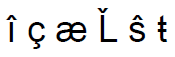
Using a Unicode font encoding, FNZ Studio now can print additional special characters not included in Cp1252 to PDF documents:
Non-Latin Characters in PDF Documents
The Unicode font encoding also enables FNZ Studio to print texts using non-Latin characters:
- Arabic, Greek
- Cyrillic, Armenian, Georgian
- Chinese, Japanese, Korean
- Thai, Tamil, Vietnamese
- ...
There is one requirement: You need to install a font which includes glyphs for the characters you would like to print in the PDF document.
If you have installed Microsoft Office 2000 or newer, you could use the font "Arial Unicode MS". It includes more than 50,000 glyphs. Find the ARIALUNI.TTF file in your Windows Font directory and upload it as new Font in FNZ Studio.
Using this font, you can even mix characters from different alphabets.

If a font does not include a glyph for a character in the text, the character is simply not printed.