Error Handling
This article illustrates how to design an application so that any possible errors are handled
While you model your process along all typical variants the execution path can possibly take, it's still a good idea to include error conditions in your application. The handling of errors should raise awareness of the error condition and provide a path to revert or resolve the condition from within the process flow. This avoids situations where the process becomes suspended, thus requiring cumbersome administration activities.
Examples of typical situations for error conditions:
- The backend system becomes unavailable.
- An external resource (e.g. a file to process) does not exist, has a different name or a different structure than expected.
- Data consistency issues arise, such as duplicate keys.
What you want to do here is take a certain indicator of the problem to a special place in your Process where you can deal with it. For example, sending a notification alert, preparing a Screen to give some insight into the problem (see Error Pages) having routing options available on how to proceed or whether to cancel to process.
To handle errors in FNZ Studio, there are two basic concepts to look at:
- Process Error
- Java exceptions
Both form the trouble path of your process but have a slightly different approach when it come to handling them. But let's first have a look at the basics.
Basics
Model an exception path just like you would model any path in your process. For Connections, select Event: Error as a Connection Type. Selecting this type creates a yellow icon on the source element of your Connection, a so-called Intermediate Error Event Handler.
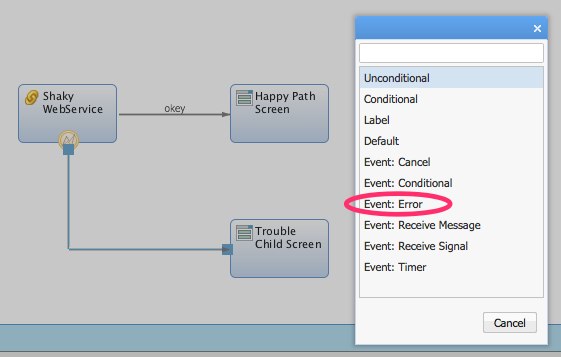
You can now configure the behavior of the Intermediate Event by clicking on the yellow icon.
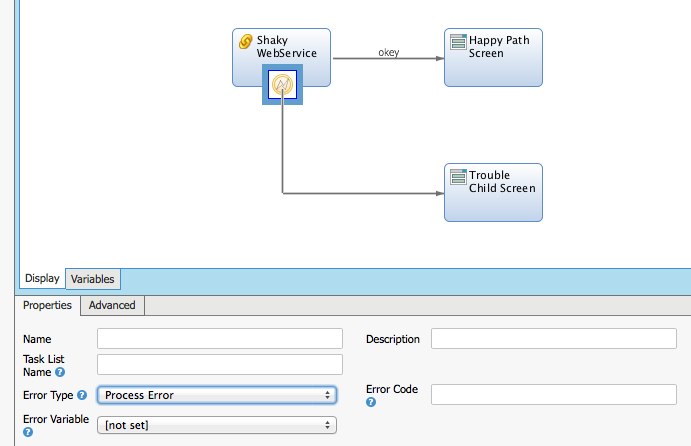
As 'Error Type', select either:
- All
- Process Error
- Java Exception
As 'Error Variable', select a variable to which to bind the error or exception. The dropdown box lists all variables of type String or Exception from the Process Variables declaration. It is good practice to have an $exception variable inherited on all of your processes.
Which Error Type?
To decide which error type to choose, analyze what is going on in your source element. Basically, there are two main sources of errors:
- Those from the inner workings of the Integration Link itself
- Those defined in the Script parts
Error conditions from the inner workings of an Integration Link component (or a Mail component or other) always trigger a Java Exception type of error — for example, a SOAP issue on a WebService call. Therefore, unless you work with a highly reliable service, it's a good idea to either handle Java exceptions as trouble conditions in your process flow or to wrap them into Process Errors so that they can be handled in your process flow. Which one you choose depends on your requirements for the error or exception handling.
The criteria to choose from are illustrated in the following sections.
When crafting error logic on your own inside of the Script parts, you can directly choose to either deal with Java exceptions or to rely on a Process Error. These are the Functions you would use:
FAIL: Throws a generic Java exception and allows you to provide a String as messageThrowJavaException: Throws a Java exception of your choice and allows you to provide an additional String as messageThrowProcessError: Indicates an error by specifying a StringSOAPThrowBusinessException: Throws an exception of typecom.nm.extensions.webservices.soap.BusinessException. This exception allows you to attach a data entity, for example the SOAP fault received from a service call.
Note: If the Integration Link uses retry error handling, throwing a custom exception may trigger the retry. The configuration property `nm.integrationlink.exceptionsIgnored` can be used to specify a comma-separated list of exceptions to exclude from the retry mechanism.
Why the "All" Error Type is Second Choice
The thing is this: You can bind a process trouble token only to either an exception variable or a Process Error String variable. Not both. This means that selecting 'All' as Error Type makes you lose one or the other information on an error.
- If you bind the problem information into an error String, exceptions get rendered into a nasty and long
TOSTRING()of the original exception. Not nice and practically unusable. - If you bind the problem information into an exception, a Process Error gets wrapped into a
com.nm.sdk.data.workflow.runtime.WorkflowErrorEventExceptionwith the Process Error text as message.
The 'All' type potentially saves you some wires to draw. But using it with an error String as variable is not convenient at all. When using the 'All' type, you should always bind it into an exception variable. This implies a switch into the more technical Java exception model instead of using the more business-oriented Process Error approach (see below for more on both approaches).
Process Error
The 'Process Error' type is preferred for its simplicity. It's very close to a regular action String you use in the process flow. It's the natural fit for modeling error flows in a Process. Just like indicating actions to route between elements of your process definition, the Process Error does the same for different types of errors that occurred. If you want to stay simple, you would need to catch technical Java exceptions and represent these as Process Errors.
The limitation is that it allows you to model this 'action-style' routing only. There is no further indication of error details. Those details would have to become part of your regular process data model. Often this is not very nice to do for error conditions, because it blows up the model with non-business related stuff.
If the amount of data variables and scale of logic for error handling becomes significantly disturbing, this is an indication to switch the process model to either Java exceptions or to source the error handling into a dedicated Sub-Process.
Java Exception
Java exceptions are more convenient for software developers, as they know about the concepts. A Java exception allows you to classify the problem according to the type of exception (the exception class) and to provide additional free text as context information, something not available with the plain Process Error. If you need to tell not just what kind or error occurred, but also to which extent something was involved (e.g. which record ID was causing the problem), a Java exception is your weapon of choice.
A Java exception, however, comes with the downside of a much higher technical handling complexity. Do not expect a business-level person to master it.
When dealing with exceptions, the original message you provide is buried into levels of encapsulated FNZ Studio exception classes. In a Script for example, you might throw an exception about illegal values in this way:
ThrowJavaException(java.lang.IllegalArgumentException,
'Value ' & $MyValue & ' is not allowed in context of ' & $MyContext)
Note: Be aware that FNZ Studio wraps your `java.lang.IllegalArgumentException` into a `com.nm.sdk.NmEvaluatorException` , and this one is in turn wrapped into a `com.nm.sdk.data.workflow.runtime.WorkflowException`.
When you want to make use of the exception type and your exception's Message String, you have to unwrap the exception class first using $exception.getCause(). When using Java exceptions, you are limited to those available to the Java subsystem of FNZ Studio. If you need more exceptions than those available in the Java standard, these Java exceptions must be coded separately and linked into the application server as Java library. There is no way to declare exception classes from within FNZ Studio.
In addition to that, be aware that the FAIL() method does not do the wrapping for the final exception class — it's not available as no such class is specified in the FAIL function. Using the FAIL function would require you to do String parsing to get hold of the original message. As a consequence, try to avoid the FAIL() method whenever you want to leverage the message in some place, like a Screen.
In summary, Process Error messages get wrapped into exceptions, and they are always different:
- 3 exceptions when used with ThrowJavaException()
- com.nm.sdk.data.workflow.runtime.WorkflowException
- com.nm.sdk.NmEvaluatorException
- java.lang.IllegalArgumentException (specified with the call)
- 2 exceptions when used with
FAIL(), but the message needs to be parsed:- com.nm.sdk.data.workflow.runtime.WorkflowException
- com.nm.sdk.NmEvaluatorException
- 1 exception when a Process Error was thrown using
ThrowProcessError()- com.nm.sdk.data.workflow.runtime.WorkflowErrorEventException
- 3-n exceptions when a technical error occurred inside an Integration Link
- com.nm.sdk.NmRuntimeException
- org.apache.camel.CamelExecutionException
- com.nm.sdk.data.expeval.ArgumentValueException
- 2-n exceptions when a technical call is used from a Script. For example in the case of the FTPAdapter, this happens when the remote host cannot be reached
- com.nm.sdk.data.workflow.runtime.WorkflowException
- com.nm.sdk.NmEvaluatorException
- com.nm.sdk.NmRuntimeException
- java.net.ConnectException
This means that you should have a generic Function at hand to deal with those dynamic depths of exceptions to get the actual message they represent. For example traversing into $exception.getClause() until there is no more wrapped Throwable, and getting the message from there:
// get the exception in here as the Throwable
java.lang.Throwable $throw;
While null != $throw.getCause() Do
   $throw := $throw.getCause();
End
Return $throw.getMessage();
Representing Errors
If we start bringing errors into our process flow, the information must be presented to the users in a friendly manner. When starting to design Process Error strings or to use Java exceptions, it is best practice to keep a record of these in a dedicated Catalog. This Catalog should contain the Process Error String or Java exception class as ID and an explanation and user action instructions as text.
Conclusion
FNZ Studio provides two mechanisms for handling fault conditions: Process Errors and Java exceptions. While the first is a simple and natural fit for a process model, the second provides more flexibility and detail. Choosing which depends on requirements for the application you are building.