Parallel Processes
At times, you may have some Processes that run parallel streams, which may cause a ParallelLockIssue in the error logs, due to a loss of updates.
Write Locks and Updates
In order to ensure consistency in a concurrent system, FNZ Studio uses a locking mechanism with exclusive write locks. When a thread holds a lock for a long time, FNZ Studio force-unlocks the object held by this blocking thread after a certain period of time (after 130 seconds).
After the blocking thread completes, it may try to commit changes to the object — but that thread now no longer holds a lock on the object. This can result in a lost update situation: Other threads may have acquired a lock on the same object in the meantime, performed changes to that object, and committed the changes.
Parallel Streams: Example and Explanation
The Process in the screenshot below shows a situation where a lost update occurs in a Process with an 'AND' gateway, and parallel streams processed by different users according to the Swimlane definition. A single variable, $myvar, is defined at the Process Instance level.
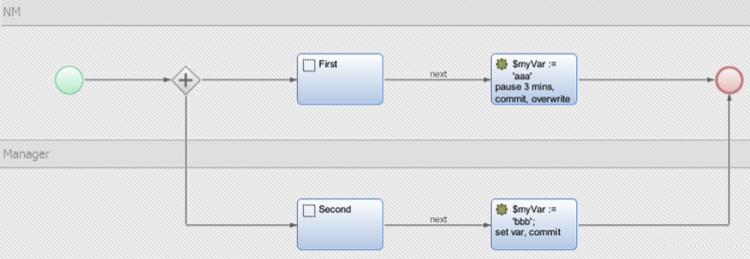
The upper Swimlane is assigned to user NM. This Swimlane defines a placeholder task, followed by a script task. The script task first sets the variable $myvar to "aaa", then prints a log message and pauses for 3 minutes. Note that the script therefore runs for a time greater than 120s.
In the Manager Swimlane, there is a placeholder task, followed by a script task that sets the value of $myvar to "bbb".
The following steps describe the Process flow. The log entries produced are included for reference.
Step 1
NM starts the Process, and clicks Next on the placeholder task. The token moves to the script task. The NM HTTP thread sets the variable $myvar to "aaa", prints a log message, and pauses for "PAUSE(300 * 1000)" while holding the lock on the Process Instance.
The Process outputs the following message, showing the value of variable $myVar:
2015-03-16 10:00:35,458 ERROR [http-bio-127.0.0.1-8080-exec-17] com.nm.Workflow.ParallelLockIssue - NM before lock: aaa
Step 2 The Manager clicks on the work item in the portal. The manager finds that the first Screen takes quite a while to load. In fact, the Manager’s HTTP thread is waiting to acquire a lock on the Process Instance, currently held by NM's HTTP thread.
Step 3 After (120s + (x < 120s)), the force-unlock thread frees the lock held by NM. FNZ Studio prints the following warning.
2015-03-16 10:02:48,001 WARN [Force Unlock ProcessInstances] com.nm.cluster.locks.LockPoolForceUnlockRunnable - Force unlocking old lock: LockAcquisition [lockKey=processInstancesLockPool530, threadName=http-bio-127.0.0.1-8080-exec-17, ageMs=132543]
Step 4
The Manager's thread gets the lock on the Process Instance, and loads the placeholder task. The manager clicks next. In the subsequent script task, processed by the manager’s HTTP thread, the variable $myVar is set to "bbb".
The changes to the Process Instance are committed, and the lock is released.
The script task logs the following message, showing the value of $myVar:
2015-03-16 10:03:24,325 ERROR [http-bio-127.0.0.1-8080-exec-24] com.nm.Workflow.ParallelLockIssue - Manager value: bbb
Step 5 After 3 minutes, the NM HTTP thread finally completes processing the script task.
The NM HTTP thread, although it no longer holds a lock on the Process Instance, commits its changes (that is, the variable $myvar is set to "aaa") to the Process Instance, and tries to release the lock. The lock, however, has already been released by the force-unlock thread.
FNZ Studio logs the following warning:
2015-03-16 10:05:35,462 WARN [http-bio-127.0.0.1-8080-exec-17] com.nm.cluster.locks.LockPool - Lock 'processInstancesLockPool530' was already released.
The variable $myVar is subsequently reset to "aaa". The Manager’s changes are thus overwritten, leading to a lost update situation.
The NM script tasks prints the following log message:
2015-03-16 0:05:35,461 ERROR [http-bio-127.0.0.1-8080-exec-17] com.nm.Workflow.ParallelLockIssue - NM Value after Lock: aaa
Recommendations
-
When designing the Process, make sure that the execution of the Process Instance is "paused" somehow, and that the Process Instance and the Value Store get committed. One way to achieve this is to add an intermediate timer event between the script tasks. The timer event should block the Process token for a short amount of time (e.g. 5 seconds).
The current thread then releases the lock on the Process Instance and commits everything, giving another thread the chance to work on it. Execution will later continue asynchronously in the background after the timer intermediate event has been triggered. This solution has another advantage: If the execution is interrupted due to a system crash, it is very likely that at least a part of the changes have already been committed (up to the latest intermediate timer event), and that the process engine does not need to rerun every script task again.
-
Analyze your locks for the FNZ Studio log messages shown in the steps above. Identify where in the Process locks were held for too long, and fix the issue in the solution.