Sequential Processes
At times, you may need to start several Process Instances in sequence. If you do this via script, you may get the following warning in the log file: WarnManyCommon: Commit size is N. A size of more than 2 might indicate an issue in your model.
Start Process Function
When you need to start a Process Instance from an FNZ Studio script you can use the function StartProcess.
In order to avoid triggering the WarnManyCommon warning when using StartProcess:
- Set the
StartProcessfunction's "update" parameter to false. - Call the
CommitProcessInstancefunction immediately. The process engine then takes over, and the Process is triggered as part of regular scheduling (default setting: every 5 minutes). (a). If execution is required immediately, call theUpdateProcessInstancefunction after theCommitProcessInstancefunction.
Note: The second parameter of the `UpdateProcessInstance` function MUST be set to "-1".
- Regardless of whether you follow (2) or (2a), do not call other functions which need to acquire a process instance lock on the Process Instance just started!
Here's an example where the instance is triggered by the process engine as part of regular scheduling:
// initialize new process instance
String $processInstanceID := StartProcess('OrderProducts', false, $variables, null, false);
// commit process instance and its value store
CommitProcessInstance($processInstanceID);
Here's an example where Process Instance execution is required immediately:
// initialize new process instance
String $processInstanceID := StartProcess('OrderProducts', false, $variables, null, false);
// commit process instance and its value store
CommitProcessInstance($processInstanceID);
// update process instance in the background
UpdateProcessInstance($processInstanceID, -1);
Note: The functions must be called in the specific order outlined above.
We recommend using an Integration Link which asynchronously starts multiple Process Instances in sequence. Using an Integration Link for this task ensures that the execution of such a bulk operation is performed by a background thread which does not block users from performing their current tasks.
Consider that, in this case, the 'latest committed' filter is applied. As a workaround, you can force the timestamp filter inside the Integration Link to 'head', if necessary.
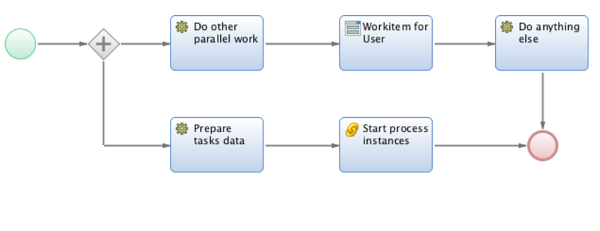
Locks and Updates
Why is it necessary to make the calls in a specific order?
If the current unit of work, e.g. a thread, starts multiple Process Instances in a synchronous way using StartProcess, that thread acquires as many Process Instance locks as Process Instances are started. The platform then needs to release all these acquired locks in a single transaction — which might lead to performance issues (due to high CPU and memory consumption).
The CommitProcessInstance call commits the Process Instance and its Value Store, and also releases the Process Instance lock. Releasing the lock makes the Process Instance visible for other threads on the platform.
The UpdateProcessInstance call, if used, delegates the update of the Process Instance data to a background thread of the process engine. This delegation only happens if the second parameter is set!
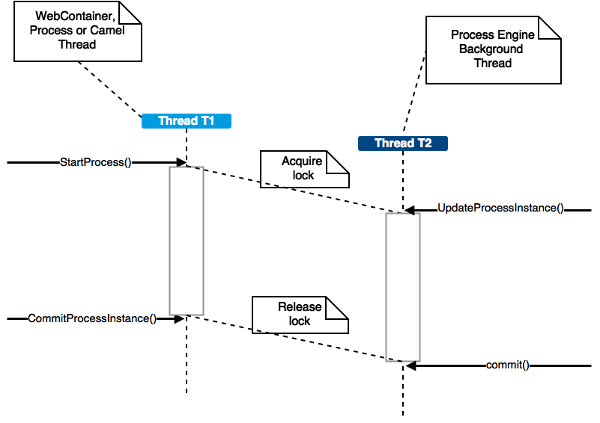
In step 3, I wrote that you need to make sure that after the UpdateProcessInstance function call you do not call other functions which need to acquire a Process Instance lock on the Process Instance just started.
Here's an example list of functions that must not be called:
getWorkflowInstance(String)getWorkflowInstanceByTokenId(String)deleteWorkflowInstance(String)Script: ProcessInstanceSetAttribute(String, String, Any)Script: ProcessInstanceRemoveAttribute(String, String)Script: ProcessTokenSetAttribute(String, String, Any)Script: ProcessTokenRemoveAttribute(String, String)Script: UseValuestore(String, String)Script: CreateWorkflowToken(String, Integer)Script: DeleteWorkflowToken(String)Script: AssignWorkitemToUser(String, String)
Note: This list is not exhaustive.