Process Instance Persistence
Process Instances may be:
-
Persistent: They have Swimlanes and are saved to persistent storage.
-
Non-persistent: They do not have Swimlanes and are not saved to persistent storage, thus disappearing e.g., if the system goes down. However, they still consume CPU and memory resources.
Process Instances: Tokens, Value Stores and Attributes
The FNZ Studio Platform maintains the following data for each Process Instance:
-
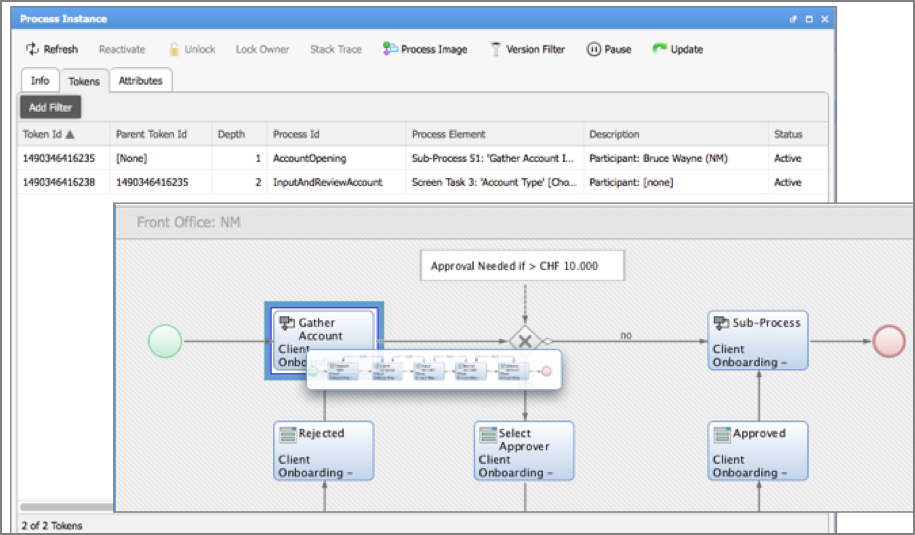
The token set. A token represents the execution of an activity within the Process Instance. In the example below, a token is executing the Sub-Process task, and a second token has been created to execute the activities within the Sub-Process. A Process Instance comes to the end of its life when the process engine, responsible for executing Process Instances, finds that there are no more non-transient tokens to move. A transient token is a token that does not need to complete for the Process Instance to be considered completed.
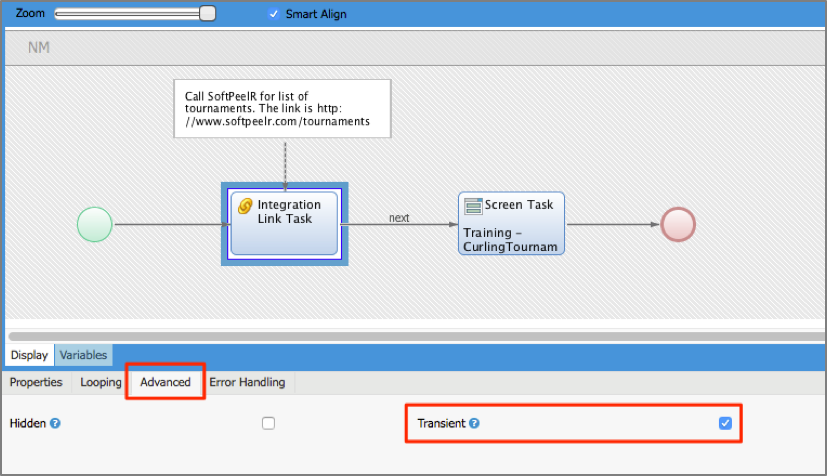
By default, all tokens are non-transient. Within a Process Editor, you can mark activities to be transient:
-
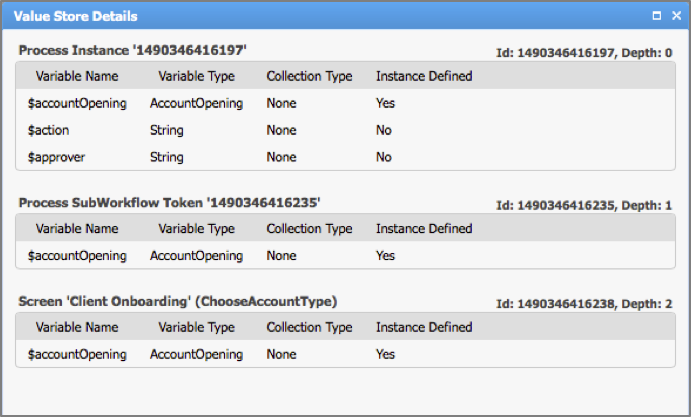
The Value Store holds the data of the Process Instance, that is, the values bound to each of the variables. The figure below shows a view of the Value Store for an AccountOpening Process Instance. This view is available Solution Maintenance > Value Store> [right click] > View . We see that values are bound to variables in the scope of the Process, the Sub-Process, and the Screen task.
-
Each Process Instance may have its own Process Instance attributes. The platform function
ProcessInstanceSetAttributebinds an attribute name and value to a Process Instance designated by an ID, e.g.ProcessInstanceSetAttribute('1490346415978', 'Sector', 'Swiss/EU'). You can take a look at these attributes under Solution Maintenance > Process Instance > [right click] > Details: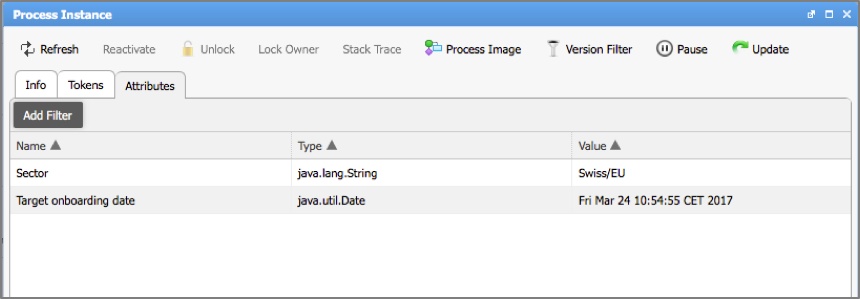
FNZ Studio worklists can display attributes for each Process Instance. Users can therefore sort and filter Process Instances.
Persistence in FNZ Studio
Before comparing non-persistent and persistent Process Instances in FNZ Studio, let's first take a look at FNZ Studio's architecture, as shown in the image below.
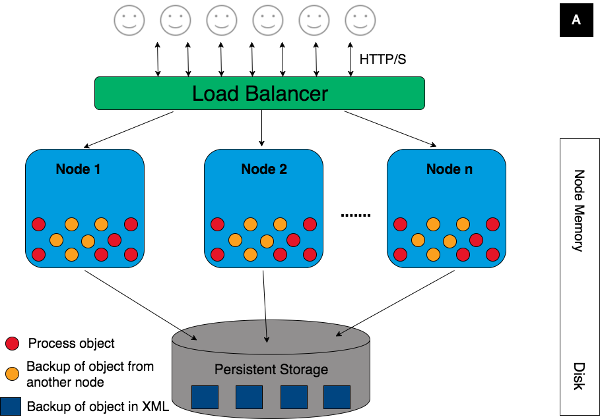
When a Process Instance is created, its data — token set, value store and Process Instance attributes — are stored in the primary memory of the node on which the Process Instance is running. The Hazelcast software layer ensures that this data is copied to other nodes, so that the data remains accessible if one node is stopped. In this way, each Process Instance can continue running from other nodes if the node on which it was started is removed from the cluster.
An FNZ Studio installation also has a persistent cluster storage, to which all nodes have access. This contains data that needs to be persisted in the event of all FNZ Studio nodes going down, so that the cluster can be restarted. Examples of the data stored on the persistent storage are the Business Objects and their versions, as well as user preference data, mail and data source configuration data.
Persistent VS Non-Persistent Process Instances
As mentioned above, a persistent Process Instance is a Process Instance for which data is saved to the persistent cluster storage. The FNZ Studio platform saves a copy of Process Instance data every 10 seconds. As a result, if the cluster is shut down while persistent Process Instances are running, those Instances can continue executing when the cluster is brought back up.
A non-persistent Process Instance is a Process Instance for which data is never saved to the cluster persistent storage. The data remains in the FNZ Studio nodes’ memory only. Consequently, these Process Instances do not survive if the nodes of the cluster are all taken down.
How does FNZ Studio runtime decide if a Process Instance is persistent or not? If there is a Swimlanes in the Process which is instantiated, then the Process Instance is earmarked as being persistent.
On a more technical level, when a Process without a Swimlane is started, FNZ Studio associates the underlying HTTP Session ID with the Process Instance. When a Process with Swimlanes is started, the HTTP Session ID attribute of the Process Instance is left empty. When persisting Process Instances, FNZ Studio determines that a Process Instance is persistent if its HTTP Session ID ( under Solution Maintenance > Process Instance > [right click] > Details) is empty.
The presence of the Swimlane means that there is at least one Workitem in the Process Instance that a user, role or group is responsible for executing. The Process Instance is persisted to ensure that the responsible user, group or role always has the possibility of terminating the Workitem.
Properties of Non-Persistent Process Instances
Non-persistent Process Instances have some characteristic properties:
-
Terminated after inactivity. Like any Process Instance, a non-persistent Process Instance terminates when it has no more non-transient tokens. In addition, a non-persistent Process Instance is terminated by the FNZ Studio platform when it has been inactive for too long. Each non-persistent Process Instance is associated with the unique HTTP session ID from the HTTP call that started the Process Instance. When the session expires, typically after 30 minutes of inactivity, the Process Instance is terminated.
-
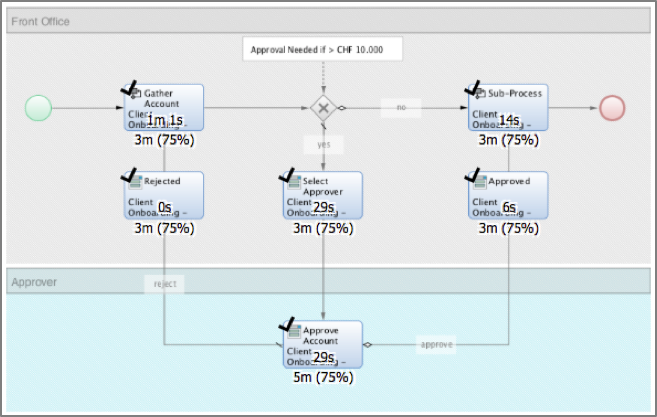
Unable to be measured with Business Activity Monitoring (BAM). The BAM extension lets you define performance scenarios that form the basis of service level agreements. The figure below shows a scenario for a Process where times in minutes are associated with activities. Scenarios can only be defined on Processes where there is at least one Swimlane. Therefore, non-persistent Process Instances are not measurable using BAM.
-
Not displayed in Portal worklists. Portal worklists only show Workitems that are placed inside a Swimlane. The FNZ Studio query that retrieves Workitems excludes non-persistent Process Instances from the query.
Sizing a Platform Running Non-Persistent Process Instances
It is important to consider the impact of non-persistent Process Instances in your Solution. In some cases, users create over 100 non-persistent Process Instances daily. For Instance, the Portal Process is typically modeled as a non-persistent Process Instance in many solutions.
To evaluate memory usage for a business solution with many non-persistent Process Instances, you need to collect data at runtime to see how many non-persistent Process Instances run simultaneously during a typical working day.
Since non-persistent Process Instance data is not persisted, the Value Store, tokens and Process Instance attributes are not available on disk. This data can only be measured from the data in the node memory.
Value Store sizes are available in Solution Maintenance > Value Store. The values are taken from the Hazelcast layer, where the Process Instance data are represented as byte arrays that correspond to serialized Java objects. The figures for the compressed and non-compressed byte array sizes are given.
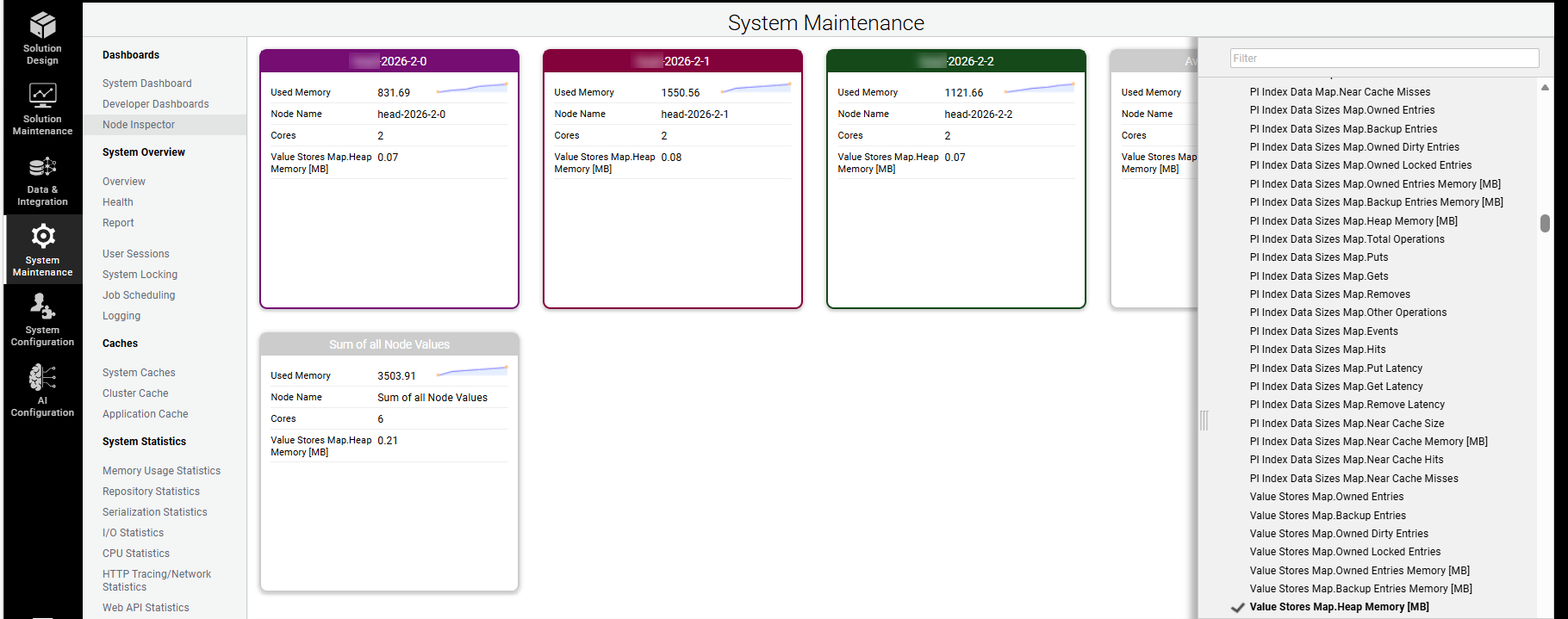
Value Store sizes and Process Instance memory consumption data are also available in the Node Inspector tab (System Maintenance > Dashboards). Clicking on the dropdown menu on the right-hand sidebar lets you select the values that you want to see. Data is aggregate, and corresponds to the sum of the compressed Process Instance data sizes in memory.