Script Function Validators
You can build and use a Script Function validator to validate your FNZ Solution but avoid empty strings. This is a better solution than creating a custom validator.
The advantage of the Script Function validator over a Condition validator is that it is less complex to configure — and it forces you to externalize the validation logic into a script function, making it easier to maintain.
You can then also probably reuse the same logic in other locations, and viceversa: You already have a function to check if a value is a legal phone number? Cool, you can immediately start using it in a Script Function validator to validate user input of phone numbers.
-
Write a Script Function which implements your validation logic. The function must have one parameter of type String* and a return type of
Boolean. The contract is that the input value entered by the user will be passed as argument and that the function must returntrueif the value is legal, andfalseotherwise.Here is an example implementation of such a function:
CopyFunction MandatoryTrimmed(String $value) : Boolean Begin
If LENGTH(TRIM($value)) > 0 Then
Return true;
Else
Return false;
End
EndSave and commit this script function.
-
Open your Screen, and select the component where you need this improved validation logic. Switch to the Validator tab and add a Script Function validator.
-
This validator has a property, Script Function, with a dropdown list. The list shows all script functions which have one parameter and a Boolean return value. Select your script function and you're done.
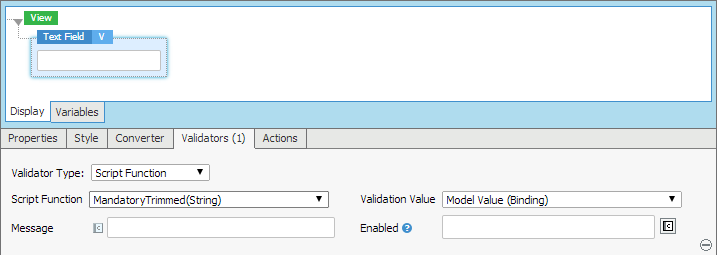
Note: We wrote above that the function must have a single parameter of type String. This is not entirely true. If you attach your validator to a text field which is bound to a variable or property of type Date or Integer, you can also write a script function which takes a Date or Integer object as parameter. You only have to make sure that you configure the Script Function validator correctly: Next to the property "Script Function", there is a second property called "Validation Value" where you can pick either Input Value (String) or Model Value (Binding).
- If you select Input Value (String), the function always gets the user's input as first parameter. This is always a string.
- If you select Model Value (Binding), the function gets the converted model value. The type of this model value depends on the return type of the binding expression. If your text field is bound to a variable or property of type String, it doesn't make a difference. But if it is bound to an expression of type Date, it is easier to work with the already converted date value instead of having to parse the date value inside your script function before validating it.