This article provides an overview of Known Issues for released versions of the Appway 10 Core Platform and compatible extensions.
Each issue is introduced by a unique code (e.g. KI-100-1) used only for communication purposes. It has no priority or sorting value.
The article is divided into four parts:
The following list always refers to the
latest Appway 10.0 and 10.1 patch version (check the
Appway 10 Products card to know the latest patch version), unless specified otherwise for each single issue.
See the
Fixed Issues in the Core Platform section to know which issues were fixed in specific patch versions.
KI-100-1 — Invalid Class Path entries in JAR files cause warnings
Problems caused by invalid Class Path entries in JAR files – When starting Appway 10 on some Java application servers, you may see warnings in the application server logs due to invalid Class Path entries in JAR files which are bundled with Appway.
This issue affects the following application servers:
The exact log message depends on the application server and JAR file:
-
JBoss EAP 7.2 and WildFly:
WFLYSRV0059: Class Path entry jaxb-api.jar in /appway/webapp.war/WEB-INF/lib/jaxb-core-2.3.0.jar does not point to a valid jar for a Class-Path reference.
-
JBoss EAP 6.4:
JBAS015960: Class Path entry jaxb-api.jar in /appway/webapp.war/WEB-INF/lib/jaxb-core-2.3.0.jar does not point to a valid jar for a Class-Path reference.
Workarond: None. These warnings can be ignored.
KI-100-2 — Multi-release JAR files cause warnings
Problems caused by multi-release JAR files – When starting Appway 10 on some older versions of Java application servers, you may see warnings in the application server logs due to the multi-release JAR files which are bundled with Appway.
This issue affects the following application servers:
- Apache Tomcat before versions 8.5.12, 8.0.42, and 7.0.76
- JBoss EAP before version 7.2.0
- IBM WebSphere Liberty before version 17.0.0.4
The exact log message depends on the application server:
-
Apache Tomcat:
SEVERE: Unable to process Jar entry [META-INF/versions/9/module-info.class] from Jar [jar:file:/appway/webapp.war/WEB-INF/lib/bcprov-ext-jdk15on-1.62.jar!/] for annotations
-
JBoss EAP:
WFLYSRV0003: Could not index class META-INF/versions/9/module-info.class at /appway/webapp.war/WEB-INF/lib/bcprov-ext-jdk15on-1.62.jar
-
IBM WebSphere Liberty:
CWWKC0044W: An exception occurred while scanning class and annotation data.
Workarond: None. These warnings can be ignored.
KI-100-13 - Unrecognized annotations
Problems caused by conflicting Java library versions - When starting Appway 10 on IBM WebSphere (Full Profile or Liberty), you may see warnings in the application server logs due to conflicts between Java libraries shipped with Appway and Java libraries preinstalled in WebSphere. There may be 10 or more warnings with code CWNEN0070W like the following messages:
CWNEN0070W: The javax.ws.rs.PathParam annotation class will not be recognized because it was loaded from the file:/.../WEB-INF/lib/jakarta.ws.rs-api-2.1.6.jar location rather than from a product class loader.
CWNEN0070W: The javax.inject.Inject annotation class will not be recognized because it was loaded from the file:/.../WEB-INF/lib/jakarta.inject-2.6.1.jar location rather than from a product class loader.
Workaround: None. Appway does not rely on automatic discovery of such annotations. These warnings can be ignored.
KI-100-30 — Incompatibility with newer releases of WebSphere Liberty
When starting Appway on WebSphere Liberty 22.0.0.3 or greater, an exception is logged while Appway tries to initialize Hazelcast, and start-up is aborted:
java.lang.NoClassDefFoundError: javax/cache/CacheException
Workarond: Run Appway on WebSphere Liberty 22.0.0.2
Fix planned for: Appway 10.0.5; Appway 10.1.13
KI-101-23 — Business Object patching causes errors
When patching a Business Object that is on the latest committed version or on Head, the cache behind the Business Object in Appway Studio is not updated. This may cause the following:
- Errors when exporting Packages
- Errors when importing Packages to Head
- The Package Overview page may show incorrect information on Package modifications ("black dot")
- Errors may occur when listing WebAPIs or Custom lists
- Other Package operations related to 'Move Business Object' , 'Make Business Object visible' or 'Make Business Object replaceable' may fail
Workaround: After performing Business Object patching, restart the environment to rebuild the caches correctly.
Affected version: Appway 10.0.2, Appway 10.0.3, Appway 10.0.4, Appway 10.1.0, Appway 10.1.1
Fix planned for: Appway 10.0.5 (already fixed in 10.1.2 and higher)
KI-100-3 — Chat Popup overlaps with other popup components
When using the Chat Popup Screen Component, layering issues can occur in conjunction with other popup components placed on the same page. This results in only a part of the Chat Popup being visible, the rest being overlapped by other content.
Workaround: Use a Layout Container and place a Chat Screen Component inside. Add a Set Visibility action to hide this Layout Container when the Screen is rendered. Show/hide this Layout Container using a Show as Popup action, triggered e.g. by clicking on an icon.
Fix planned for: Currently not defined.
KI-101-16 — Re-ordering Labeled Values causes Variable Assignment warnings
When re-ordering Labeled Values through drag-and-drop in the Data Class Editor (Behavior > Labeled Values tab), Variable Assignments may cause warnings.
Workaround: None
Affected version: Appway 10.1.0
Fix planned for: Currently not defined.
KI-101-20 — Double-clicking on a Function triggers an error in the Script
When you open a Data Class Function by double-clicking on it in the Data Class Editor, an error is displayed with the following message: "Script Function Package '' doesn't match Business Object Package 'CurrentPackageId'".
Workaround: Open the Function from the Script tab.
Affected versions: Appway 10.0.3 and higher, Appway 10.1.0 and higher
Fix planned for: Appway 10.0.5 (already fixed in 10.1.2 and higher)
KI-100-5 — Form does not support multiline
The Form Screen Component does not support the activation and deactivation of 'Multiline' in the Correctness Expression Data Rules at runtime. When the activation state of a Correctness Expression Data Rule changes, the Form does not update the rendered input controls impacted by the rule dynamically.
Workaround: None.
Affected version: Appway 10.1.1 and higher
Fix planned for: Appway 10.1.x
KI-100-6 — Starting all nodes with empty Cluster Storage returns errors
When starting a multi-node installation of Appway with an empty Cluster Storage: Start one node first, to initialize the Cluster Storage, and only then start up the other nodes in the cluster.
Starting all nodes simultaneously when the Cluster Storage is empty (typically after a new installation), leads Appway to return many error messages. These error message can be safely ignored, as the writing of Business Objects will be performed once all nodes are fully started.
Example of these messages:
2019-08-09 17:19:49,564 INFO [localhost-startStop-1] com.nm.cluster.service.ClusterServiceImpl - Ignoring exception when executing task BusinessObjectAddedTask. Exception: com.nm.bricks.BrickNotRunningException: Brick 'com.nm.sdk.data.businessobjects.BusinessObjectRepository' does not yet exist.
or on "non-first" nodes:
2019-08-09 17:19:43,661 WARN  [hz.appway.cached.thread-2] com.nm.cluster.persistence.AbstractReadWriteHzStore - Error writing single map entry: map name = businessObjects, map key = Style/DesignSystem:MasterDetail_Icon-validationNonMandatory/7015c3e8-7765-4fef-b4f6-993199618276, cause = Serialization error encountered: Error serializing Style/DesignSystem:MasterDetail_Icon-validationNonMandatory/7015c3e8-7765-4fef-b4f6-993199618276: Could not save business object object.xml ObjectVersionRef-Style-DesignSystem:MasterDetail_Icon-validationNonMandatory-7015c3e8-7765-4fef-b4f6-993199618276. Retrying in a moment...
  2019-08-09 17:19:44,661 ERROR [hz.appway.cached.thread-2] com.hazelcast.map.impl.mapstore.writebehind.DefaultWriteBehindProcessor - [127.0.0.1]:5714 [blade] [3.11.2] Number of entries which could not be stored is = [1], Hazelcast will indefinitely retry to store them
Fix planned for: Currently not defined.
KI-100-7 — Style Business Objects not available for all components
Style Business Objects are not available for some components, namely:
-
Slider
-
Data Table
-
Ajax Throbber
-
Notification components (Topic Subscription, Single Topic Subscription)
-
Money Field
-
Number Picker
-
Some visual components (e.g. labels) used by the Form, Actions, and Inconsistencies Screen Components.
Workaround: Style these components using legacy styles.
Fix planned for: Currently not defined
KI-100-8 — Font families cannot be defined for Style and Style Value Business Objects
Definition of Font families is not possible in Style Business Objects and Style Value Business Object.
Workaround: Use the nm.workspace.styleBO.fonts configuration property instead; set its value to a comma separated list of font families that should be made available in the 'Style' BO mask. See Using Custom Fonts for more details.
Fix planned for: Currently not defined
KI-2023-5 — System health sensor warning on class loading issues
When running on Tomcat 8.5.76 or 9.0.59 (or greater), the System Health Sensor System Installation may report the following warning:
Class Loader: The following libraries are not loaded from Appway: Jakarta Annotations API.
This warning can be ignored.
Affected version: Appway 10.x.x
Fix planned for: FNZ Studio 2023
KI-100-9 — SLA definitions are not copied
SLA definitions are not copied when moving a Process from one Package to another Package.
Affected version: 3.6.0 and higher
Workaround: Copy the SLA definitions manually from the old Process to the new Process.
KI-100-10 — User import causes warnings
When existing users are imported and updated, warnings about potential lost updates are logged.
Example warning:
2018-09-03 12:24:16,729 WARN [[ACTIVE] ExecuteThread: '7' for queue: 'weblogic.kernel.Default (self- tuning)'] com.nm.cluster.cachelayer.UserCacheLayer - Potential lost update for user \'Maria00677\' (from other thread).
Affected version: 11.0.1 and higher
Workaround: None: These warnings are not an issue and can be safely ignored.
KI-101-28 — .AWDEPLOYMENT file could not be exported
A corrupted (i.e. non-importable either in Appway 10 or Appway 11 versions) .AWDEPLOYMENT file was generated under the following conditions:
- There are uncommitted (not part of a Package version) changes in Package Properties (Logo, Description, Dependencies, Entry Points, Visibility, Replaceable and Replacements).
- The version of the Package selected for export is either Latest (e.g. 1.0.0), or Latest modified (e.g. 1.0.0 (modified)).
Affected version: Appway 10.1.8 and Appway 10.1.9
KI-101-27 — Package Latest version could not be exported
When exporting a Package after changing any Package properties ('Properties' tab), only the 'Package (modified)' version was displayed on the 'Select version' dropdown, thus preventing the selection of the Package 'Latest' version.
KI-101-24 — Filtering by tags not working when using the Filesystem Blob Storage
Fixed an issue where it was not possible to retrieve the list of blob keys based on a Blob:Filter with tags.
Affected version: Appway 10.1.x
KI-101-25 Configuration BO version mismatch in import/re-export
Due to a change of behavior in the export/import of Configuration Business Objects introduced in Appway 11 (and backported to Appway 10.1.6) (see Upgrade Guide), there might be a mismatch in the Configuration Business Object versions exported from 10.1.5 (and lower) and imported in 11.x. This change of behavior affected import/export both in Appway Studio and through the Deployment Extension.
The change of behavior occurring in Appway 11 (and backported to 10.1.6) is represented in the schemas below with the example of Data Classes mapped through Data History Configuration Business Objects.
Consider that the same change applies to all Configuration Business Objects.
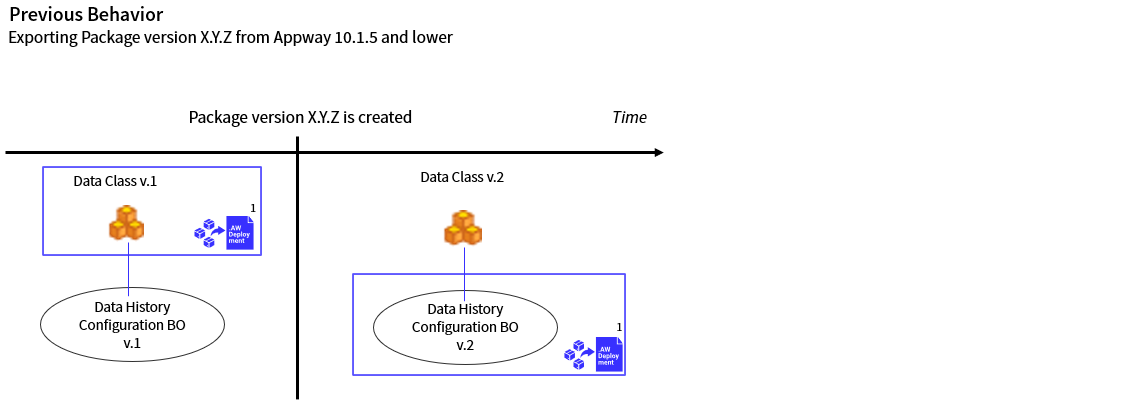
When exporting an .AWDEPLOYMENT file containing Data Classes mapped through Business Data Storage or Data History from Appway 10.1.5 (or lower), the exported .AWDEPLOYMENT file (blue square in the image represents the file content) could contain Data History Configuration Business Objects which do not match the corresponding Package version but, instead, match the immediately subsequent version (e.g. if you are exporting the latest Package version, you could have Data History Configuration Business Objects corresponding to the 'head' Package version).
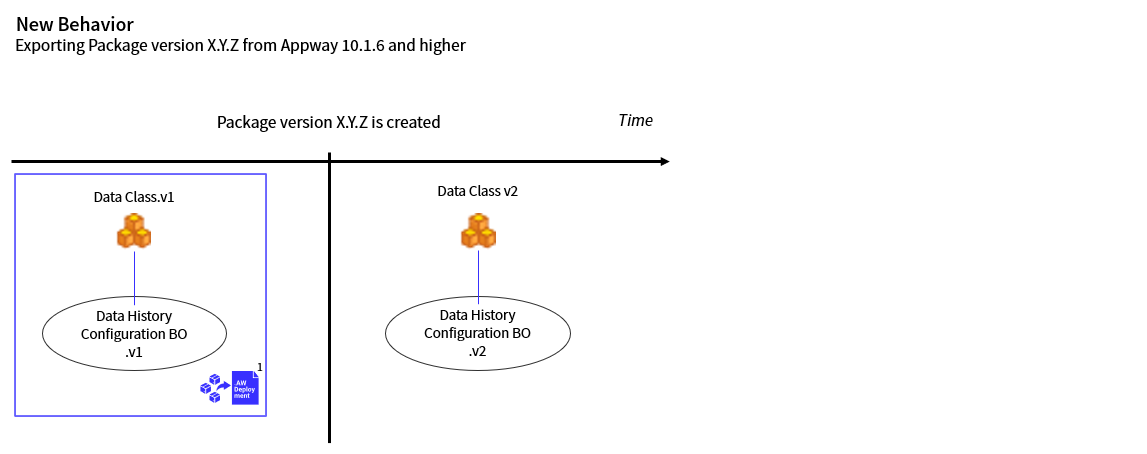
When exporting an .AWDEPLOYMENT file containing Data Classes mapped through Data History from Appway 10.1.6 (or higher), the exported .AWDEPLOYMENT file (blue square in the image represents the file content) contains Data History Configuration Business Objects reflecting the corresponding Package version.
The known issue is represented in the schema below:
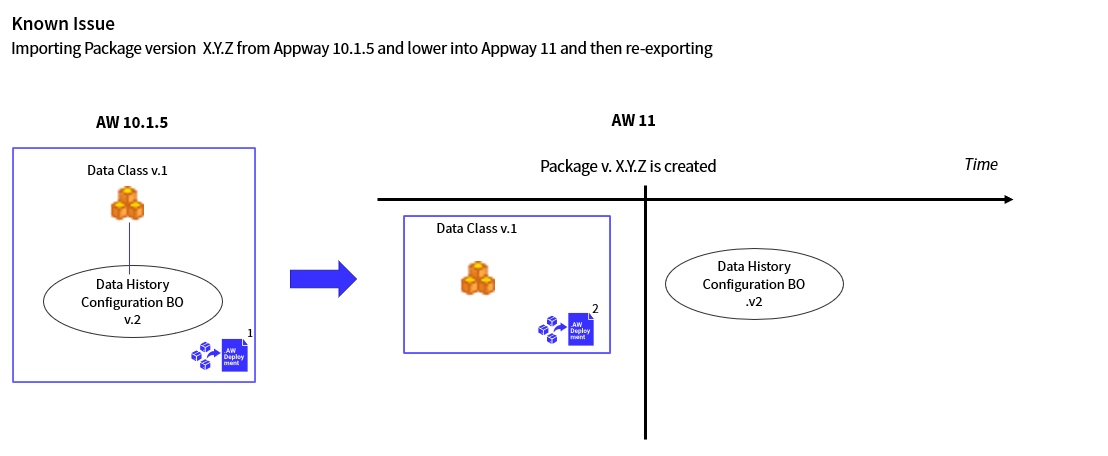
Continuing with the example above, the .AWDEPLOYMENT (1) file (blue square in the image represents the file content) exported from Appway 10.1.5 and lower into Appway 11.0.x or higher could contain Data History Configuration Business Objects which did not match the corresponding Package version. When you re-export such file from Appway 11, the new behavior is applied, therefore the .AWDEPLOYMENT (2) file may not contain any Data History Configuration Business Objects, since such objects reflect the 'head' version, which is in conflict compatible with the new behavior.
- Affected versions: Appway 10.1.5 and lower and Deployment Extension 12.0.1 and lower
- Further resources:
KI-101-23 — Business Object patching causes errors
When patching a Business Object that was on the latest committed version or on Head, the cache behind the Business Object in Appway Studio was not updated. This might cause the following:
- Errors when exporting Packages
- Errors when importing Packages to Head
- The Package Overview page might show incorrect information on Package modifications ("black dot")
- Errors might occur when listing WebAPIs or Custom lists
- Other Package operations related to 'Move Business Object' , 'Make Business Object visible' or 'Make Business Object replaceable' might fail
Affected version: Appway 10.0.2, Appway 10.0.3, Appway 10.0.4, Appway 10.1.0, Appway 10.1.1. Fix is planned for Appway 10.0.5 for the 10.x branch.
KI-101-20 — Double-clicking on a Function triggered an error in the Script
When you opened a Data Class Function by double-clicking on it in the Data Class Editor, an error was displayed with the following message: "Script Function Package '' doesn't match Business Object Package 'CurrentPackageId'".
Affected versions: Appway 10.0.3, Appway 10.0.4, Appway 10.1.0, Appway 10.1.1. Fix is planned for Appway 10.0.5 for the 10.x branch.
KI-101-22 — Variables could not be added to Label Business Objects
It was not possible to assign a variable to a Label from the Label Business Object editor (the Add Variable button was disabled).
Affected version: Appway 10.1.1
KI-100-14 — Application Servers - Incompatibility with newer releases of Apache Tomcat
Appway did not work correctly on versions of Apache Tomcat released since September 2020:
- Apache Tomcat 7.0.106 and greater
- Apache Tomcat 8.5.58 and greater
- Apache Tomcat 9.0.38 and greater
When running Appway on one of the above versions of Apache Tomcat, a Studio user might receive all kinds of error messages. When opening a Business Object editor, the editor might show only a white page, or the UI might be rendered only partially.
The problem was caused by incorrect entity tags generated by a third-party component used by Appway to compress JavaScript and CSS responses, and a change in Apache Tomcat where the server rejected requests with incorrect entity tags with an error response with status code 400 (bad request).
From the change log of Tomcat 7.0.106, 8.5.58, and 9.0.38:
Improve the validation of entity tags provided with conditional requests. Requests with headers that contain invalid entity tags will be rejected with a 400 response code.
Affected version/s: Appway 10.1.0 (only if using the above-mentioned Apache Tomcat versions). See also: Fixed Issues in Appway 10.0.4.
KI-101-21 — Description could not be filled in
In the Data Class Editor, the Description field (Properties tab) could not be filled, and a validation message was triggered when inserting an empty description.
Affected version/s: Appway 10.1.0
KI-101-15 — 'Allow Multiline' could not be set for Single Property Expression Data Rules
It was not possible to select the Allow multiline checkbox in Single Property Expression Data Rules. The Allow multiline checkbox worked correctly if already set for existing Rules.
Affected version/s: Appway 10.1.0
KI-101-17 — Scrolling inside a Business Object selector caused flickering
In some cases, when opening a Business Object selector (Label, Data Class, and so on) and scrolling down to select a value in the Data Class and Data Logic Editors, the selector might start flickering. This issue does not prevent selecting a value.
Affected version: Appway 10.1.0
KI-100-14 — Application Servers - Incompatibility with newer releases of Apache Tomcat
Appway did not work correctly on versions of Apache Tomcat released since September 2020:
- Apache Tomcat 7.0.106 and greater
- Apache Tomcat 8.5.58 and greater
- Apache Tomcat 9.0.38 and greater
When running Appway on one of the above versions of Apache Tomcat, a Studio user might receive all kinds of error messages. When opening a Business Object editor, the editor might show only a white page, or the UI might be rendered only partially.
The problem was caused by incorrect entity tags generated by a third-party component used by Appway to compress JavaScript and CSS responses, and a change in Apache Tomcat where the server rejected requests with incorrect entity tags with an error response with status code 400 (bad request).
From the change log of Tomcat 7.0.106, 8.5.58, and 9.0.38:
Improve the validation of entity tags provided with conditional requests. Requests with headers that contain invalid entity tags will be rejected with a 400 response code.
Affected versions: Appway 10.0.3 and lower (only if using the above-mentioned Apache Tomcat versions). See also Fixed Issues in Appway 10.1.1
KI-100-11 — Appway did not start on JBoss EAP 6.4
Problems caused by JBoss EAP 6.4 at startup – When trying to deploy Appway 10.0.x on JBoss EAP 6.4, startup might be aborted with one of the following error messages:
-
org.jboss.as.server.deployment.DeploymentUnitProcessingException: JBAS011232: Only one JAX-RS Application Class allowed.
-
java.lang.NoSuchMethodError: javax.ws.rs.core.Application.getProperties()Ljava/util/Map;
JBoss EAP 7.0 and greater were not affected by this issue (see the Technical Requirements article)
Affected version/s: Appway 10.0.0
KI-100-4 — Data Class validation icons did not match message
The Validation section sometimes displayed icons that did not match the validation message (Error, Warning, Info).
Affected version/s: Appway 10.0.0
KI-100-12 — 'Validation' section was hidden by the 'Dependencies' section
The Validation section in the left sidebar was hidden when the Dependencies section above it contained a large number of Data Class dependencies.
Affected version/s: Appway 10.0.0
KI-101-18 — 'Form' Screen Component had wrong default color for the 'Add element' icon
The icon of the 'Add element' button displayed on the the 'Form' Screen Component had the wrong default color.
Affected version: 10.1.0
Fix version: 10.1.1
KI-101-19 — The Base Package had the wrong default color for icons
'Icon' Style Business Objects in the Base Package displayed the wrong default colors. Namely: Button_IconDescriptive, Button_IconQualifier, Icon_inverted, Button_IconDescriptive, Link_Icon, Button_IconDescriptive-navigationToParent, Button_IconQualifier-navigationToParent, Button_IconDescriptive-secondary, Button_IconQualifier-secondary.
Affected version: 10.1.0
Fix version: 10.1.1
KI-101-25 Configuration BO version mismatch in import/re-export
Due to a change of behavior in the export/import of Configuration Business Objects introduced in Appway 11 (and backported to 10.1.6) (see documentatio), there might be a mismatch in the Configuration Business Object versions exported from 10.1.5 and imported in 11.x. This change of behavior affects both Appway Studio and the Deployment Extension.
See all details in the Appway Platform section above.
Affected versions: Appway 10.1.5 and lower and Deployment Extension 12.0.1 and lower.
KI-110-29 — Style Business Object editor preview not working with MemoryAnalysis extension.
The Style Business Object editor preview did not work properly when the MemoryAnalysis extension was installed.
Affected versions: MemoryAnalysis 7.1.0
Fixed in: MemoryAnalysis 7.1.1