In its effort to improve deployment capabilities, starting from Appway 11.1.1, Appway is introducing remote deployment operations through its REST Deployment APIs.
This feature is available through the DeploymentAPI Extension.
Deployment APIs provide functionalities to support remote deployment with no need to access Appway Studio. This allows for efficient and repeatable deployments, even in cases in which some environments are not accessible. This is achievable through the interaction with third-party CI/CD software (e.g. Jenkins).
The figure below illustrates the main flow:
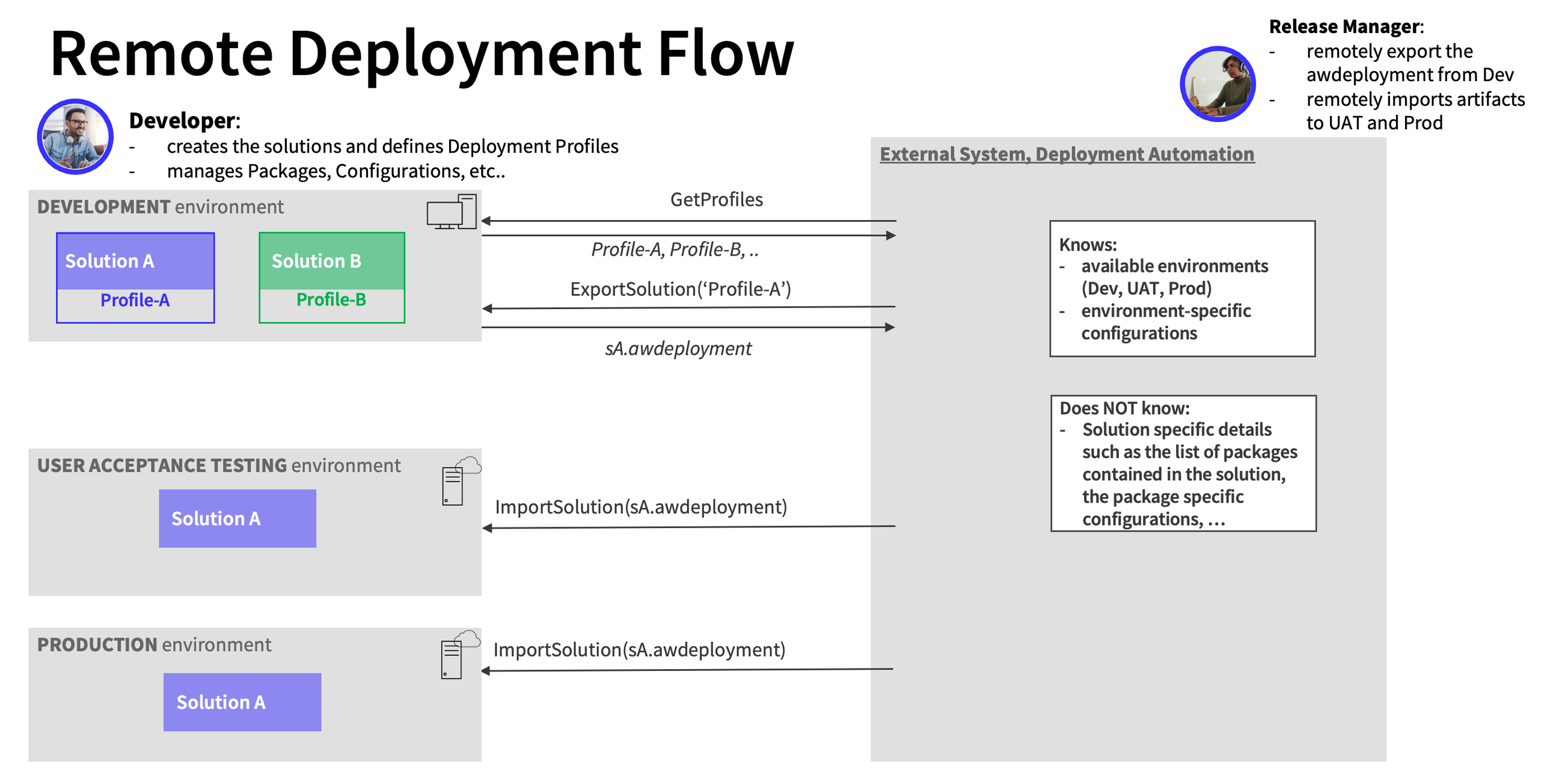
The developer is in charge of the whole Solution, including managing Packages and defining Deployment Profiles. Based on such Deployment Profiles, an external system would then be able to export the Solution, e.g., from the DEV environment and import it into the UAT and/or PROD environment.
Important note! Each operation run from the DeploymentAPI appears as if executed by a user named DeploymentAPIUser.
The following sections describe:
- The authentication mechanism for Deployment APIs
- The concurrency prevention mechanism for Deployment APIs
- A description of each REST endpoint. Currently, Deployment APIs provide endpoints for the following cases:
- Retrieving Deployment Profile data
- Exporting a Solution through Deployment Profiles
- Importing an
.AWDEPLOYMENT file - Exporting Business Objects from the Base Package
- Importing an
.AWEXPORT file from the Base Package
To use Deployment API endpoints, you need the necessary authentication credentials to perform API calls.
Deployment APIs are authenticated based on a token, which can be generated through two different mechansisms:
- Resetting and retrieving the API token from Appway Studio
- Initializing the API token remotely
When Deployment APIs are installed, Appway Studio provides a dedicated submodule (Solution Maintentance > Deployment API Token) to reset and retrieve the token.
Consider that API token can be reset by an Administrator user. However, if Advanced Studio Permissions are enabled, the access to this module is subject to the following Studio Permission to be assigned to the user: Manage Deployment API.
The second mechanism consists in initializing the API token remotely, without accessing Appway Studio. This is relevant in the case of environments that are managed remotely, where the environment setup is completely performed outside Appway.
To set a token remotely, perform the following steps:
- Create a file called
DeploymentAPI.token containing the value of the token you want to set. The value must contain from 24 to 64 alphanumerical characters. The dash symbol (-) is also allowed. - Before starting the DeploymentAPI Extension for the first time (therefore when no API token has been created yet), add the
DeploymentAPI.token file in the DeploymentAPI Extension path (/data/extensions/DeploymentAPI.token). - Start the DeploymentAPI Extension.
- The token is used by the extension, and the file is deleted from the system.
Note that this API token remote mechanism is allowed only at first setup. If the DeploymentAPI Extension has a token already, you need to reset and retrieve the API token from Appway Studio.
With Deployment APIs, Appway introduces concurrency prevention mechanisms to ensure that import and export operations are executed with no conflicts.
Note that this is the same prevention mechanism enforced in import/exports occurring in
Appway StudioAll endpoints are relative to: {protocol}://{hostname}:{port}/{context-root}/rest-api
To authenticate to each endpoint call, the following custom header must be set, with the value of the API Token: X-Appway-DeploymentAPI-API-Token.
These endpoints allow retrieving the data of the Deployment Profiles available on the environment.
| Method and Endpoint | Parameters | Description |
|---|
GET
/deployment/v1/deployment-profiles | no parameters | Returns the list of Deployment Profile Ids available on the Appway environment |
GET
/deployment/v1/deployment-profiles/{profileId} | profileId = id of the deployment profile to get | Returns the Deployment Profile definition: - List of Packages
- List of included Configuration BOs
- Package versions (from Deployment Profile) - Empty if Head
|
These endpoints allow exporting a Solution defined through Deployment Profiles. Such profiles need to be defined on the environment where the APIs are called.
| Method and Endpoint | Parameters | Description |
|---|
POST
/deployment/v1/awdeployments/exports | deploymentProfileId = Id of the deployment profile to exportexportNotes = Textual field to contain the export notesartifactBasePath = artifact path (could be {DATA_HOME} relative or absolute path)
| Starts the export of a Solution defined through a Deployment Profile Id available on the environment
Returns an Id of the export operation. |
GET
/deployment/v1/awdeployments/exports/{exportId}/status | exportId = Id of the export operation | Returns the status and percentage of completion of an export operation in progress, given its exportId. |
GET
/deployment/v1/awdeployments/exports/{exportId}/result | exportId = Id of the export operation | Returns the cluster node that executed the export operation and the absolute path where the .AWDEPLOYMENT file is stored. |
GET
/deployment/v1/awdeployments/exports/{exportId} | exportId = Id of the export operation | Streams back the .AWDEPLOYMENT file returned by the export operation. |
These endpoints allow importing an .AWDEPLOYMENT file.
| Method and Endpoint | Parameters | Description |
|---|
POST
/deployment/v1/awdeployments/imports | file = The .AWDEPLOYMENT file to import, streamed with the request bodycommitMessage = Textual import message used as a commit message
| Starts the import of an .AWDEPLOYMENT file on the environment.
The .AWDEPLOYMENT file can be streamed in the API request body or can be taken from a path.
Returns the Id of the import operation. |
POST
/deployment/v1/awdeployments/imports | fileAbsolutePath = Absolute path of the file-
commitMessage = Textual import message used as a commit message
| Starts an import of an .AWEXPORT file from a local file
Returns the Id of the import operation. |
GET
/deployment/v1/awdeployments/imports/{importId}/status | importId = Id of the import operation | Returns the status of an import operation in progress given its importId. |
GET
/deployment/v1/awdeployments/imports/{importId}/log | importId = Id of the import operation | Returns the log file generated for a completed import operation given its importId. |
These endpoints allow exporting Business Objects from the Base Package.
| Method and Endpoint | Parameters | Description |
|---|
POST
/deployment/v1/awexports/exports | customList = Name of the custom list holding Business Objectstimestamp = Timestamp limit to filter Business Objects; pattern is 2021-11-11 14:30:00 (optionally, milliseconds can be sent: 2021-11-11 14:30:00.123)
| Starts an export for Business Objects in the Base Package, chosen via a custom list and a timestamp filter. Note: the timestamp is interpreted as "server-time relative", that is, with no timezone handling. |
GET
/rest-api/deployment/v1/awexports/exports/{exportId} | exportId = Id of the export operation | Streams back the awexport generated by the export operation. |
GET
/deployment/v1/awexports/exports/{exportId}/status | exportId = Id of the export operation | Returns the status of an export operation in progress given its exportId. |
These endpoints allow importing an .AWEXPORT file from the Base Package.
| Method and Endpoint | Parameters | Description |
|---|
POST
/deployment/v1/awexports/imports | file = The .AWEXPORT file to be imported streamed with the request bodycommitMessage = Textual import message used as a commit message
| Starts an import of an .AWEXPORT file via file upload.
Returns the Id of the import operation. |
POST
/deployment/v1/awexports/imports | fileAbsolutePath = Absolute path of the file-
commitMessage = Textual import message used as a commit message
| Starts the import of an .AWEXPORT file from a local file
Returns the Id of the import operation. |
GET
/deployment/v1/awexports/imports/{importId}/status | importId = Id of the import operation | Returns the status of the import operation in progress given its importId. |
The detailed specification for the DeploymentAPI endpoints provided is also available through an OpenAPI yaml file. This specification can be downloaded here: DeploymentAPI1.yaml (updated as of March 2022).