I installed BAM and I configured the SLAs. Now I would like Appway to send out email notifications when the SLAs I defined expire for a specific activity. How can I define custom notification actions to be executed upon SLA expiration?
The notifications action can be modeled in the process editor like any other process behavior. After having defined the SLA on a specific activity (screen or Sub-Process), follow these steps in order to define the actions to be taken upon SLA expiration:
- Open the Process that contains the activity to be monitored and identify the activity (screen or Sub-Process) in the process design.
- Add a Send Mail task to the process.
Note: the Send Mail task is available in the MailExtension.
- Configure the Send Mail task with the desired sender/recipient and a subject/text such as 'SLA expired for review stage.'
- Add an outgoing connection from the activity to be monitored to the Send Mail task. Change the Connection Type property to Event:Timer. Give the name SLA Expired to the Connection.
- Select the timer icon and configure it with the expression:
TOLONG(ProcessTokenGetAttribute(WORKITEM().getTokenId(), 'activityExpirationTime'))
This checks the token attribute activityExpirationTime set by the BAM extension that contains the SLA expiration time for the current activity.
- Deselect the Interrupting checkbox, so that the SLA expiration does not interrupt the process execution.
- Add an End Event and connect the Send Mail task to it in order to complete the notification flow.
- Optionally, an additional script task can be added between the activity and the Send Mail, or between the Send Mail and the End Event in order to implement custom expiration actions such as logging the event or creating an audit trail entry.
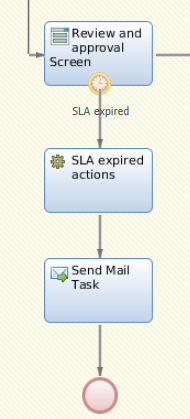
Example file
Click on the following link to download BAMSLANotificationRecipe.awexport which contains a sample process with SLA notification.