I read the recipe 'Markdown, BBCode, HTML... What's what?', and noted that Appway recommends against using Markdown in situations where untrusted people can enter text, since Appway only supports unsafe Markdown as of now. However, I am already using Markdown for rendering text entered by people I don't necessarily trust. What steps can I take to mitigate the risks?
As outlined in the recipe Markdown, BBCode, HTML... What's what?, Appway's recommendation is to not use Appway's Markdown implementation for untrusted content. However, if you do want to render untrusted content using Appway's Markdown implementation, there are mitigations against security vulnerabilities you can take.
In order to understand how to protect yourself against vulnerabilities caused by Markdown, we first need to outline what exactly the problem is. While there are safe versions of Markdown, the version that ships with Appway is unsafe by design; it is intended to be used by trusted people. This makes Appway's Markdown more powerful, as it allows users to mix Markdown code with HTML code.
However, the same feature that makes Appway's Markdown powerful also causes the problem: When you allow untrusted users to enter Markdown code that will later be rendered on other people's screens, it allows these untrusted people to add JavaScript code that will later be executed on other people's computers.
Consider the following example. Let's say you have a comment field on your public website that allows users to enter Markdown. A user — the attacker — enters the following code into the Markdown field:
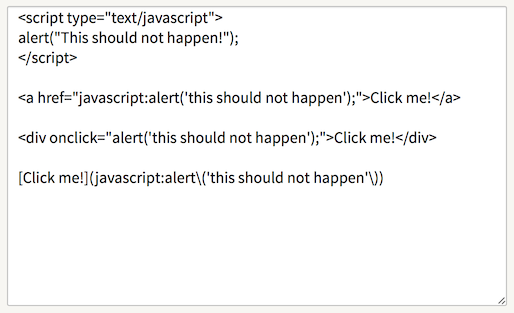
This is valid Markdown code. Unfortunately, it's also four different examples of how to include JavaScript code in a valid Markdown text.
In this example, the attacker now saves the comment. As soon as another user - the attack victim - visits the page, the code in the comment is executed, and the victim sees this dialog box pop up automatically:
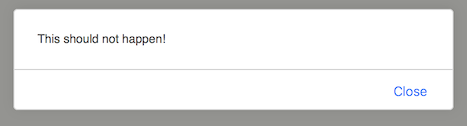
In addition, there are three links on the user's screen, each of which also executes JavaScript code:
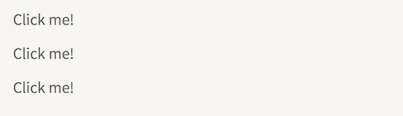
When the user clicks on any of these bits of text, again, JavaScript code is executed:
In this example, all the JavaScript code does is pop up a dialog box. In the real world, though, attackers could wreak all kinds of havoc on users' computers when they are able to execute code on their computers.
There are ways to protect against this problem. In particular, we want to do two things:
- We want to disable people's ability to add random HTML code to Markdown documents
- We want to disable Markdown's dangerous features (i.e. allowing a link to contain JavaScript code)
There are two different ways of achieving this. The better way would be to sanitize user input before it is ever stored on your Appway system. However, we're assuming that this security vulnerability already exists, so we need to do the second-best thing: sanitize user input when it is rendered.
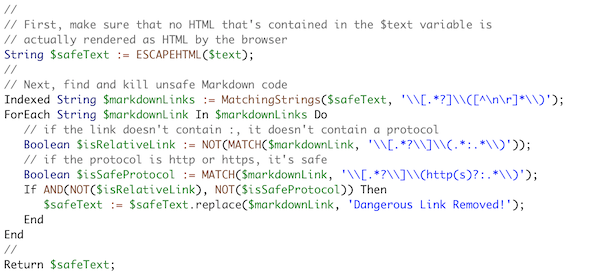
In order to do that, you have to replace the usual binding that binds the variable containing Markdown code to the Text component. Instead, the Text component's "Text" property needs to make any HTML code in the Markdown text safe, and remove all unsafe Markdown code.
Let's fix the HTML first. Running ESCAPEHTML on the text before showing it in the Text component disarms any HTML code in the Markdown text.

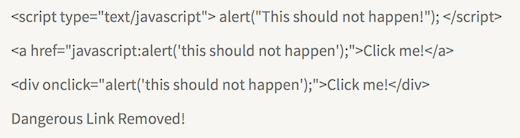
The rendered text now looks like this:
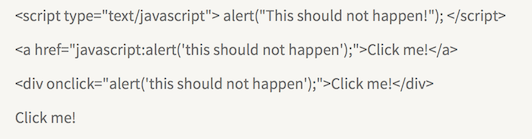
What was previously rendered as HTML by the browser is now printed as plain, inert text; nothing happens when the user loads the page, and the HTML links are no longer clickable.
The Markdown link, however, remains. It uses the javascript: protocol to execute JavaScript code using a normal Markdown link.
Can we just disable the javascript: protocol? While that action would solve this particular case, protocols can be used to launch third-party applications. These third-party applications might themselves have security problems, so it's best to disable all protocols, except for http and https. When it comes to security, it's always better to whitelist things you want, rather than trying to blacklist everything you don't want.
Furthermore, we want to disable these protocols for images as well as links. Links and images have very similar syntax in Markdown; they both basically look like this:
[text](url)
Images also have an exclamation mark at the beginning, but other than that, they look identical. So here's what we want to do:
- Get a list all links or images in a Markdown text
- Check if there is no protocol (it's a relative link), or the protocol is
http or https (mailto would also be okay, but we'll ignore that for now) - Remove any links that don't adhere to these rules
Here's what this looks like:
If we render the dangerous Markdown code again, the final remaining link is now gone as well.
Inside this .awexport file, you'll find a Script Function that implements the code above.
MarkdownMitigation.awexport