The Document Manager Package is an ingredient of the
Document Generator and
Document Tracker Business Components, which are legacy components. End of Support (EOS) for such components was scheduled in March 2023. Recommended action: Consider adopting
Digital Binder v5 or higher.
The Document Manager comprises a set of tools that allows performing several actions and configuring different scenarios for the management of documents in an Appway solution.
The main features are the following:
- Rule-based document definition;
- All documents are organized into a single object called Document Manager with the possibility of grouping them in booklets;
- Embedded comments, review/approval data and entitlements;
- Upload history;
- Easy and fast configuration for PDF generation;
- Tracking of document status transitions;
The following table shows all the Business Objects provided by the Package:
Data Classes
- DocumentManager (Visible): This is the main class. It contains the following Business Objects:
- comments: a list of comments at the document set level.
- documentSet: the collection of document entities (single documents and booklets)
- otherUploadedFiles: free collection of generic ulploaded files encapsulated into cluster file wrapper objects
Moreover, the Data Class offers a function to enable/disable the document upload history of the Document Set.
- DocumentEntity (Visible): This is the generic Data Class implementing all the common properties/functions for documents. It contains some “abstract” function that is implemented by inheriting Data Classes (e.g. DocumentItem and DocumentBooklet). Its main properties are:
- comments: collection of all the comments at the document level.
- documentFile: pointer to the latest uploaded file
- history: if enabled, the history contains each uploaded file for the document.
- documentStatus: contains the current status of the document, provides the status description as defined in the relative catalog, and stores each document status transition.
- entitlements: objects containing the configuration for the users who can view, edit and review the document.
- pdfConfiguration: pdfRenderConfiguration object used to drive the generation of PDF files.
- reviewStory: collection of all the review steps for the document.
- DocumentBooklet (Visible): It inherits from DocumentEntity and implements the concept of booklet. In contains a collection of DocumentEntity objects that can either be simple documents (DocumentItem) or booklets.
A booklet is handled as a single entity, therefore the configuration for the generation of PDF files is applied to all the documents contained in the booklet. Moreover, a booklet always produces a single PDF file that is the result of merging all of the contained elements (recursively about contained booklets). - DocumentItem (Visible): It inherits from DocumentEntity and implements the concept of a single document. It contains a DocumentAction object that stores the configuration coming from the relative document generation rule.
- DocumentStatus (Visible): It contains information about the current status of a document. Moreover, it automatically tracks the status transitions.
- DocumentStatusTransition (Visible): It implements the concept of a status transition keeping information about ‘status from’, ‘status to’, ‘date’ and ‘useird’ (of the user who triggered the change of status).
- DocumentAction (Visible): It wraps the document action (type Action) returned by a generation rule. It contains all the properties to be used by the document manager and that were defined in the rule action .
- Comment (Visible): It implements the concept of a comment, that is the comment text, the userid of the user who created it, and the creation timpestamp.
- DocumentFile (Visible): It contains the cluster file of an uploaded document plus the necessary functions to handle the upload action. Each document entity contains a DocumentFile that stores the latest uploaded file of the entity,while the history, if enabled, contains the previously uploaded files.
- DocumentGenerationMode (Visible)Utility class that contains two static functions that define the two ways of generating a document:
- BLANK: the PDF file is blank without any information added by Appway.
- PREFILLED (default): the PDF file contains all the mappings and calculated fields as defined in the Appway pdfOutput Business Object.
- EntitlementConfiguration (Visible): This is the Data Class that implements the entitlement logic. It allows configuring permissions for viewing, editing and reviewing the entity at document entity level. The check is always performed against a provided userid, and the configuration is performed by placing userIds, Roles or Groups inside the provided collections:
- viewers
- editors
- reviewers
This Data Class also offers the following functions to check whether a user is eligible to perform any action on the document: - isUserEligibleToView
- isUserEligibleToEdit
- isUserEligibleToReview
By default (empty collections) everyone can perform any action on a document. Therefore, the configuration needs to be set properly to restrict possible actions.
- ReviewStep (Visible): Each document entity contains a collection of review steps. This object supports the approval/review flow, if required. A review step contains the reviewAction, a comment and the user who performed the review step.
- DocumentManagerBuilder (Visible): It contains the implemented logic to create DocumentItem and DocumentBooklet objects given a rule. Moreover, it contains an abstract function to be implemented by an inheriting dataclass used to build the whole Document Set of a Document Manager.
- PdfGenerator (Hidden): Utility Data Class used to centralize the PDF file generation code.
- ClusterFileWrapper (Visible) A simple Data Class that wraps a ClusterFile object, used to manage references through the solution lifecycle, adding some simple property like originalFileName, date and userId.
- AdditionalDocumentAction (Visible): As with the DocumentAction, it wraps the optional document action provided by the platform.
- Configuration (Hidden): Configuration Data Class used as a proxy for environment configurations. It currently provides the configuration of the directory where uploaded files are stored:
CONF('document.manager.upload.root.folder', 'content/uploads/').
Catalogs
- DocumentStatuses (Replaceable): Catalog to be replaced by the final solution, containing all the possible statuses for a document.
- DocumentManager (Data Class)
- DocumentEntity (Data Class)
- DocumentBooklet (Data Class)
- DocumentItem (Data Class)
- DocumentStatus (Data Class)
- DocumentStatusTransition (Data Class)
- DocumentAction (Data Class)
- Comment (Data Class)
- DocumentFile (Data Class)
- DocumentGenerationMode (Data Class)
- EntitlementConfiguration (Data Class)
- ReviewStep (Data Class)
- DocumentManagerBuilder (Data Class)
- DocumentStatuses (Catalog)
- DocumentStatuses (Catalog)
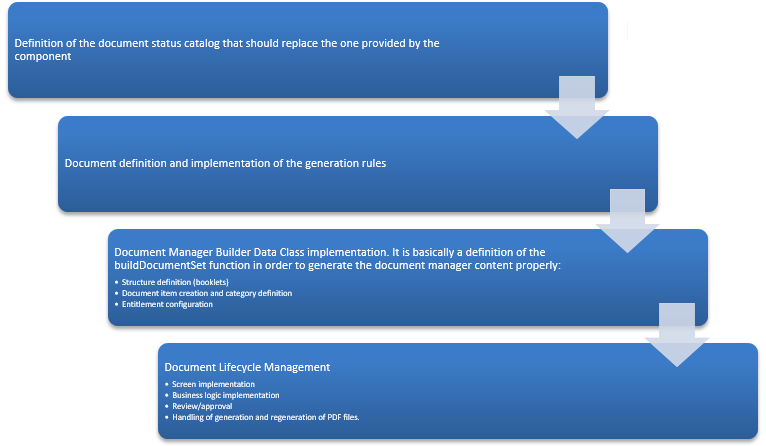
The following diagram shows the most general workflow that can be implemented using the Document Manager. Some of the reported steps can be implemented automatically, while others require an action on the user’s part. This is done to guarantee the maximum flexibility and to give the possibility to cover as much use cases as possible.