
Have you ever been writing some Appway Script in the Expression Editor when a variable you did not define appears in the variable list in the right sidebar? In this article, we'll go through some of these 'hidden' variables that, in some specific situations, are defined and initialized for you automatically by Appway/FNZ Studio.
While writing some Appway Script code, you might have noticed that variables you had not defined appeared in the variable list in the right sidebar of the Expression Editor. Some of these variables are really valuable—or even essential—when performing certain tasks.
In this article, we'll introduce some of these hidden gems that are created and initialized by the system in specific situations.
This first section covers the following two variables:
$bo in the Smart List's script$records in the Catalog editor
The first hidden variable we would like to introduce you to is $bo, available in the context of a Smart List of Business Objects.
Smart Lists are a useful way to organize the Business Objects within a Package according to custom criteria. To create a new Smart List for a Package:
- Open the Business Objects tab of the Package
- Right-click among the list of Business Object types in the left sidebar
- Choose Add Smart List
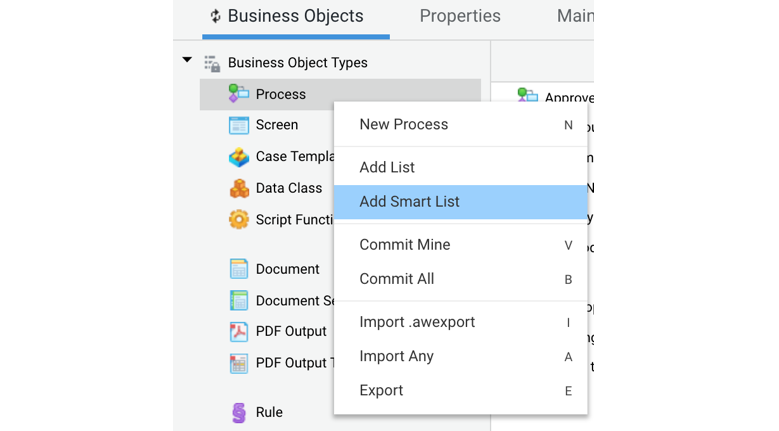
Let's go through a quick example to see how useful this 'hidden' variable is. Let's say you would like to create a list of "all Data Classes in a given Package that are mapped to a Data Store using the Data Store Extension".
To do this, you need to specify some rules for the Smart List, so the List includes only Data Classes mapped to a Data Store. To do this, you right-click on the Smart List and select Edit Smart List.
At this point, you need to specify two conditions:
- The Business Objects to be included must be of type Data Class
- The Business Objects to be included should be mapped to the Data Store extension
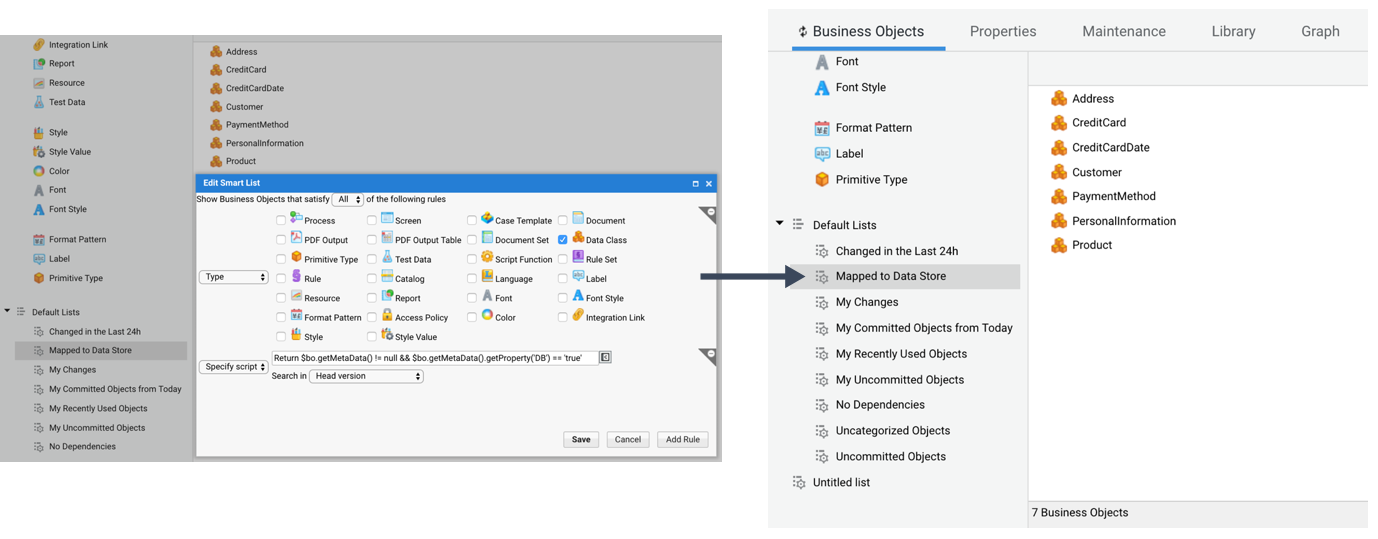
The first one is quite easy, and you can implement it using the wizard. you select Type as the Rule type, and tick the checkbox for Data Classes. This means my list just contains Data Classes.
The second condition is more complex: How do you know if a Data Class is mapped to a Data Store? By exploiting the metadata of the Business Object.
Whenever a Data Class is mapped to a Data Store, a metadata property named DB is set to true. To implement this rule, click the Add Rule button in the bottom right corner, and select Specify script as the rule type. You can then specify some code using the Expression Editor. As you can see in Figure 1, the variable $bo, of type BusinessObject, is already defined for you to use.

Figure 1: Variable $bo in the Expression Editor for custom filtering expression for Smart Lists
It is quite simple. A Smart List is a collection of Business Objects. In the custom filtering script, you can specify a condition to identify which Business Objects must be added to the List. The condition is based on the variable $bo, that is, a placeholder for any Business Object in the Package.
At runtime, in order to generate the List, the system iterates over all the Business Objects in the Package and, at each step, populates the variable $bo with the Business Object corresponding to the current iteration. Appway then evaluates the condition: If it returns true, then the Business Object is added to the List; otherwise, the object is not added.
In our case, the condition checks whether the Business Object $bo contains a metadata property named DB, and whether it is set to true.
Here is our Smart List definition, along with the Objects it filters out in the Package:
The second hidden gem we are going to tell you about is $records. This variable is defined by the system in the context of the Catalog Editor. It appears when you add the Expression component to manipulate the Catalog output. What's the purpose of this $records variable? And how do you use it?
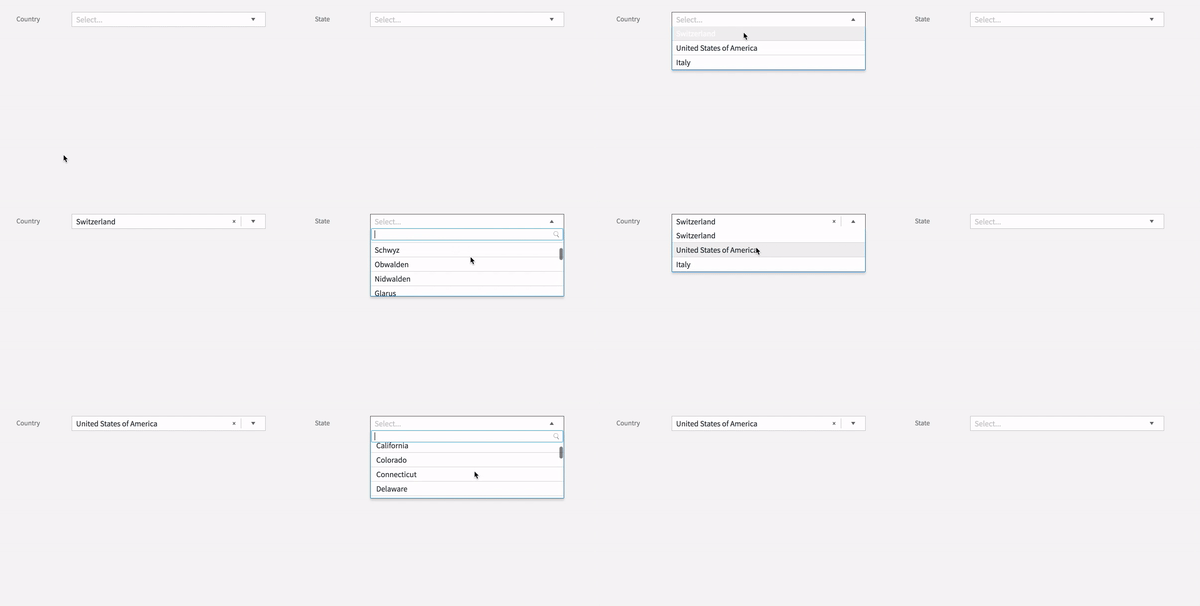
Let's take a look at an example: You have a Screen in which you collect some personal information about a customer. When entering the address, you need to select the country from a dropdown. After the country has been provided, you then need to specify a state (or province or canton) within that country as part of the address. That list of states needs to be generated dynamically, based on the country selected.
Fortunately, this can easily be implemented with a Catalog!
You've created a new Catalog with the ID States. The Catalog contains the names of all cantons of Switzerland and states of the USA.
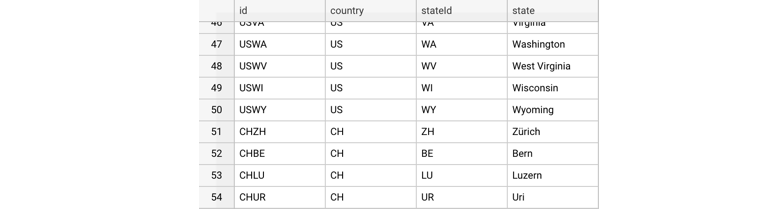
Note: This Catalog reads data from the CSV file States.csv contained in the Resource named States
In the context of the Catalog, you define a variable named $country, of type String, and scope Assigned. The idea is that the Screen assigns a given country to the Catalog, and the Catalog then returns all the states or cantons for that specific country.
To do this, you need an expression that filters the Catalog to retain just the states for the specified country. So you add an Expression component to the chain of operations in the Catalog, and edit the expression in the Editor.
As depicted in Figure 2, the variable $records, an Indexed Collection of Records, is available, even though you did not define it anywhere. The idea here is that you get a list of records as the input of the current operation—in this case, a filtering operation—and you put a list of records as the output of that operation. The operation can modify the list of records: filtering them, or changing the data contained in each of them. The variable $records represents the input list of records. In my example, $records contains records related to all the states and cantons, as they are defined in the csv file.

Figure 2: The variable $records contains the input records for an Expression component used to process or filter the records of a Catalog
As shown in Figure 2, you type an expression that filters the input list of records, retaining just the ones for which the column 'country' is equal to the variable $country, that is, the country for which we want to get states.
You then set the States catalog as Data Source for the 'State' Dropdown List, and assign the variable, $country, to the Catalog.
Here is the result:
In this section, we're going to cover the following variables:
$this and $super for Data Class functions$exception in the Catch block of a 'Try/Catch' statement
The next hidden variables that we'd like to introduce to you are the $this and $super variables. These variables can be found in the Data Class editor.
Why are these variables useful? Let's take a look at an example: a simple data model consisting of two data classes, 'Person' and 'Customer'.
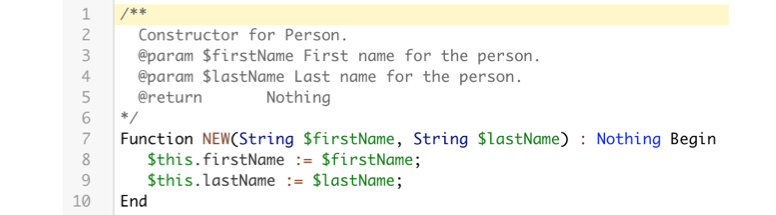
The 'Person' Data Class, shown below, defines two properties, firstName and lastName. The Data Class also contains a constructor that accepts the same arguments, $firstName and $lastName, and initializes a data entity accordingly. The constructor function is called right after an object is instantiated. In this example, the purpose of the constructor is to set the properties of the Objects being created to the values provided as arguments.
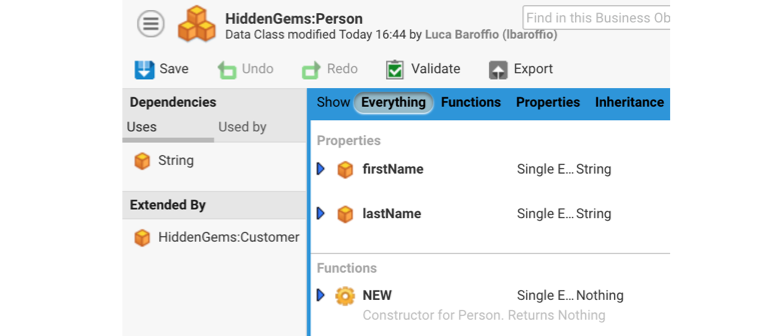
How do you access the Object instance being created, and access its properties?
Simple: using the $this variable.
As shown below, the function consists of two lines of code in which you set $this.firstName and $this.lastName to the values provided as input.
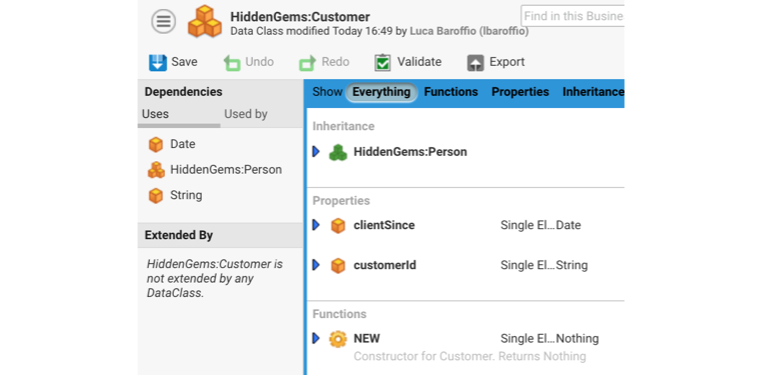
Now let's move on to the second Data Class of our data model, 'Customer'. As a 'Customer' is a 'Person', this scenario represents a good use case for inheritance; the 'Customer' Data Class inherits from 'Person'.
In the 'Customer' Data Class, you've defined two more properties: customerId, a String storing the ID of the customer, and clientSince, of type Date, that stores the timestamp of when the customer was signed.
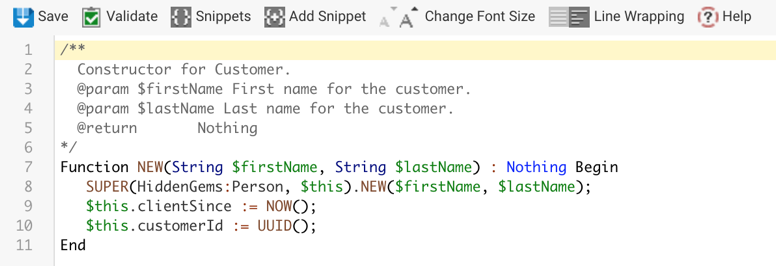
Let's now say that you want to define a constructor for the 'Customer' Data Class. Such a constructor function should:
- Accept the parameters
lastName and firstName - Initialize the data instance by creating a 'Person' with the provided first and last names
- Set the
customerSince property to the current date - Assign a unique identifier as the
customerId
Here is where $super comes into action! You can use $super to access properties and functions of the parent Data Class.
However, what happens if your Data Class uses multiple inheritance? As understanding the Data Type of $super is not so straightforward, Appway provides a useful function: SUPER().
The SUPER()function accepts two arguments:
- The Data Type of the specific parent class that you want to use
- The Object that you want to cast to the parent Data Type
In order for your code to be compliant with multiple inheritance, we'd recommend that you use the SUPER() function in place of $super.
In this example, you call the constructor for the 'Person' Data Class in order to initialize the first and last names of our Customer (as shown in the image below). You then proceed by setting the properties clientSince and customerId.
The final hidden variable presented in this post is $exception. This variable is available in the context of the 'Catch' block of a 'Try/Catch' statement block written in Appway Script. The variable, $exception is of primitive type 'Exception'. See the infobox below for more information about this primitive type.
What does $exception do in this context? The purpose of this variable is to expose the exception thrown by an instruction in the 'Try' block.
Let's use a concrete example. Consider this code snippet:
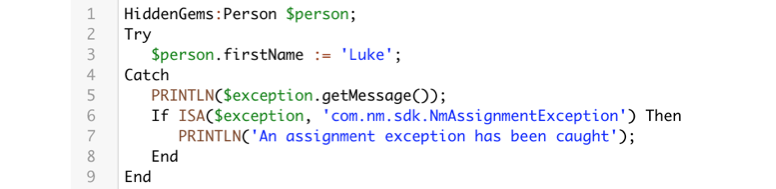
You use a Try/Catch statement to catch possible exceptions raised by the instructions contained in the 'Try' block. Here the instruction at line 3 is clearly going to throw an exception, as you are trying to access a property of a data entity that has not been initialized.
In the Catch statement, you can print the message associated with the exception by calling the function getMessage() of the $exception variable. You can also get the full Stack Trace related to the exception using the function call StackTrace($exception).
In this situation, you can also use an 'If' statement to execute some code based on the type of exception that has been raised, or on a condition based on any of its properties.
The variable $exception is of primitive type 'Exception'.
This is a type which can store any kind of Java exception. However, solutions should not store such a value in a variable of a Process or Screen, or in a property of a Data Class.
Why? Some implementations of 'Exception' contain other Java objects which can cause problems during serialization or deserialization of a Value Store.
If a solution must remember information about an exception it has caught, it should only store the class name or message of the exception:
String $exceptionClassName := $exception.getClass().getName();
String $exceptionMessage := $exception.getMessage(); // may be null as not every kind of exception has a message
In this section, we'll focus on caching, and the 'hidden' variables that are defined and initialized by the system in the context of cache retention expressions:
$insertTimestamp$accessTimestamp$cachedObject
Caching objects makes applications more efficient, and makes wiser use of server resources. For example, you can use caching when you don’t want your application to make useless, repeated calls to a certain third-party service. A good rule of thumb: 'first try to read data from a cache; if the data is available and still valid, use cached data. Otherwise, compute that data from scratch'. Caching an object is usually a good option when the object does not change too often, is expensive to be computed or queried, and does not take too much space in memory.
In Appway, you can cache variables using the CacheStore and ClusterCacheStore functions. A cache is a set of key-value pairs, and a cache entry is accessed by specifying its unique key. To keep it simple, the key is just a unique name to address a cache entry.
The two functions work in a similar way, but:
CacheStore stores data in the Application cache, on a per-node basis
- You usually use
CacheStore to store values that can be computed multiple times, and that are not too expensive to be computed. In fact, in this case, each node of a cluster computes and stores its own version of the same value.
ClusterCacheStore stores data in the Cluster cache, so that this data is available for all nodes
- You use
ClusterCacheStore to store values that cannot be computed multiple times — for example, due to some restrictions on the service calls you make to do that — or when these values are very expensive to be computed. In fact, in this case, you only compute and store the value once for all nodes in the cluster.
Note: In both cases, data being cached is not persisted. This means that data is lost whenever the Appway web application or the application server are restarted.
The CacheStore function accepts three input arguments:
$name: The key of the objects being cached$object: The object being stored in the application cache$retentionExpression: The retention expression
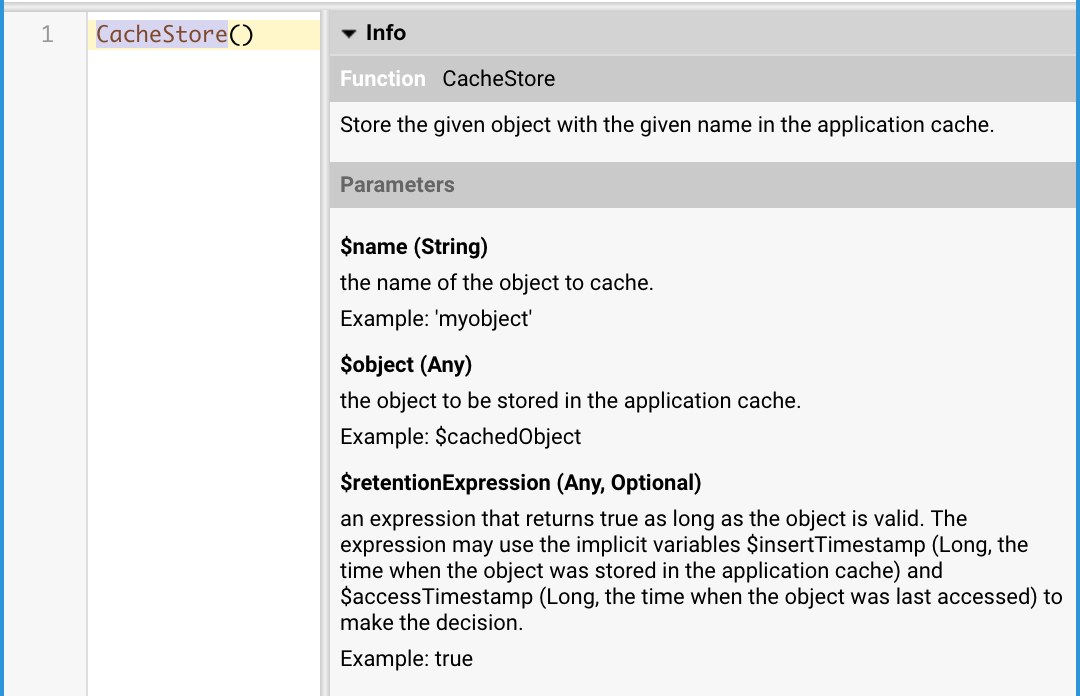
The last argument, the $retentionExpression, is particularly important: as data usually changes over time, you need to decide until when such data can be considered valid. But how can you do this?
A retention expression is a Boolean expression that works as follows: if it returns true, then the cached object is still valid and can be used; if it returns false, then the object is not valid anymore and needs to be recomputed.
If you set the retention expression to true, cached data is considered valid forever (just remember that cache entries are not persisted: if you restart Appway, all cache entries are lost).
Three 'hidden' variables implicitly defined by the system in the context of the retention expression argument of a CacheStore function call can assist you:
$insertTimestamp$accessTimestamp$cachedObject
The variable $insertTimestamp represents the moment in time in which a specific entry is stored in the cache. The type of this variable is Long, that is, a 'long' integer number, representing the number of milliseconds elapsed since Jan 1, 1970. Strange format to represent data, isn’t it? This format is called UNIX time and has been used for decades to represent time in computers, and in electronic devices in general.
Did you know? This unusual data format is projected to potentially cause some kind of 'millennium bug' in year 2038. The 'number of milliseconds since 1970' is constantly increasing, and if a data type with a limited precision, or number of digits, is used, this might result in an overflow. For systems using 32-bit integers to represent UNIX timestamps, this overflow will occur on Jan. 19, 2038. Electronic devices using 32-bit integers will not be able to represent or parse timestamps after that date, and may even think they're back in the '70s!
Using $insertTimestamp and the functions TIMEDIFF and NOW it is pretty easy to define a ‘time-to-live’ for the object being cached. The idea is: if the time difference between the moment in which you get data and the moment in which you put data into the cache is greater than the desired time-to-live of the cache entry, than cached data is not valid anymore.
Assuming a time-to-live of 24 hours, this can be translated into the following retention expression
TIMEDIFF($insertTimestamp, NOW(), 'h') < 24
The variable $accessTimestamp represents the time when the cache entry was last accessed.
Using this variable, you can set the cache to expire if it is not read for a given amount of time. For instance, you can invalidate the cache if it was last read more than 24 hours ago using the following retention expression:
TIMEDIFF($accessTimestamp, NOW(), 'h') < 24
Last, but not least, you can directly access the cached object and define a retention expression based on its properties. This can be extremely useful for objects with a specific expiration date. For instance, let's consider the case of a certificate of proficiency that has a precise expiration date, 365 days from the date of issue.
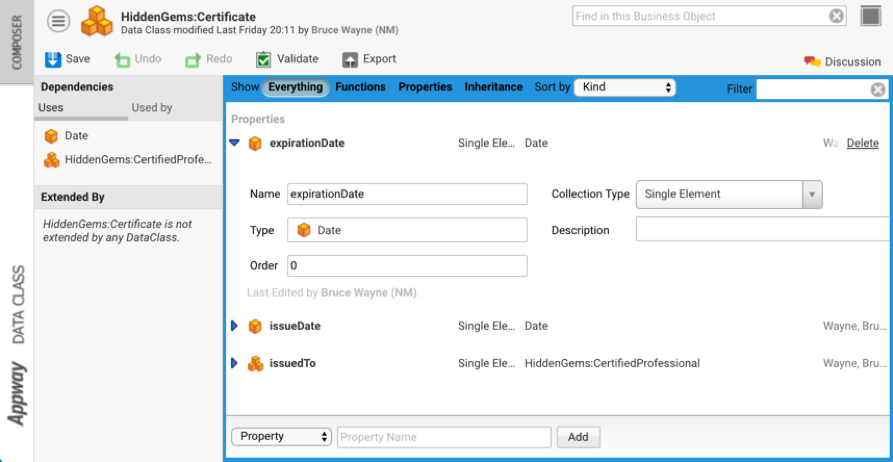
The Data Class representing an issued certification has a property named expirationDate (representing the time when the certificate expires), so you can cache the certificate object and set the following retention expression to invalidate the cache entry once the expiration date has been reached:
NOW() < CAST(HiddenGems:Certificate, $cachedObject).expirationDate
In this section, we'll focus on process messaging, and a 'hidden' variable that is defined and initialized by the system in the context of message receival: $message
In BPMN, a message is 'the content of a communication between two entities'. Those entities can be participants of the same process, different process instances, or a process instance and some external entity. Messages differ from signals in that messages are addressed to a specific recipient.
In BPMN, 'events' are provided in order to send and receive messages within the flow of a process. Some very interesting patterns can be implemented using events in combination with messages. For instance, you can set a process instance to start whenever a message is received; set a process to wait before a certain activity, until a message is received; set a task to be interrupted by an incoming message; or some process data to be updated any time a new message is received. Those patterns are key to orchestrate a set of processes, organize them meaningfully, and let them exchange some data.
A message is an addressed communication. Developers need to be able to send it to the desired recipient or recipients. Oftentimes, recipients are Process Instances that are somehow logically connected with the Instance that sends the Message. For example, the 'sender' and the 'receiver' Process Instances execute two operations needed to onboard the same client.
For these reasons, when you send a Message in Appway using the Send Message Intermediate or End Events, you have several fields that you can use to specify where the message should be sent.
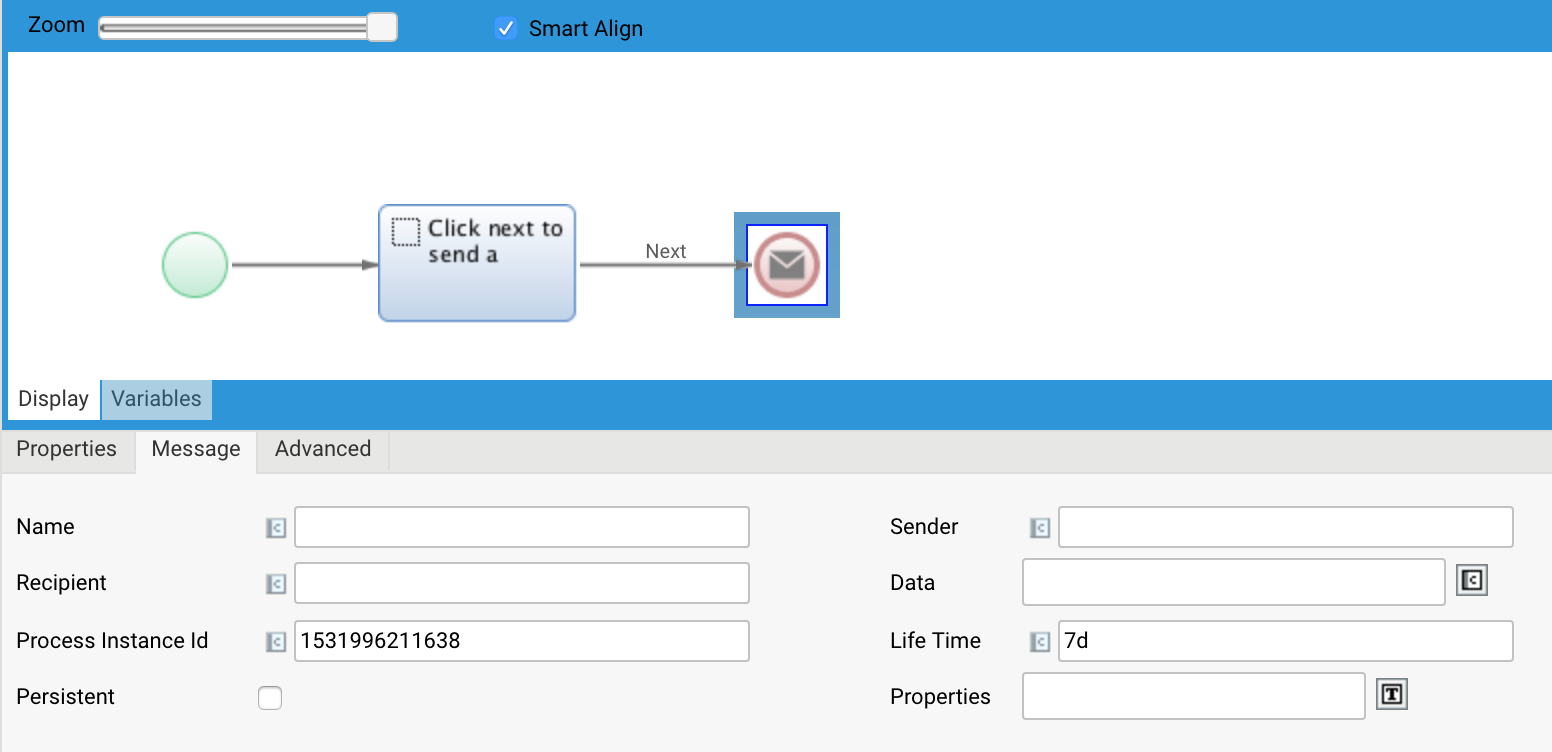
The most simple set-up is when you know the Process Instance ID of the recipient: Specify the desired recipient Process Instance ID in the relevant field, and set the Message Queue to be the same for both the Sender and Receiver Events. Then only the Process Instance with that specific ID is able to receive the Message. This behavior is implemented out-of-the-box by the platform.
In other cases, you might not know the target Process Instance ID, but may know other information about the Message itself. You can use some other tools to address the Message to the desired recipients.
On the 'sender' side you have the option of:
- Using the Queue on which the Message is sent
- Specifying the Sender
- Specifying the Recipient
- Setting the Message Name
- Using the Data field to add some of this information to the body of the Message
When you use these fields, it is the receiver that is responsible for deciding whether it should accept a certain message or not. This check is implemented using the Filter field of the Receive Message Start, Intermediate, and Attached Events.
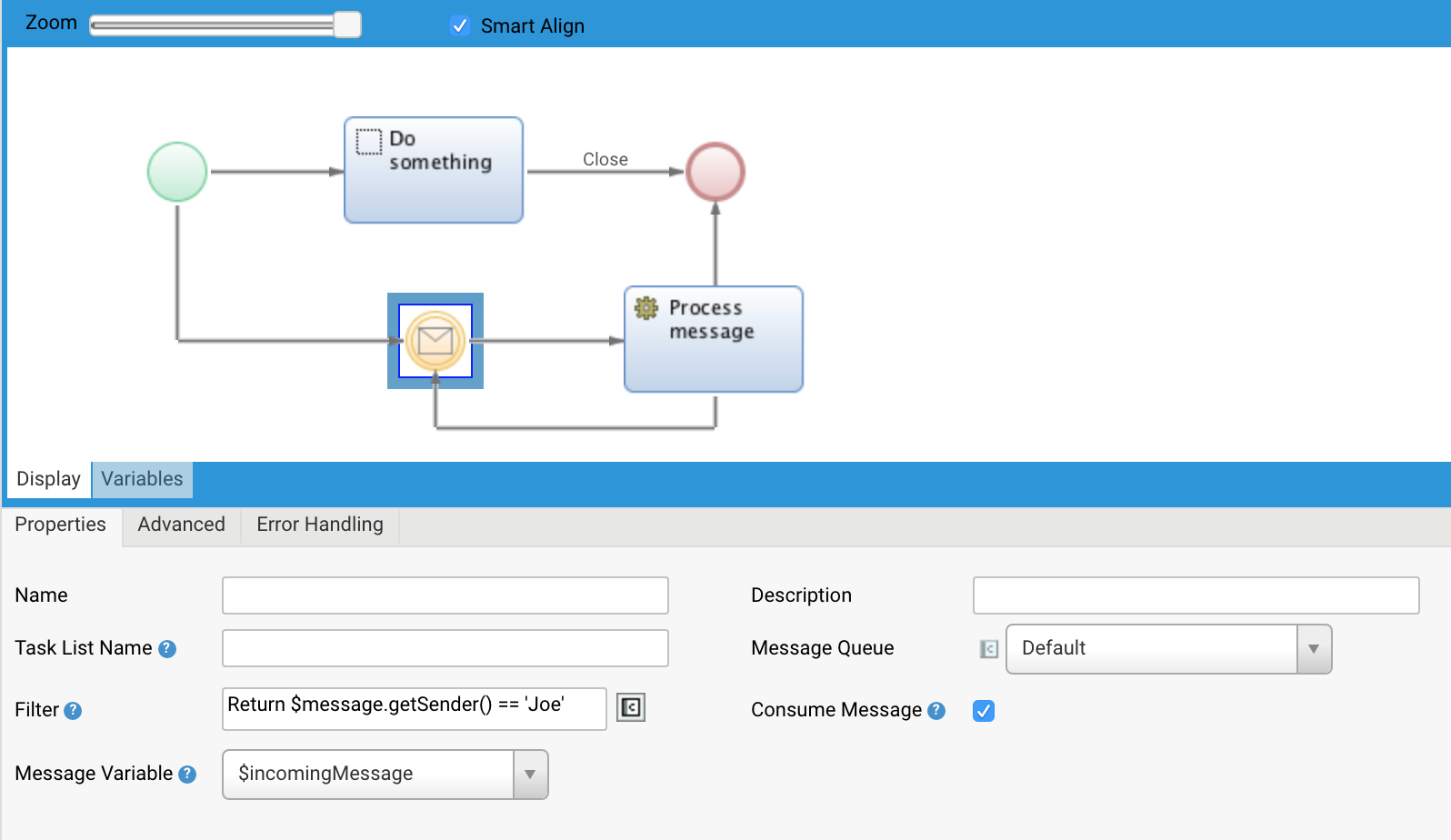
The Filter field behaves in a fairly simple way. You provide a Boolean expression, and if it returns true, then the message is accepted; otherwise, the message is rejected.
Here's where we get to the 'hidden variable': When defining this expression, an implicit variable named $message is made available by the system. This variable is created automatically, and represents the Message that is going to be received. You can access all the properties of the Message, and use these properties to decide whether the Message should be accepted.
Here are some common filtering expression examples:
-
Checking whether the sender is the required one in order for the Message to be accepted:
$message.getSender() == 'Joe'
-
Checking the value of the recipient property:
$message.getRecipient() == 'Rudy'
-
Checking the name of the message:
$message.getName() == 'A Message to you, Rudy'
In all cases, the implicit variable, $message, is the key: It lets you implement whatever custom Message filtering logic you may need.
What happens when a message needs to be sent to multiple recipients? To implement this pattern, configure the filter expressions of the receivers according to the relevant criteria, and uncheck the Consume Message option. Unchecking this option ensures the Message is not destroyed upon arrival, and is made available to other potential recipients.