How do I monitor Integration Link load at run-time? How can I find out whether the Integration Link thread pool size is appropriate for the system’s load?
You can monitor the message queue size of each Integration Link via JMX Beans, using JConsole, for example.
Figure 1 shows the current queue size of a "test" Integration Link, and the path to access it. The attributes ConcurrentConsumers and Timeout, visible in the list of attribute values as well as in the EndpointURI attribute, are configured in the Integration Link itself. In this example, these attributes are set to the default values of 5 concurrent consumers, and a timeout of 30 seconds.
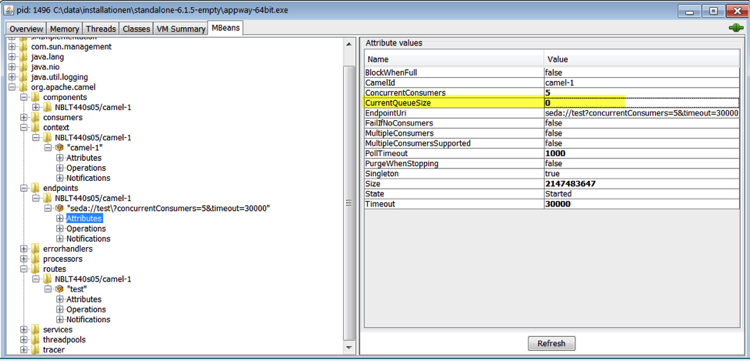
Figure 1: Message Queue Size
Should there not be enough threads in the Integration Link's thread pool to manage the load, the thread pool size can be adapted at run-time.
As the thread pool size is dynamically adapted based on the current load, we recommend increasing the attribute which defines the maximum number of threads: MaxPoolSize. The pool size is automatically decreased in case of a lower load.
Figure 2 shows the thread pool attributes, while Figure 3 shows how to change the MaxPoolSize attribute using the method setMaximumPoolSize.
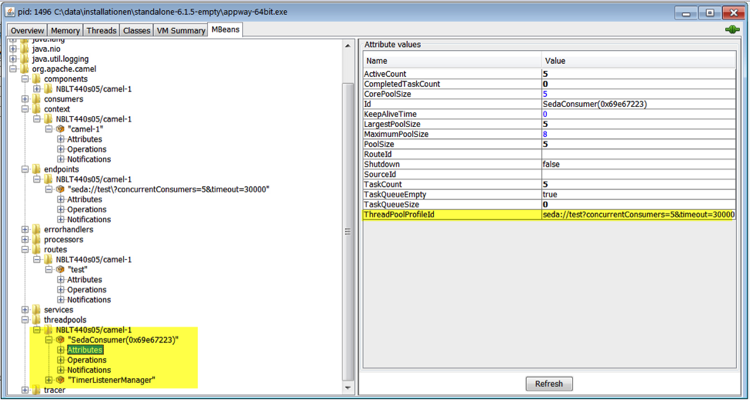
Figure 2: Thread pool attributes
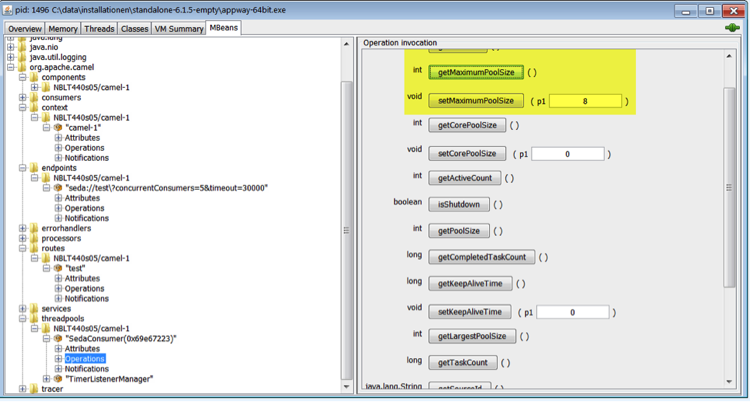
Figure 3: Operation "setMaxPoolSize"
Note: Changes to the size of an Integration Link thread pool via the JMX bean are not persisted. Restarting Appway resets the pool size to the value specified in the Integration Link Business Object