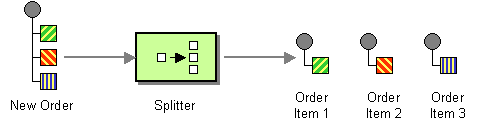
Many messages passing through an integration solution consist of multiple elements. For example, an order placed by a customer consists of more than just a single item. Each item may need to be handled by a different inventory system. Thus, we need to find an approach to process a complete order, but treat each item contained in the order individually.
Use a Splitter to break out the composite message into a series of individual messages, each containing data related to one item. The Splitter publishes one message for each single element (or subset of elements) from the original message.
In Appway, create an Integration Link which uses the Splitter component. The Splitter component uses the 'splitter script' to create a list of single items that must be processed, and the 'aggregation script' to aggregate the result of processing the single items.
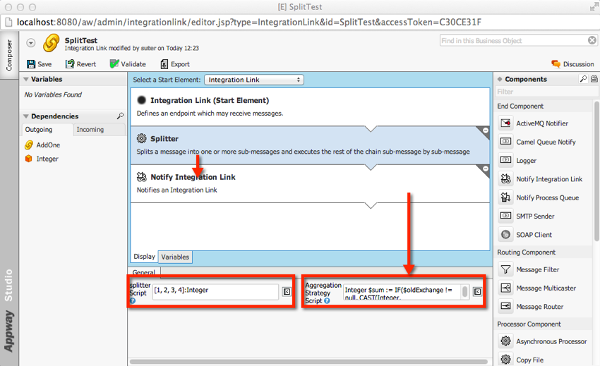
In the example above, the splitter script creates a list of numbers.
[1,2,3,4]:Integer
Each number is processed by the subsequent elements of the Integration Link. The result of processing is sent back to the aggregation script.
Integer $sum := IF($oldExchange != null, CAST(Integer, $oldExchange.getIn().getBody()), 0);
Integer $i := CAST(Integer, $newExchange.getIn().getBody());
Return $sum := $sum + $i;
The script takes the 'last' aggregated value (line 1) and the current / new value (line 2), and builds the sum of both (line 3).
The sum (which is the result of the aggregation) is used as the new last value for the next aggregation step.
The aggregation script is called four times — once for each item in the items collection. This is what the old and new exchanges look like in each iteration:
Iteration 1:
$oldExchange is null,$newExchange contains the value 1
Iteration 2:
$oldExchange contains the value 1 (result of adding 0 + 1)$newExchange contains the value 2
Iteration 3:
$oldExchange contains the value 3 (result of adding 2 + 1)$newExchange contains the value 3
Iteration 4:
$oldExchange contains the value 6 (result of adding 3 + 3)$newExchange contains the value 4
The result of Iteration 4 is 10, which is the overall result that the Integration Link returns.