From Appway 6.3, a new Dropdown List component is available which replaces the old, legacy Dropdown List from Appway version 6.2 or older. This article discusses the differences between the two versions and how to migrate the component. Without going into the new features, this document outlines the critical parts of the migration and how to retain the same functionality.
You can migrate the Dropdown List (Legacy) with help of the Migration Module in the Appway Studio or perform this migration manually.
The new Dropdown List provides more stability and seamless user experience on desktop and mobile devices. Apart from better browser support, the component is also capable of using a lazy loading mechanism to enhance the performance of your solution.
Appway strongly recommends to migrate to the newer version of the Dropdown List to get future fixes and updates for the component.
On a desktop device, the two Dropdown List versions differ only slightly in design.
Closed Dropdown List:

Expanded Dropdown List:
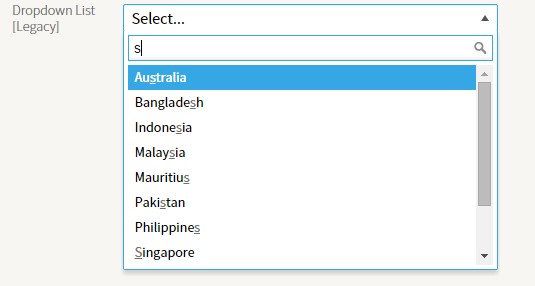
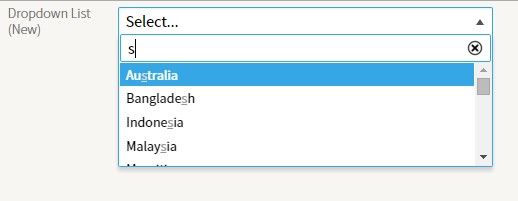
What has changed, is that now the Dropdown List also displays in full screen for smaller mobile devices for easier user interaction:
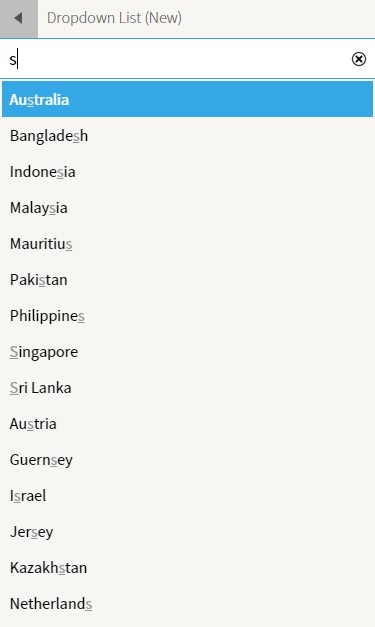
In addition, the new Dropdown List supports mouse, touch, and keyboard interaction.
| Dropdown List (Legacy) | Changes | New Dropdown List |
| Binding | Not needed anymore | Binding |
| Default Value | Renamed | This information is read from the binding value. |
| Show ‘Select…’ | Renamed | Allow resetting to empty state marked by placeholder
Note: If this option is selected, behavior differs slightly between the legacy and the new Dropdown List: The legacy Dropdown List shows the placeholder, but does not allow returning to the placeholder after a different option has been selected. The new Dropdown List also shows the placeholder, but was improved to also allow returning to the placeholder using the 'x' icon. If this option is not selected, both Dropdown Lists behave consistently and do not show the Placeholder |
| Select Text | Renamed | Placeholder |
| Text If Disabled | Not needed anymore | Show As Text If Disabled |
| If empty disabled selection, display | Not needed anymore | The information is read from the binding value. |
| HTML ID | | HTML ID |
| | | |
| Searchable Dropdown | Information lost | This option does not exist. All new dropdowns are searchable and consistent in design and functionality. For this reason, the option for the native dropdown is not available anymore. |
| Min. Search Length | Not needed anymore | This is now indicated by the data source. |
| Width | Not needed anymore | Styles are applied globally in Workspace version 3. |
| Multiple | Not supported, use Multiple Selection Field instead | The new Dropdown List does not support the multiple select option. Use the Multiple Selection Field instead (available from Appway 7.1). |
| Clear Button | Not needed anymore | Styles are applied globally in Workspace version 3. |
| Options URL | Not supported | This option is not available anymore. See the FAQ chapter for further information. |
| Options URL Query Parameter Name | Not supported | This option is not available anymore. See the FAQ chapter for further information. |
| | | |
| Styles | Information lost | The Styles tab is not available anymore. Styles will be applied globally in Workspace version 3. |
A lot of the properties were removed with the new Dropdown List but at the same time the overall functionality has been improved. The best and safest way to migrate this component is to use the Migration Module in the Studio. It detects and outlines critical parts and provide support in auto-migration of the Screens.
What happened to the OPTION URL property?
This property was removed because the same functionality can be achieved using a Catalog together with an Expression or an Integration Link. This change allows the component to benefit from the new lazy loading mechanism. More information can be found in the documentation of the Dropdown List.
What if I used the MULTIPLE option on the Dropdown List?
Since the new Dropdown List is not capable of multi selection we recommend using the Multiple Selection Field instead (available from Appway 7.1).
What happens to the applied Styles?
All styles get lost in the process of migration. Styles should never be applied directly on component level because the solution will get less maintainable. Try to aggregate styles to a main style sheet and use Appway's built-in features to adapt your solution to your corporate design.
Is the migration safe?
Since Appway Business Objects have a versioning mechanism, you will always be able to revert to a previous state of a Screen. The same goes for migration done with the Migration Module.