The Money Extension expands the functionality of the Primitive Money Type, a built-in Data Type which provides only very basic mathematical functions.
The extension provides:
- additional Functions to convert between currencies according to rates
- a Catalog containing the most relevant currencies
- two Screen Components with a built-in currency chooser
The following Screen Components are provided by the Money Extension:
- Money Field
- Currency Selector
The 'Money Field' Screen Component provides a currency chooser and a field to enter a value.
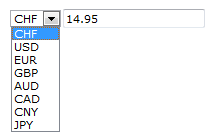
The following properties are available for configuring this component:
-
Binding – The variable bound to this input field.
-
HTML ID – The ID used to reference this element.
-
Default Currency – The currency selected by default.
-
Default Amount – The default value entered.
-
Currency Catalog – The Catalog used for currency selector options. If set to [default], the catalog is read from the extension configuration. If the catalog contains a column called 'label', the values in this column are used as display names.
-
Currency Selector – The position of the currency selector. If set to [default], the position will be read from the extension configuration.
-
Number Format – The format pattern for the entered value. If not defined, the format pattern is read from the extension configuration. Use the following symbols:
- '0' = digit
- '#' = digit (zero shows as absent)
- '.' = decimal separator
- ',' = grouping separator
Typical patterns are: '0', '0.00', '#,##0' or '#,##0.00'
-
Locale – The language (locale code) used for grouping and the decimal separator. Examples: 'en', 'en_US', 'de_CH' or 'fr'.
-
Decimal Shift – The number of digits by which the decimal point is shifted to the left (or right, if negative values are used).
Examples: '6' to display millions, '-2' to display cents
-
Text if disabled – Displays a text if the component is disabled.
The 'Currency Selector' Screen Component provides only a currency chooser.
For information on the available properties, see the section on the 'Money Field' Screen Component just above.
The MoneyExtension provides some additional convenience functions.
Money $m1 := ToMoney(1);
Money $m2 := ToMoney(2);
Money $m3 := ToMoney(3);
//
Money $m := MoneyAdd($m1, $m2, $m3);
//
$m := MoneySubstract($m1, $m2);
$m := MoneyMultiply($m1, 1.08);
$m := MoneyDivide($m1, 2);
$m := MoneyRound($m1, 0.05);
MoneyFormat($m, '$ 0.00'); ----> CHF 1235.75
MoneyFormat($m, '#,##0.000 $', 'en_US'); ----> 1,235.752 USD
Functions to extract information from the Money Data Type:
$m.getCurrency();  ---> will return CHF or USD

$m.toInteger();
$m.toDouble();

$m.getJavaCurrency().getSymbol();  ---> return $ or USD (depends if symbol is available in current java implementation)
Converting Money takes a little more attention and requires conversion rates to be stored in the Currency catalog:
- The first column of the Currency catalog contains the ISO 4217 code of the most relevant currencies, the catalog can be altered or created dynamically.
- The rate column contains the conversion rate. To calculate the conversion, a reference currency is required and can be set in the Appway configuration property
nm.default.currency (default is CHF). This currency is used as a conversion base to calculate from and to any currency in the list. Rates must be set either manually or provided dynamically by an external system. - The precision column describes the calculation precision.
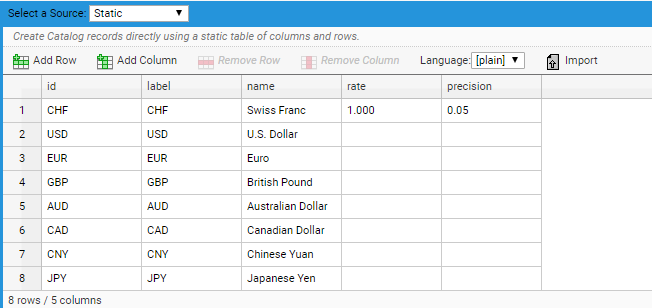
Figure 3 : Currency Catalog
The MoneyConvert function takes care the math:
$m := MoneyConvert($m1, 'USD');
// catalog "Currencies", column "rate" (optional: column "precision")
MoneyConvert(ToMoney(1, 'USD'), 'CHF');
// catalog "Currencies", column "rate" (optional: column "precision")
MoneyConvert(ToMoney(1, 'EUR'), 'USD', 3, 'DOWN');
// catalog "Currencies", column "rate"