How do you split workitems into multiple items executed in parallel? Executing a fixed number of subprocesses is the most common way. This recipe also shows how to deal with an arbitrary number of subprocesses.
Let's say we have a Process that deals with approvals for book orders. The Process requires two persons from the approver team to approve a book order. We can implement this using a simple AND gateway.
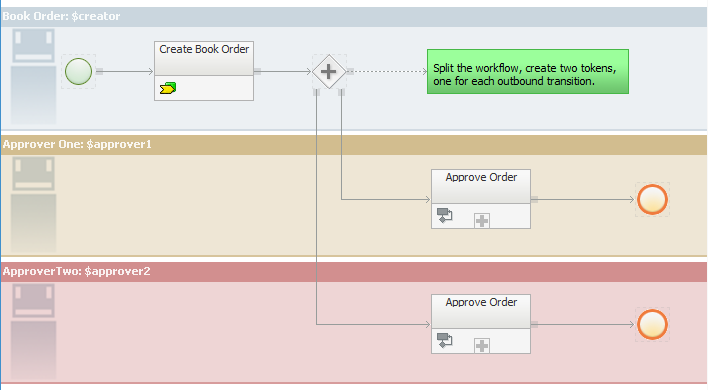
Figure 1: fixed number split
The AND gateway creates a workitem for each outbound transition. In this example, we have two outbound transitions: one transition for each Approver.
For more Approvers we would simply add more swimlanes, and make addtional outgoing transitions.
For the following example, let's assume we have a Process that can deal with multiple book orders at a time. We don't know how many orders are going to be entered.
The fixed 'number parallel split' pattern can not be applied, since we do not know in advance how many times the approval step must be available.
The following figure shows a possible solution to this dilemma:
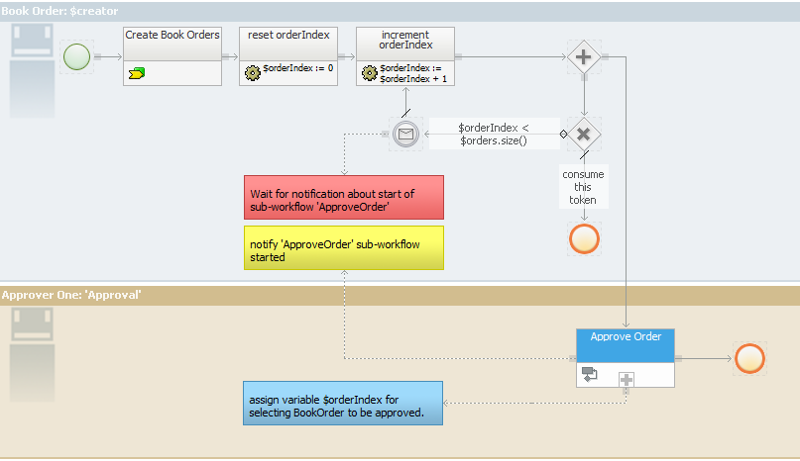
Figure 2: arbitrary number of parallel tokens
The basic idea is to create as many tokens as there are sub-processes to be executed. We do this using a loop containing an AND gateway. One of the tokens generated by the AND gateway will be used to start the subprocess. The other token is used to implement the loop.
The 'loop' token is consumed when the number of parallel sub-workflows has reached its maximum. Before the loop reaches the start node, an intermediate 'message' event waits for a notification sent by the subprocess. The notification tells the loop that the process has been started and the loop may proceed.
Note: It is very important to wait in the loop until we are sure that the 'current' subprocess is started. If we didn't wait, the value of the assigned variable for the subprocess would not be deterministic since the Process engine does not use a defined sequence of token execution after the AND gateway has been processed. That means that the index variable we are using could already be incremented an arbitrary number of times before the subprocess has been created. This leads to a wrong index beeing assigned to the subprocess.
In our example we have have to loop as many times as there are elements in the indexed collection $orders:

Figure 3: variable definitions
Global WorkflowMessage $message;
Action $state := CAST(Action, $message.getProperty('entity'));
Return STARTSWITH($state.type, 'Started');
Code 1: intermediate event waiting for notification
The subprocess must send a message that must be consumed by the Intermediate Event.
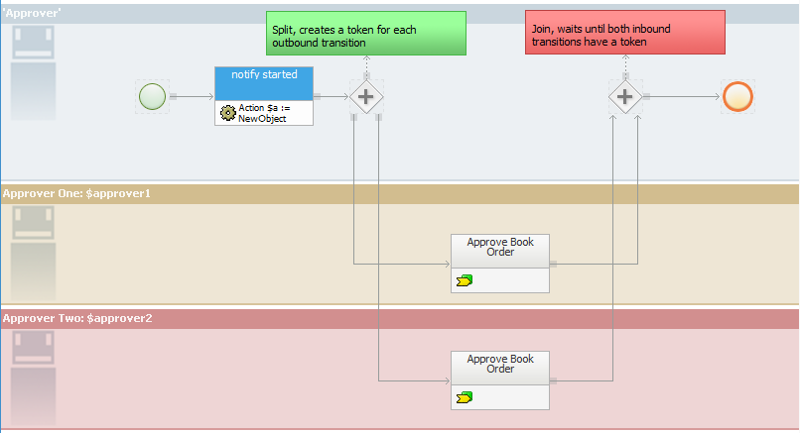
Figure 4: ApproveOrder subprocess sending notification
The notification is sent by the first script task in the Process definition.
Action $a := NewObject(Action);
$a.type := JOIN('Started approval for book order ', $orderIndex);
SendWorkflowMessage(WORKFLOWINSTANCEID(), UID(), $a);
Code 2: Sending Process message
The ApproveOrder Process shows an additional feature of the AND gateway. The AND gateway delays outgoing tokens until all inbound transitions contain a token.
The effect of this is that the subprocess is terminated when both Approval screenflows have ended.
The same effect could have been implemented by placing and END event after each Approval screenflow. The implicit rule for Process termination would then be applied: a Process is terminated if there are no active tokens left in the tokenset of the Process.