Phase Control is a screen component that allows you to improve screen performance.
Phase Control acts as a container for other screen components (children) and allows you to configure the conditions under which you execute or skip the Update, Validate, or Process phases for such child components.
This component can be useful for screen areas that do not change often, such as headers, footers, navigation sidebars, and so on.
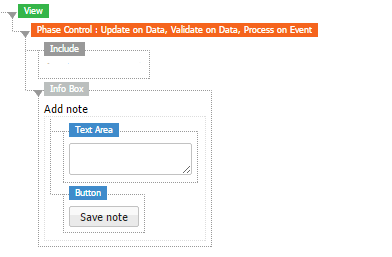
Figure 1 : Phase Control and child component
Follow these steps to configure the Phase Control component:
-
Go to the Properties tab.
-
Select the desired option for the Update, Validate, and/or Process phase. There are five available options:
a. On Data – The phase is executed if at least one input element inside the container (a Text Field, a Dropdown List, a Checkbox, and so on) is edited and, therefore, has data. This is the most common setting for the Update and Validate phases.
b. On Event – The phase is executed if an event is triggered for at least one child component (for action-enabled components with an associated server-side action). An example is when the user clicks a button. This is the most common setting for the Process phase.
c. On Data or Event – The phase is executed if data are inserted or events are triggered for at least one child component.
An example is when server-side actions are configured to be executed in the Validate phase (instead of the Process phase). In this case, the Process phase property (which is usually set to On Event) can be set to Never. However, we need to make sure that the Phase Control component allows the execution of events for its child components. If the Validate phase property is set to On Data or Event, both data and events are executed during this phase.
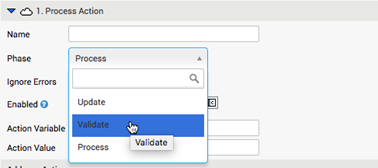
Figure 2 : Server-side actions configured to be executed during the Validation phase
d. Always – The phase is always executed, even if there are no data or events available for child components.
A possible use case is when the Phase Control component contains a script configured to be executed in a certain phase. In this case, we need to make sure that the Phase Control component does not stop script execution.
e. Never – The phase is always skipped for all child components without further checks.
For more information on Screen Phases, see the following recipe: How do Screen Phases work?