The WorldCheck Connector is a Connector Component that allows you to call the World-Check ONE API from Refinitiv, which is used to perform background searches. Refinitiv's World-Check is one of the main service providers for Background Check analysis, more information about the product can be found at the following link.
The Connector exposes a set of Script Functions that allow the user to send JSON requests to and retrieve JSON responses from World-Check.
World-Check exposes a WebAPI that allows third parties to invoke its services using Web Services. The Appway WorldCheck Connector wraps those APIs into Appway Script Functions to accelerate the invocation inside Solutions.
Disclaimer: Refinitiv's World-Check is one of the main service providers for Background Check analysis and is owned by Refinitiv. WorldCheck Connector is an Appway product that uses the World-Check ONE API, access to it needs to be enabled via product licensing within the World-Check One administration interface before integration can be completed. Appway has no affiliation with Refinitiv.
- WorldCheckConnector Package
- WorldCheckConnector (restartable) Extension
- WebServices Extension
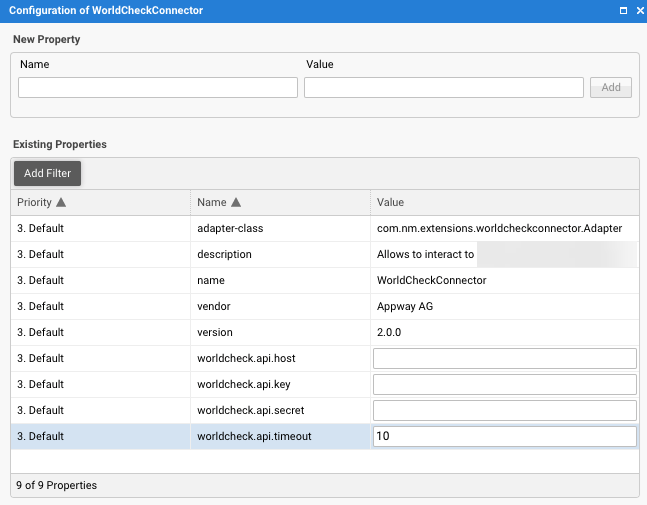
The Component needs to be configured using the credentials of your World-Check account:
-
Go to System Configuration > Extensions. To edit the extension configuration, right-click on WorldCheckConnector in the list of extensions and select Edit Configuration,
-
Configure the following properties:
worldcheck.api.host – The host that points to the URL of Refinitiv's World-Check ONE API, without http(s)://.
Example: rms-world-check-one-api-pilot.thomsonreuters.com
Note: The complete URL of this API would be similar to https://world-check-api-host/v1/method. The version of the API is hardcoded in the extension, so the component always invokes version 1 of the APIs.
worldcheck.api.key – The API Key, provided by Refinitiv.
Example: d69d61eb-8454-4895-bc1f-8ac6e892444fworldcheck.api.secret – The API Secret, provided by Refinitiv.
Example: TTwlxvARML+l8Yuj9hk1zTg4mE2Rp8E9DBTL0Hqf5Un5TJfyyf3vqMwbgdgdgUzBMbQPVEg/8/+6E4s8WBWe6w==worldcheck.api.timeout – (available in WorldCheckConnector v2 and higher) Configurable timeout property to be considered when performing service calls
(default = 10 seconds)
The WorldCheck Connector exposes the IntegrationFacade Data Class, which is used to perform searches with the World-Check service. Initialize IntegrationFacade with an implementation of the abstract WorldCheckConnector:Configuration Data Class. This Data Class allows:
- Configuring the timeout – Used to wait for results from the Search service (default: 5000 ms).
- Enabling debug mode – When enabled, the Connector prints debugging information to the Logger.
- Setting the GroupId – A string provided by World-Check that needs to be sent as a unique identifier.
Once IntegrationFacade is configured, it can be used to start searches using the method getHits. Let’s say for example we want to perform a Background Search for "Mario Smith":
WorldCheckConnector:Configuration $conf := NewObject(MyBackgroundCheck:WorldCheckConfiguration);
WorldCheckConnector:IntegrationFacade $wcFacade := NewObject(WorldCheckConnector:IntegrationFacade, $conf);
WorldCheckConnector:RequestBuilder $builder := NewObject(WorldCheckConnector:RequestBuilder);
$builder.setEntityType(WorldCheckConnector:EntityTypeEnum.INDIVIDUAL());
$builder.setName('Mario Smith');
WorldCheckConnector:WorldCheckResultWrapper $result := $wcFacade.getHits($builder);
Indexed WorldCheckConnector:Result $wcResults := $result.getResults();
In order to retrieve more information about a result, the method getHitDetails returns the Entity object which contains all the information that can be retrieved from World-Check on a single result. For example, to retrieve more information about the first result:
Indexed WorldCheckConnector:Result $wcResults := $result.getResults();
WorldCheckConnector:Result $wcResult := $wcResults[1];
WorldCheckConnector:Entity $entity := $wcFacade.getHitDetails($result.referenceId);
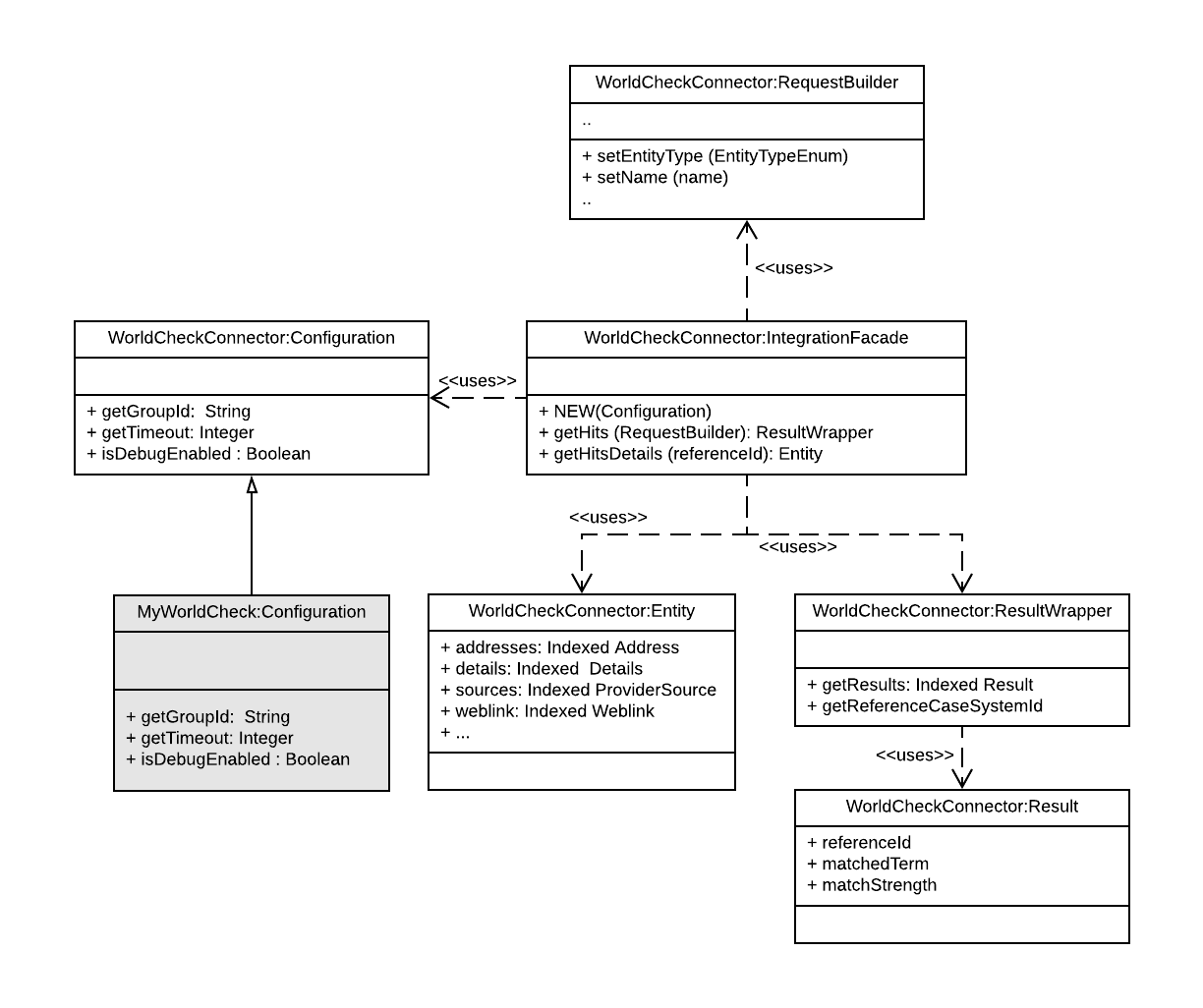
The data model provided in the WorldCheck Connector can be visualized as follows. The Data Class in gray indicates the Data Class you need to create in your Solution to be able to use the WorldCheck Connector:
A number of Script Functions are available with the WorldCheck Connector extension.
Wraps the HTTP call to the World-Check method /cases.
Parameters
$jsonRequest
The JSON for submitting a new case.
Type: String
Example:
{
"secondaryFields": [],
"entityType": "INDIVIDUAL",
"customFields": [],
"groupId":"0a3687cf-5d60-1234-9769-ad0b00000708",
"providerTypes": [
  "WATCHLIST"
],
"name": "Mario Smith"
}
Return Value
- The response JSON from World-Check ONE API. The
caseSystemId included in the JSON is required when using WorldCheckConnector:RequestScreening and WorldCheckConnector:RetrieveCaseResults.
Type: String
Example:
{
  "caseId": "68557422-2b4e-4d6f-9c67-7459b9173cc1",
  "name": "Mario Smith",
  "providerTypes": [
      "WATCHLIST"
  ],
  "customFields": [],
  "secondaryFields": [],
  "groupId": "0a3687cf-5d60-1234-9769-ad0b00000708",
  "entityType": "INDIVIDUAL",
  "caseSystemId": "0a3687cf-69ca-1294-9a8d-1ca70013be09",
  "caseScreeningState": "INITIAL",
  "lifecycleState": "UNARCHIVED",
  "creator": {
      "userId": "0a3687d0-5e80-13af-97aa-5f3500000335",
      "firstName": "Name",
      "lastName": "LastName",
      "fullName": "name last name",
      "email": "whatever@email.com",
      "status": "ACTIVE"
  },
  "modifier": {
      "userId": "0a3687d0-5e80-13af-97aa-5f3500000335",
      "firstName": "Name",
      "lastName": "LastName",
      "fullName": "name last name",
      "email": "whatever@email.com",
      "status": "ACTIVE"
  },
  "assignee": null,
  "creationDate": "2019-04-19T07:14:47.436Z",
  "modificationDate": "2019-04-19T07:14:47.436Z",
  "outstandingActions": false
}
Wraps the HTTP call to the World-Check method /cases/{caseSystemId}/screeningRequest.
Parameters
$caseSystemId
The caseSystemId (available in the JSON returned by WorldCheckConnector:SubmitCase).
Type: String
Example: 0a3687cf-69ca-1294-9a8d-1ca70013be09
Return Value
true if the request was successful, false otherwise.
Type: Boolean
Wraps the HTTP call to the World-Check method /cases/{caseSystemId}/results.
Parameters
$caseSystemId
The caseSystemId (available in the JSON returned by WorldCheckConnector:SubmitCase).
Type: String
Example: 0a3687cf-69ca-1294-9a8d-1ca70013be09
Return Value
- A JSON response with all the hits. The most important value is the
referenceId, as it allows users to request details of that specific entry using WorldCheckConnector:RetrieveCaseDetails.
Type: String
Example:
[
  {
      "resultId": "0a3687cf-69ca-1d06-9a8d-2211018a0921",
      "referenceId": "e_tr_wci_3695591",
      "matchStrength": "STRONG",
      "matchedTerm": "Mario, Smith",
      "submittedTerm": "Mario Smith",
      "matchedNameType": "NATIVE_AKA",
      "secondaryFieldResults": [],
      "sources": [
          "b_trwc_4"
      ],
      "categories": [
          "Other Bodies"
      ],
      "creationDate": "2019-04-19T07:38:27.035Z",
      "modificationDate": "2019-04-19T07:38:27.035Z",
      "resolution": null,
      "resultReview": {
          "reviewRequired": false,
          "reviewRequiredDate": "2017-12-08T00:00:00.000Z",
          "reviewRemark": null,
          "reviewDate": null
      }
  }, …
]
Wraps the HTTP call to the World-Check method /reference/profile/{worldcheckProfileId}.
Parameters
$worldcheckProfileId
The referenceId of the case (available in the JSON returned by RetrieveCaseResults).
Type: String
Example: e_tr_wci_3695591
Return Value
- A complex JSON containing all the details for the specified case.
Type: String
Available in WorldCheckConnector v2 and higher.
Wraps the HTTP call to the World-Check method [PUT] /cases/{caseSystemId}.
Updates an existing Case identified by the given caseSystemId. When the case is updated, all non-empty fields for the case are required to be sent, including the updated field(s). Non-empty fields that are not sent when calling this endpoint will be overwritten as null. For example, if the date of birth for a case needs to be updated, existing fields such as nationality etc. should contain the original values, otherwise the date of birth is updated as null. This means that all the other fields should be included in the body with their existing data. This applies to Custom Fields as well.
Return Value
Returns a Boolean value that states if the update call for the specified Case System ID was successful.
Available in WorldCheckConnector v2 and higher.
Wraps the HTTP call to the World-Check method [PUT] /cases/{caseSystemId}/results/resolution.
Resolves a list of results for the Case identified by the given caseSystemId.
Return Value
Returns a Boolean value that states if the resolution for the specified Case System ID was successful.
Available in WorldCheckConnector v2 and higher.
Wraps the HTTP call to the World-Check method [PUT] /cases/{caseSystemId}/ongoingScreening.
The function wraps the HTTP call to WorldCheck method /cases/{caseSystemId}/ongoingScreening
It enables ongoing screening function (OGS) for a case.
Return Value
Returns a Boolean value that states if the enabling of ongoing screening (OGS) for the specified Case System ID was successful.
Available in WorldCheckConnector v2 and higher.
Wraps the HTTP call to the World-Check method [DELETE] /cases/{caseSystemId}/ongoingScreening.
The function wraps the HTTP call to WorldCheck method /cases/{caseSystemId}/ongoingScreening
Disables ongoing screening function (OGS) for a case.
Return Value
Returns a Boolean value that states if the disabling of ongoing screening (OGS) for the specified Case System ID was successful
Available in WorldCheckConnector v2 and higher.
Wraps the HTTP call to the World-Check method [GET] /groups.
Gets all the top-level groups with their immediate descendants.
Available in WorldCheckConnector v2 and higher.
Wraps the HTTP call to the World-Check method [GET] /groups/{groupId}.
Gets a specified group including its immediate descendants.
Available in WorldCheckConnector v2 and higher.
Wraps the HTTP call to the World-Check method [GET] /groups/{groupId}/resolutionToolkits.
Get the ResolutionToolkits for the given Group, used to construct a valid resolution request(s) on the results for a Case.
Available in WorldCheckConnector v2 and higher.
Wraps the HTTP call to the World-Check method [GET] /groups/{groupId}/resolutionToolkits/{providerType}.
Get the ResolutionToolkit for the given Group and provider type, used to construct a valid resolution request(s) on the results for a Case.
Available in WorldCheckConnector v2 and higher.
Wraps the HTTP call to the World-Check method [GET] /cases/{caseSystemId}/auditEvents.
Return Value
Returns all audit events related to case visible to the current user.
Available in WorldCheckConnector v2 and higher.
Wraps the HTTP call to the World-Check method [POST] /cases/screeningRequest.
Perform a synchronous screening for a given case. This endpoint can perform a synchronous screening for a set of valid case details.
Return Value
The returned result collection contains the regular case result details plus identity documents and important events.
Available in WorldCheckConnector v2 and higher.
Wraps the HTTP call to the World-Check method [GET] /groups/{groupId}/caseTemplate.
Gets the CaseTemplate for the given Group, used for constructing a Case.
Available in WorldCheckConnector v2 and higher.
Wraps the HTTP call to the World-Check method [POST] /cases/{caseSystemId}/mediacheck/results/content
Retrieves MediaCheck news articles content and summary by the given caseSystemId and list of article IDs
Available in WorldCheckConnector v2 and higher.
Wraps the HTTP call to the World-Check method [POST] /cases/{caseSystemId}/mediacheck/results
Retrieves Media Check headlines results by the case ID.
Available in WorldCheckConnector 2.0.2 and higher.
Wraps the HTTP call to the World-Check method [GET] /cases/{caseSystemId}?aggregatedSummary={aggregatedSummary}
Parameters
$caseSystemId
Type: String
Case System Id
Example: 5jb7jnzou2wx1hytux7tz5um3$aggregatedSummary
Type: Boolean
Aggregated Summary flag for API call
Example: true
Return Value
Return a case result with full details of the case identified by the given caseSystemId and the aggregatedSummary flag. aggregatedSummary "tells" the system if there are the necessary elements to retrieve the aggregated details.
Example
Any{
endpoint=...,
reqBody=null,
reqHeaders=...,
signature="...",
Content-Type=application/json, Date=Fri, 1 Sep 2023 08:27:07 GMT},
resBody={
  "caseId": "5jb7jnzou2wx1hytux7tzeum3",
  "name": "Mario Smith",
  "providerTypes": [
    "WATCHLIST"
  ],
  "customFields": [],
  "secondaryFields": [],
  "groupId": "5jber3y11jmmu1hwdi0zddr5fa",
  "entityType": "INDIVIDUAL",
  "caseSystemId": "5jbqwqnzou2wx1hytux7tz5um4",
  "caseScreeningState": {
    "WATCHLIST": "INITIAL"
  },
  "lifecycleState": "UNARCHIVED",
  "creator": {
    "userId": "5jb83y11jmmu1hwdi2mkb4sr2",
    "firstName": "Lars",
    "lastName": "Smith",
    "fullName": "...",
    "email": "....",
    "status": "ACTIVE"
  },
  "modifier": {
    "userId": "5jb83ysasmu1hwdi2mkb4sr2",
    "firstName": "Lars",
    "lastName": "...",
    "fullName": "..",
    "email": "..",
    "status": "ACTIVE"
  },
  "assignee": null,
  "creationDate": "2023-09-01T08:27:05.869Z",
  "modificationDate": "2023-09-01T08:27:07.644Z",
  "nameTransposition": false,
  "outstandingActions": true,
  "lastScreenedDatesByProviderType": {
    "WATCHLIST": "2023-09-01T08:27:07.644Z"
  },
  "aggregatedResultSummaries": {
    "totalMandatoryActions": 15,
    "totalSubCases": 0,
    "mediaCheck": {
      "mediaCheckAttachedCount": 0,
      "mediaCheckReviewRequired": false
    },
    "watchlist": {
      "watchlistTotalMatches": 15,
      "watchlistUnresolved": 15,
      "watchlistReviewRequired": 0,
      "categorisedMatches": {
        "watchlistUnresolvedBySubCategory": {
          "Other Bodies": 3,
          "Law Enforcement": 8,
          "PEP": 4,
          "Special Interest Categories": 11,
          "Sanctions": 0,
          "Regulatory Enforcement": 0
        },
        "watchlistReviewRequiredBySubCategory": {
          "Other Bodies": 0,
          "Law Enforcement": 0,
          "PEP": 0,
          "Special Interest Categories": 0,
          "Sanctions": 0,
          "Regulatory Enforcement": 0
        }
      }
    },
    "clientWatchlist": {
      "clientWatchlistReviewRequired": 0,
      "clientWatchlistUnresolved": 0,
      "clientWatchlistTotalMatches": 0
    }
  }
},
resHeaders=...,
statusCode=200
}