Is there a simple way to create a Dropdown List that contains a list of users?
Appway Solutions often contain Dropdown Lists populated with users of the Appway platform. It's really easy to create this kind of Dropdown List in Appway:
-
Add a Dropdown List Screen Component to your Screen.
-
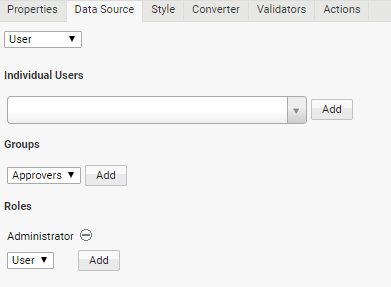
In the Dropdown List's properties, go to the Data Source tab and select the User option. This displays the User Data Source properties.
-
In the User Data Source properties, you can:
- Select individual users that you want to appear in the Dropdown List
- Select Groups and Roles whose members you want to appear in the Dropdown List.
In this example, the Administrator role was added:
-
Click on the Start Screen button available in the top toolbar of the Screen editor to render the Screen and verify that the Dropdown List contains the users you defined.
Note: This works with any Screen Component that supports Data Sources, e.g. you can easily populate Checkbox Lists with users.