I'm using a database-sourced Catalog in my Data Logic Business Object (Catalog Values Data Rule). Is lazy loading an available option for such Catalog?
Yes. The example below illustrates how a Data Source-based
Catalog can be configured to be used in a Catalog Values Data Rule inside a Data Logic Business Object and how to enable lazy loading for it.
First of all, check the documentation for:
This example is based on a Catalog Business Object based on a source of type Data Source whose ID is Commons:Addresses. This Catalog is used to retrieve addresses from a Postgres database stored in a table address defined inside a schema commons. The table is defined as follows:
create table address
(
	id           bigserial
		constraint address_pk
			primary key,
	street       text not null,
	postal_code  text not null,
	country_code text not null
);

create unique index unique__index
	on address (street, postal_code, country_code);
Let's illustrate the whole procedure to create and configure a database-sourced Catalog with lazy loading.
-
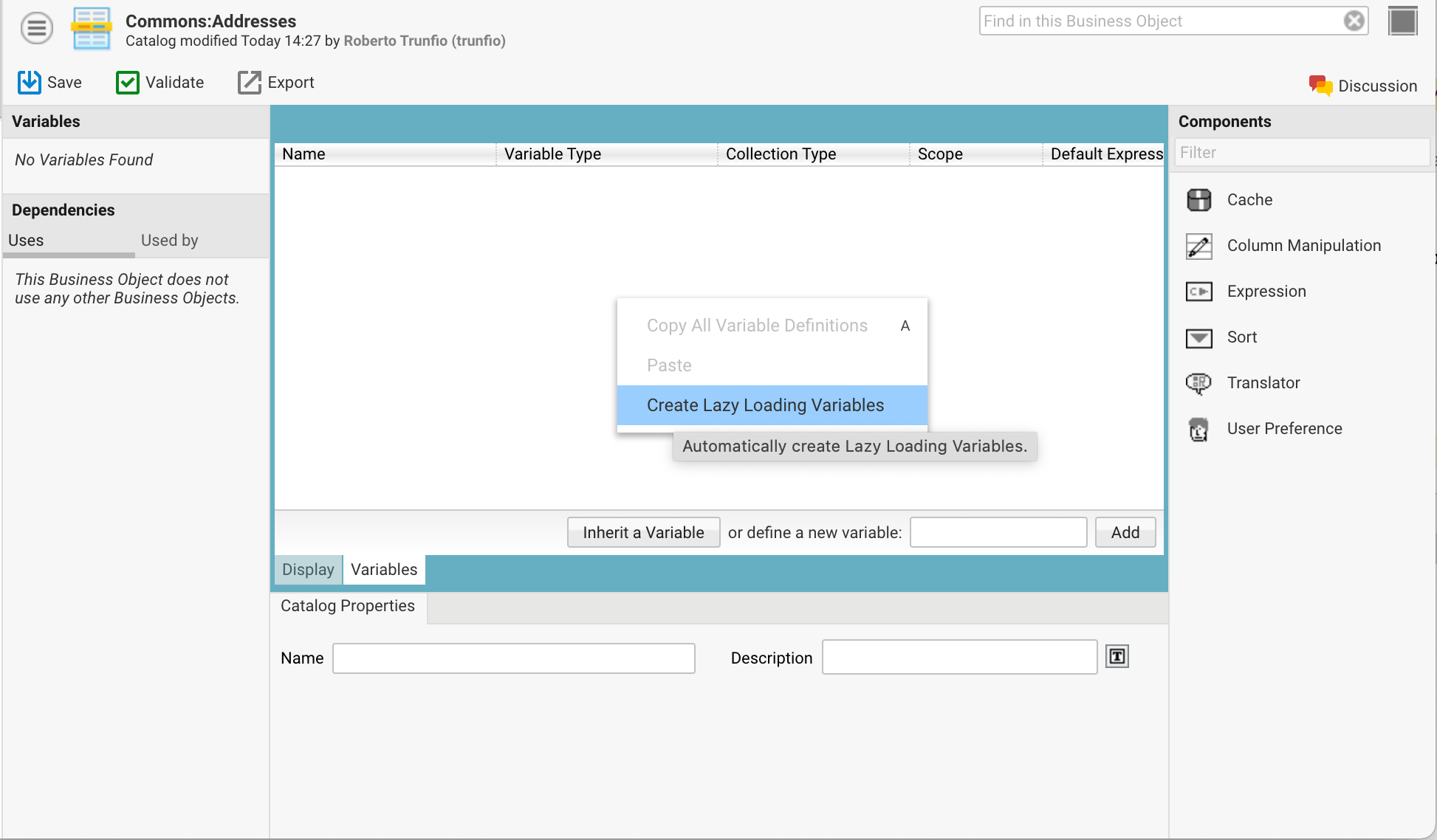
In the Business Object library, create a Catalog Business Object called Commons:Addresses. To use the default lazy loading Assigned Variables, right-clicking inside the Variables tab of the Catalog editor and select Create Lazy Loading Variables.
-
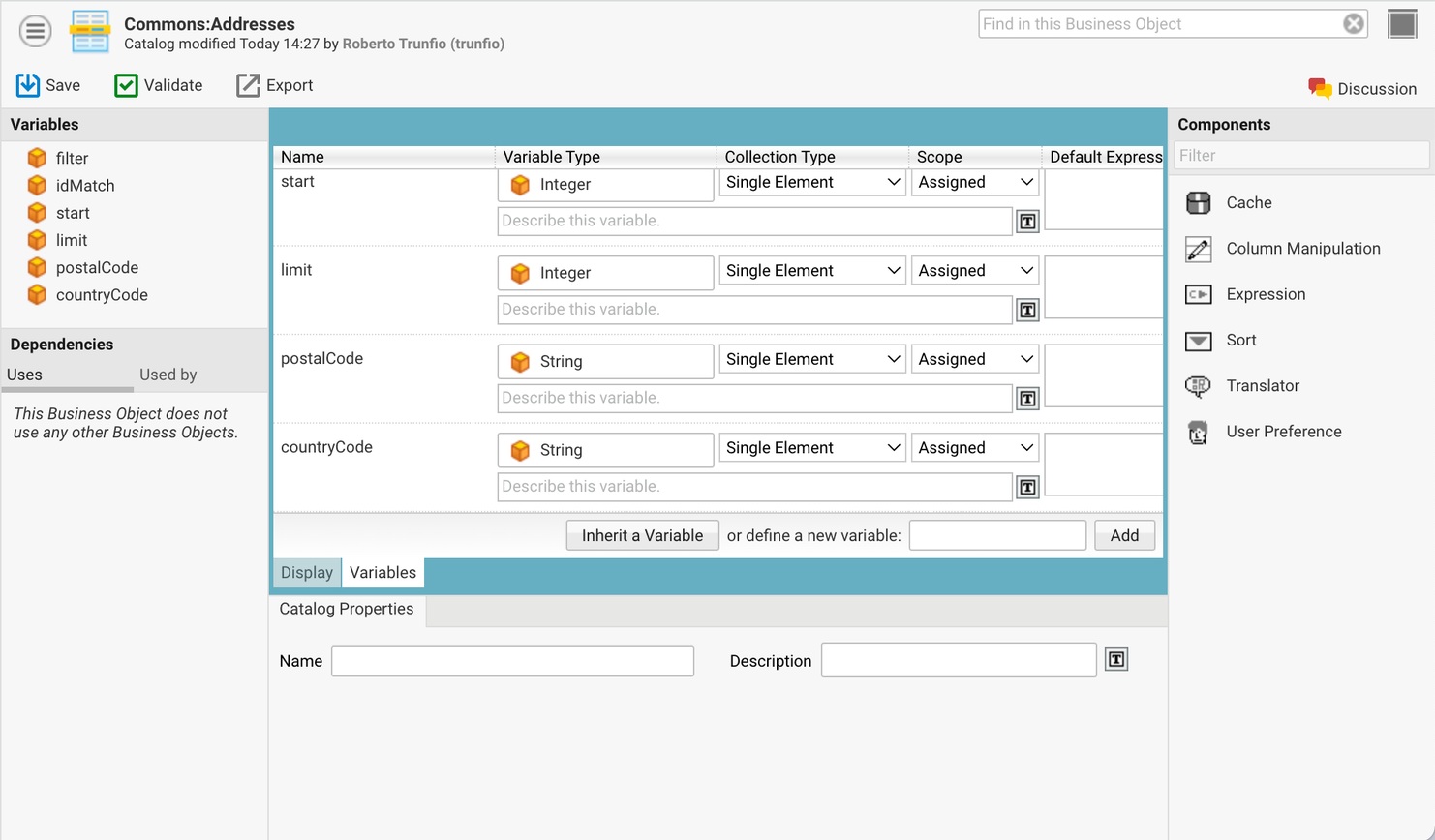
In addition, create two assigned variables of type String named postalCode and countryCode. These two variables are used in the Data Logic Business Object to further filter the content of the Catalog. These values could be selected, for example, in two additional input fields.
-
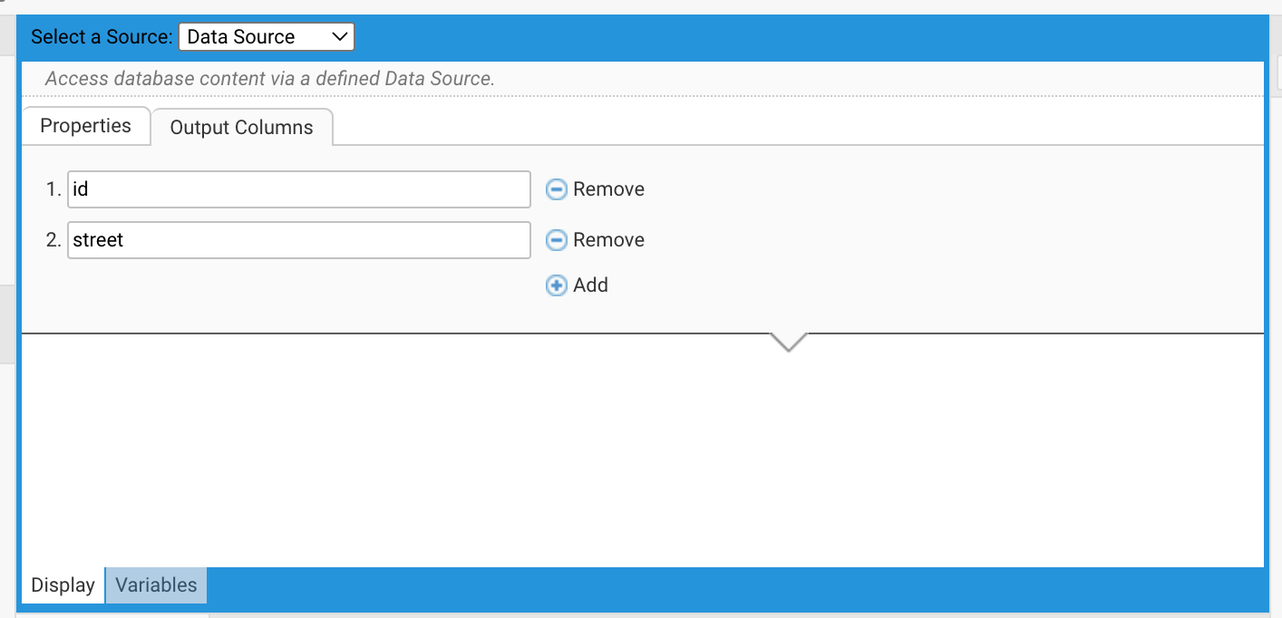
In the Catalog Business Object editor, select a source of type Data Source. In the Properties tab, select the relevant Data Source Name. In the Output Columns tab, define the columns to be contained in the returned records; they must match the columns in the table. Based on the DDL for the table commons.address, the following columns are selected:
-
Back to the the Properties tab, configure the Sql Statement field to allow the Catalog Values Data Rule to work. The Sql Statement field must be defined as an Appway Script. Based on the DDL for the address table, it could be defined using the following script:
String $sql := 'SELECT id, street FROM commons.address WHERE';
$sql := $sql & ' postal_code = \'' & $postalCode & '\'';
$sql := $sql & ' AND country_code = \'' & $countryCode & '\'';
If ($idMatch != null) Then
   // Case 2 - exact match
   $sql := $sql & ' AND id IN (';
   Integer $numOfIdsToMatch = Collection:Size($idMatch);
   If $numOfIdsToMatch <> 0 Then
      For Integer $i := 1 Condition $i <= $numOfIdsToMatch Step $i := $i + 1 Do
         If $i <> 1 Then
            $sql := $sql & ', ';
         End
         $sql := $sql  & $idMatch[$i];
      End
   Else
      // prevent returning any value in the SQL when no value is currently selected
      $sql := $sql & 'null';
   End
   $sql := $sql & ')';
   $sql := $sql & ' ORDER BY street DESC';
Else
   // Case 1 - search text
   $sql := $sql & ' AND street LIKE \'%' & $filter & '%\'';
   $sql := $sql & ' ORDER BY street DESC';
   $sql := $sql & ' LIMIT ' & $limit;
   $sql := $sql & ' OFFSET ' & $start;
End
Return $sql;
-
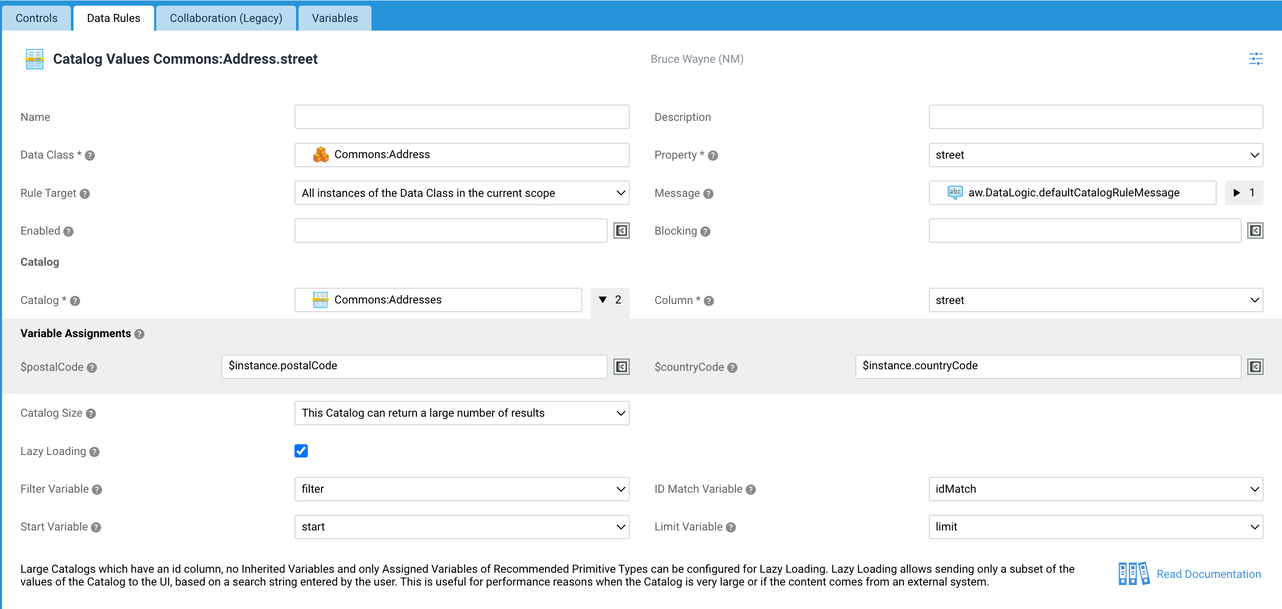
Finally, in the Data Logic Business Object, define a Catalog Values Data Rule so that the current values from the postal code and country code are assigned to the Catalog, along with the Lazy Loading variables. See full configuration details in the Data Logic documentation).
When working with Catalog lazy loading, you may want to auto populate other properties upon the selection of a specific entry; such properties may need values coming from other columns of the newly selected Catalog Record. This can be achieved configuring an Update Function on the Control bound to the property subject to the Catalog Values Data Rule.
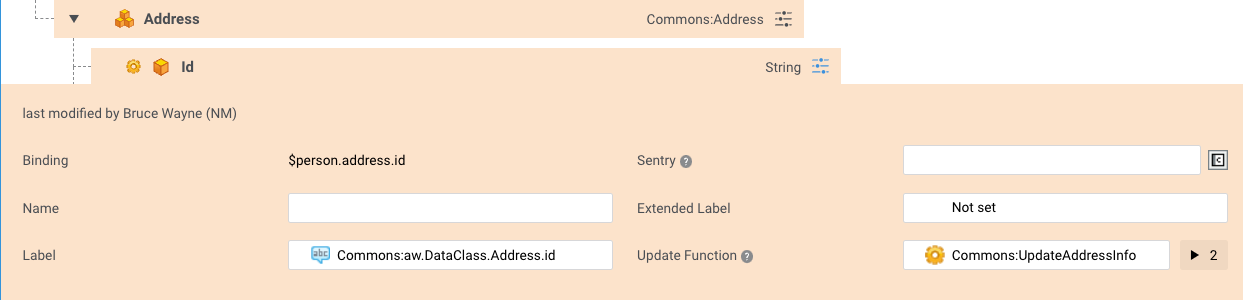
The Update Function itself then takes care of retrieving the Record based on the newly selected id and populates the associated properties.
Function Commons:UpdateAddressInfo(Commons:Address $address, String $tokenId) : Nothing Begin
   If $address.id != null Then
      Indexed String $idMatch := [$address.id]:String;
      String $addressInstanceId := DataClass:GetInstanceId($address);
      Record $r := Record($address.id, Catalog:NewReference('Commons:Addresses'), 'id', {'idMatch'=$idMatch, 'tokenId'=$tokenId, 'addressInstanceId'=$addressInstanceId}:Any);
      If $r != null Then
         $address.city := TOSTRING($r.getValue('city'));
         $address.postalCode := TOSTRING($r.getValue('postal_code'));
         $address.street := TOSTRING($r.getValue('street'));
      End
   Else
      $address.city := null;
      $address.postalCode := null;
      $address.street := null;
   End
End
However, there is a major disadvantage in this procedure: calling the Record function in the Update Function basically runs a new evaluation of the Catalog, which triggers a query to the Database (or an external Service call based on the Catalog source). This is to be avoided if we want to make the Update Function execution fast and lightweight.
The Catalog Cache Filter can solve this issue:
-
Set the Cache Location property to Application Cache (local node). By using sticky sessions, in fact, the user is always served by the same Cluster node.
-
Set the Cache Entry Key Expression property, which is evaluated at runtime to build the key associated to the Cache entry. The value to be set depends on the Solution; usually, a combination of user id, token id and instance id (i.e., the instance whose property is subject to the Catalog Values Data Rule) is enough.
JOIN(User:CurrentUserGetId(), '-', $tokenId, '-', $addressInstanceId);
// User + Token + DataObjectId
-
Finally, set the Retention Expression property, which is used to validate the current Cache entry and determine whether a new Cache entry must be rebuilt.
If $idMatch == null Then
   Return false;
End
ForEach String $id In $idMatch Do
  Boolean $found := false;
  ForEach Record $r In $cachedRecords Do
    If (STRINGCOMPARE(TOSTRING($r.getValue('id')), $id) == 0) Then
      $found := true;
      Break;
    End
  End
  If !$found Then
    Return false;
  End
End
// If we are here it means we have found all the given ids in the Cache Entry
Return true;
Let’s analyze this expression step by step:
- First, if the
$idMatch variable is null, the Cache entry is invalid and is rebuilt: this is the case where you are using $filter to obtain a new subset of Records from the Database or external Service, so you are basically refreshing the Cache entry. Note that, this way, you are caching only the last loaded page; however, in the most common scenario, you would select an entry from it after scrolling or refining the filter string. - Then, scan through the given ids and leverage on the implicitly defined variable
$cachedRecords (see documentation) to check if all the Records you are looking for are present in the Cache entry. If you fail to find one of the records, then the Cache entry is considered invalid and is rebuilt by querying the Database or calling the external Service. If you find all the given ids in the $idMatch collection, then you solely resort to the Cache entry to return the records (i.e., you avoid querying the Database or calling the external Service).