Endless loops in Scripts can happen. The good news is that there is a way to detect and stop them in just a few clicks.
Appway measures and observes all script execution very closely and registers all instances of a running Script.
To detect an endless loop, you have to look out for long running Scripts. Here is how...
-
Let's run an endless loop from the Interactive Script Editor (CTRL-SHIFT-I to open it) using the following Script:
While true Do
   1 + 1;
End
-
Start the Script and let it run (the script will not harm your installation, don't worry).
-
Go to Solution Maintenance > Script Language, and select the Contexts tab. This is where all running Scripts are registered. This list also displays how long a Script has been running. Sort the list on the Elapsed Time column to see the Scripts that have been running longest; for minutes or even hours.
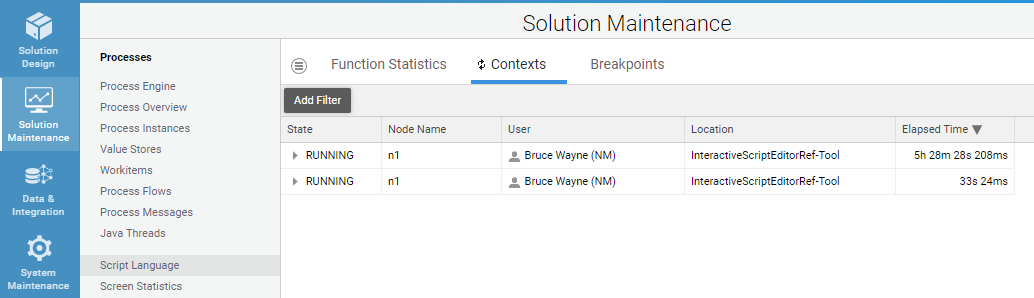
Note: The origin of each Script is displayed in the Location column, allowing you to jump right to the core of the problem.
-
Right-click on the Script in the table and select Pause Script. This generates a breakpoint, and stops the execution of that specific instance of the Script.
Note: If endless loops occur on production environments, more instances need to be paused.
-
The Breakpoints View window is automatically opened, allowing you to investigate the Script in question, and solve the problem.
Note: You can also access this window from the Breakpoints tab (also available at Solution Maintenance > Script Language): right-click on the breakpoint in the table and select Inspect.
-
Pausing or canceling the execution of a running Script leaves traces! Check the log for an entry similar to the following:
Execution canceled at breakpoint Breakpoint{id=36318029-cdcf-4101-9f4e-915b2b7765b7,oref=InteractiveScriptEditorRef-Tool,location=null,line=0,creatorId=NM,ownerId=NM,enabled=true,autogenerated=true}
at com.nm.utils.breakpoints.BreakpointContext.pause(BreakpointContext.java:102)
at com.nm.utils.breakpoints.BreakpointServiceImpl.testBreakpoints(BreakpointServiceImpl.java:489)
at com.nm.sdk.data.expeval.ExecutionContext.testBreakpoint(ExecutionContext.java:137)
at com.nm.sdk.data.expeval.nodes.WhileNode.execute(WhileNode.java:147)
at com.nm.sdk.data.expeval.nodes.ScriptBodyNode.execute(ScriptBodyNode.java:176)