The Household Structure allows gathering the relationships of the parties within a household in order to gain a better understanding of family needs. The same concept applies to connections between organizations and parties. Relationships can be added to existing parties. Each relationship consists of two parties and of the type of relationship that connects the two parties, like a director, or a parent.
The Household Structure component enables managing, editing and visualizing bidirectional relationships between natural parties, that is, the relationships that usually apply in a family household. For instance, it is possible to define “children”, “parents”, “spouse”, “relatives” (etc.) relationships. Whenever a relationship is added (i.e. “child”), the opposite (“parent”) is automatically set.
The component allows changing relationships.
Relationships with legal entities are also important in the definition of the prospect/customer’s personal situation. Therefore, the component supports the definition of relationships of natural parties with legal entities, and legal entities with complex structures. The Household Structure can be used also to define and navigate inside nested complex structures.
The Household Structure Reference Implementation uses the following patterns:
- Activity screen
- Master-detail list:
- List of parties
- Party’s relationships
The following figure shows the Household Structure in its initial state. No relationships have been assigned.
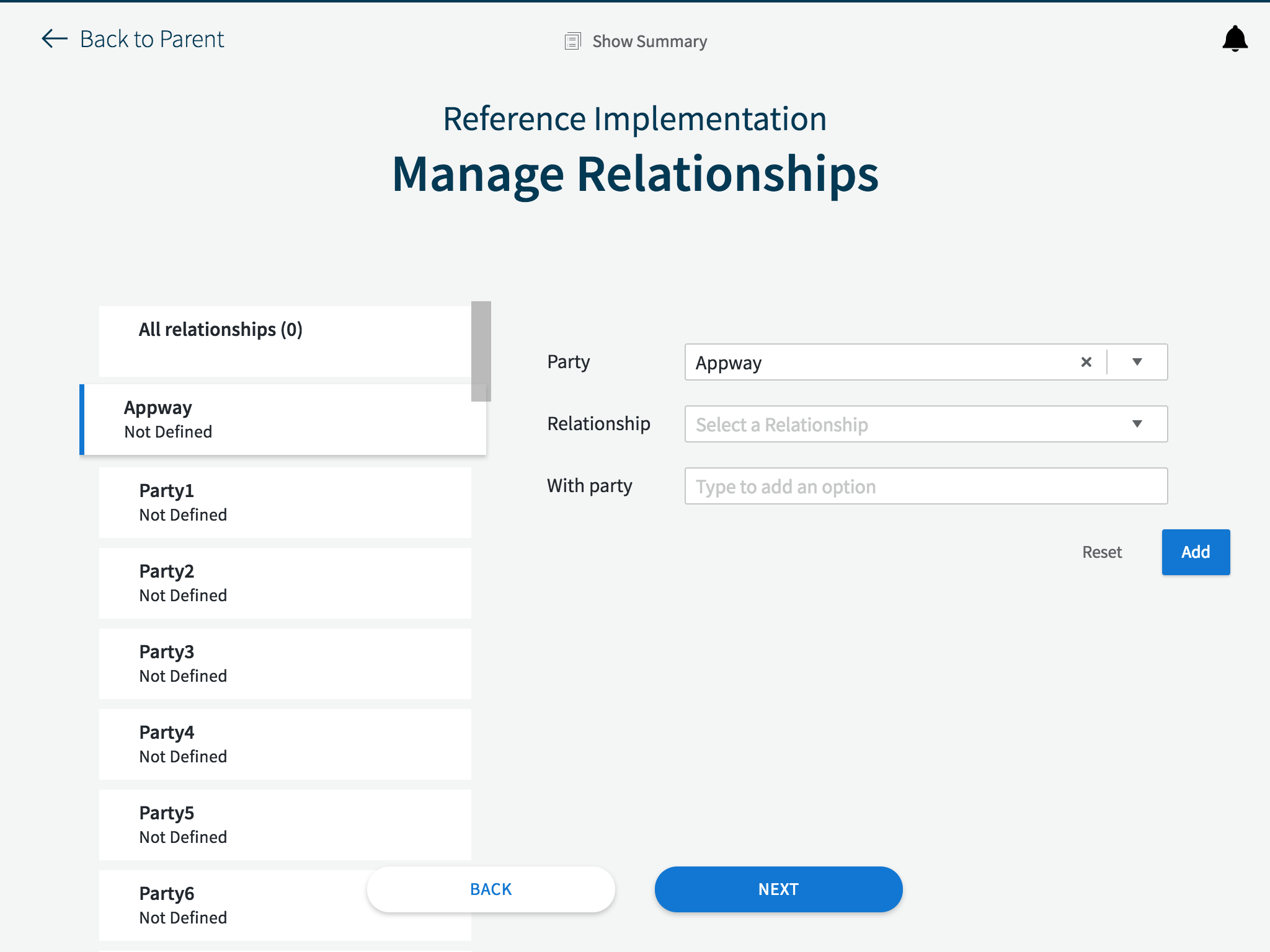
The master-detail list separates the page content into two columns, the list of parties, and the individual party’s relationships.
The parties column on the left lists all the existing parties of the business relationship under the All relationships entry. Each master item indicates the party name, and a summary of the assigned relationships. Since relationships are optional, no mandatory indicator is shown.
Follow these steps to edit the party’s relationship details:
- When you select a role on the left column, the according edit form of the relationship is shown in the detail column on the right. Adding a relationship requires to define:
- a party (Party): the party dropdown is preselected according to the chosen party in the left-hand list.
- a relationship (Relationship)
- a relationship party (With party). If a relationship allows numerous parties (e.g. the sibling relationship), multiple relationship parties may be selected.
- Once the relationship form has been submitted, the relationships are added to all the parties involved, and listed beneath the form. In addition, the relationships are also added to the overview master item. Consider the following information:
- Existing relationships can be removed, but not edited.
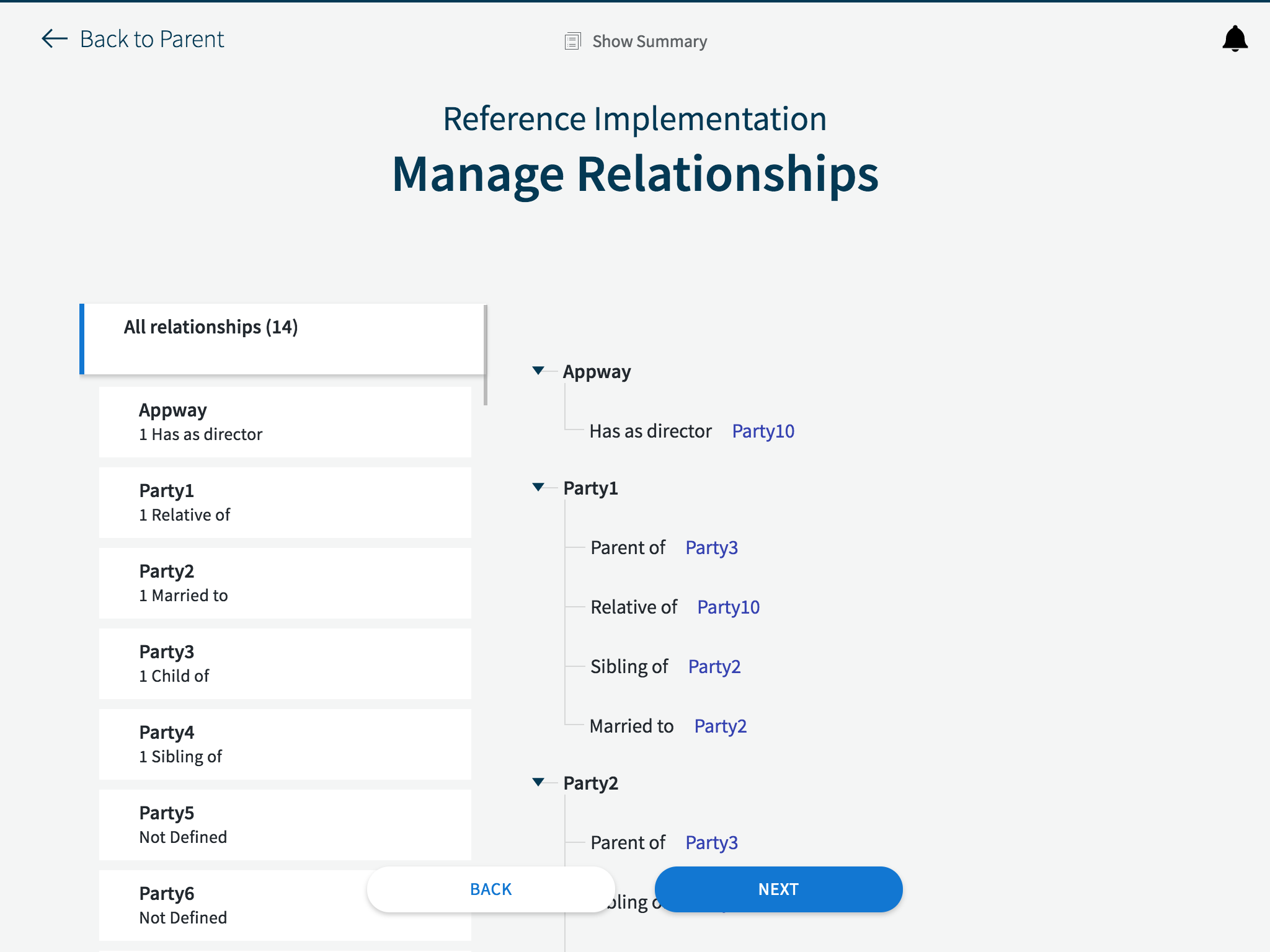
- The detail of the All relationships master item aggregates all defined relationships in a collapsible tree representation of the parties. The tree representation is not editable.
The basic data model (such as Party, PhysicalParty, LegalEntity, and so on) needed to use the Household Structure Business Component is included in the component itself. We recommend that you either move the Data Classes from the Package to another Package and modify them or that you leave the data model in the Household Structure and extend it. The vanilla implementation is based on the extension of the data model.
Screen implementation is based on one simple rule: since Design System is used, templates and screens were wrapped, when needed, to extend basic functionalities.
The Household Structure Package requires:
- Appway Core 7.2.4 or higher and Design System 4.1.0 or higher for Household Structure 1.2
- Appway Core 8.0 or higher and Design System 5.0 or higher for Household Structure 2.1.
- Appway Core 9.0 or higher and Design System 6.0 or higher for Household Structure 3.0.
- Appway Core 10.0 or higher and Design System 7.0 or higher for Household Structure 4.0.
The following extensions must be installed:
- HierarchyTree 3.0.3 or higher
- Functions (version compatible with Appway Core)
- Component (version compatible with Appway Core)
- DefaultIcons (version compatible with Appway Core)
- (Only for Household Structure 1.x and 2.x) ScreenValidationAddons (version compatible with Appway Core 7.2 or 8).
The Household Structure Package may use Visible Business Objects from the following Packages:
- Hierarchy Tree Core Package
Household Structure 3.1 is based on Design System 6. To enable the updated Master Detail on smaller screen devices, it is necessary to wrap the whole template around an Ajax Update Area Screen Component and trigger it when navigating across the different entries. This requires the following changes:
- HouseholdStructure:HouseholdTree — Remove the Ajax Update Area with the HTML Id aua-householdtree-content and keep its children.
- HouseholdStructure:HouseholdTree — Remove the Ajax Update Area with the HTML Id aua-householdtree-entries and keep its children.
- HouseholdStructure:HouseholdTree — Wrap all the content around an Ajax Update Area with the HTML Id aua-householdtree-content.
Performance testing allows determining how a system performs in terms of responsiveness and stability under a specific workload. Performance testing includes categories such as: Load Testing, Stress Testing, Spike Testing, Configuration Testing, Isolation Testing, etc.
As the goal of this initiative consists in removing bottlenecks in the Reference Implementation components and optimize their code, a lower priority was granted to Load and Stress testing as these are strongly influenced by the infrastructure the system is running on. Instead, the tests focus more on the isolation of bottlenecks in the different components.
Testing Approach:
- Manual testing was performed using the Reference Implementation with HTTP enabled.
- Multiple test cases were executed with the measurement of the execution time of each screen processing phase.
- 10 tests were executed for each use case and the average execution time was computed.
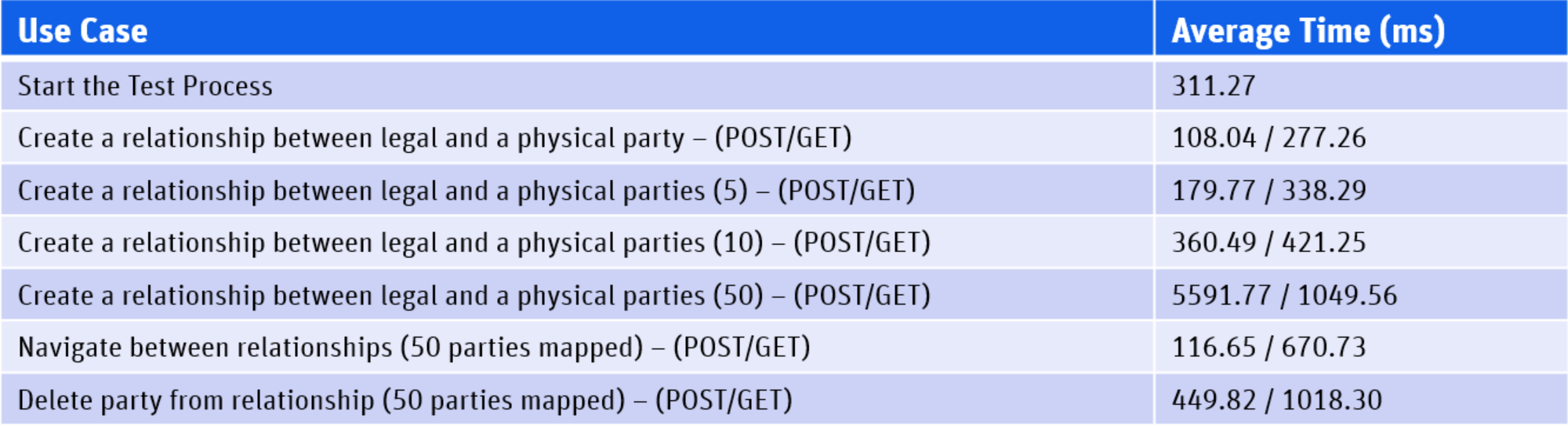
The Household Structure component has been performance-tested up to 51 parties. The response time for most operations was below 1s, except for the most expensive operations performed, which should be exceptional cases. Consider the following: 1. Results were achieved using the Reference Implementation without customizations. Adding rules, validations and logical operations to each interaction might significantly impact response times. 2. Tests were conducted on a system under no additional workload. Therefore, results under load might differ.
Common parameters:
- 51 parties defined in the test process
- 4 mandatory roles defined (Associate, Director, Representative, Shareholder)
- 9 physical relationships defined (Child, Cousin, Divorced From, Grandparent, Grandchild, Parent, Relative, Sibling, Spouse)
- Main relationships can be set between any kinds of party, physical relationships can only be set between physical parties.
Test cases:
- Start the Test Process
- Add parties to a role without signatures (1, 5, 10 and 50 physical parties at a time)
- Navigate between relationships (50 parties mapped)
- Delete party from relationship (50 parties mapped)