Party and Business Relationship Rating Starter Kit is a legacy component.
End of Support (EOS) has taken place in September 2022.
The Party and Business Relationship Regulating Rating Starter Kit provides a starting point to model business-specific regulations such as FATCA or MiFID, and to calculate a rating for parties or business relationships.
The Starter Kit consists of a Package, called RatingManager, that is modifiable to accommodate client specific implementation requirements. The Package contains Data Classes, Script Functions, Rules and other supplemental Business Objects, such as Catalogs or Labels. The Script Functions rely on the data model provided with the Package. Therefore, in order to use the features, the developer must provide the right input information when working with the Business Objects provided with the Starter Kit.
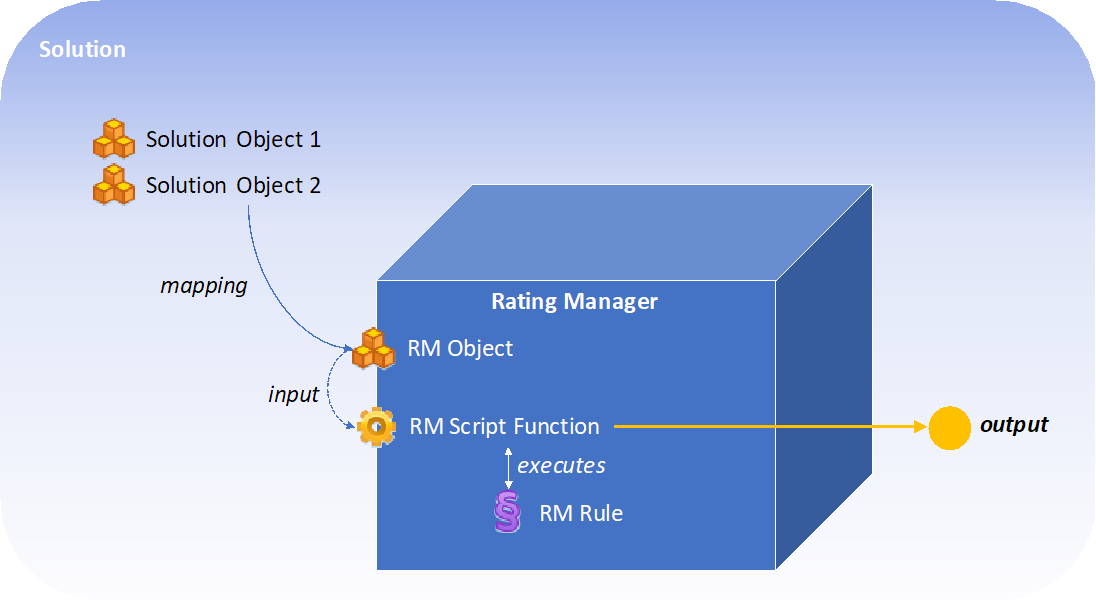
The following diagram illustrates the usage of Rules:
| Topic | Data Classes
(All Visible) | Script Functions
(All Visible) | Rules
(All Hidden) |
| common | RM_Address
RM_MailingInstruction
RM_Profession | | |
Bearer
Share | RM_BearerShareLegalEntityInput | RM_GetBearerShareRelevanceLevel | RM_BearerShareLegalEntityRelevanceRate
RM_BearerShareLegalEntityScore |
| CRS | RM_CRSBRIndiciaInput
RM_CRSBRRelevanceInput
RM_CRSPartyIndiciaInput
RM_CRSPartyRelevanceInput | IsCrsJurisdictionCountry
RM_GetCRSAccountHolderPartyRate
RM_GetCRSBRIndicia
RM_GetCRSBRRate
RM_GetCRSControllingPersonPartyRate
RM_GetCRSPartyIndicia
RM_GetGlobalCRSBRRate | RM_AccountHolderCrsRelevanceScore
RM_ControllingPersonCrsRelevanceScore
RM_CrsBrIndicia
RM_CrsBrRate
RM_CrsBRRelevanceScore
RM_CrsPartyIndicia
RM_CrsPartyRate |
| EMIR | RM_EMIRInput | RM_GetBusinessRelationshipEmirRelevanceLevel
RM_GetEmirLegalEntityRelevanceLevel
RM_IsLegalEntityEmirRelevant | RM_EMIRLegalEntityScore
RM_LegalEntityEmirRelevanceRate |
| FATCA | RM_FATCABRInput
RM_FATCAPartyInput | RM_GetBusinessRelationshipFatcaRate
RM_GetGlobalBusinessRelationshipFatcaRate
RM_GetPartyFatcaRate | RM_FatcaBRRatingScore
RM_FatcaRate
RM_PartyFatcaRatingScore |
| KYC | RM_KYCBRInput
RM_KYCInput | RM_KYCGetBRGlobalRating
RM_KYCGetBRSpecificRating
RM_KYCGetPartyRating | RM_KYCBRRating
RM_KYCBRRatingScore
RM_KYCPartyRateScore
RM_KYCPartyRating |
| MiFID | RM_MiFIDNaturalPerson
RM_MiFIDInput | RM_GetBRMiFIDClassificationRate
RM_GetMiFIDClassificationRate | RM_MiFIDClassificationRate
RM_MiFIDNaturalPersonRatingScore
RM_MiFIDRatingScore |
| UKRND | RM_UKRNDInput | RM_GetUKRNDRelevanceLevel
RM_IsUKRNDRelevant | RM_UKRNDPartyRelevanceRate
RM_UkrndPartyScore |
| US Person Policy & QI | RM_USPPandQIInput | RM_GetUSPPandQIRelevanceLevel
RM_IsUSPersonPolicyAndQIRelevant | RM_USPPandQIRelevanceRateScore
RM_USPPandQIRelevanceRate |
| VAT CH | RM_VATCHInput | RM_GetVATCHBRRelevanceLevel
RM_GetVATCHPartyRelevanceLevel | RM_VATCHRelevanceRate
RM_VATCHRelevanceScore |
Moreover, the Package contains the following objects:
Countries (Catalog) – Package configuration: Replaceable, VisibleMiFIDClassificationRate (Catalog) – Package configuration: Replaceable, VisibleNOGA_V (Catalog) – Package configuration: Replaceable, VisiblePartyPhysicalProfessions (Catalog) – Package configuration: Replaceable, VisiblePartyProfessionStatus (Catalog) – Package configuration: Replaceable, VisiblePossibleRatings (Catalog) – Package configuration: Replaceable, VisibleStaticCrsIndicia (Catalog) – Package configuration: Replaceable, VisiblePossibleRatingScores (Catalog) – Package configuration: Replaceable, VisibleDefaultRuleIndex (Data Class) – Package configuration: VisibleConstants (Data Class) – Package configuration: Visible
To customize the data model and/or the rating calculation logic provided with the Starter Kit inside the RatingManager Package, follow these guidelines:
- Data Class customization: All Data Classes can be extended by creating a Solution-specific Data Class and inheriting from the relevant Data Class provided with the Package.
- Rule replacement: To change the logic of a specific Rule, follow these steps:
- Create the newly required Rules.
- Create a new Data Class inheriting from the
RatingManager:DefaultRuleIndex. - Redefine the required methods for the newly created Data Class to provide the IDs of the new customized Rules.
- As an input to the rating function, provide an instance of this custom rule index (each Script Function accepts an instance of type
RatingManager:DefaultRuleIndex as the last parameter).
This mechanism allows replacing the Rule used by the rating functions at runtime in order to apply custom logic where and when required.