When you forward a Workitem to another user, you are actually forwarding the associated Process Token. For this reason, it is important to be aware of the behavior of Process Tokens when using multiple Swimlanes:
- Although it appears that a Process Token moves through a Process, it is in reality newly created every time it enters a Screen, Connection etc.
- Every time a Process Token is created, the Swimlane participant expression is evaluated and the Process Token is assigned to the user, role, or group the expression returns.
- If you reassign a Process Token to another participant (e.g. using the
AssignWorkitemToUser function), this reassignment only has an effect as long as the Process Token stays at its current location in the Process. - When the Process Token "moves" to the next Screen, Connection etc., it is newly created and reassigned to a user according to the Swimlane participant expression.
This article demonstrates the above behavior in detail, and answers the question how you can permanently reassign a Process Token – by modifying the result of the Swimlane Participant expression.
For this explanation, we assume the following values for the variables which are all defined in the top-most Process:
$creator := 'bob';$validator := 'alice';$advisor := 'tom';
See this example:
-
Here, the Process Token belongs to 'tom':
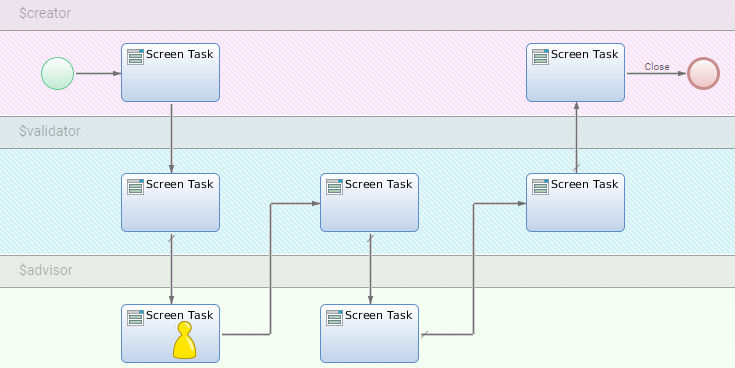
-
For certain reasons, we want to forward the Process Token to the user 'george'. For this purpose, we use the following function:
$forwardUserId := 'george';
AssignWorkitemToUser($workitem, $forwardUserId);
The Process Token now belongs to the user 'george'.
-
In the previous step, we didn't overwrite $advisor. This means the Process Token now belongs to 'tom' again after moving to a further Screen:
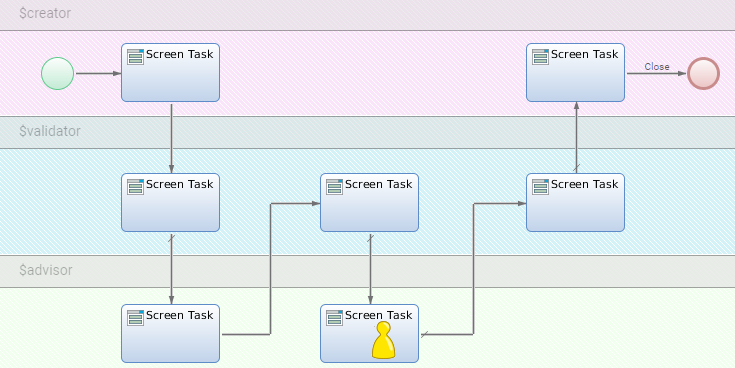
If we would have overwritten $advisor before, it would now belong to 'george'.
The correct way to overwrite $advisor would be to do the following:
$forwardUserId := 'george';
$variableAssignments['advisor'] := $forwardUserId;
AssignWorkitemToUser($workitem, $forwardUserId, $variableAssignments, true);
With the $variableAssignments parameter, we can overwrite variable values from the top-most Process (e.g. $advisor).
But remember that this only works if:
$advisor is defined in the top-most Process.- The participant of a Swimlane is a reference to a variable.
This could also be automated so you do not need to know the participant assignment. But you must be sure that the participant variables are defined on the top-most Process:
Global String $forwardUserId;
Global Named String $variableAssignments;
Global Workitem $workitem;
String $expr := $workitem.getParticipantUserExpression();
If $expr != null and MATCH($expr, '^\\$[a-zA-Z_][a-zA-Z_0-9]*$') Then
   $forwardUserId := 'george';
   $variableAssignments[SUBSTRING($expr, 1, LENGTH($expr))] := $forwardUserId;
   AssignWorkitemToUser($workitem.getId(), $forwardUserId, $variableAssignments, true);
End