I know there are two Screen components you can use to hide parts of a Screen. However, I'm not sure which one is the correct component to use. Could you explain?
There are two Screen components you can use to hide parts of a Screen:
If and Group are both "handled" on the server, but there is also an important difference that you need to be aware of to understand the functionality correctly.
Hidden or Inexistent
The difference is that Group only hides the content, but the elements inside still exist. You simply cannot see them anymore. E.g., if the Group contains a Text Field and you enter something before you make it invisible, the value is submitted nevertheless.
The If component on the other hand prevents the content from being rendered or processed in any way on the server. The HTML code sent to the client doesn't contain any hint that there could be more elements. From the client's point of view, the content of the If component is not invisible, it is inexistent.
Let me make a simple example to show you why these differences are important.
Your Screen is used to enter contact details for a customer. The customer has to provide his name. You have business customers (companies) and private customers (persons). The variable $type is used to distinguish between these two types of customers. In both cases, you save the name in the same variable $name, but you would like to display different labels next to the input field: "Company Name" or "First and Last Name".
If you use If components, your Solution could look like this (both Text Fields are bound to the same variable, $name):
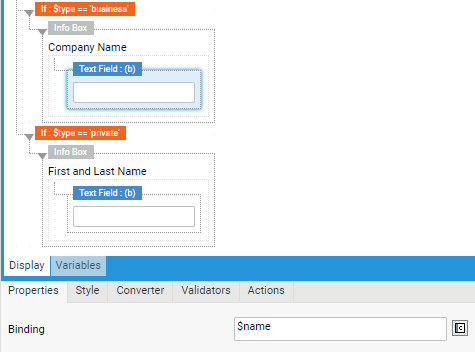
This works perfectly!
Now let's replace the If components with Group components. You will have to invert the conditions, because the If condition specifies when the content is visible, while the Group's hidden condition specifies when the content is hidden.
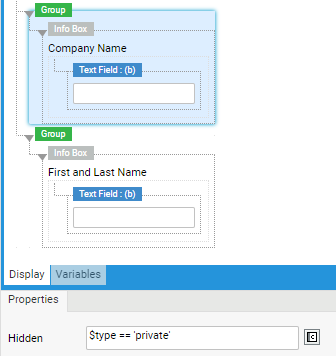
What is the problem with this Solution?
The problem is that the rendered Screen will contain two Text Fields. Depending on the value of the variable $type you can see one or the other, but even though you can see only one Text Field at a time, the other Text Field is there too.
Now you may run into a "mysterious" effect. If you enter data for a private customer, everything works as expected. But if you enter data for a business customer, the company name is never saved. If you return to this Screen, the Text Field is always empty. If you add a Mandatory Validator to this Text Field, you will always get an error message that you have to enter a value. Why is this the case?
The reason for this is that your Screen contains both Text Fields, both bound to the same variable $name. Although you cannot see the second Text Field because it's hidden, its value is submitted to the server nevertheless. If the Text Field is invisible, you cannot enter data into it, so the value submitted for the second Text Field will be an empty string.
When the data is sent to the server, Appway processes the input elements starting at the top of the Screen. It first detects the Text Field used to enter the company name. Let's say you have entered Appbird AG. This value is now saved in the variable $name. Next, Appway detects the Text Field for first and last name. This Text Field was invisible, so an empty string is submitted to the server. This empty string is saved in the variable $name. Oops ... your company name is lost.
After saving all data for the input elements on this Screen, Appway validates the input. If you have a Mandatory Validator on the first Text Field, it now checks the value of the bound variable $name. But because your second invisible Text Field has overwritten your variable with an empty string, the Mandatory Validator complains that you haven't entered a valid value.
Now that we have identified this problem, you might ask yourself: "Why does the example work with If components?"
The answer is because the second Text Field is "inexistent". The Screen doesn't display an input element, the browser doesn't submit a value and Appway doesn't process this Text Field at all. Therefore Appway doesn't write an empty string into the variable $name and the Mandatory Validator on the first Text Field works as expected.
Note: This example would work as expected if we would use different binding expressions for the two Text Fields.
The Group component can be useful in certain situations, e.g. to disable a part of a Screen.
Never use Group components to hide parts of a Screen to protect information in both read and write scenarios, as the content is only hidden, but still exists in the HTML document (can be accessed on the client-side).
Moreover, be aware that 'hidden' Group content is still executed in all four of Appway's Screen phases and then sent to the browser. The latter point has an adverse effect on browser performance, without having any meaningful result to the user.
Based on the above points, the recommendation is to always use the If component instead of 'Group Hidden'. The only reason not to use the If component is in cases where you want to hide content initially, and later display the content via a Client Side action. However, there are further ways to accommodate this kind of scenario in Appway, e.g. using the Set Visibility Action.