I have a process model with a loop on a screen task. I understand how to iterate through the loop forward and backward, but how can I "cancel" the loop and leave it without going through the remaining iterations?

There is unfortunately no one-click solution for this.
However, you can implement this behavior with the help of an embedded Sub-Process (or a real Sub-Process if you like) and a Cancel Event:
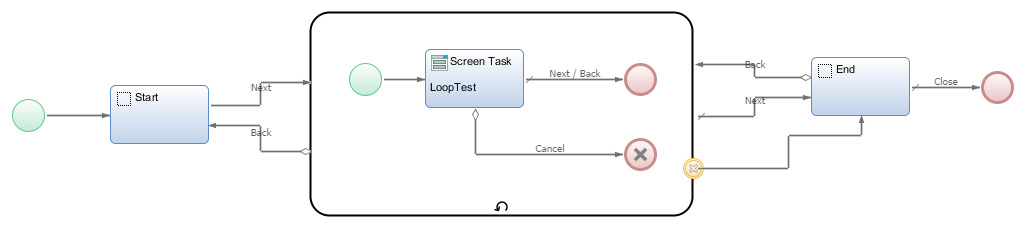
Note that the loop is no longer defined on the Screen task, but on the embedded Sub-Process. If you hit the Cancel button in the Screen task, the token moves to a Cancel end event. This cancels the current loop iteration of the embedded Sub-Process.
But this alone is not sufficient. You also need an attached Cancel intermediate event on the embedded Sub-Process. It listens to the Cancel event inside the Sub-Process, and also cancels the complete loop. The token then leaves the embedded Sub-Process over the outgoing connection on the attached event.
The important lesson to learn: If an attached intermediate event is triggered, it cancels a loop on the element it is attached to.
Let me make another simple example:
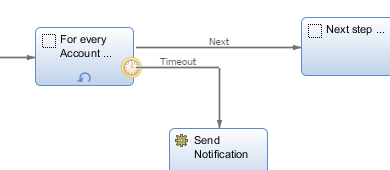
The timer in the above process does not "restart" for every loop iteration. It is started once when the original token reaches the task. It keeps waiting while the token may iterate over the accounts. If it triggers, it cancels the complete loop, no matter how far it has come.
If you want to have a timeout on every loop iteration individually, you should use an embedded Sub-Process:
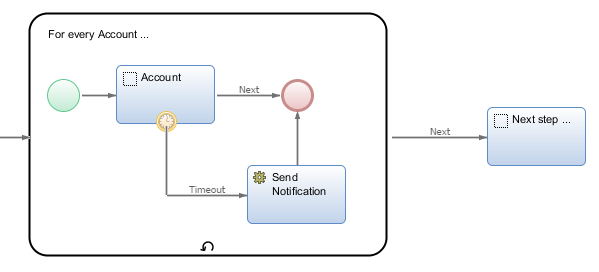
Now the timer cancels only the task inside the embedded Sub-Process. The loop is defined on the embedded Sub-Process itself, and not affected by the timer.
Hacks based on script code (e.g. move the token or modify the internal loop counter variable), are strongly not recommended.