The Signature Manager Package is part of the Document Generator, which is a legacy component. This component is End of Support (EOS) as of March 2023 (see
details). Recommended action: Consider adopting
Digital Binder v5 or higher.
The Signature Manager component is a set of tools that supports e-signature mechanisms, generalizing common concepts in order to implement an easy layer to plug in all the required integrations to perform digital signing in Appway solutions.
The following Data Classes are provided by this Package:
-
Signable – Implements the concept of a signable object (usually a document file) that can be digitally signed. It contains a collection of signatures and several utility functions. For example, it is possible to add/remove a signature or a signer (automatically creating/deleting a signature in the second case).
Moreover there are the following very important functions:
sign – Applies a signaturegetTargetFilePath – To be implemented by an inheriting Data Class that must provide the right path to the file that needs to be signed.storeSignedCopy – To be implemented by an inheriting Data Class in order to store the signed file available on the path provided as a parameter.
Package Configuration: Visible
-
Signature – Defines the concept of a signature, containing the following information:
signatureDate – Set with a timestamp indicating when the signature was applied.signerEntity – Reference to the signer (signatures and signers have a one-to-one relationship).status – The status of the signature (pending, completed, or declined).signatureProperties – A Named Collection of Any used to attach specific properties if required by the real e-signature service (e.g. suppose the e-signature service provides the possibility to define different kinds of signatures, then it is enough to put a property into this Named Collection to handle it).
Package Configuration: Visible
-
Signer – A signer is an entity that identifies who must apply the signature on the signable object. Basically, this Data Class defines a type and a set of functions that must be implemented by an inheriting Data Class:
getEmailForSignature – Returns the email address of the signer.getSignatureCaption – Returns a single string as a caption of the signer.getSignatureFirstNameCaption and getSignatureLastNameCaption – Return pieces of the caption, first name and last name.
Package Configuration: Visible
-
SignatureStatusUtil – Utility class providing standard values about the signature. Statuses are:
Each status code is accessible by a static function (e.g. PENDING())
Package Configuration: Visible
-
SignatureProvider – This is an “abstract” Data Class to define the interface for signature providers. The aim is to have a common set of functions to retrieve information about the provider, in terms of configuration and callback handling (if required):
isConfigurationRequired – Must return true or false depending on whether configuration is required or not.getConfigurationProcessId – If configuration is required, then this function must return the ID of the Process to be used for configuration.callbackHandlingRequired – Must return true or false depending on whether callback handling is required or not.getCallbackHandlingProcessId – If callback handling is required, then this function must return the ID of the Process to be used to manage callbacks.getSignatureProviderId – Must return an identifier for the signature provider (e.g. Silanis, Docusign, etc…)getSignatureProviderDescription – Must provide a human readable name for the signature provider (e.g. eSignLive, DocuSign, etc…)
Package Configuration: Visible
The SignatureManagerExample Package provides an exercise about an e-signature process based on the Signature Manager component described above.
Basically, there is a SignatureProviderExample Data Class inheriting from SignatureProvider, where all of the properties of this AppwayESignature dummy service are defined. It requires a configuration step to define the kind of signature desired. Moreover, once the signature is submitted, there is a dummy callback service that signs the signable object after a few seconds and the user can monitor this process from a dedicated screen.
A screenshot of the main Process SignatureExample follows:
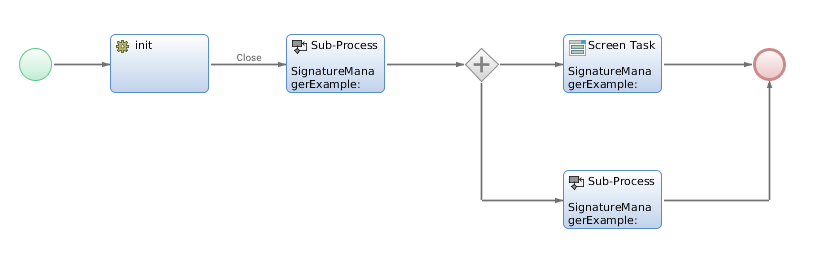
After a first init step (where two signers are added to a signable object), the configuration step follows. Once the user has defined the signature types and submitted the form, they proceeds to the monitoring screen waiting for the signatures to be applied.
Refer directly to the Business Objects contained in the SignatureManagerExample Package for more implementation details.