I have a large screen that takes a few seconds to render. As I have to redraw parts of the screen, I'm using Ajax Update Areas so I don't have to reload the whole screen.
However, every single Ajax Update Area takes as much time to redraw as the whole screen! Why is that, and how can I improve it?
By default, redrawing an Ajax Update Area takes almost as much time as redrawing the whole screen. The reason for this can be found in how Ajax Update Areas work; fortunately, there is a way to work around the problem.
In order to understand why redrawing a single Ajax Update Area takes almost as much time as redrawing the whole screen, it's important to understand what Ajax Update Areas actually do.
Appway screen rendering supports a number of very sophisticated features. For example, you can put Script components inside a Screen, and those Script components can use variables that are bound to fields on the same Screen.
Let's imagine that you have a text field on your screen. That text field is bound to the variable $text. Later in the same Screen, there's an Ajax Update Area that contains a Script that uses the variable $text.
Now, when the user changes the text in the text field (and thus its bound variable $text), and clicks on a button that updates the Ajax Update Area, the newly rendered Ajax Update Area needs to reflect the change the user made to $text.
This means that, every time the user triggers an Ajax Update Area Action, Appway needs to do the following:
- Collect all of the values in all of the visible fields
- Send them to the server
- Render the whole page using the new values of all of bindings to all of the fields
- Execute all of the Scripts
- Return the new content of the Ajax Update Area to the browser
In short: Even though Appway only updates part of the screen, it needs to redraw the whole screen.
Take a look at the following example. The following screen contains 30 Ajax Update Areas. Each of them renders a random value, and takes about 0.1 seconds to do so (thanks to a call to the PAUSE() function). This is what an individual Ajax Update Area in this screen looks like:
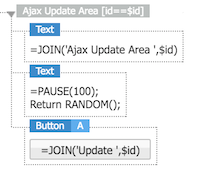
And here's what the rendered screen looks like:
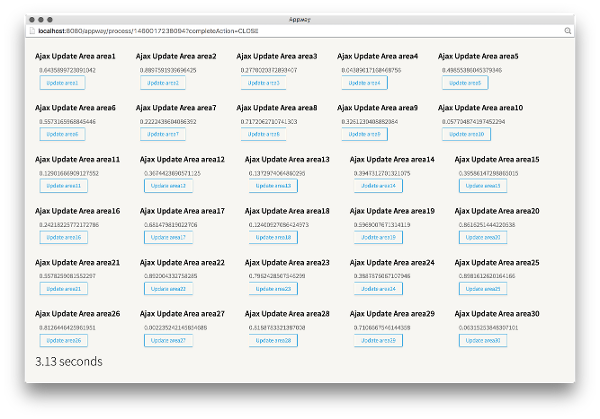
The whole screen takes 3.13 seconds to load, as indicated by the counter in the bottom left corner of the screen.
If I click on any of the buttons, the corresponding area updates. Let's click on Area 7's button, and see what happens:
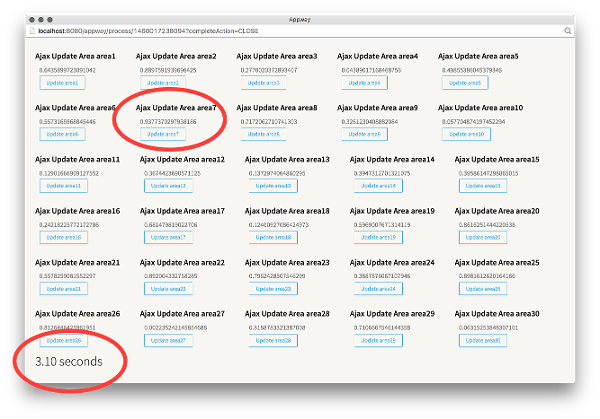
Ajax Update Area 7 did indeed reload, but the whole update still took over 3 seconds! Even though only a small part of the screen changed, it took about as much time as drawing the whole screen.
Sometimes, there's no way around this: Updating an Ajax Update Area requires redrawing the whole screen, because the content of the Ajax Update Area is dependent on other parts of the screen.
In our example, though, this is not the case. Every individual Ajax Update Area only draws a random number; it doesn't care what any of the other components on the screen do. When you update Ajax Update Area number 7, you don't really need to render all of the other parts of the screen again.
Fortunately, there's a component in Appway that allows you to control which parts of the screen are redrawn: the Screen Cache component. Using this component, you can control which parts of the screen are redrawn during an Ajax Update Area Action.
Note: You can use this component to control which parts of a screen are redrawn during normal screen loading as well — not just when using Ajax Update Areas. Caching sections of your screen that don't change can make a huge difference in Screen rendering performance.
With my example, I can put a Screen Cache component around each one of the Ajax Update Areas on the Screen (as the Screen does not contain anything else). In reality, you only put Screen Cache components around those parts of the screen that can potentially be ignored during Ajax Update Area Actions.
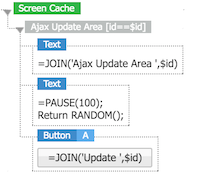
Next, you need to decide when to use the cache, and when to redraw the component. Basically, in my example, I want to do the following:
- I only want to use the cache during Ajax Update Area Actions
- When the screen is loaded normally, I always want to redraw all components
- When the user triggers an Ajax Update Area Action by clicking a button, that Ajax Update Area should be redrawn. Otherwise, the user would click the button and nothing would change because Appway would re-send the cached version of the rendered components to the browser.
First of all, you need to give the Screen Cache component a unique Cache Key. This is how Appway knows which cache to use to render that section of the screen. You also want to decide whether the cache is per-user, per-session, and/or per-language.

Next, implement the rules for when the cache is being used. You can use the "Content Modification Time" property for this.
Note: There is a known bug which causes "Content Modification Time" to be displayed as a dynamic property (i.e. its value can be changed from Script to String, and vice versa). It is not a dynamic property: The property is always evaluated as a Script. In versions of Appway where the little "Script/String" toggle on the left of the property's input field is shown, you need to switch this toggle to "Text" mode, but enter a Script into the field:

Now, what should the "Content Modification Time" field contain?
Remember, you want to use the cache when the screen is being redrawn in an Ajax Update Area Action, except for when the Ajax Update Area Action redraws the current Screen Cache component's Ajax Update Area.
There's a Script Function called IsAjaxUpdateRequest which allows you to determine:
- Whether the page is currently being redrawn for an Ajax Update Area Action
- Which Ajax Update Area ID the redraw is for
So the logic for when to use the cache, and when to redraw any section of the screen, looks like this:
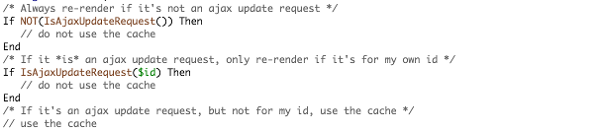
- If it's not an Ajax Update Area Action, then redraw.
- If it's an Ajax Update Area Action for the current Ajax Update Area, then redraw.
- In all other cases, use the cache.
At this point, only one thing remains. How do you actually tell the Screen Cache whether or not to use the cache?
Remember that this Script is inside the Content Modification Time property. The Content Modification Time property returns a timestamp.
- If the timestamp is newer than the time the cache was created, the cache is discarded, and the section of the screen is rendered.
- If the timestamp is older than the time the cache was created, the cache is used.
The cache is created when the user originally renders the screen.
Given this information, you can ascertain:
- If you return a current timestamp, the cache will not be used, and the section of the screen will always be rendered because a current timestamp is always newer than the last time the screen was rendered. You can just do this:
Return TIMESTAMP(); - If, on the other hand, you want the cache to be used, you should return a really old timestamp; now, you could return
0, but maybe it's good to have some kind of safety net, and redraw the section of the screen after some reasonable amount of time has passed. So we return this: Return TIMESTAMP() - 10000000;
In short:
- To redraw the section of the screen, call
Return TIMESTAMP(); - To use the cache, call
Return TIMESTAMP() - 10000000;
This means that my script for the "Content Modification Time" property now looks like this:
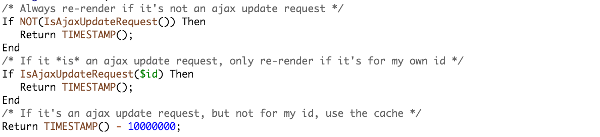
There's one final, important thing that you need to do. If the cached area contains any form elements, or anything else that needs to be done during the Process phase on the server, you need to check the Cache component's Process Response property:

If the Process Response box is unchecked, anything you put inside the Cache component is rendered but won't "do" anything. Bindings won't be evaluated, for example.
That's it! Let's start our process again, and click on any of the Ajax Update Area buttons.
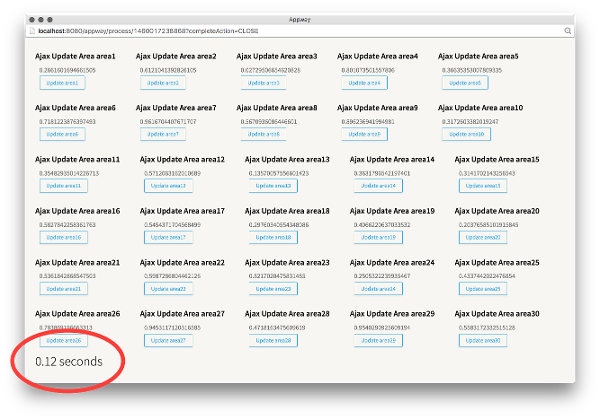
Instead of taking over three seconds, redrawing the Ajax Update Area now takes but a fraction of a second. In fact, if you use the Ajax Throbber to show a loading wheel for the Ajax Update Area, the update concludes before the loading wheel is even shown.
To see exactly how this approach is implemented, you can download the attached .awexport file, run the process AjaxUpdatePerformanceTest, and see the results for yourself:
AjaxUpdatePerformanceTest.awexport