The Chat Channel is a new Screen Component based on Case Management. Like the Form Channel, the Chat Channel is an Interaction Channel which automatically "translates" the settings of a Case Template into a UI with which users can interact.
Note: To use the 'Chat Channel', which is implemented as a Screen Component, the Chat Channel extension must be installed (compatible with Appway versions from 7.2.1). The use of this extension is subject to a dedicated license agreement.
Conceptually, the Chat Channel is designed to complement more traditional user interfaces such as online forms (provided by the Form Channel). Though the interface is very different than the Form Channel, the Chat Channel leverages the existing business logic of applications built with Appway meaning no significant effort is required when implementing it.
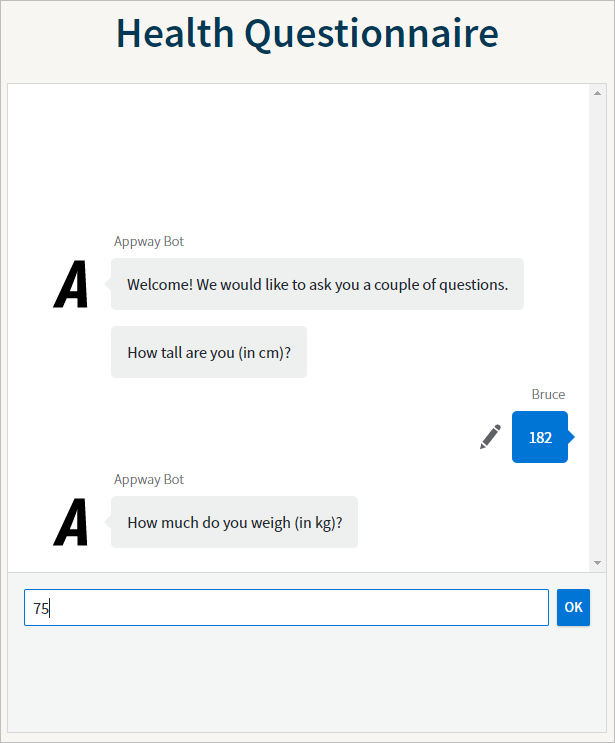
From a visual point of view, the Chat Channel creates a rule-driven chatbot and renders input fields, date pickers, dropdown lists, and buttons for easy data entry by the user in the course of the conversation. This approach enables a natural and guided conversation to facilitate tasks such as:
- Data gathering
- Delivering information
- Basic customer servicing
A simple example of a conversation generated by the Chat Channel, with responses from a user called "Bruce":
Example use cases for the Chat Channel include:
- Product Selection Bot
Build a simple bot to guide customers so that they select the right product based on a few simple profiling questions. - Regulatory Reviews
Task a bot to interact with customers to update specific personal information triggered by requirements from regulators. - Surveys and Feedback
Gather a few focused pieces of information via a convenient conversation orchestrated by an ad-hoc bot. - Enhanced Customer Profiling
Trigger a bot to start a short conversation to better understand and profile individual customers. Let the bot offer additional products and services that reflect their identified needs in an optimal way. - Pre-Onboarding Bot
A bot that helps asynchronously collect missing information required for successful onboarding. Put the customers in the driving seat, enabling them to provide the data when they feel ready to do so. - Change Personal Information
Allow customers to autonomously update or change their personal information.
In summary, features provided by the Chat Channel are:
- Auto-generated conversational interface
- Rule-based sequence of interactions
- Styleable user interface (colors, icons, etc.) based on a dedicated 'Style' Business Object
- Customizable bot name and profile icon
- Customizable user name and profile icon
- Customizable interaction sounds
- Editable responses (users can modify previous answers)
- Automatic mapping of conversation entries to data records