I know that I should put all of my controls (Text Fields, Dropdown Lists, and so on) inside Info Boxes when building Screens. I'm a little confused, however, about what the "text" for the Infobox should be — especially when the Info Box contains something like a checkbox, which has its own text label.
When designing forms in Appway, a control — a Text Field, Text Area, Checkbox, Dropdown List, Radiobutton, etc. — should always be inside an Info Box. While there are some exceptions to this guideline (such as a single search field, for example), they are rare.
Briefly summarized, the Info BoxText property should contain a name or title that indicates what the control is for.
Let's say you have a Text Field where you expect a name as an input. You'd set "Name" as the Info Box's Text property.
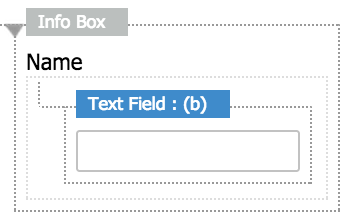
When rendered, the Info Box's Text appears as a label above the Text Field:

The text for the control inside the Info Box shows the user's selection. In this case, the name is "John Woo", so that's the text that appears on the control itself.
This is a pretty simple example. The solution is a bit less clear if the Info Box contains a Checkbox.
Again, we need to put the Checkbox inside an Info Box. Then what? The Info Box's Text property probably needs to show what the Checkbox refers to, and we can leave the Checkbox's Text property empty, because we've already filled in the Info Box's Text, right? Like this:
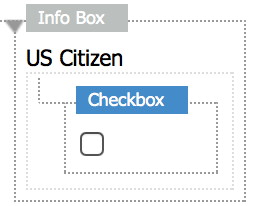
This isn't quite the right approach, however, because the rendered Screen then looks like this:
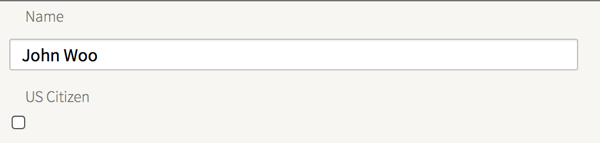
The checkbox looks kind of lost: it's just there, stuck below the title, without any text. So let's take a step back and think about what we said before:
- The Info Box's Text property acts as a kind of title or name
- The text on the control should be the user's selection
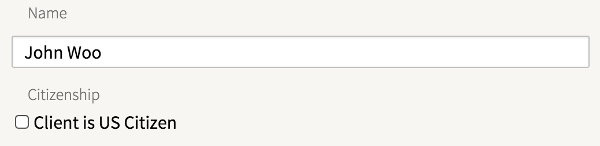
In this case, what would be a good title to use for this section? Maybe something like "Citizenship". What is the user's selection? Whether the client is a US citizen or not. Following this line of thinking, the Info Box's Text should be "Citizenship", and the Checkbox's Text should say something along the lines of "Is US Citizen".
Now the two elements — the Text Field and the Checkbox — look much better than before, and align properly.
Let's take another example: Part of your client onboarding process requires users to specify if a given Taxpayer Identification Number (TIN) is a US TIN. This is a yes/no question, so a Checkbox makes sense. Now, what should be the Info Box Text, and what should be the Checkbox Text? This is an opportunity to provide some more information, so maybe here, we could do it like this:
Info Box Text: "Taxpayer Identification Number Type"
Checkbox Text: "This TIN is a US TIN"
Note: Checkbox texts should never be questions, but statements; the user is agreeing with a statement by checking the Checkbox.
But what if you can't come up with a suitable title? It may be that the Checkbox is completely self-explanatory. In these cases, just leave the Info Box Text property empty, and only set the Checkbox Text.