The OpenApi Extension provides functionalities to import and export OpenAPI specification files.
The Export functionality provides a Business Object exporter that can be used to generate the OpenAPI Specification of a given Web API.
Note the following:
- Schemas names are mapped from Data Class names. Package names are not exported.
- If a Web API Business Object references Data Classes with the same name from different Packages, the export will fail.
- Multiple inheritance in Data Classes should be avoided because auto-generated clients might not support multiple inheritance (e.g., Java clients).
The OpenAPI Import functionality can be used to automatically generate Business Objects such as Packages and Data Classes from a given OpenAPI Specification. The import functionality can be used as follows:
OpenApi:GenerateDataClasses Script Function- OpenAPI Importer module in FNZ Studio Composition (Data&Integration tab).
Note that you need
Packages Permission (Full-Access level) to use the OpenAPI Importer feature.
Both the Script Function and the OpenAPI Importer module rely on regex to establish rules that define the correlation among the schemas referenced by API paths and the Package where they are imported in the form of FNZ Studio Data Classes.
A simpler alternative to regex is to define one default Package. In this case, all Data Classes will be imported into the selected Package.
The Import process not only adds essential dependencies among Packages but also facilitates the deletion of existing Data Classes in target Packages, if these are unrelated to any schemas in the provided OpenAPI Specification (this option is configurable).
Important! Enabling the delete option does not trigger the removal of dependencies that are no longer needed.
The OpenApi:GenerateDataClasses($packageId, $location) Scrip Function generates the data model from a given OpenAPI specification. It has the following parameters:
packageId — Package where Data Classes are generated. If the provided packageId does not exist, a new Package is created.defaultPackageId — Package where the Data Classes that do not belong to any pathPatterns are generated. If the provided packageId does not exist, a new Package is created.location — Location of the OpenAPI specification. It can be an absolute file path, or a relative file path to the data-home. For relative paths, the {DATA_HOME} placeholder can be used as prefix e.g.: '{DATA_HOME}/work/tmp/simpleSpec.json').regexes — List of regexes that are matched against the paths of the Open Api specification.options — Named Collection that contains all the optional parameter of the function.pathPatterns — List of regexes that are matched against the paths of the Open Api specification.
All the generated Data Classes from the schema that match the regex will be assigned to the Package in the same position in the Package list.
Example: Indexed String $regexes := NewIndexed(String); $regexes[1] := '/api/distribution/.*'; $regexes[2] := '/api/gateway/openplatform/gbr/.*'; $regexes[3] := '/api/gateway/openplatform/.*';packages — List of the packages where put the data classes generated by the schema that are part of the paths matched by the regexes.
Example: Indexed String $packages := NewIndexed(String); $packages[1] := 'FnzOneApiDistribution'; $packages[2] := 'FnzOneApiGbr'; $packages[3] := 'FnzOneApi';
Example: Indexed String $pathPatterns := NewIndexed(String); $pathPatterns[1] := '/api/distribution/.*'; $pathPatterns[2] := '/api/gateway/openplatform/gbr/.*'; $pathPatterns[3] := '/api/gateway/openplatform/.*';deleteMissingDataClasses — Deletes existing Data Classes in the target Packages, if they are not related to any schemas.
The OpenApi:GenerateDataClasses($packageId, $location) Scrip Function can accept two or three parameters, e.g.:
OpenApi:GenerateDataClasses($packageId, $location)OpenApi:GenerateDataClasses($packageId, $location, $options)
In the case of four parameters, the developer needs to provide two lists without null/blank elements with the same length.
The OpenAPI Importer is an FNZ Studio Wizard that can be accessed under Data & Integation > OpenAPI > OpenAPI Importer. The wizard is split in multiple steps that allow importing an OpenAPI specification file and generate the data model automatically.
When navigating through schemas referenced by paths, the regex matching algorithm retrieves every new schema including the ones referenced by it, even if previously mapped, and excluding those referenced by paths that have already been visited.
For instance, consider the linked OpenApi specification.
The table below illustrates the outcomes obtained by sequentially applying the designated regex rules.
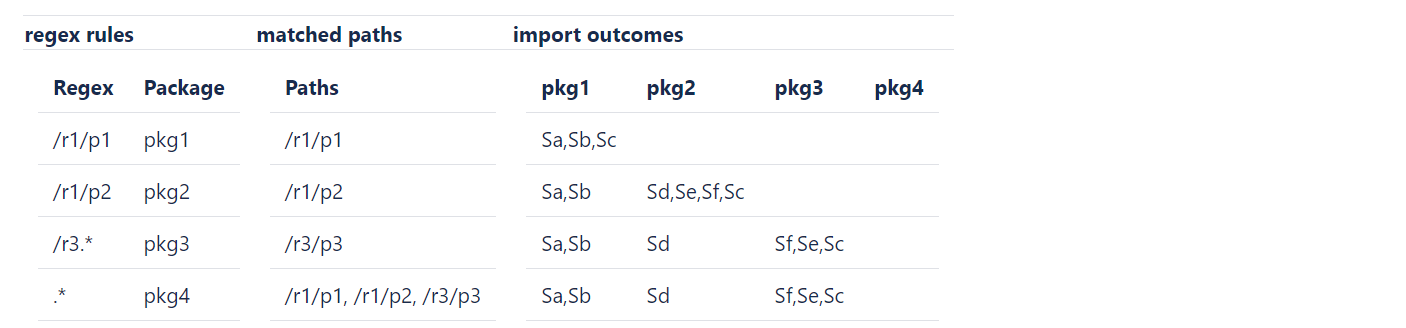
Note the following details about the Data Classes generated using the OpenAPI import functionality:
- If a schema name provided contains a
. (dot), this is replaced with an empty string. - Schemas representing dates could be mapped to a
Date or a String based on the extension property (System Configuration > Extensions > [Extension]> Edit Configuration) openapi.importer.map.date2string. Default is Date. - Schemas representing money could be mapped to the Primitive Type Money based on the extension property
openapi.importer.map.money2primitive. Default is false.
All generated Data Classes are enriched with following metadata:
Generator — Name of the generating extension (e.g., OpenApi).Adapter-Version — Version of the generating extension (e.g., 2.0.0-dev).OpenApi-SpecVersion — OpenAPI specification version (e.g., 3.0.1).OpenApi-ApiVersion — API version (e.g., 1.0).OpenApi-ClusterFilePath — Path to the Cluster File where the imported OpenAPI specification file is stored (e.g., openapi/OpenApiSpec.json/n11676977603348)
Data Class Generator does not support nested collections or nested maps or a mixed solution (e.g., a map of collections). In this case the nested type would be of type Any.
Data Class Generator supports:
- Primitive types as follows:
Integer, String, Boolean, Long, Float, Double, Date, Money - Indexed and Named Collections
- Inheritance
- Enumerations
ClusterFile and LocalFile will not be mapped as a primitive type but rather as regular Data Classes.
Other types that do not fit in the FNZ Studio Primitive Types or Data Class will be imported as type Any.
Currently, only String enumerations are supported. These can be defined in the following ways:
- Standard definition at schema level:
    "schemas": {
      "Color": {
        "type": "string",
        "enum": [
          "black",
          "white",
          "red"
        ]
      },
      "Marker": {
        "type": "object",
        "properties": {
          "color": {
            "$ref": "#/components/schemas/Color"
          }
        }
      }
    }
- Standard definition at schema level using
x-enumNames extension:
    "schemas": {
      "Color": {
        "type": "string",
        "x-enumNames": [
          "blackName",
          "whiteName",
          "redName"
        ],
        "enum": [
          "black",
          "white",
          "red"
        ]
      }
    }
- Inline definition at property level:
    "schemas": {
      "Marker": {
        "type": "object",
        "properties": {
          "color": {
            "type": "string",
            "enum": [
              "black",
              "white",
              "red"
            ]
          }
        }
      }
    }
- Inline definition at property level using
x-extensible-enum extension:
    "schemas": {
      "Marker": {
        "type": "object",
        "properties": {
          "color": {
            "type": "string",
            "x-extensible-enum": [
              "red",
              "blue",
              "green"
            ]
          }
        }
      }
    }
Supported enums will be mapped to Data Classes with static functions returning each enum's values. The ids of such Data Classes have Enum as a suffix (e.g., ColorEnum). In the case of inline definition at property level, the parent container name is added as a prefix (e.g., MarkerColorEnum).
Based on the last definition example we will have the following mapping:
    MarkerColorEnum
      static function RED   -> return "red"
      static function BLUE  -> return "blue"
      static function GREEN -> return "green"

    Marker
      property color -> with type "String" and description "related to package:MarkerColorEnum"
In case of unsupported enums, we will have a mapping such as:
    Marker
      property color -> with type "Any" and description "related to a non-mappable Enum"
These functions streamline exploration of the provided OpenAPI specification.
OpenApi:ListSchemasWithPropertiesOpenApi:ListPathsOpenApi:ListSchemas
OpenApi:ListSchemasWithProperties($location, $regex) lists the schemas and properties of the OpenAPI specification provided.
This Script Function has the following parameters:
location — Location of the OpenAPI specification.regex (optional) — The regular expression used to match against the paths within the OpenAPI specification. If provided, all referenced schemas starting from those paths are considered.
Example: '/api/opc/service.*'
OpenApi:ListPaths($location, $regex) lists the paths from the given OpenAPI specification.
This Script Function has the following parameters:
location — Location of the OpenAPI specification.
OpenApi:ListSchemas($location, $regex) lists the schemas from the given OpenAPI specification.
This Script Function has the following parameters:
location — Location of the OpenAPI specification.