Gateways
Gateways are used to specify a conditional logic in the Process flow, e.g. to split or join execution paths (tokens). There are different types of Gateways:
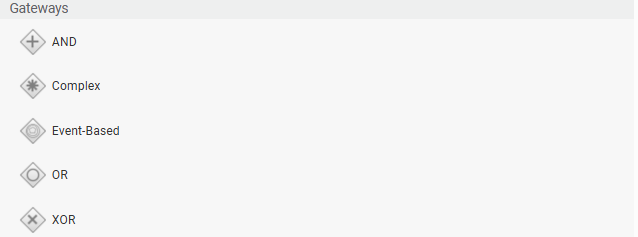
- AND (or parallel) gateways allow the execution of activities in parallel.
- XOR (or exclusive) gateways allow following only one of the possible execution paths. The XOR Gateway can activate only one outgoing Connection.
- OR (or inclusive) gateways allow the execution of activities in parallel but follow only the chosen execution path. Outgoing Tokens can be split by OR Gateways. Depending on the types of the outgoing Connections, there may be zero, one or more Connections being activated.
- Complex gateways allow fine-grained customization in handling incoming and outgoing connections.
- Event-Based gateways handle multiple outcomes of an activity.
Gateways do not have additional properties besides the common Component properties (see Process Business Object).
AND Gateway
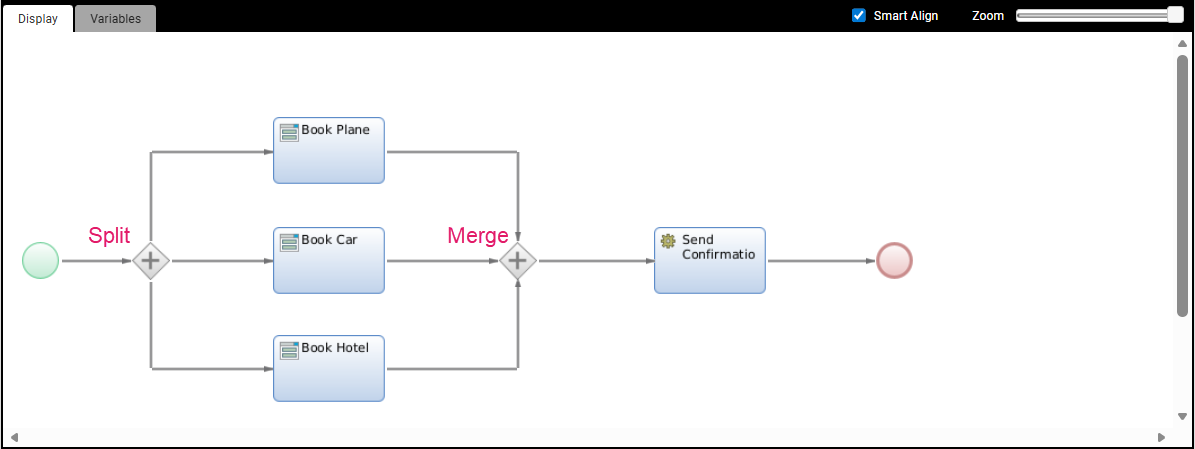
The AND (or parallel) gateway is based on Unconditional Connections.
When a token reaches the AND gateway, it sends one token out through all of its outgoing connections. In the example above, when you start the Book Holiday Process, the token reaches the AND gateway and will be split into three parallel tokens taking each connection, Book Plane, Book Car, and Book Hotel.
There must be at least one token on every incoming Connection before the Gateway can merge them into one. Therefore, you must complete all the three tasks above before you are able to reach the merge gateway and, only then, the Send Confirmation action.
XOR Gateway
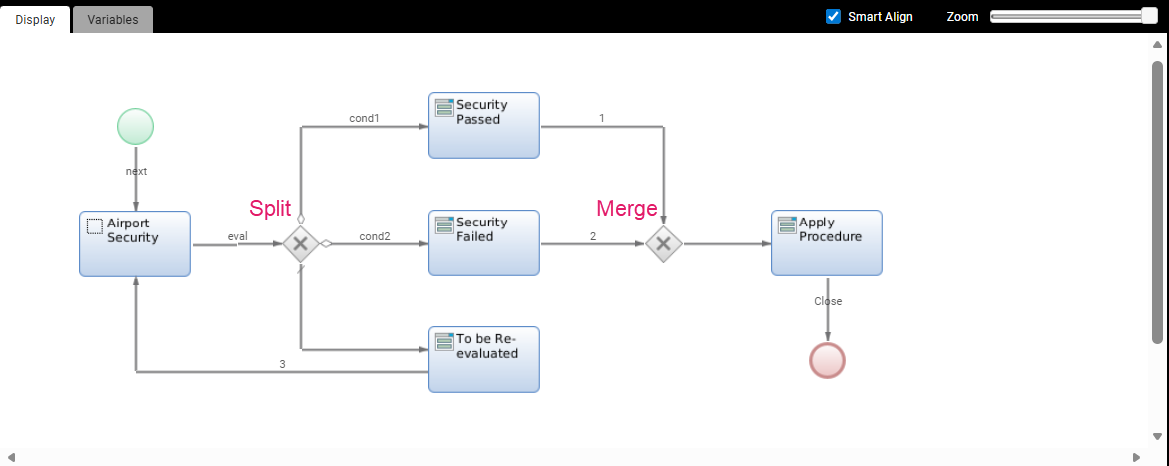
The XOR (or exclusive) gateway allows following only one of the possible execution paths.
Its split and merge strategy is based on any number of conditional connections plus one default connection. The system will check the conditions and, according to the logic of the gateway, will send the tokens accordingly. If no condition is true, the default connection is taken, thus making sure that at least one token leaves the task.
In the example above, when you start your Process Instance, you land on Screen Airport Security. When you click on eval, you reach the XOR gateway. At this point, the system checks if condition1 is true and condition2 is false. In this case, the token is sent to Security Passed. On the other hand, if condition1 is false,and condition2 is true, the token is sent to Security Failed. Finally, if both conditions are false, the token is sent to the default connection and reach Screen To Be Re-Evaluated. Note that, if both condition1 and condition2 return true, you have made a design mistake. Only one token can leave the gateway and reach the Apply Procedure Screen.
OR Gateway
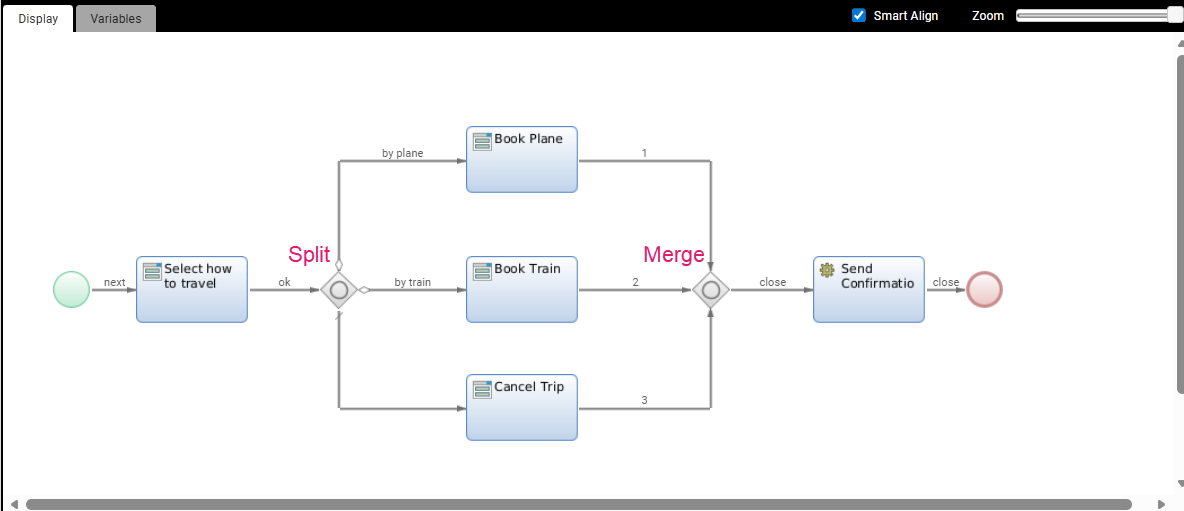
The OR (or inclusive) gateway executes one or more paths based on conditions.
Like the XOR gateway, it is based on any number of conditional connections plus one default connection. However, unlike XOR, you can take one or more paths.
In the example above, when you start your Process Instance, you land on Screen Select how to travel. When you click on ok, you reach the OR gateway. At this point, the system checks if condition by plane is true and condition by train is false. In this case, the token is sent to Book Plane. On the other hand, if by plane is false,and by train is true, the token is sent to Book Train. If both conditions are false, the token is sent to the default connection and reach Screen Cancel Trip. Finally, and unlike the XOR gateways, you have the possibility that both conditions are true. In this case, you get two parallel tasks, Book Train and Book Plane.
The merger waits until all the tokens that left the split are received before letting you proceed to Send Confirmation. In the case of two parallel tokens, you will need to execute both activities before you can proceed to Send Confirmation.
Complex Gateway
A Complex Gateway allows a high degree of freedom in deciding how to split and merge tokens.
Important note: According to BPMN 2.0, the use of a complex gateway in a Process Model is neither necessary nor encouraged. Understanding and interpreting a complex gateway can be difficult, since many actions are hidden from sight through the use of such a gateway. Furthermore, complex gateways can, in most cases, be replaced by simple types of gateways such as XOR, OR or AND gateways. Using simple types of gateway may mean the model ends up containing more elements and connections than otherwise – but such a model is also generally more understandable at a glance.
Let's assume that you want to implement a simple travel booking process. Users are required to select whether they want to book a plane ticket or a train ticket to their destination. In addition, a hotel stay always needs to be booked, regardless of travel method. While this scenario would usually be modeled using an inclusive OR gateway, you may decide to use a complex gateway.
The model looks as follows (no Swimlanes are included to reduce complexity):
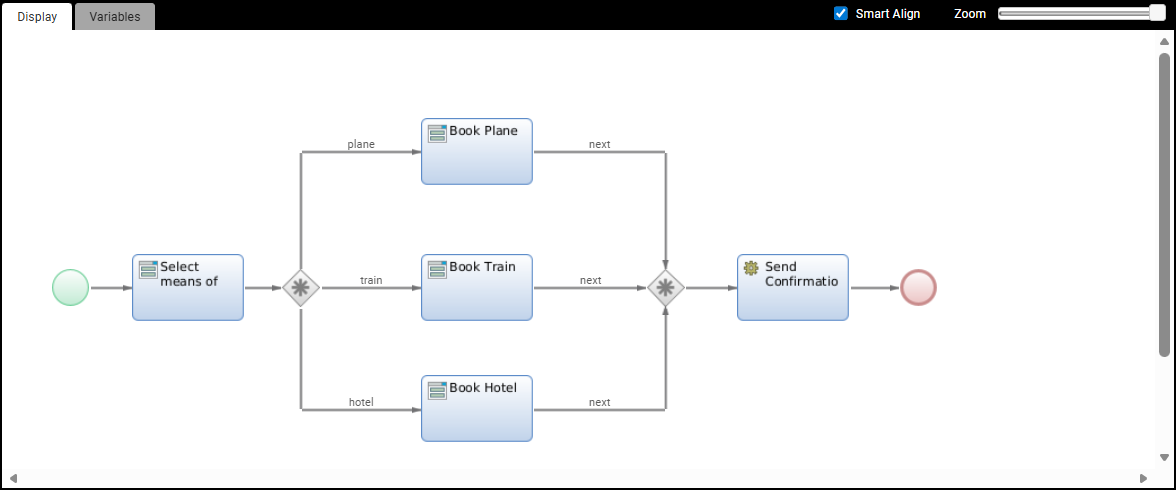
You know that you definitely need to split the initial token into two tokens: one for the hotel connection, and one for either plane or train. You can use the 'split' expression to achieve this. The split expression requires an indexed collection of labels (strings) to be the result of the evaluation. That means you could write the following expression:
//Create  an empty collection of strings

Indexed String $activatedConnections := NewIndexed(String);

//add the 'plane' or 'train' connection to the collection

$activatedConnections.addElement($meansOfTravel);

//add 'hotel' as a connection to be activated

$activatedConnections.addElement('hotel');

Return $activatedConnections;
The connections in your Process Model need to match the strings you add to the collection returned in the split expression, or you end up with suspended tokens (since the Process Engine wouldn't know where to put the next token).
The Process Engine puts a token on the Book Hotel activity, as well as on one of the other two activities (Book Trainor Book Plane). There are now two simultaneous parallel activities.
These activities will, at some point, be completed by one (or multiple) users. In order to send a confirmation message at the end of the Process, you need to merge these two tokens into one. This is necessary because you only want to send one confirmation message, not two. It is therefore important that only one token lands on the Send Confirmation activity. Note that you are not merging in order to avoid the fastest token through the Process bringing the Process Instance to an end; this instance only completes once there is no token left in the Process anyway. The second token would therefore still pass through the gateway and be consumed at the end event, but two confirmations would be sent.
At this point, you need to evaluate your merging logic. An AND gateway waits until every incoming connection has a token ready for the merge. The same happens for an inclusive OR gateway as well, except that the OR is capable of back-tracing and then waiting for the right connections to provide a token.
When working with a complex gateway, you are responsible for defining the merging logic yourself. For this complex gateway, specify the join expression and leave the split expression empty. The join expression has an implicitly defined variable which can be used in the expression (no declaration necessary). The variable automatically contains the tokens.
The join expression can read the implicitly available variable $workflowTokens (Indexed WorkflowToken). This is the collection of tokens that eventually merge. If you do not specify a split expression, FNZ Studio simply outputs a single token after the merge. You want to make sure the complex gateway only merges if all tokens have arrived.
Considering that there are always two tokens making their way toward this second gateway, the required expression should be:
If $workflowTokens.size() == 2 Then

   Return $workflowTokens;

End
Even if one user now finishes their task much earlier than the other, the first token simply waits on the gateway before merging:
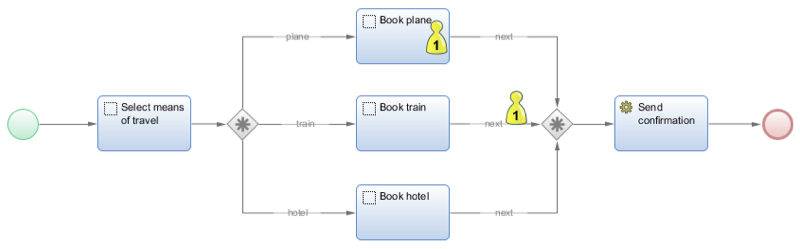
The gateway merges the tokens once the second token arrives, and produces a single token. It is this single token that moves onto the Send confirmation activity. The Process Instance then ends immediately after the execution of this automated task.
Event-Based Gateway
The Event-Based gateway determines which path to take based on an event that occurs.
At times, you may need to execute some activities conditional on the outcome of someone else's decision. However, if the person required to reach a decision has not done so within a set amount of time, your Process Instances might get locked.
An event-based gateway allows for the execution of different activities based on a prior event. The event-based gateway is an exclusive gateway, meaning only one activity can be executed.
In the example below, at some point in a larger Process, an employee in the Front Office (FO) must submit a request for approval to another employee in the Back Office (BO).
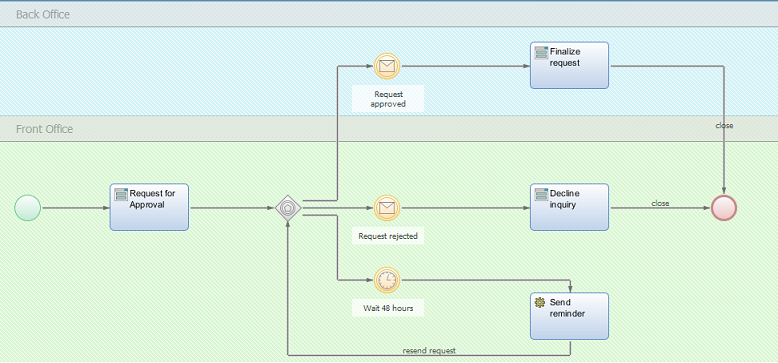
The process logic might involve creating a new workitem for the BO. The BO is supposed to approve or reject a request — but their actions are unknown to the FO.
Since the approval Sub-Process is built using the internal messaging feature, and relies on sending Process Message Objects, this Process can be modeled using an event-based gateway to listen for a specific message. This means the Process can react based on the occurrence of an event. Multiple events could possibly take place: receiving a Process Message Object which carries a message of approval, and another object carrying a rejection message. You could also listen for a signal which might be sent out in some other Process such as the approval Sub-Process.
The logic of the event-based gateway now triggers the following sequence of actions:
- Whichever event takes place first gets a token: the BO's decision dictates which outgoing connection is activated.
- All other modeled events after the event-based gateway never occur in that particular Process Instance (of course other running instances could observe a different event taking place).
- If your modeled activities are mutually exclusive, then time is no longer the deciding factor for the event to take place (that is, it is not necessarily the first event that gets the token, but the event corresponding to the decision made by BO). In the case of mutually exclusive activities, two events are triggered but only one event will return
true, based on the filter property in the event config (If $message == 'approve' Then Return true; Else Return false;)
If the BO does not decide immediately (or if both your message events are not triggering because of faulty filters), your Process Instance will be locked until the BO decides to either approve or reject. To prevent a situation where progress is dependent on the BO's work speed, there should always be an "emergency exit" event.
In our case, this is a Timer Intermediate Event. The timer eventually runs out of time (let's say, after 48 hours) and, if no decision has been made, the first event will take place. This Timer Event makes the other events useless, and initiates a different sequence of actions. In our case, we might execute a script which reminds BO to take a decision (e.g. Send Reminder). Next, the Process would restart the event-based gateway logic.
This Process could be modeled with other means, e.g. an XOR gateway and some Script expressions. However, working with a visual approach is often easier to understand.