Token Authentication for WebAPI Endpoints
This article details how to use tokens for authentication for endpoints exposed by WebAPIs (see general information on Web API Business Object).
Authentication Method
In order for tokens to be used, an endpoint must be set to require authentication and delegate it to the application server. As illustrated in the image below, this implies using the /secure/api/ endpoint instead of /api/.
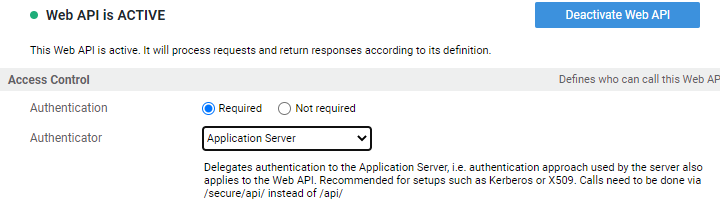
Technical Details: The application server in our cloud environments is configured to use the OIDC Authenticator Tomcat Valve to handle authentication. Beside the ability to verify tokens, this valve also provides OIDC flows, such as the code flow ("normal user login") or the client credentials flow for machine-2-machine communication. Note that this component is a custom Tomcat library and it does not integrate with the OIDCAuth Extension, which includes the functionality to work with tokens in FNZ Studio.
Tokens for Authentication
In order for a token to be used for authentication, it needs to be sent as an authorization header using the Bearer scheme:
Header:

Authorization: Bearer <Token>
The token needs to fulfill the following standards to be accepted (following RFC 9068 "JWT Profile for OAuth 2.0 Access Tokens"):
- Token must be a valid JWT
- Token must not be expired
- Signature must be valid
- Token must contain an issuer "iss" claim that matches a configured OpenId Provider in the FNZ Studio configuration (example:
https://ae56oidservice.fnzc.co.uk) - Token must contain an audience "aud" claim (value or array) containing the according FNZ Studio client id (example:
fnz-dev2.appway.com) - Token must contain a claim that can be mapped to a user
- Token may contain a claim that can be mapped to roles.
Users from Tokens
The user is extracted from the token based on the usernameClaim configuration for the OpenId Provider. This can either be a single value (example usernameClaim: name) or an array (usernameClaim: [name, clientId]). If an array is given, the first claim of the array present in the token is used. This is useful for OPs that can create different kind of tokens (example: Azure AD token will not contain a name claim if an access token was obtained using the client credentials flow). If no claim is mapped, the subject sub claim is used.
The value in the specified claim can be transformed/mapped using the usernameMapping OP configuration. Example:

Authorization and Tokens
Authorization in FNZ Studio has multiple layers. The inner layers (Swimlanes, sentries, and so on -Process Business Object) are handled by the FNZ Studio Solution leveraging the internal user database.
The outer layer is handled by the application server based on protected resources and security roles (see Authentication and Authorization.
In order to pass through the outer layer of security, roles might be needed. When using a token, roles can be provided to FNZ Studio either in an explicit or implicit way.
Explicit Role Passing
Explicit passing of roles works similar to the handling of usernames. One of the claims in the token is read and its value(s) mapped to roles. This configuration is again (token) provider specific.
Example:
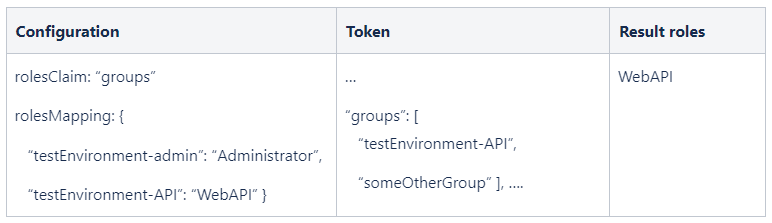
Important: Only roles mapped in the nm.auth.roles.mapped property are available on the inner authorization layer. Recommendation is to use the standard WebAPI role to provide access to APIs.
Technical details: The application server finishes authentication by creating a Principal describing the user, which might include roles. The UserFilter in FNZ Studio maps the roles in the Principal that are also listed in `nm.auth.roles.mapped` to the internal user database. This means adding roles which are in the Principal but not in the database while removing roles that are in the database but not in the Principal.
If the user described in the Principal cannot be found, the UserFilter also takes care of creating the user.
Implicit Role Passing
This method is used if no roles are present in the token or no rolesClaim is defined for the provider. The mechanism for implicit roles works as follows:
- If no roles can be extracted from the token, the user (after mapping) is searched in the FNZ Studio internal database.
- If roles exist (and are of type REMOTE), such roles are searched in the FNZ Studio internal user database.
- If the required security roles are found, access is granted
Implicit role passing normally requires setting up a user synchronization mechanism. It is typically used if the provider cannot add roles to the token.