Using the Ajax Update Area Screen Component, you can avoid page refreshes when users make changes on individual screens, such as adding or removing an entry to or from a list.
Here is a Screen with a very simple list of search results, as you see in a lot of Appway solutions. Other examples that could be improved in a similar fashion would be lists that have Add and Remove buttons, e.g. for a customer's Accounts lists.
Clicking on a button (in this case, the search button) should redraw part of the Screen (in this case, the search results).
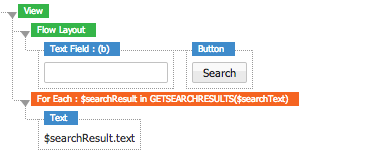
What's wrong with it? Well, every time the user clicks on Search, the whole screen reloads, which is really annoying.
Fortunately, you can fix this problem in less than 60 seconds. Here's how.
- Add an Ajax Update Area component around all the elements that need to be updated when the user makes a change.
- Give the Ajax Update Area a unique ID.
- Go to every Screen element that has actions that change the stuff inside the Ajax Update Area (e.g. Search, Add or Remove buttons). Add Ajax Update Area Actions with the same ID you gave to the Ajax Update Area.
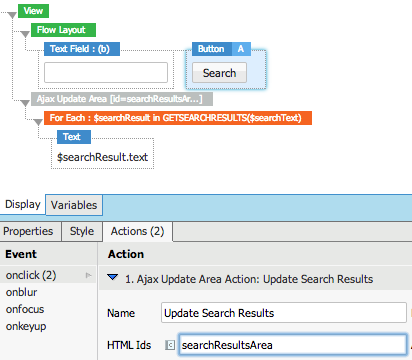
Note on the HTML Id property. Consider that the HTML Id must be unique in any HTML page. Non-unique HTML IDs within a page may cause unexpected behavior in your Screens.
There's nothing more involved, and it makes a huge difference to your users.
See also: