I have a Screen where clients are displayed in separate sections, according to their client type, but stored in the same Indexed Collection. Each section has its own separate Ajax Update Area, and its own add/delete buttons.
When I delete a client in a section I expect the other clients to be unaffected. However, deleting a client causes other client attributes to be overwritten: How can I prevent this from happening?
There are three steps necessary in order to ensure that overwriting of items in an indexed collection does not occur:
- Make the delete buttons update other Ajax Update Areas
- Define a filter function on the collection
- Influence the component path
For an in-depth explanation, please read the whole of this article.
If you're short on time, the Preventing Overwriting section discusses the three steps listed above in more detail.
I'm going to use the example of four clients who have been split into two different client types — Owner, or Additional Party — to illustrate the problem outlined above and explain my solution. This example uses a simple process, with just one Screen:
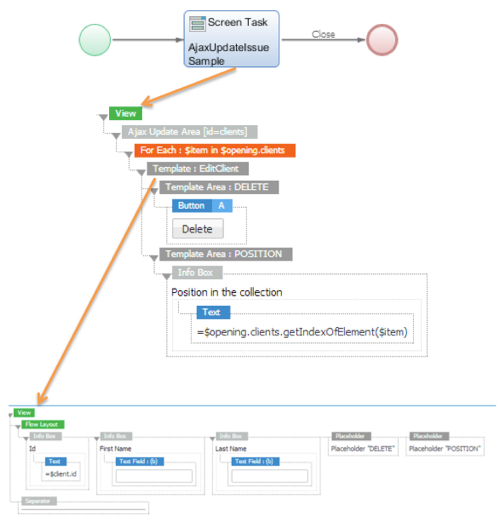
This Screen just iterates on all the items in a collection, $opening.clients, and displays one item at a time. The Screen artificially displays the position of each item in the collection thanks to a function created for this purpose.
The delete button removes the current $item from the collection. There is an Ajax Update Area with id=clients on the page: Clicking the Delete button updates this Area.
A very simple set of information is shown for each client:
- id — Output-only field, never saved back to the server
- First name — Input/output field, saved back to the server on each screen submit
- Last name — Input/output field, saved back to the server on each screen submit
The data is saved in a root Opening Object, which contains an Indexed collection of clients. The client class has four String attributes, only three of which (ID, first name and last name) are displayed on the Screen.
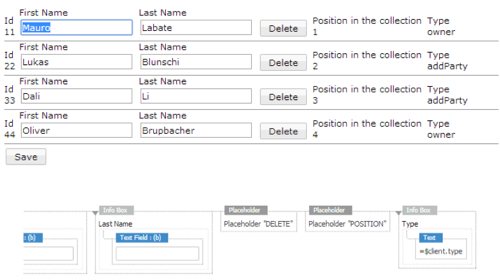
A business user requests that the fourth String attribute, Type, also be displayed on the Screen: Displaying Type makes it clear to business users which clients are Owners, and which are Additional Parties. To fulfill this request, the Include Screen is changed to display the additional column.
At this point, everything is still functional:
Then comes the next business change request: Visually separate clients on screen to make it even more clear to business users which clients are Owners and which are Additional Parties. The Screen is adjusted by copying the For Each loop and introducing an If condition to separate the client types, and separating the Ajax Update Areas:
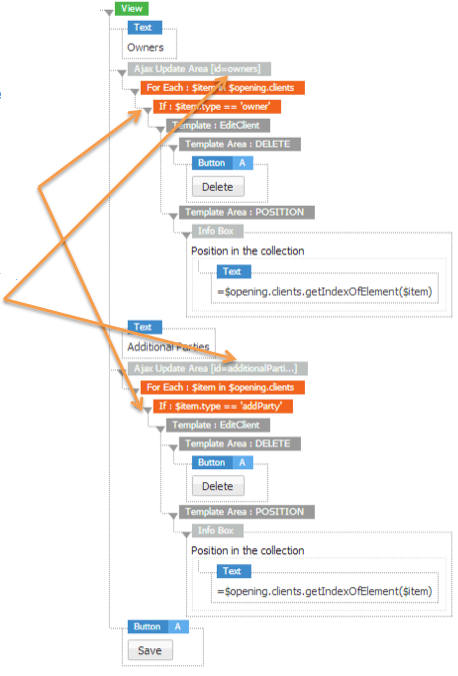
Then, the Delete buttons are updated so each button triggers just the Ajax Update Area it is located in, leaving other Ajax Update Areas untouched.
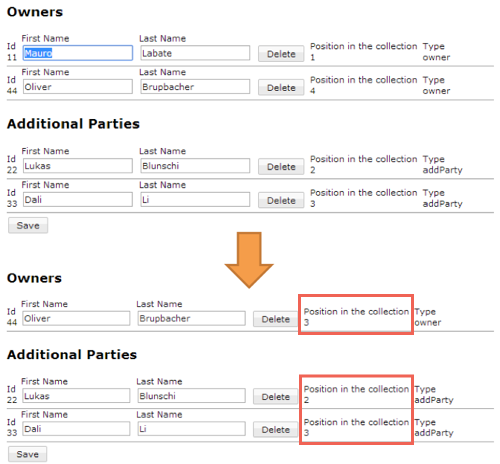
After this change, however, users start running into a serious problem: Deleting the first Owner ("ID11 Mauro Labate") updates the position of "ID44 Oliver Brupbacher" in the collection but does not update the Additional Parties portion of the Screen:
So what happens when the user clicks Save?
The browser submits the page to Appway using the binding IDs reported in the previously-generated HTML page. As the image above shows, only the top part of the Screen has been updated — so the browser sends the Additional Parties to Appway as if they have not changed position within the collection. This is the result:
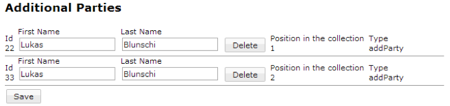
This is definitely not what the user wants to happen!
So how can we avoid this scenario?
This section covers the three options outlined at the start of the solution in more detail. I recommend implementing options 1 and 2 simultaneously as this ensures that update areas and bindings are more robust. Always execute pre-filtering and then unwrap each ForEach loop.
Option 3 acts more as a patch to existing running Process Instances.
1. The Delete buttons and Ajax Update Areas
Make sure that each Delete button also updates the other Ajax Update Area. This way the HTML page elements update correctly, thus solving the overwrite problem.
2. Defining filter functions
A filter function is a function that can be defined on a Data Class holding a collection of items. It filters the content to return a specified sub-collection.
Using a filter function in this case ensures that the HTML generated in the page reports the item position correctly, regardless of any missing Ajax update actions. The HTML reports the items' position in that specific ForEach loop, not their global position in the collection.
3. Influence the component path
Influence the component path (used as an HTTP parameter name) to include a unique key for the entry in the collection, such as a person ID, instead of just the position in the collection: Specify an expression for the Iteration Id on the ForEach, For or While components.
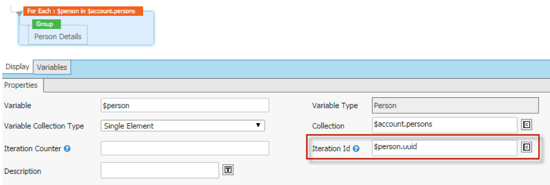
The value returned by this expression is embedded in the component path, replacing the collection position. As a result, operations like adding, reordering or removing an entry no longer have an impact on the bindings.
Old component path: root/1/3/4/18/[2]/83
New component path: root/1/3/4/18/[pers008719288]/83