This article provides an overview of Known Issues beginning with the Appway 7 Official Release and covers all following releases.
The listed Known Issues represent the status quo on the indicated date of release and do not cover findings made post-release, unless explicitly indicated.
The article is divided into two parts:
Studio (Updated February 10, 2020)
-
Business Objects lock in Chrome 80 browser – Due to a change in the restrictions of the 'Close Editor' callback in the Chrome 80 browser, callbacks to unlock Appway Business Objects are not triggered, thus leaving Business Objects locked. The lock is released after 30 seconds.
Workaround: Go to chrome://flags/, search for the 'Allows synchronous XHR requests in page dismissal' option, and set its value to 'Allow'.
Fix planned for: Appway 7.2.17
For the other known issues applying for Appway 7.2.16, see Appway 7.2.10 section below.
The same known issues apply as for version 7.2.10, see the section below for details.
The same known issues apply as for version 7.2.10, see the section below for details.
The same known issues apply as for version 7.2.10, see the section below for details.
The same known issues apply as for version 7.2.10, see the section below for details.
The same known issues apply as for version 7.2.10, see the section just below for details.
Workspace
- 'Style' Business Object – 'Style' Business Objects are not available for all components for which their implementation is planned.
Workaround: Style remaining components using legacy styles.
'Style' BOs for the following components are currently not implemented:
- Info Table
- Money Field
- Ajax Throbber
- Adaptive Tab
- Number Picker
- Notification Alert
- Notification List
- Notification Popup
- Notification Topic Subscription
- Notification Single Topic Subscription
- List
- List Item
- Slider
- Text Field with Rich HTML
- Data Table
- 'Style' Business Object – 'Style' BO states that should be 'exclusive' are not behaving as intended.
Example: When there is a 'on hover' style for a Button, that style is also applied when hovering over a disabled button. In this case, the disabled state should be 'exclusive' and not combine the hover styles. - 'Style' Business Object / 'Style Value' Business Object – Definition of Font families is not possible.
Workaround: Use the nm.workspace.styleBO.fonts configuration property instead; set its value to a comma separated list of font families that should be made available in the 'Style' BO mask. - Workspace Collaboration Extension – Discussion List: Clicking the Reply button does not append the name of the user you are replying to in the Reply field.
Workaround: Enter the mention manually. - Form Channel – Some visual components, like Labels and the Navigation Menu Screen components, cannot be styled.
- Chat Popup – When using the Chat Popup Screen Component, layering issues can occur in conjunction with other popup components placed on the same page. This results in only a part of the Chat Popup being visible, the rest being overlapped by other content.
Workaround: Use a Layout Container and place a Chat Screen Component inside. Add a Set Visibility action to hide this Layout Container when the Screen is rendered. Show/hide this Layout Container using a Show as Popup action, triggered e.g. by clicking on an icon.
Packages & Studio
- Studio – The functionality (menu item) for finding unused Business Objects is no longer available. Use Package Validation (available on the Maintenance tab for individual Packages) to find unused Business Objects instead.
- Studio – The Revert All operation is no longer available. To revert to an older Package version, export the version and import it again.
- Studio – The Undelete Deleted Objects operation is no longer available. Instead, press ALT before selecting a category in the Library (Process, Screen etc.) to see deleted and committed Business Objects and then select Undelete from the context menu to undelete any deleted object.
- Fast Track – Fast Track has not been adapted to Packages.
- Replacing Business Objects – There are no checks verifying whether the BOs set as replacements are compatible with the ones that they are replacing (except that they are of the right type).
The same known issues apply as for version 7.2.3, see the section just below for details.
The same known issues apply as for version 7.2.3, see the section just below for details.
The same known issues apply as for version 7.2.3, see the section just below for details.
The same known issues apply as for version 7.2.3, see the section just below for details.
The same known issues apply as for version 7.2.3, see the section just below for details.
The same known issues apply as for version 7.2.3, see the section just below for details.
Workspace
- 'Style' Business Object – 'Style' Business Objects are not available for all components for which their implementation is planned.
Workaround: Style remaining components using legacy styles.
'Style' BOs for the following components are currently not implemented:
- Info Table
- Money Field
- Ajax Throbber
- Adaptive Tab
- Number Picker
- Notification Alert
- Notification List
- Notification Popup
- Notification Topic Subscription
- Notification Single Topic Subscription
- List
- List Item
- Slider
- Text Field with Rich HTML
- Data Table
- 'Style' Business Object – 'Style' BO states that should be 'exclusive' are not behaving as intended.
Example: When there is a 'on hover' style for a Button, that style is also applied when hovering over a disabled button. In this case, the disabled state should be 'exclusive' and not combine the hover styles. - 'Style' Business Object / 'Style Value' Business Object – Definition of Font families is not possible.
Workaround: Use the nm.workspace.styleBO.fonts configuration property instead; set its value to a comma separated list of font families that should be made available in the 'Style' BO mask. - Workspace Collaboration Extension – Discussion List: Clicking the Reply button does not append the name of the user you are replying to in the Reply field.
Workaround: Enter the mention manually. - (FIXED in Appway 7.2.10) Form Channel – When you make a setting in a Multiple Selection Field or a Checkbox List, the scroll/focus position is not preserved in some cases.
- (FIXED in Appway 7.2.10) Form Channel – The popup of the Multiple Selection Field component sometimes gets stuck and requires multiple clicks outside of it before closing.
- Form Channel – Some visual components, like Labels and the Navigation Menu Screen components, cannot be styled.
- (FIXED in Appway 7.2.10) Form Channel – When users click on an End Case action in a Form based on the Form Channel Screen Component without removing the focus from a field that was filled in: An error is generated, and the fields the user was editing are not updated, due to a race condition.
For information on how to work around this issue, contact your assigned Appway Solution Engineer.
- Chat Popup – When using the Chat Popup Screen Component, layering issues can occur in conjunction with other popup components placed on the same page. This results in only a part of the Chat Popup being visible, the rest being overlapped by other content.
Workaround: Use a Layout Container and place a Chat Screen Component inside. Add a Set Visibility action to hide this Layout Container when the Screen is rendered. Show/hide this Layout Container using a Show as Popup action, triggered e.g. by clicking on an icon.
Packages & Studio
- Studio – The functionality (menu item) for finding unused Business Objects is no longer available. Use Package Validation (available on the Maintenance tab for individual Packages) to find unused Business Objects instead.
- Studio – The Revert All operation is no longer available. To revert to an older Package version, export the version and import it again.
- Studio – The Undelete Deleted Objects operation is no longer available. Instead, press ALT before selecting a category in the Library (Process, Screen etc.) to see deleted and committed Business Objects and then select Undelete from the context menu to undelete any deleted object.
- Fast Track – Fast Track has not been adapted to Packages.
- Replacing Business Objects – There are no checks verifying whether the BOs set as replacements are compatible with the ones that they are replacing (except that they are of the right type).
Workspace
- 'Style' Business Object – 'Style' Business Objects are not available for all components for which their implementation is planned.
Workaround: Style remaining components using legacy styles.
'Style' BOs for the following components are currently not implemented:
- Info Table
- Money Field
- Ajax Throbber
- Adaptive Tab
- Number Picker
- Notification Alert
- Notification List
- Notification Popup
- Notification Topic Subscription
- Notification Single Topic Subscription
- List
- List Item
- Slider
- Text Field with Rich HTML
- Data Table
- 'Style' Business Object – 'Style' BO states that should be 'exclusive' are not behaving as intended.
Example: When there is a 'on hover' style for a Button, that style is also applied when hovering over a disabled button. In this case, the disabled state should be 'exclusive' and not combine the hover styles. - 'Style' Business Object / 'Style Value' Business Object – Definition of Font families is not possible.
Workaround: Use the nm.workspace.styleBO.fonts configuration property instead; set its value to a comma separated list of font families that should be made available in the 'Style' BO mask. - Workspace Collaboration Extension – Discussion List: Clicking the Reply button does not append the name of the user you are replying to in the Reply field.
Workaround: Enter the mention manually. - (FIXED in Appway 7.2.10) Form Channel – When you make a setting in a Multiple Selection Field or a Checkbox List, the scroll/focus position is not preserved in some cases.
- Form Channel – Some visual components, like Labels and the Navigation Menu Screen components, cannot be styled.
- (FIXED in Appway 7.2.10) Form Channel – When users click on an End Case action in a Form based on the Form Channel Screen Component without removing the focus from a field that was filled in: An error is generated, and the fields the user was editing are not updated, due to a race condition.
For information on how to work around this issue, contact your assigned Appway Solution Engineer.
- Chat Popup – When using the Chat Popup Screen Component, layering issues can occur in conjunction with other popup components placed on the same page. This results in only a part of the Chat Popup being visible, the rest being overlapped by other content.
Workaround: Use a Layout Container and place a Chat Screen Component inside. Add a Set Visibility action to hide this Layout Container when the Screen is rendered. Show/hide this Layout Container using a Show as Popup action, triggered e.g. by clicking on an icon.
Packages & Studio
- Studio – The functionality (menu item) for finding unused Business Objects is no longer available. Use Package Validation (available on the Maintenance tab for individual Packages) to find unused Business Objects instead.
- Studio – The Revert All operation is no longer available. To revert to an older Package version, export the version and import it again.
- Studio – The Undelete Deleted Objects operation is no longer available. Instead, press ALT before selecting a category in the Library (Process, Screen etc.) to see deleted and committed Business Objects and then select Undelete from the context menu to undelete any deleted object.
- Fast Track – Fast Track has not been adapted to Packages.
- Replacing Business Objects – There are no checks verifying whether the BOs set as replacements are compatible with the ones that they are replacing (except that they are of the right type).
Data Management
(FIXED in Appway 7.2.2 and RelationalDbHazelcastStore Extension 12.1.0) When using Appway with a relational database, connection timeouts related to Data Sources and to the RelationalDbHazelcastStore extension can occur. These timeouts can then lead to interrupted Process Instances with suspended Process Tokens.
If you are affected by this timeout issue, run the following code in the Interactive Script Editor to apply new parameters to all connection pools to resolve the issue:
-
for each Data Source (replace dsName with the actual name)
CONTEXT().getDataSourceRegistry().getDataSourceInstance(dsName,false).getConnectionPool().setTimeBetweenEvictionRunsMillis(30000);
CONTEXT().getDataSourceRegistry().getDataSourceInstance(dsName,false).getConnectionPool().setMinEvictableIdleTimeMillis(600000);
-
for the RelationalDbHazelcastStore extension
java.lang.reflect.Field $field := CONTEXT().getAdapterService().getAdapter('RelationalDbHazelcastStore').getClass().getDeclaredField('connPool');
$field.setAccessible(true);
$field.get(CONTEXT().getAdapterService().getAdapter('RelationalDbHazelcastStore')).setTimeBetweenEvictionRunsMillis(30000);
$field.get(CONTEXT().getAdapterService().getAdapter('RelationalDbHazelcastStore')).setMinEvictableIdleTimeMillis(600000);
Note: If you restart the Appway platform, the changes made by the above code are lost. Run the code again to restore the fix.
To restart suspended Process Tokens:
- Go to Solution Maintenance > Processes > Process Instances.
- Select the affected Process Instance, and click on the Details button.
- Go to the Tokens tab, right-click on the affected Token and select Restart.
If you require further assistance with this issue, contact
Appway Support.
Workspace
- 'Style' Business Object – 'Style' Business Objects are not available for all components for which their implementation is planned.
Workaround: Style remaining components using legacy styles.
'Style' BOs for the following components are currently not implemented:
- Info Table
- Money Field
- Ajax Throbber
- Adaptive Tab
- Number Picker
- Notification Alert
- Notification List
- Notification Popup
- Notification Topic Subscription
- Notification Single Topic Subscription
- List
- List Item
- Slider
- Text Field with Rich HTML
- Data Table
- 'Style' Business Object – 'Style' BO states that should be 'exclusive' are not behaving as intended.
Example: When there is a 'on hover' style for a Button, that style is also applied when hovering over a disabled button. In this case, the disabled state should be 'exclusive' and not combine the hover styles. - 'Style' Business Object / 'Style Value' Business Object – Definition of Font families is not possible.
Workaround: Use the nm.workspace.styleBO.fonts configuration property instead; set its value to a comma separated list of font families that should be made available in the 'Style' BO mask. - Workspace Collaboration Extension – Discussion List: Clicking the Reply button does not append the name of the user you are replying to in the Reply field.
Workaround: Enter the mention manually. - (FIXED in Appway 7.2.10) Form Channel – When you make a setting in a Multiple Selection Field or a Checkbox List, the scroll/focus position is not preserved in some cases.
- Form Channel – Some visual components, like Labels and the Navigation Menu Screen components, cannot be styled.
- (FIXED in Appway 7.2.10) Form Channel – When users click on an End Case action in a Form based on the Form Channel Screen Component without removing the focus from a field that was filled in: An error is generated, and the fields the user was editing are not updated, due to a race condition.
For information on how to work around this issue, contact your assigned Appway Solution Engineer.
- Chat Popup – When using the Chat Popup Screen Component, layering issues can occur in conjunction with other popup components placed on the same page. This results in only a part of the Chat Popup being visible, the rest being overlapped by other content.
Workaround: Use a Layout Container and place a Chat Screen Component inside. Add a Set Visibility action to hide this Layout Container when the Screen is rendered. Show/hide this Layout Container using a Show as Popup action, triggered e.g. by clicking on an icon.
Packages & Studio
- Studio – The functionality (menu item) for finding unused Business Objects is no longer available. Use Package Validation (available on the Maintenance tab for individual Packages) to find unused Business Objects instead.
- Studio – The Revert All operation is no longer available. To revert to an older Package version, export the version and import it again.
- Studio – The Undelete Deleted Objects operation is no longer available. Instead, press ALT before selecting a category in the Library (Process, Screen etc.) to see deleted and committed Business Objects and then select Undelete from the context menu to undelete any deleted object.
- Fast Track – Fast Track has not been adapted to Packages.
- Replacing Business Objects – There are no checks verifying whether the BOs set as replacements are compatible with the ones that they are replacing (except that they are of the right type).
Workspace
- 'Style' Business Object – 'Style' Business Objects are not available for all components for which their implementation is planned.
Workaround: Style remaining components using legacy styles.
'Style' BOs for the following components are currently not implemented:
- Info Table
- Money Field
- Ajax Throbber
- Adaptive Tab
- Number Picker
- Notification Alert
- Notification List
- Notification Popup
- Notification Topic Subscription
- Notification Single Topic Subscription
- List
- List Item
- Slider
- Text Field with Rich HTML
- Data Table
- 'Style' Business Object – 'Style' BO states that should be 'exclusive' are not behaving as intended.
Example: When there is a 'on hover' style for a Button, that style is also applied when hovering over a disabled button. In this case, the disabled state should be 'exclusive' and not combine the hover styles. - 'Style' Business Object / 'Style Value' Business Object – Definition of Font families is not possible.
Workaround: Use the nm.workspace.styleBO.fonts configuration property instead; set its value to a comma separated list of font families that should be made available in the 'Style' BO mask. - (FIXED in 7.2.1) 'Style' Business Object "Compare Version" – Comparing versions of a modified 'Style' Business Object from the Diff Viewer or from the 'Style' Business Object Editor can throw an error.
- Workspace Collaboration Extension – Discussion List: Clicking the Reply button does not append the name of the user you are replying to in the Reply field.
Workaround: Enter the mention manually. - (FIXED in Appway 7.2.10) Form Channel – When you make a setting in a Multiple Selection Field or a Checkbox List, the scroll/focus position is not preserved in some cases.
- Form Channel – Some visual components, like Labels and the Navigation Menu Screen components, cannot be styled.
- (FIXED in Appway 7.2.10) Form Channel – When users click on an End Case action in a Form based on the Form Channel Screen Component without removing the focus from a field that was filled in: An error is generated, and the fields the user was editing are not updated, due to a race condition.
For information on how to work around this issue, contact your assigned Appway Solution Engineer.
- (FIXED in 7.2.1) Form Channel – In the Form Channel 'Style' Business Object, you can define 'Style' Business Objects to apply to Date Pickers and Dropdown Lists used within the Form Channel. Any non-default settings for icons in these 'Style' Business Objects are not reflected in the Form Channel, the default icons are used instead.
- (FIXED in 7.2.1) Screen Actions – The 'ShowAsPopup' action can be triggered only twice and then fails.
- Chat Popup – When using the Chat Popup Screen Component, layering issues can occur in conjunction with other popup components placed on the same page. This results in only a part of the Chat Popup being visible, the rest being overlapped by other content.
Workaround: Use a Layout Container and place a Chat Screen Component inside. Add a Set Visibility action to hide this Layout Container when the Screen is rendered. Show/hide this Layout Container using a Show as Popup action, triggered e.g. by clicking on an icon.
Packages & Studio
- Studio – The functionality (menu item) for finding unused Business Objects is no longer available. Use Package Validation (available on the Maintenance tab for individual Packages) to find unused Business Objects instead.
- Studio – The Revert All operation is no longer available. To revert to an older Package version, export the version and import it again.
- Studio – The Undelete Deleted Objects operation is no longer available. Instead, press ALT before selecting a category in the Library (Process, Screen etc.) to see deleted and committed Business Objects and then select Undelete from the context menu to undelete any deleted object.
- Fast Track – Fast Track has not been adapted to Packages.
- Replacing Business Objects – There are no checks verifying whether the BOs set as replacements are compatible with the ones that they are replacing (except that they are of the right type).
The same known issues apply as for version 7.1.1, see the section just below for details.
The same known issues apply as for version 7.1.1, see the section just below for details.
The same known issues apply as for version 7.1.1, see the section just below for details.
Workspace
- 'Style' Business Object – 'Style' Business Objects are not available for all components for which their implementation is planned.
Workaround: Style remaining components using legacy styles.
'Style' BOs for the following components are currently not implemented:
- (FIXED in 7.2) Adaptive Flow Layout
- (FIXED in 7.2) Phase Chevron
- Info Table
- Money Field
- Ajax Throbber
- (FIXED in 7.2) File Upload
- Adaptive Tab
- Number Picker
- Notification Alert
- Notification List
- Notification Popup
- Notification Topic Subscription
- Notification Single Topic Subscription
- List
- List Item
- Link List (Will not be fixed as this feature is deprecated with Appway 8)
- Adaptive List (Will not be fixed as this feature is deprecated with Appway 8)
- Slider
- Text Field with Rich HTML
- Data Table
- 'Style' Business Object – 'Style' BO states that should be 'exclusive' are not behaving as intended.
Example: When there is a 'on hover' style for a Button, that style is also applied when hovering over a disabled button. In this case, the disabled state should be 'exclusive' and not combine the hover styles. - 'Style' Business Object / 'Style Value' Business Object – Definition of Font families is not possible.
Workaround: Use the nm.workspace.styleBO.fonts configuration property instead; set its value to a comma separated list of font families that should be made available in the 'Style' BO mask. - (FIXED in 7.2.1) 'Style' Business Object "Compare Version" – Comparing versions of a modified 'Style' Business Object from the Diff Viewer or from the 'Style' Business Object Editor can throw an error.
- (FIXED in 7.2) Popup – The popup that is opened when using a Dropdown List or Date Picker remains open and overlaps other components when scrolling the page.
- (FIXED in 7.2) Date Picker in AFL – When a Date Picker is placed inside an Adaptive Flow Layout Element that exceeds the Date Picker's 'max-width', the Date Picker shrinks when opened.
Workaround: The 'max-width' option in the DatePicker 'Style' Business Object is set to 400rem by default. To force the DatePicker to grow to the available space, set 'max-width' to 100%. - Workspace Collaboration Extension – Discussion List: Clicking the Reply button does not append the name of the user you are replying to in the Reply field.
Workaround: Enter the mention manually.
Case Management
- (FIXED in 7.2) Case Template Editor (Studio) – It is not possible to create Correctness rules that are associated with a fieldpath contained inside a collection.
- Form Channel (Workspace) – Some visual components, like Labels and the Navigation Menu Screen components, cannot be styled.
- (FIXED in Appway 7.2.10) Form Channel (Workspace) – When users click on an End Case action in a Form based on the Form Channel Screen Component without removing the focus from a field that was filled in: An error is generated, and the fields the user was editing are not updated, due to a race condition.
For information on how to work around this issue, contact your assigned Appway Solution Engineer.
- (FIXED in 7.2) Form Channel 'Style' BO (Studio) – The Date Picker and Dropdown List components can be customized with a default style, but this default style cannot be overridden specifically for the Form Channel.
Packages & Studio
- Studio – The functionality (menu item) for finding unused Business Objects is no longer available. Use Package Validation (available on the Maintenance tab for individual Packages) to find unused Business Objects instead.
- (FIXED in 7.2) Studio – The Obliterate operation is currently not available.
- Studio – The Revert All operation is no longer available. To revert to an older Package version, export the version and import it again.
- Studio – The Undelete Deleted Objects operation is no longer available. Instead, press ALT before selecting a category in the Library (Process, Screen etc.) to see deleted and committed Business Objects and then select Undelete from the context menu to undelete any deleted object.
- Fast Track – Fast Track has not been adapted to Packages.
- Replacing Business Objects – There are no checks verifying whether the BOs set as replacements are compatible with the ones that they are replacing (except that they are of the right type).
Native App
- (FIXED in 7.2) File Upload – The Upload action provided by the File Upload component is not working correctly on Native App installations.
Updated as of October 09, 2017
System Installation
(FIXED in 7.1.1) When the system is empty and the RelationalDbHazelcastStore Extension is used, the system cannot be started successfully. However, a migrated system can be started successfully.
As a workaround for an empty system, one entry can be added to the cryptokeys table. Please ask your Appway representative for support.
Workspace
- 'Style' Business Object – 'Style' Business Objects are not available for all components for which their implementation is planned.
Workaround: Style remaining components using legacy styles.
'Style' BOs for the following components are currently not implemented:
- (FIXED in 7.2) Adaptive Flow Layout
- (FIXED in 7.2) Phase Chevron
- Info Table
- Money Field
- Ajax Throbber
- (FIXED in 7.2) File Upload
- Adaptive Tab
- Number Picker
- Notification Alert
- Notification List
- Notification Popup
- Notification Topic Subscription
- Notification Single Topic Subscription
- List
- List Item
- Link List (Will not be fixed as this feature is deprecated with Appway 8)
- Adaptive List (Will not be fixed as this feature is deprecated with Appway 8)
- Slider
- Text Field with Rich HTML
- Data Table
- 'Style' Business Object – 'Style' BO states that should be 'exclusive' are not behaving as intended.
Example: When there is a 'on hover' style for a Button, that style is also applied when hovering over a disabled button. In this case, the disabled state should be 'exclusive' and not combine the hover styles. - 'Style' Business Object / 'Style Value' Business Object – Definition of Font families is not possible.
Workaround: Use the nm.workspace.styleBO.fonts configuration property instead; set its value to a comma separated list of font families that should be made available in the 'Style' BO mask. - (FIXED in 7.2.1) 'Style' Business Object "Compare Version" – Comparing versions of a modified 'Style' Business Object from the Diff Viewer or from the 'Style' Business Object Editor can throw an error.
- (FIXED in 7.2) Popup – The popup that is opened when using a Dropdown List or Date Picker remains open and overlaps other components when scrolling the page.
- (FIXED in 7.2) Date Picker in AFL – When a Date Picker is placed inside an Adaptive Flow Layout Element that exceeds the Date Picker's 'max-width', the Date Picker shrinks when opened.
Workaround: The 'max-width' option in the DatePicker 'Style' Business Object is set to 400rem by default. To force the DatePicker to grow to the available space, set 'max-width' to 100%. - Workspace Collaboration Extension – Discussion List: Clicking the Reply button does not append the name of the user you are replying to in the Reply field.
Workaround: Enter the mention manually.
Case Management
- (FIXED in 7.2) Case Template Editor (Studio) – It is not possible to create Correctness rules that are associated with a fieldpath contained inside a collection.
- Form Channel (Workspace) – Some visual components, like Labels and the Navigation Menu Screen components, cannot be styled.
- (FIXED in Appway 7.2.10) Form Channel (Workspace) – When users click on an End Case action in a Form based on the Form Channel Screen Component without removing the focus from a field that was filled in: An error is generated, and the fields the user was editing are not updated, due to a race condition.
For information on how to work around this issue, contact your assigned Appway Solution Engineer.
- (FIXED in 7.2) Form Channel 'Style' BO (Studio) – The Date Picker and Dropdown List components can be customized with a default style, but this default style cannot be overridden specifically for the Form Channel.
Packages & Studio
- Studio – The functionality (menu item) for finding unused Business Objects is no longer available. Use Package Validation (available on the Maintenance tab for individual Packages) to find unused Business Objects instead.
- (FIXED in 7.2) Studio – The Obliterate operation is currently not available.
- Studio – The Revert All operation is no longer available. To revert to an older Package version, export the version and import it again.
- Studio – The Undelete Deleted Objects operation is no longer available. Instead, press ALT before selecting a category in the Library (Process, Screen etc.) to see deleted and committed Business Objects and then select Undelete from the context menu to undelete any deleted object.
- Fast Track – Fast Track has not been adapted to Packages.
- Replacing Business Objects – There are no checks verifying whether the BOs set as replacements are compatible with the ones that they are replacing (except that they are of the right type).
Native App
- (FIXED in 7.2) File Upload – The Upload action provided by the File Upload component is not working correctly on Native App installations.
The same known issues apply as for version 7.0.7, see the section just below for details.
Workspace
- 'Style' Business Object – 'Style' Business Objects are not available for all components for which their implementation is planned.
Workaround: Style remaining components using legacy styles.
'Style' BOs for the following components are not implemented yet:
- (FIXED in 7.2) Adaptive Flow Layout
- (FIXED in 7.2) Phase Chevron
- Info Table
- Money Field
- Ajax Throbber
- (FIXED in 7.2) File Upload
- Adaptive Tab
- Number Picker
- Notification Alert
- Notification List
- Notification Popup
- Notification Topic Subscription
- Notification Single Topic Subscription
- List
- List Item
- Link List (Will not be fixed as this feature is deprecated with Appway 8)
- Adaptive List (Will not be fixed as this feature is deprecated with Appway 8)
- Slider
- Text Field with Rich HTML
- Data Table
- (FIXED in 7.1) Navigation Menu
- 'Style' Business Object – 'Style' BO states that should be 'exclusive' are not behaving as intended.
Example: When there is a 'on hover' style for a Button, that style is also applied when hovering over a disabled button. In this case, the disabled state should be 'exclusive' and not combine the hover styles. - 'Style' Business Object / 'Style Value' Business Object – Definition of Font families is not possible.
Workaround: Use the nm.workspace.styleBO.fonts configuration property instead; set its value to a comma separated list of font families that should be made available in the 'Style' BO mask. - Workspace Collaboration Extension – Discussion List: Clicking the Reply button does not append the name of the user you are replying to in the Reply field.
Workaround: Enter the mention manually.
Case Management
- (FIXED in 7.1) Case Template Editor (Studio) – It is currently not possible to edit Field Bindings.
Workaround: Remove the control/rule with the Field Binding and drag it in again. - (FIXED in 7.2) Case Template Editor (Studio) – It is not possible to create Correctness rules that are associated with a fieldpath contained inside a collection.
- Form Channel (Workspace) – Some visual components, like Labels and the Navigation Menu Screen components, cannot be styled.
- (FIXED in Appway 7.2.10) Form Channel (Workspace) – When users click on an End Case action in a Form based on the Form Channel Screen Component without removing the focus from a field that was filled in: An error is generated, and the fields the user was editing are not updated, due to a race condition.
For information on how to work around this issue, contact your assigned Appway Solution Engineer.
- (FIXED in 7.2) Form Channel 'Style' BO (Studio) – The Date Picker and Dropdown List components can be customized with a default style, but this default style cannot be overridden specifically for the Form Channel.
Packages & Studio
- Studio – The functionality (menu item) for finding unused Business Objects is not available.
- Studio – The Obliterate (FIXED in 7.2), Revert All, and Undelete operations are not available.
- Fast Track – Fast Track has not been adapted to Packages.
- Replacing Business Objects – There are no checks verifying whether the BOs set as replacements are compatible with the ones that they are replacing (except that they are of the right type).
Cluster / Startup
- (FIXED in 7.0.7 and 7.1) For multi-node installations, in some cases an empty Studio window is displayed after a user logs in. The root cause is a contention during the startup of the nodes, which results in one node being unable to initialize the EntitlementService correctly. When the load balancer assigns a user who is logging in to the node that was unable to initialize the EntitlementService, the issue occurs. In such cases, the log shows an error stating that the user does not have the Studio Access Permission.
Workaround: Stagger the startup of the nodes, or restart the affected node.
Workspace
- 'Style' Business Object – 'Style' Business Objects are not available for all components for which their implementation is planned.
Workaround: Style remaining components using legacy styles.
'Style' BOs for the following components are not implemented yet:
- (FIXED in 7.2) Adaptive Flow Layout
- (FIXED in 7.2) Phase Chevron
- Info Table
- Money Field
- Ajax Throbber
- (FIXED in 7.2) File Upload
- Adaptive Tab
- Number Picker
- Notification Alert
- Notification List
- Notification Popup
- Notification Topic Subscription
- Notification Single Topic Subscription
- List
- List Item
- Link List (Will not be fixed as this feature is deprecated with Appway 8)
- Adaptive List (Will not be fixed as this feature is deprecated with Appway 8)
- Slider
- Text Field with Rich HTML
- Data Table
- (FIXED in 7.1) Navigation Menu
- 'Style' Business Object – 'Style' BO states that should be 'exclusive' are not behaving as intended.
Example: When there is a 'on hover' style for a Button, that style is also applied when hovering over a disabled button. In this case, the disabled state should be 'exclusive' and not combine the hover styles. - 'Style' Business Object / 'Style Value' Business Object – Definition of Font families is not possible.
Workaround: Use the nm.workspace.styleBO.fonts configuration property instead; set its value to a comma separated list of font families that should be made available in the 'Style' BO mask. - Workspace Collaboration Extension – Discussion List: Clicking the Reply button does not append the name of the user you are replying to in the Reply field.
Workaround: Enter the mention manually.
Case Management
- (FIXED in 7.1) Case Template Editor (Studio) – It is currently not possible to edit Field Bindings.
Workaround: Remove the control/rule with the Field Binding and drag it in again. - (FIXED in 7.2) Case Template Editor (Studio) – It is not possible to create Correctness rules that are associated with a fieldpath contained inside a collection.
- Form Channel (Workspace) – Some visual components, like Labels and the Navigation Menu Screen components, cannot be styled.
- (FIXED in Appway 7.2.10) Form Channel (Workspace) – When users click on an End Case action in a Form based on the Form Channel Screen Component without removing the focus from a field that was filled in: An error is generated, and the fields the user was editing are not updated, due to a race condition.
For information on how to work around this issue, contact your assigned Appway Solution Engineer.
- (FIXED in 7.2) Form Channel 'Style' BO (Studio) – The Date Picker and Dropdown List components can be customized with a default style, but this default style cannot be overridden specifically for the Form Channel.
Packages & Studio
- Studio – The functionality (menu item) for finding unused Business Objects is not available.
- Studio – The Obliterate (FIXED in 7.2), Revert All, and Undelete operations are not available.
- Fast Track – Fast Track has not been adapted to Packages.
- Replacing Business Objects – There are no checks verifying whether the BOs set as replacements are compatible with the ones that they are replacing (except that they are of the right type).
The same known issues apply as for version 7.0.3, see the section just below for details.
Workspace
- 'Style' Business Object – 'Style' Business Objects are not available for all components for which their implementation is planned.
Workaround: Style remaining components using legacy styles.
'Style' BOs for the following components are not implemented yet:
- (FIXED in 7.2) Adaptive Flow Layout
- (FIXED in 7.2) Phase Chevron
- Info Table
- Money Field
- Ajax Throbber
- (FIXED in 7.2) File Upload
- Adaptive Tab
- Number Picker
- Notification Alert
- Notification List
- Notification Popup
- Notification Topic Subscription
- Notification Single Topic Subscription
- List
- List Item
- Link List (Will not be fixed as this feature is deprecated with Appway 8)
- Adaptive List (Will not be fixed as this feature is deprecated with Appway 8)
- Slider
- Text Field with Rich HTML
- Data Table
- (FIXED in 7.1) Navigation Menu
- 'Style' Business Object – 'Style' BO states that should be 'exclusive' are not behaving as intended.
Example: When there is a 'on hover' style for a Button, that style is also applied when hovering over a disabled button. In this case, the disabled state should be 'exclusive' and not combine the hover styles. - 'Style' Business Object / 'Style Value' Business Object – Definition of Font families is not possible.
Workaround: Use the nm.workspace.styleBO.fonts configuration property instead; set its value to a comma separated list of font families that should be made available in the 'Style' BO mask. - Workspace Collaboration Extension – Discussion List: Clicking the Reply button does not append the name of the user you are replying to in the Reply field.
Workaround: Enter the mention manually.
Case Management
- (FIXED in 7.1) Case Template Editor (Studio) – It is currently not possible to edit Field Bindings.
Workaround: Remove the control/rule with the Field Binding and drag it in again. - (FIXED in 7.2) Case Template Editor (Studio) – It is not possible to create Correctness rules that are associated with a fieldpath contained inside a collection.
- Form Channel (Workspace) – Some visual components, like Labels and the Navigation Menu Screen components, cannot be styled.
- (FIXED in Appway 7.2.10) Form Channel (Workspace) – When users click on an End Case action in a Form based on the Form Channel Screen Component without removing the focus from a field that was filled in: An error is generated, and the fields the user was editing are not updated, due to a race condition.
For information on how to work around this issue, contact your assigned Appway Solution Engineer.
- (FIXED in 7.2) Form Channel 'Style' BO (Studio) – The Date Picker and Dropdown List components can be customized with a default style, but this default style cannot be overridden specifically for the Form Channel.
Packages & Studio
- Studio – The functionality (menu item) for finding unused Business Objects is not available.
- Studio – The Obliterate (FIXED in 7.2), Revert All, and Undelete operations are not available.
- Fast Track – Fast Track has not been adapted to Packages.
- Replacing Business Objects – There are no checks verifying whether the BOs set as replacements are compatible with the ones that they are replacing (except that they are of the right type).
Value Store Splitting
-
(FIXED in 7.0.3) In Appway 7.0, 7.0.1, and 7.0.2, if Value Store Splitting is enabled and you store Process variables outside the Value Store, the application cache or user preferences may be corrupted. There are 2 workarounds for this:
- Disable Value Store Splitting
- Ensure manually that the Process variables are cloned before storing them outside the Value Store in the application cache.
Note that Value Store Splitting is disabled by default, so unless you explicitly set the corresponding system configuration property to true, you are not affected by this issue.
Workspace
- (FIXED in 7.0.3) View Component (Screen Business Object) – When you create a Screen Business Object, you associate its View Component with a 'Style' Business Object, and then export it to another solution, then the imported Screen Component uses Legacy Styles instead of the associated 'Style' Business Object. Since this is due to a serialization issue, this issue affects all exports from versions 7.0.1 and 7.0.2.
- 'Style' Business Object – 'Style' Business Objects are not available for all components for which their implementation is planned.
Workaround: Style remaining components using legacy styles.
'Style' BOs for the following components are not implemented yet:
- (FIXED in 7.2) Adaptive Flow Layout
- (FIXED in 7.2) Phase Chevron
- Info Table
- Money Field
- Ajax Throbber
- (FIXED in 7.2) File Upload
- Adaptive Tab
- Number Picker
- Notification Alert
- Notification List
- Notification Popup
- Notification Topic Subscription
- Notification Single Topic Subscription
- List
- List Item
- Link List (Will not be fixed as this feature is deprecated with Appway 8)
- Adaptive List (Will not be fixed as this feature is deprecated with Appway 8)
- Slider
- Text Field with Rich HTML
- Data Table
- (FIXED in 7.1) Navigation Menu
- 'Style' Business Object – 'Style' BO states that should be 'exclusive' are not behaving as intended.
Example: When there is a 'on hover' style for a Button, that style is also applied when hovering over a disabled button. In this case, the disabled state should be 'exclusive' and not combine the hover styles. - 'Style' Business Object / 'Style Value' Business Object – Definition of Font families is not possible.
Workaround: Use the nm.workspace.styleBO.fonts configuration property instead; set its value to a comma separated list of font families that should be made available in the 'Style' BO mask. - Workspace Collaboration Extension – Discussion List: Clicking the Reply button does not append the name of the user you are replying to in the Reply field.
Workaround: Enter the mention manually. - (FIXED in Component Extension 7.0.2, released with Appway 7.0.3) Phase Chevron Component: The Phase Chevron Component disappears when clicked after the browser switches from mobile to desktop version.
Case Management
- (FIXED in 7.1) Case Template Editor (Studio) – It is currently not possible to edit Field Bindings.
Workaround: Remove the control/rule with the Field Binding and drag it in again. - (FIXED in 7.2) Case Template Editor (Studio) – It is not possible to create Correctness rules that are associated with a fieldpath contained inside a collection.
- Form Channel (Workspace) – Some visual components, like Labels and the Navigation Menu Screen components, cannot be styled.
- (FIXED in Appway 7.2.10) Form Channel (Workspace) – When users click on an End Case action in a Form based on the Form Channel Screen Component without removing the focus from a field that was filled in: An error is generated, and the fields the user was editing are not updated, due to a race condition.
For information on how to work around this issue, contact your assigned Appway Solution Engineer.
- (FIXED in 7.2) Form Channel 'Style' BO (Studio) – The Date Picker and Dropdown List components can be customized with a default style, but this default style cannot be overridden specifically for the Form Channel.
Packages & Studio
- Studio – The functionality (menu item) for finding unused Business Objects is not available.
- Studio – The Obliterate (FIXED in 7.2), Revert All, and Undelete operations are not available.
- Fast Track – Fast Track has not been adapted to Packages.
- Replacing Business Objects – There are no checks verifying whether the BOs set as replacements are compatible with the ones that they are replacing (except that they are of the right type).
The same known issues apply as for version 7.0, see the section just below for details.
Workspace
- 'Style' Business Object – 'Style' Business Objects are not available for all components for which their implementation is planned.
Workaround: Style remaining components using legacy styles.
'Style' BOs for the following components are not implemented yet:
- (FIXED in 7.2) Adaptive Flow Layout
- (FIXED in 7.2) Phase Chevron
- Info Table
- Money Field
- Ajax Throbber
- (FIXED in 7.2) File Upload
- Adaptive Tab
- Number Picker
- Notification Alert
- Notification List
- Notification Popup
- Notification Topic Subscription
- Notification Single Topic Subscription
- List
- List Item
- Link List (Will not be fixed as this feature is deprecated with Appway 8)
- Adaptive List (Will not be fixed as this feature is deprecated with Appway 8)
- Slider
- Text Field with Rich HTML
- Data Table
- (FIXED in 7.1) Navigation Menu
- 'Style' Business Object – 'Style' BO states that should be 'exclusive' are not behaving as intended.
Example: When there is a 'on hover' style for a Button, that style is also applied when hovering over a disabled button. In this case, the disabled state should be 'exclusive' and not combine the hover styles. - (FIXED in 7.0.2) 'Style' Business Object / 'Style Value' Business Object – 'Style Value' Business Objects used in 'Style' Business Objects which are located in a custom Package are always displayed in the form
<custom_package_name>:<style_value_name>, even when the Style Value is located in the Base Package, not the custom Package. - 'Style' Business Object / 'Style Value' Business Object – Definition of Font families is not possible.
Workaround: Use the nm.workspace.styleBO.fonts configuration property instead; set its value to a comma separated list of font families that should be made available in the 'Style' BO mask. - (FIXED in 7.0.2) InfoBox in Adaptive Flow Layout – In some cases, the layout of an InfoBox using a 'Style' Business Object is incorrect when used inside an Adaptive Flow Layout.
- (FIXED in 7.0.2) Screen Admin Functionalities – On Windows, the CTRL+ALT shortcut designed to highlight components in the Workspace selects the whole Screen instead.
- (FIXED in 7.0.2) Workspace Collaboration Extension – Chat: In some cases, suggestions are not displayed when mentioning a user with "@" in the text field.
- Workspace Collaboration Extension – Discussion List: Clicking the Reply button does not append the name of the user you are replying to in the Reply field.
Workaround: Enter the mention manually.
Case Management
- (FIXED in 7.1) Case Template Editor (Studio) – It is currently not possible to edit Field Bindings.
Workaround: Remove the control/rule with the Field Binding and drag it in again. - (FIXED in 7.2) Case Template Editor (Studio) – It is not possible to create Correctness rules that are associated with a fieldpath contained inside a collection.
- Form Channel (Workspace) – Some visual components, like Labels and the Navigation Menu Screen components, cannot be styled.
- (FIXED in 7.0.2) Form Channel (Workspace) – Date Picker: When a previously selected date is removed manually, this change is not saved. This means that when the page is refreshed (or some other value in the form is changed), the last valid date which was chosen reappears in the Date Picker (instead of an empty value).
- (FIXED in Appway 7.2.10) Form Channel (Workspace) – When users click on an End Case action in a Form based on the Form Channel Screen Component without removing the focus from a field that was filled in: An error is generated, and the fields the user was editing are not updated, due to a race condition.
For information on how to work around this issue, contact your assigned Appway Solution Engineer.
- (FIXED in 7.2) Form Channel 'Style' BO (Studio) – The Date Picker and Dropdown List components can be customized with a default style, but this default style cannot be overridden specifically for the Form Channel.
Packages & Studio
- Studio – The functionality (menu item) for finding unused Business Objects is not available.
- Studio – The Obliterate (FIXED in 7.2), Revert All, and Undelete operations are not available.
- (FIXED in 7.0.2) Interactive Script Editor – If you open the Interactive Script Editor from the Base Package, reference either a Script Function or a Data Class which is located in a different Package, and validate, a Null Pointer exception occurs and validation does not report this issue.
- Fast Track – Fast Track has not been adapted to Packages.
- Replacing Business Objects – There are no checks verifying whether the BOs set as replacements are compatible with the ones that they are replacing (except that they are of the right type).
- (FIXED in 7.0.2) Workspace Collaboration Extension – The Studio module does not display the top-left menu:
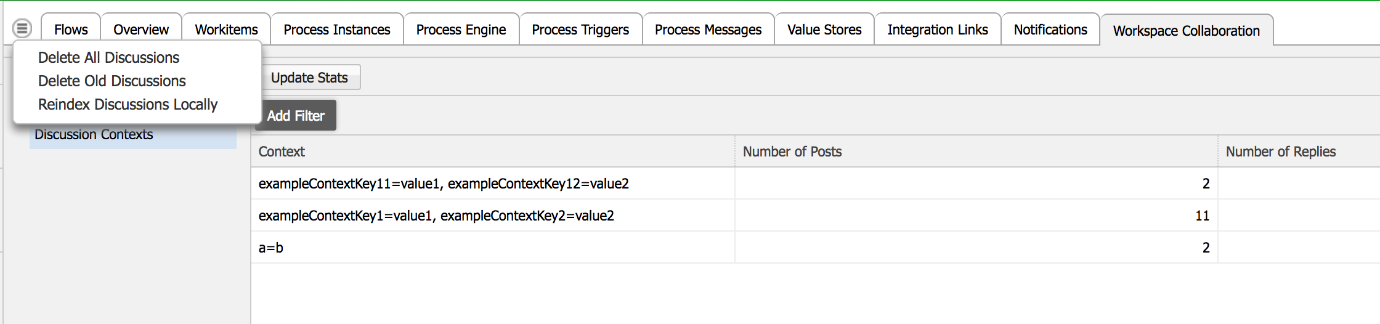
Workaround: Run the following Scripts in the Interactive Script Editor instead:
- Delete All Chats
CONTEXT().getUserMessagingService().getChatModule().bulkDeleteAllChats() - Delete All Discussions
CONTEXT().getUserMessagingService().getDiscussionModule().bulkDeleteAllDiscussionMessages() - Delete Old Discussions
CONTEXT().getUserMessagingService().getDiscussionModule().bulkDeleteDiscussionMessages(timestamp) - Reindex Discussions Locally
CONTEXT().getUserMessagingService().getDiscussionModule().reindexDiscussionMessagesLocally()
- Versions 3.4.3 (May 31, 2017) through to 3.4.5 (February 22, 2018)
- SLA definitions are not copied when moving a Process from one Package to another Package.
Workaround: Copy the SLA definitions manually from the old Process to the new Process.
-
Versions 3.3.4 (June 6, 2017) through to 3.3.10 (February 22, 2018)
- When a mapped Data Class is moved/refactored and then undeleted, both the old and the new Data Class contain the same table name.
Workaround: A sensor notifies the user of this inconsistency. Fix the metadata in the Data Classes manually. - If there are mapped Data Classes and the DataStore is not running, the system can end up in an inconsistent status.
Workaround: Keep the DataStore running if there is at least one mapped Data Class.
-
Version 3.3.3 (May 31, 2017)
- When a mapped Data Class is moved/refactored and then undeleted, both the old and the new Data Class contain the same table name.
Workaround: Fix the metadata in the Data Classes manually. - (FIXED in 3.3.4) Users are not notified of an inconsistent metadata status unless they open the DataStore UI.
Workaround: Check the DataStore UI periodically (e.g. always before committing). - If there are mapped Data Classes and the DataStore is not running, the system can end up in an inconsistent status, but users are not notified that the DataStore is not running.
Workaround: Keep the DataStore running if there is at least one mapped Data Class.
(FIXED with 9.0.0, released September 6, 2017) The extension has not been updated yet and currently no version compatible with Appway 7 is available.
- Versions 3.0.3 (December 13, 2017) & 3.0.2 (May 31, 2017)
- (FIXED in 4.0.0, released April 12, 2018) Batch programs (stored as Resources) can contain references to Business Objects. If those Business Objects are moved to another Package, batch programs will break.
- Version 3.0.5 (May 31, 2017)
- (FIXED in 3.0.6, released July 26, 2017) The extension has not been tested comprehensively to ensure it is fully functional with Appway 7.