The CMISforDigitalBinder Starter Kit (ingredient of Digital Binder v4 and lower) is a legacy component.
End of Support (EOS) has taken place in September 2022. Recommended action: Consider adopting
Digital Binder v5 or higher.
CMISForDigitalBinder is a Starter Kit that shows how to configure CMIS to be used to persist Digital Binder file attachments.
CMIS specifications are used by the main Document Management Systems (DMS) such as Alfresco™, IBM® FileNet, IBM® OnDemand etc.
The Starter Kit includes a Package which extends the Digital Binder to support CMIS attachments and an Appway extension that provides a subset of the operations offered by the underlying Apache Chemistry OpenCMIS library. The library implements the CMIS 1.0 and 1.1 specifications (more details here). The provided operations are available in the form of Appway functions and can be used to interact with the CMIS server, and deal with documents, folders, and properties.
- CMISForDigitalBinder – A modifiable Package
- CMISConnector extension
- Digital Binder Business Component
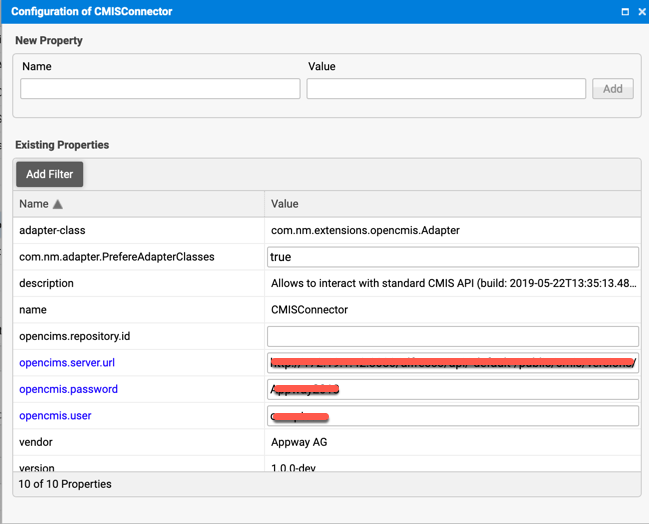
After you have installed the extension, set the following extension configuration properties to ensure the extension works as expected:
opencmis.server.url – URL to the CMIS server endpoint.opencmis.user – The user to be used for the integration calls.opencmis.password – Password of the integration user.opencmis.repository.id – ID of the repository to be used. Not required in all cases, for example the Alfresco server doesn’t require this setting if you intend to use the default repository.
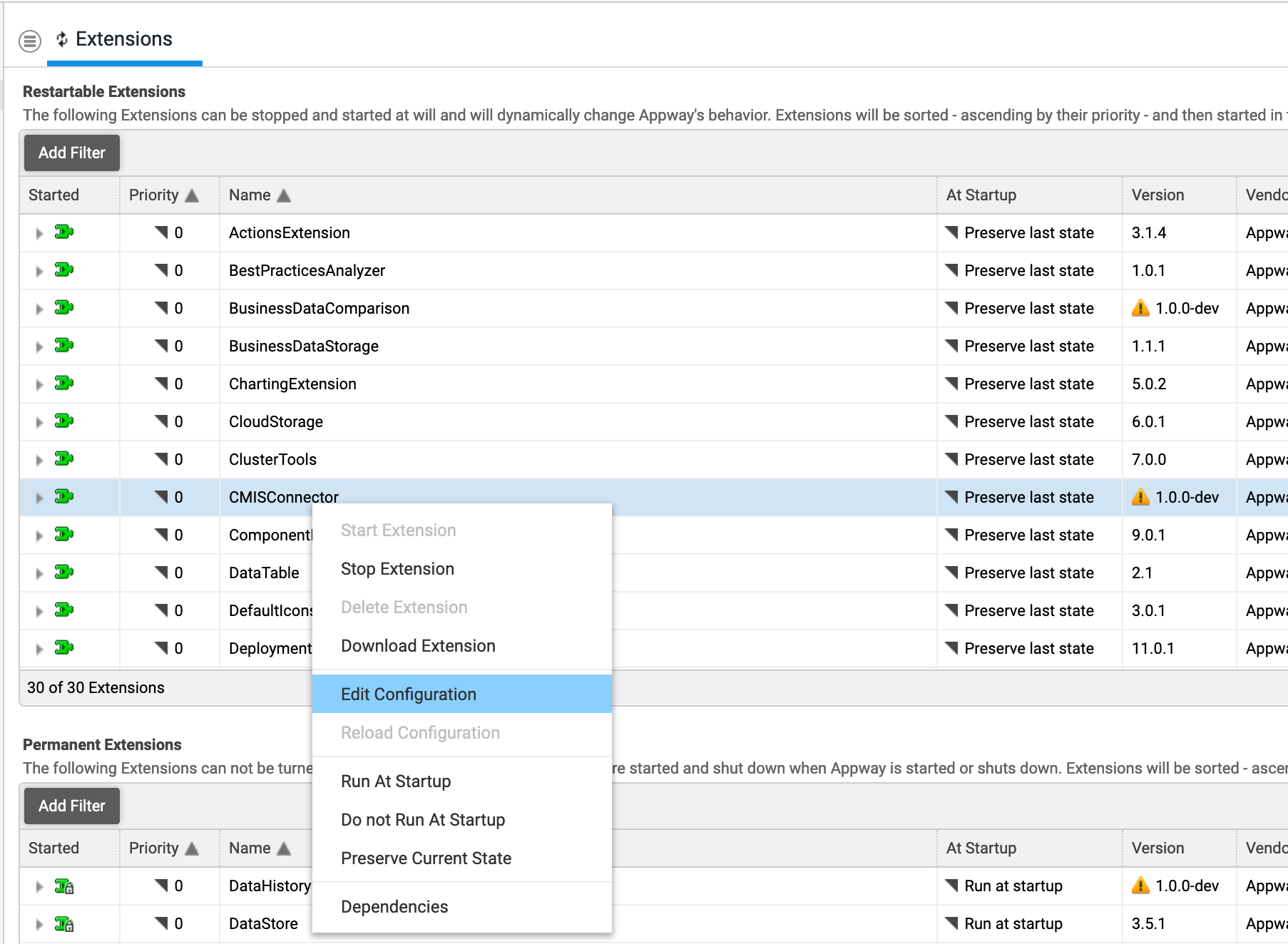
The configuration properties are set at the extension level and are accessed through the extension configuration dialog (System Configuration > Extensions):
An example of configuring the CMIS Connector:
The CMISConnector is a suitable module for extending the Digital Binder capabilities, allowing to use a CMIS server as the Digital Binder backend for storing attachments.
To achieve this goal, you do not need to build a new type of Smart Attachment from scratch. Instead, Appway has implemented the CMISAttachment Data Class, which is shipped in the CMISForDigitalBinder Package.
Once the Package has been installed, and the extension was properly configured and started, define the following system configuration properties (at System Configuration > Configuration Properties) to enable the CMIS backend:
- Set the property
digitalbinder.file.attachment.type to CMISForDigitalBinder:CMISAttachment to specify it as the file attachment type for the Digital Binder instance (see the section covering the Digital Binder Configuration in the Digital Binder documentation). - Set the property
smartattachments.cmisAttachment.root.folderId to the ID of the root folder on the CMIS server.
An example configuration:

After enabling the CMIS server as the Digital Binder backend, all attachment files are stored on that external system instead of on the local file system. Upload/download operations are transparent for the end users.
The CMISConnector extension exposes a number of functions.
Creates a new document on the CMIS server.
Parameters
$name
The name of the document to create.
Type: String$filePath
Absolute path to the file to upload to the document.
Type: String$mimeType (Optional)
Mime type of the uploaded file, default is application/octet-stream.
Type: String$parentFolderId (Optional)
ID of the parent folder into which to place the created document. By default the function creates the document in the root folder of the repository.
Type: String
Return Value
- The ID of the created document.
Type: String
Downloads the specified document from the CMIS server, storing it at the specified file path.
Parameters
$documentId
ID of the document to download.
Type: String$filePath
Absolute path where the downloaded file is saved.
Type: String
Return Value
- The absolute file path to the downloaded file.
Type: String
Deletes the specified document from the CMIS server.
Parameters
$documentId
ID of the document to delete.
Type: String
Return Value
true if the operation was successful, false otherwise.
Type: Boolean
Replaces the content of the specified document on the CMIS server with the specified file.
Parameters
$documentId
ID of the document to update.
Type: String$filePath
Absolute path to the file to upload as a replacement.
Type: String
Return Value
true if the operation was successful, false otherwise.
Type: Boolean
Creates a folder on the CMIS server. Provide a parent folder ID to create the new folder as its sub-folder.
Parameters
$name
Name of the folder to create.$parentFolderId (Optional)
ID of the parent folder into which to place the created folder. By default the function creates the folder in the root folder of the repository.
Type: String
Return Value
- The ID of the created folder.
Type: String
Returns the CMIS ID of the specified folder.
Parameters
$name
Name of the folder to resolve.
Type: String
Return Value
- The ID of the specified folder.
Type: String
Returns an Indexed String with the Document IDs of the documents contained in the specified folder.
Parameters
$folderId
ID of the folder to read.
Type: String
Return Value
- The Document IDs of the documents contained in the specified folder.
Type: Indexed String
Returns the properties of the specified document from the CMIS server.
Parameters
$documentId
ID of the document from which to retrieve properties.
Type: String
Return Value
- The document properties.
Type: Named String
Updates the specified properties on the CMIS server.
Parameters
$documentId
ID of the document for which to update properties.
Type: String$properties
The properties to update.
Type: Named String
Return Value
true if the operation was successful, false otherwise.
Type: Boolean