Note that the Appway Platform has been renamed
FNZ Studio (also referred to, generically, as Platform in this article). Appway Studio (design-time environment) and Appway Workspace (runtime environment) have been renamed
FNZ Studio Composition and
FNZ Studio Runtime, respectively. Refer to our Renaming
article for full information.
Data Gathering is the Platform’s one stop shop for all data gathering use cases. It provides a modern, intuitive and fast approach to gathering client data for business cases of any complexity. It can be used for complex party and account profiling steps of a solution, as well as smaller but equally important activities such as defining mailing instructions.
This document contains configuration information and technical details on Data Gathering and the Data Gathering App Task, and is intended for users in charge of Data Gathering configuration. See also:
- AppTask Extension (included in the FNZ Studio Platform)
- AppTaskAPI Extension (included in the FNZ Studio Platform)
- DataGathering Extension
- (optional) WorkspaceCollaboration Extension (to be installed if you are using Collaboration features).
All ingredients are provided by Support. Always check the Data Gathering
Products card for information on all available ABC versions, their specific ingredients, and their compatibility with the Platform.
- Check the Platform version compatible with your Data Gathering version in the Data Gathering Products card. Moreover:
- Make sure that your Platform installation includes all other mandatory extensions to be checked on the System Upgrade guide in addition to the AppTask and AppTaskAPI mentioned above.
- Make sure that your Platform installations includes the mandatory Packages to be checked on the System Upgrade guide(dowloadable from the Products page).
- Upload the extensions:
- AppTask
- AppTaskAPI
- DataGathering
- Optionally, for an example of configuration of the Data Gathering, install the DataGatheringExample Package:
- Upload the WebServices extension (only needed for the DataGatheringExample Package).
- Download the DataGatheringExample Package from the Products page
- Import the DataGatheringExample Package.
Label Refactoring
Some Labels have been refactored in Data Gathering v4, therefore some actions may be necessary if you are upgrading to this version. See also the Labels and Translations section in the App Tasks - Generic Configuration documentation for further details.
- Added Labels — The following Labels have been added to the AppTask Platform Package with default English texts. You can add and edit translations for such Labels (in Solution Design> Translations tab):
ErrorMessages.Savepoints.FetchErrorMessages.Catalog.FetchErrorMessages.Collaboration.UpdateErrorMessages.Data.FetchErrorMessages.DefaultErrorMessages.Update.Collection.AddErrorMessages.Update.Collection.RemoveErrorMessages.Update.Object.CreateErrorMessages.Process.Action.ExecuteErrorMessages.Task.InitErrorMessages.Theme.FetchErrorMessages.Document.AddErrorMessages.EndTaskErrorMessages.StartSubprocessErrorMessages.Definition.Update
- Moved Labels — The following Labels have been moved from the DataGathering Platform Package to the AppTask Platform Package. If you set translations for such Labels, you need to copy your translated texts (displayed in Solution Design> Translations tab) from the old to the new Label:
AppTask:RulesInfo.BlockingAppTask:RulesInfo.NonBlockingAppTAsk:RulesInfo.Blocking.a11yAppTask:RulesInfo.NonBlocking.a11y
- Removed Labels — The following Label has been removed. If you set a translation for such Labels you can optionally remove it (from **Solution Design **> Translations tab):
DataGathering:Actions.Deleting
Label Refactoring
Some Labels have been refactored in Data Gathering v3.1, therefore some actions may be necessary if you are upgrading to this version. See also the Labels and Translations section in the App Tasks - Generic Configuration documentation for further details.
- Moved Labels — The following Labels have been moved from the DataGathering Platform Package to the AppTask Platform Package. If you set translations for such Labels, you need to copy your translated texts (displayed in Solution Design> Translations tab) from the old to the new Label:
BlobFileControl.Error.Count.MessageBlobFileControl.Error.Count.TitleBlobFileControl.Error.Size.MessageBlobFileControl.Error.Size.TitleBlobFileControl.Error.Type.MessageBlobFileControl.Error.Type.Title
Label Refactoring
Some Labels have been refactored from Data Gathering v2.4 to v2.4.1, therefore some actions may be necessary.
- Added Labels — The following Labels have been added to the AppTask Platform Package with default English texts. You can add and edit translations for such Labels (in Solution Design> Translations tab):
AppTask:SavingSaved.saving (default value: Saving Data...)AppTask:SavingSaved.saved (default value: Data Saved!)AppTask:SavingSaved.error (default value: Error Saving Data)AppTask:CollaborationSidebar.Comments.Reply (default value: Reply)AppTask:CollaborationSidebar.Comments.Reply-plural (default value: Replies)
Label Refactoring
A Label has been refactored from Data Gathering v2.1 to v2.2, therefore some actions may be necessary. See also the Labels and Translations section in the App Tasks - Generic Configuration documentation for further details.
- Moved Labels — The following Label has been moved from the DataGathering Platform Package to the AppTask Platform Package. If you set translations for such Label, you need to copy your translated texts (displayed in Solution Design> Translations tab) from the old to the new Label:
Label Refactoring
Some Labels have been refactored from Data Gathering v2.0.1 to v2.1, therefore some actions may be necessary. See also the Labels and Translations section in the App Tasks - Generic Configuration documentation for further details.
- Moved Labels — The following Labels have been moved from the DataGathering Platform Package to the AppTask Platform Package. If you set translations for such Labels, you need to copy your translated texts (displayed in Solution Design> Translations tab) from the old to the new Label:
DataGathering:UnsupportedControl.Message to AppTask:UnsupportedControl.MessageDataGathering:ControlError.Title to AppTask:ControlError.TitleDataGathering:ControlError.Message to AppTask:ControlError.MessageDataGathering:RulesPanel.Blocking to AppTask:IssuePanel.Blocking.TitleDataGathering:RulesPanel.Nonblocking to AppTask:IssuePanel.NonBlocking.TitleDataGathering:RulesPanel.View to AppTask:IssuePanel.ViewDataGathering:RulesPanel.Fix to AppTask:IssuePanel.Fix
- Added Labels — The following Labels have been added to the AppTask Platform Package with default English texts. You can add and edit translations for such Labels (in Solution Design> Translations tab):
AppTask:IssuePanel.Blocking.DescriptionAppTask:IssuePanel.Nonblocking.DescriptionAppTask:IssuePanel.ReviewRequests.TitleAppTask:IssuePanel.ReviewRequests.DescriptionAppTask:IssuePanel.ReviewRequests.Required
Label Refactoring
Some Labels have been refactored from Data Gathering v2.0 to v2.0.1, therefore some actions may be necessary. See also the Labels and Translations section in the App Tasks - Generic Configuration documentation for further details.
- Moved Labels — The following Labels have been moved from the DataGathering Platform Package to the AppTask Platform Package. If you set translations for such Labels, you need to copy your translated texts (displayed in Solution Design> Translations tab) from the old to the new Label:
TabNavigation.GoToPreviousTabNavigation.GoToNextObjectNavigation.a11y.ObjectMenuObjectNavigation.a11y.GoToPreviousObjectNavigation.a11y.GoToNextObjectNavigation.PopupSeeAllObjectNavigation.a11y.PopupSeeAllExtendedObjectNavigation.a11y.SelectedObjectPageNavigation.ShowPageNavigation.Close
- Removed Labels — The following Label has been removed. If you set a translation for such Labels you can optionally remove it (from **Solution Design **> Translations tab):
ControlHistoryWidget.Popup.Heading
- Added Labels — The following Labels have been added to the AppTask Platform Package. You can add translations for such Labels (in Solution Design> Translations tab):
ChangeHistory.Popup.HeadingChangeHistory.List.EmptyState.Message
When upgrading Data Gathering from v1.4 to v2.0, consider the following changes of behavior.
App Tasks Actions
Before Appway 11, Actions were specified using Action Controls (End Task and Start Subprocess) in the Data Logic. This approach is now deprecated, therefore App Tasks ignore all Action Controls added to Data Logic Business Objects in Appway 11 and higher.
Action Controls added to Data Logic Business Objects before Appway 11 still work as before for compatibilty reasons, but it is recommended to migrate them to the new approach. To achieve this, replace each Data Logic Action Control used for App Tasks with an Action defined in the App Task as described in App Task Actions in the App Tasks - Generic Configuration document.
Consider that Data Gathering buttons generated from the End Task and Start Subprocess Action Controls defined in Data Logic Business Objects were automatically disabled in case of Blocking violations to Data Rules. This logic is now fully configurable using the Sentry field on Custom Actions. In order to preserve the existing behavior and disable Custom Actions in case of blocking violations, use the Script Function AppTask:HasBlockingViolations in the Sentry scripts (see details in Custom Actions in the App Tasks - Generic Configuration document).
Asynchronously Loaded Catalogs
In previous versions of Data Gathering, Catalogs without variable assignments were asynchronously loaded. Starting with Data Gathering v2, Catalogs for which the corresponding Data Logic 'Catalog Values' Rule (Catalog Size property) configuration specifies the option The catalog can return a large number of results are asynchronously loaded, no matter if they declare assigned variables.
To benefit from asynchronously loading, which improves performances, you need to specify the option The catalog can return a large number of results in the Catalog Values Rule (Catalog Size property).
After following the installation steps above, the Data Gathering App Task will be available in your Platform installation in the Process Editor that you can drag into the central composition area. The Data Gathering App Task generates a UI whose main scope is the gathering of data from the end user.

| Tab | Description |
|---|
| Properties | Configure general properties of the App Task:- Task Title field: Select the Label Business Object containing the title for the whole Data Gathering page. In case the property is not set, it shows 'Appway'.
- Task type dropdown: Select the Task pattern (details).
|
| Data | Configure specific Data Gathering properties: - Data Logic field: Define the Data Logic Business Object that governs the UI generation (details)
- History Enabled checkbox: If selected, change history is enabled for all fields from the tracking start point.
|
| Actions | Configure Global Actions (generic to all App Tasks) (details). |
| Collaboration | Configure features such as Comments and Review Requests, which are common to the Data Gathering and Data Review App Tasks (details). |
Other configurations, such as the
Home button configuration, are not performed in the Process Editor but through configuration properties. See the
App Home button in the App Tasks - Generic Configuration document.
As mentioned in the previous section, the whole UI is generated starting from the Data Logic Business Object according to mapping strategies specific to the Data Gathering business requirements.
The Autogenerated UI is composed by the elements illustrated in the following image. The table below summarizes the corresponding Data Logic configurations. These configuration are common to most App Tasks.

| UI element | Data Logic configuration |
|---|
Page navigation, including:- (
1) Header navigation (first-level navigation) - (
2) Page navigation (second-level navigation) - (
3) Anchor navigation (content navigation)
| Data Logic 'Group' Controls (see details). |
(4) Content area | Data Logic 'Data' Controls (Data Class, Primitive and Collection Controls) and 'Text' Controls (see details for Primitive Types and Text). |
(5) Information Framework : Contains change-highlighting strategies to support the end user in finding and fixing such changes in the most efficient way. | Data Logic Data Rules. See configuration details and UI details. |
The Data Gathering App Task provides features for file uploading. These are provided by the so-called File Uploader, which is available in the Data Gathering and Digital Binder App Tasks and is configured through Data Classes.
When building a solution that uses Data Driven UIs, the User Interface is automatically generated based on:
- The specific App Task used in the Process, such as the Data Gathering App Task
- The business logic defined in one or more Data Logic Business Objects
- The data model defined through Data Classes
When the Data Logic is translated in a Data Driven UI, such as in the Data Gathering, controls are rendered as form elements by default. However, in some situations, specific Data Classes need to be shown in a different way. For example, an Address in a list of addresses could be shown using a more compact UI element than a full list of form elements.
Data Class Behaviors provide semantic information at Data Class level to ensure that the final representation of the Data Class in a Data Driven UI is coherent with the data contained in the Data Class.
See more resources:
- General information on Data Class Behaviors, their different types, and configuration details in the Data Class Behaviors document.
- Specific information on how Behaviors impact the Data Gathering App Tasks in the sections below.
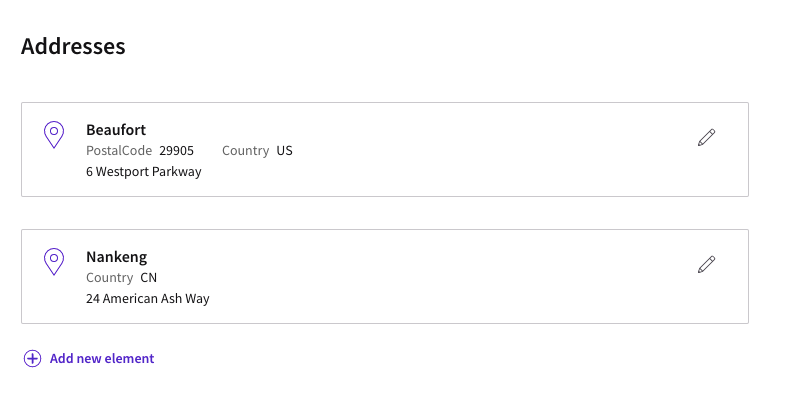
The Summary Behavior allows organizing the list of data in a list of entities in order to have a condensed view of a large amount of data.
Consider the example of a Data Gathering process in which the information about a Person has to be filled in through the form. In the business model required by the application, consider that a piece of information attached to a person is a list of Addresses.
This situation can be represented by a Person Data Class, containing a property addresses of type Indexed Address, where Address is another Data Class containing the address information items country, city, street and number.
Following is an example of an Address Data Class with a Summary Behavior:
The File Component mentioned above already provides a File Uploader.
However, by adding a Document Behavior, you can obtain advanced file uploading features, such as adding Solution-specific business metadata to your uploaded files, and organize documents in folders.
Language, date and number localization is available for App Tasks.
Moreover, you can brand your solution through the Theme Editor, a tool available in the workspace side of the App Tasks out-of the-box