Important Note: The Hierarchy Tree Package was previously called Role Manager Package (before March 29, 2018).
With the Hierarchy Tree, you can assign an object to one or multiple roles. The roles depend on a rule that must be specified at runtime. Depending on the use case, some roles may be mandatory, while others may be optional.
The Hierarchy Tree aims to solve the problem of hierarchical dependencies between data objects, for instance “Relation -> Person” or “Person -> Person”, in general “Object -> Object”.
The new module of the Hierarchy Tree is far less complex than the previous one, but it maintains the possibility to solve the same use cases as before and also extends them without the need of creating other Data Classes.
To find all the Business Objects related to the Hierarchy Tree, go to Solution Design > Hierarchy Tree > Business Objects > Lists > Hierarchy Tree in the Appway Studio. Below you can find reference information for the most essential Business Objects.
The following Data Classes are available:
- RoleManager – This Data Class manages all the features to read and write data into the tree structure. Should be inherited by every class that is eligible to become a container of roles.
- HTAcceptedInfoTypes – Utility class that contains constants for accepted info types in HTNode.
- HTActionTypeEnum – [Legacy] Utility class that contains static methods to filter legacy custom actions ‘role’, ‘complexrole’, ‘treenode’ and ‘subtreenode’.
- HTAndFilter – Container filter that connects all the filters it contains with a AND operator.
- HTApplyFilterVisitor – Visitor that applies the given filter chain on the given HTNode.
- HTBaseFilter – Base class for all the filters.
- HTBuilderByActions – Builds a tree structure starting from the Actions evaluated from a Rule.
- HTBuilderByRule – Builds a tree structure starting from the evaluation of a rule.
- HTByInfoFilter – Filter that checks the equality of instance info and the given node info.
- HTByInfoTypeFilter – Filter that checks the equality of the instance info type and the given node info type.
- HTByNameFilter – Filter that checks the equality of the instance node name and the given node name.
- HTByPropertyFilter – Filter that checks the equality of the instance property value and the given node property value.
- HTCardinalityConstraint – Contains the cardinality constraint of the node.
- HTCardinalityFinding – Contains information on the difference of cardinality found when comparing trees.
- HTComparator – Executes the comparison between 2 trees and returns a report containing all the differences.
- HTComparisonCategoryEnum – Utility class for comparison categories.
- HTComparisonFinding – Base class for all the comparison finding classes.
- HTComparisonFindingCaseEnum – Utility class for comparison cases.
- HTComparisonFindingFactory – Enables the user to create instances of all the comparison finding Data Classes.
- HTComparisonVisitor – Visitor that actually does the comparison between 2 trees.
- HTComplexNodeAction – New class that is used instead of the SUBTREENODE/COMPLEX ROLE custom actions.
- HTCopyVisitor – Visitor that copies a tree structure into another one.
- HTInfoFinding – Contains information on the difference of info found when comparing trees.
- HTNode – The representation of every node in the tree structure.
- HTNodeAction – New class that is used instead of the TREENODE/ ROLE custom actions.
- HTNodeInfo – Interface class used as placeholder for node infos.
- HTNodeInfoHelper – Helper wrapper class to select a HTNodeInfo.
- HTNotFilter – Container filter that puts the filter it contains in NOT.
- HTOrFilter – Container filter that connects all the filters it contains with the OR operator.
- HTPropertyFinding – Contains information on the difference of properties found when comparing trees.
- HTPrototypeFinding – Contains information on the difference of prototypes found when comparing trees.
- HTree – Contains the tree structure.
- HTreeVisitor – Interface class for all the visitors.
- HTRegistrationMode – Utility class used to understand when registering/unregistering a node.
- HTRegistrationVisitor – Visitor that registers/unregisters a node consistently into the tree structure.
- HTSafeDeleteVisitor – Visitor that deletes a node safely and consistently from the tree structure.
- HTStructureFinding – Contains information on structural differences found when comparing trees.
- HTValidationError – Wraps the validation error that can occur when setting the HTNodeInfo into an HTNode.
- RoleManagerModeEnum – Utility enum that contains static methods to understand if you are using the Role Manager in CREATE or UPDATE mode.
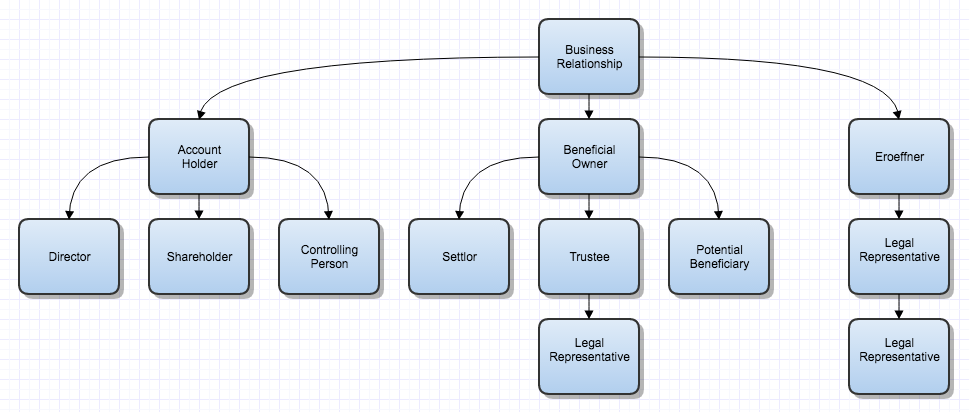
As mentioned above, the structure behind the Hierarchy Tree is a tree which is, by definition, a hierarchical structure. Here is a sample representation of a solved use case.
The following properties are available:
rolesTree (HTree) – Contains the tree structure of the roles.mode (String) – Convenience property to let the user set a mode for the role manager.
E.g. mode = insert mode, mode = read only mode
The following methods are available:
addObjectToRole(HTNodeInfo $entity, HTNode $role) (Returns Nothing) – Adds the $entity as content of the parameter $role.addRoleFromExisting(HTNode $role) (Returns Nothing) – Clones the parameter $role and adds the clone at the same level of the $role parameter in the tree structure.addRoleFromOptional(HTNode $role, HTNode $optionalRole) (Returns HTNode) – Adds an optional Role to the parameter $role based on the definition given by the parameter $optionalRole.addRoleFromExisting(HTNode $role) (Returns HTNode) – Clones the $role parameter and adds the clone at the same level as the $role parameter in the tree structure.canAddRole(HTNode $role) (Returns Boolean) – Returns TRUE if is it possible to add another role like $role parameter in the tree structure based on cardinality constraints, FALSE otherwise.canRemoveRole(HTNode $role) (Returns Boolean) – Returns TRUE if is it possible to remove the $role parameter from the tree structure based on cardinality constraints, FALSE otherwise.compareRoles(HTNode $roleA, HTNode $roleB) (Returns Integer) – Compares two roles based on optionality and name.getInfo(HTNode $node) (Returns HTNodeInfo) – Retrieves the information stored in $node.getMode (Returns String) – Retrieves the value of the mode property.getObjectRoles(HTNodeInfo $entity)(Returns Indexed HTNode) – Retrieves the roles which the parameter $entity is bound to.getObjectsInRole(String $roleId)(Returns Indexed HTNodeInfo) – Retrieves all the objects contained in roles of type $roleId.getRoleActions() (Returns Indexed HTNodeInfo) – Interface method that returns the result of the evaluation of the rule.getRoleManagerCopy (Returns RoleManager) – Retrieves a copy of the current instance of the RoleManager.hasRole(HTNodeInfo $entity, String $roleId) (Returns Boolean) – Returns TRUE if the parameter $entity is in the role $roleId, FALSE otherwise.init(String $ruleId) (Returns Nothing) – Initializes the tree structure by evaluating the rule $ruleId.isOptionalRole(HTNode $role) (Returns Boolean) – Returns TRUE if the $role parameter has been created as an optional role based on cardinality constraints, FALSE otherwise.removeRole(HTNode $role)(Returns Nothing) – Removes $role from the tree structure along with all its children.resetRoleInfo(HierarchyTreeNode $role) (Returns Nothing) – Clears the info of $role and sets it to null.setMode(String $value) (Returns Nothing) – Sets the value of the property mode.
The following methods are available:
- static
getAcceptAll() (Returns String) – Retrieves the constant value to make the node accept anything as info.
The following methods are available:
- static
COMPLEXROLE() (Returns String) – Retrieves the constant value to identify the complex role custom action. - static
ROLE() (Returns String) – Retrieves the constant value to identify the role custom action. - static
SUBTREENODE() (Returns String) – Retrieves the constant value to identify the sub tree node custom action. - static
TREENODE() (Returns String) – Retrieves the constant value to identify the tree node custom action.
The following methods are available:
accept(HTNode$node) (Returns Boolean) – Executes the specific runtime of the filter, acting as an AND gateway.addFilter(HTBaseFilter $filter) (Returns Nothing) – Adds $filter to the filter chain.removeFilter(HTBaseFilter $filter) (Returns Nothing) – Removes $filter from the filter chain.
The following properties are available:
breakAtFirstMatch (Boolean States) – if the filter chain has to be stopped after hitting the first match.filter (HTBaseFilter) – The filter to be evaluated.findings (Indexed Elements HTNode) – Contains all the findings after the evaluation of all the filters.
The following methods are available:
visit(HTNode $node) (Returns Nothing) – Executes the specific runtime of the visitor applying all the filters to the $node.
The following properties are available:
filters (Indexed Elements HTBaseFilter) – Contains all the filter instances to be evaluated.
The following methods are available:
accept(HTNode $node) (Returns Boolean) – Interface method, throws an exception if called directly.addfilter(HTBaseFilter $filter) (Returns Nothing) – Interface method, throws an exception if called directly.removefilter(HTBaseFilter $filter) (Returns Nothing) – Interface method, throws an exception if called directly
The following methods are available:
- static
build( Indexed Action $actions, HTNode $root) (Returns Nothing) – Creates the tree structure by filling the $root node starting from the collection of actions parameter $actions. - static
isAcceptedAction(HTNodeAction $a) (Returns Boolean) – Private method that states if the current evaluated action is either an HTNodeAction or an HTComplexNodeAction.
The following methods are available:
- static
build(String $ruleId, HTNode $root) (Returns Nothing) – Creates the tree structure by filling the $root node starting from the rule $ruleId. - static
isAcceptedAction(HTNodeAction $a) (Returns Boolean) – Private method that states if the current evaluated action is either an HTNodeAction or an HTComplexNodeAction.
The following properties are available:
info (HTNodeInfo) – Instance info for checking equality.
The following methods are available:
accept(HTNode $node) (Returns Boolean) – Asserts the equality of instance $info and $node.info.
The following properties are available:
infoType (String) – Instance info type for checking equality.
The following methods are available:
accept(HTNode $node) (Returns Boolean) – Asserts the equality of instance $infoType and $node.info.type.
The following properties are available:
nodeName (String) – Instance node name for checking equality.
The following methods are available:
accept(HTNode $node) (Returns Boolean) – Asserts the equality between $nodeName and $node.name.
The following properties are available:
key (String) – Key of the map to check.value (Any) – Instance value for checking equality.
The following methods are available:
accept(HTNode $node) (Returns Boolean) – Asserts the equality between $value and $node.properties[$key].
The following properties are available:
max (Integer) – Contains the maximum cardinality of a HTNode in the tree structure.min (Integer) – Contains the minimum cardinality of a HTNode in the tree structure.
The following properties are available:
case (String) – Contains the case (see HTComparisonFindingCaseEnum).maxA (Integer) – Contains the max cardinality of node A.maxB (Integer) – Contains the max cardinality of node B.minA (Integer) – Contains the min cardinality of node A.minB (Integer) – Contains the min cardinality of node B.nodeName (String) – Contains the node name.
The following methods are available:
getCase() (Returns String) – Returns the case based on the values of minA, minB, maxA, maxB.
The following properties are available:
report (Indexed Elements HTComparisonFinding) – Contains all the comparison findings discovered.treeA (HTree) – The source tree to compare.treeB (HTree) – The destination tree to compare.
The following methods are available:
compare() (Returns Nothing) – Compares the two given tree structures.getComparisonReport() (Returns Indexed Elements HTComparisonFinding) – Gets the comparison report by returning $this.report.
The following methods are available:
- static
CARDINALITY() (Returns String) – Category of type HTCardinalityFinding - static
INFO() (Returns String) – Category of type HTInfoFinding - static
PROPERTY() (Returns String) – Category of type HTPropertyFinding - static
PROTOTYPE() (Returns String) – Category of type HTPrototypeFinding - static
STRUCTURE() (Returns String) – Category of type HTStructureFinding
The following properties are available:
category (String) – Category of the comparison finding.nodeIdA (String) – ID of node A of the finding case.nodeIdB (String) – ID of node B of the finding case.
The following methods are available:
getCase() (Returns String) – Interface method, throws an exception if called directly.
The following methods are available:
- static
CONTENT_DIFFERENCE() (Returns String) – Case of finding differences in the content of the node - static
IN_A_NOT_IN_B() (Returns String) – Case of finding differences present in node A but not in node B - static
IN_B_NOT_IN_A() (Returns String) – Case of finding differences present in node B but not in node A
The following methods are available:
- static
buildCardinalityFinding(String $nodeIdA, String $nodeIdB, String $nodeName, Integer $minA, Integer $minB, Integer $maxA, Integer $maxB) (Returns HTCardinalityFinding) – Creates an instance of the data class HTCardinalityFinding. - static
buildInfoFinding(String $nodeIdA, String $nodeIdB, HTNodeInfo $infoA, HTNodeInfo $infoB) (Returns HTInfoFinding) – Creates an instance of the data class HTInfoFinding. - static
buildPropertyFinding(String $nodeIdA, String $nodeIdB, String $propertyName, Any $propertyValueA, Any $propertyValueB) (Returns HTPropertyFinding) – Creates an instance of the data class HTPropertyFinding. - static
buildPrototypeFinding(String $nodeIdA, String $nodeIdB, String $nodeName, String $prototypeIdA, String $prototypeIdB) (Returns HTPrototypeFinding) – Creates an instance of the data class HTPrototypeFinding. - static
buildStructureFinding(String $nodeIdA, String $nodeIdB, String $fatherIdA, String $fatherIdB) (Returns HTStructureFinding) – Creates an instance of the data class HTStructureFinding.
The following properties are available:
mainNode (HTNode) – Instance of HTNode to compare to the one passed to the visit methodreport (LinkedList) – The final collection containing all the comparison findings (differences).treeANodeStack (Stack) – Convenience private variable used for difference calculation.treeBNodeStack (Stack) – Convenience private variable used for difference calculation.windowFlags (LinkedList) – Convenience private variable used for difference calculation.
The following methods are available:
compareCardinalities(HTNode $nodeA, HTNode $nodeB, Named HTCardinalityConstraint $cardA, Named HTCardinalityConstraint $cardB) (Returns Nothing) – Compares the cardinalities of $nodeA and $nodeB and fills the report with the correct finding class.compareProperties(HTNode $nodeA, HTNode $nodeB, Named Any $propertiesA, Named Any $propertiesB) (Returns Nothing) – Compares the properties of $nodeA and $nodeB and fills the report with the correct finding class.comparePrototypes(HTNode $nodeA, HTNode $nodeB, Indexed HTNode $prototypesA, Indexed HTNode $prototypesB) (Returns Nothing) – Compares the prototypes of $nodeA and $nodeB and fills the report with the correct finding class.visit(HTNode $node) (Returns Nothing) – Implementation of an interface method to traverse the nodes.
The following properties are available:
rebuildOnInfoChange (Boolean) – States if the structure of the node has to be re-evaluated when the info is set or changed.rule (String) – The rule id that has to be evaluated for calculating the sub structure of the node.
The following properties are available:
rootNode (HTNode) – The node to copy.
The following methods are available:
visit(HTNode $node) (Returns Nothing) – The implementation of the interface method that actually performs the copy operation.
The following properties are available:
infoA (HTNodeInfo) – The info of nodeA.infoB (HTNodeInfo) – The info of nodeB.
The following properties are available:
acceptedInfoTypes (Indexed Elements String) – Contains all the types that are allowed to be used as info of the node.cardinalityByName (Named Elements HTCardinalityConstraint) – Contains all the cardinalities of the children.children (Indexed Elements HTNode) – All the children of the node.father (HTNode) – The father node of the current node.filterExpression (String) – An expression that is evaluated when the info is set.info (HTNodeInfo) – Information part of the node.name (String) – Name of the node.nodeId (String) – Unique ID of the node.nodeProperties (Named Elements Any) – Properties of the node.prototypes (Indexed Elements HTNode) – The optional nodes ( minimum cardinality = 0 )rebuildOnInfoChange (Boolean) – States if the node has to rebuild its children when the info is set or changed.ruleId (String) – The rule to evaluate if rebuildOnInfoChange is TRUE.treePointer (HTree) – The instance of the HTree the node is into
The following methods are available:
accept(HTreeVisitor $visitor) (Returns Nothing) – Runs the visitor $visitor.addChildFromPrototype(HTNode $prototype) (Returns HTNode) – Appends a new child to the node starting from a prototype.addPrototype(NTNode $node) (Returns Nothing) – Adds a new prototype.append(HTNode $child) (Returns Nothing) – Adds a new child to the node.clone() (Returns HTNode) – Creates a clone of the current node.countChildrenByName(String $name) (Returns Integer) – Counts the number of children with the given name.downgradeNodeToPrototype(String $name) (Returns Nothing) – Creates a prototype starting from a node with the given type and updates the cardinality accordingly.getFather() (Returns HTNode) – Retrieves the father of the current node.getInfo() (Returns HTNodeInfo) – Retrieves the info of the current node.getMaximumAllowedForType(String $name) (Returns Integer) – Retrieves the upper boundary of the cardinality constraint given the name of the node.getMinimumAllowedForType(String $name) (Returns Integer) – Retrieves the lower boundary of the cardinality constraint given the name of the node.getName() (Returns String) – Retrieves the name of the current node.getNodeId() (Returns String) – Retrieves the node ID of the current node.hasProperty(String $propertyName) (Returns Boolean) – Returns true if the node has a property with that name in the input.isHardInfoTypeAccepted(HTNodeInfo $info) (Returns Boolean) – Checks the type of information against the list of provided types.isTypeAccepted(String $type) (Returns Boolean) – States if $type is accepted according to $acceptedInfoTypes.removeChild(HTNode $node) (Returns Nothing) – Removes a child from the children list.removeFromTree() (Returns Nothing) – Removes the current node from the tree structuresetCardinalityConstraint(String $name, Integer $min, Integer $max)(Returns Nothing) – Set the cardinality constraint to the given name nodes.upgradePrototypeToNode(String $name, Integer $min) (Returns Nothing) – Removes a prototype creating a normal structure according to the given cardinality (0 cardinality doesn't affect the tree).validateInfo(HTNodeInfo $info) (Returns Boolean) – Validates the info that is going to be set.
The following properties are available:
acceptedInfoTypes (Index Elements String) – Contains all the types that the info of the node can contain.filterFunction (String) – Contains a script that is evaluated when setting the info.max (Integer) – Upper boundary of the cardinality constraint for this node.min (Integer) – Lower boundary of the cardinality constraint for this node.name (String) – Name of the node.properties (Named Elements) – Any Properties of the node.
The following methods are available:
addAcceptedInfoType(String $infoType) (Returns Nothing) – Adds a new accepted info type to the already existing ones.setAcceptedInfoType(Indexed String $infoTypes) (Returns Nothing) – Overwrites the entire collection of accepted info types.
The following properties are available:
nodeInfo (HTNodeInfo) – The selected information part.role (HTNode) – The role containing the information part.roleManager (RoleManager) – The role manager instance.
The following methods are available:
getNodeInfo() (Returns HTNodeInfo) – Gets the nodeInfo Data Class property.reset(RoleManager $roleManager) (Returns Nothing) – Sets the roleManager Data Class property to $roleManager and the nodeInfo Data Class property to null.setNodeInfo(HTNodeInfo $nodeInfo) (Returns Nothing) – Sets the nodeInfo Data Class property.
The following properties are available:
filter (HTBaseFilter) – The filter to negate.
The following methods are available:
accept(HTNode $node) (Returns Boolean) – Implementation of the interface method, negates the outcome of $filter.addFilter(HTBaseFilter $filter) (Returns Nothing) – Sets $filter.removeFilter(HTBaseFilter $filter) (Returns Nothing) – Sets $filter to null.
The following methods are available:
accept(HTNode $node) (Returns Boolean) – Implementation of the interface method, connects all the filters in the filter chain with an OR operator.addFilter(HTBaseFilter $filter) (Returns Nothing) – Adds $filter to the filter chain.removeFilter(HTBaseFilter $filter) (Returns Nothing) – Removes $filter from the filter chain.
The following properties are available:
case (String) – Contains the case (see HTComparisonFindingCaseEnum).propertyName (String) – Name of the property of the finding case.propertyValueA (Any) – Value of the property contained in nodeA.propertyValueB (Any) – Value of the property contained in nodeB.
The following methods are available:
getCase() (Returns String) – Returns the case based on the values of propertyValueA and propertyValueB.
The following properties are available:
case (String) – Contains the case (see HTComparisonFindingCaseEnum)prototypeIdA (String) – ID of the prototype contained in nodeA.prototypeIdB (String) – ID of the prototype contained in nodeB.prototypeName (String) – Name of the prototype of the finding case.
The following methods are available:
getCase() (Returns String) – Returns the case based on the values of protypeIdA and prototypeIdB.
The following properties are available:
nodeIndex (Named Elements HTNode) – Convenience map that contains all the references to the nodes of the structure.root (HTNode) – Root node of the tree structure.
The following methods are available:
getRoot() (Returns HTNode) – Retrieves the root of the tree.getTreeNodeById(String $nodeId) (Returns Nothing) – Returns the tree node from the given Id.registerNode(HTNode $node) (Returns Nothing) – Registers a node into the structure consistently.unregisterNode(HTNode $node) (Returns Nothing) – Unregisters a node from the structure consistently.
The following methods are available:
visit(HTNode $node) (Returns Nothing) – Interface method, throws an exception if called directly.
The following methods are available:
- static
getRegisterAction() (Returns String) – Retrieves the enum value for registering a node. - static
getUnregisterAction() (Returns String) – Retrieves the enum value for unregistering a node.
The following properties are available:
mode (String) – The mode of the visitor, see HTRegistrationMode.tree (HTree) – The tree to register/unregister the node to/from.
The following methods are available:
visit(HTNode $node) (Returns Nothing) – Implementation of the interface method, register/unregister a node to/from the tree.
The following properties are available:
nodeStack (Stack) – Convenience variable used for the implementation of the visit method.
The following methods are available:
safeDeleteNode(HTNode $node) (Returns Nothing) – Private method that unregisters $node from the structure.visit(HTNode $node) (Returns Nothing) – Implementation of the interface method, removes a node from the structure consistently.
The following properties are available:
case (String) – Contains the case (see HTComparisonFindingCaseEnum).nodeFatherIdA (String) – ID of the father of nodeA.nodeFatherIdB (String) – ID of the father of nodeB.
The following methods are available:
getCase() (Returns String) – Returns the case based on the values of nodeFatherIdA and nodeFatherIdB.
This Data Class does not have properties and methods, it is just a placeholder for a possible implementation that must be extended by the user.
The following methods are available:
- static
CREATE() (Returns String) – Returns the string representing the create mode of the role manager. - static
UPDATE() (Returns String) – Returns the string representing the update mode of the role manager.
The following Script Functons are available:
HTBuildTreeStructure (String $ruleId) (Returns HTree) – Builds the HTree starting from the evaluation of the rule.HTCompareHierarchyTrees(HTree $treeA, HTree $treeB) (Returns Indexed HTComparisonFinding) – Compares two trees and returns the comparison report.HTGetFilteredChildren(HTNode $node, HTBaseFilter $filter, Boolean $breakAtFirstMatch := false) (Returns Indexed HTNode) – Applies $filter to the children of $node.HTGetFilteredNodes (HTree $tree, HTBaseFilter $filter, Boolean $breakAtFirstMatch := false) (Returns Indexed HTNode) – Applies $filter to the whole tree structure.HTGetFilteredNodesInfo(HTree $tree, HTBaseFilter $filter, Boolean $breakAtFirstMatch := false) (Returns Indexed HTNodeInfo) – Applies $filter to the whole tree structure and returns all the infos of all the filtered nodes.HTGetTreeCopy(HTree $treeToCopy) (Returns HTree) – Retrieves a HTree copied instance starting from the input HTree.HTSetTreeNodeInfo(HTNode $node, HTNodeInfo $info) (Returns Nothing) – Sets the info of the given $node.HTHandleFilterExpressionError(HTNode $node, HTNodeInfo $info) (Returns HTValidationError) – Interface function that handles the filter expression validation error when setting an info on an HTNode.HTHandleValidationFilterError(HTNode $node, HTNodeInfo $info) (Returns HTValidationError) – Interface function that handles the info validation error when setting an info on an HTNode.
The following Business Objects are visible:
- HTAndFilter (Data Class)
- HTBaseFilter (Data Class)
- HTBuilderByActions (Data Class)
- HTBuilderByRule (Data Class)
- RoleManager (Data Class)
- HTByPropertyFilter (Data Class)
- HTByNameFilter (Data Class)
- HTByInfoTypeFilter (Data Class)
- HTByInfoFilter (Data Class)
- HTCardinalityFinding (Data Class)
- HTComparisonFinding (Data Class)
- HTAcceptedInfoTypes (Data Class)
- HTActionTypeEnum (Data Class)
- HTAndFilter (Data Class)
- HTApplyFilterVisitor (Data Class)
- HTBaseFilter (Data Class)
- HTInfoFinding (Data Class)
- HTNode (Data Class)
- HTNodeInfo (Data Class)
- HTNodeInfoHelper (Data Class)
- HTNotFilter (Data Class)
- HTOrFilter (Data Class)
- HTPropertyFinding (Data Class)
- HTPrototypeFinding (Data Class)
- HTValidationError (Data Class)
- HTree (Data Class)
- HTreeVisitor (Data Class)
- HTStructureFinding (Data Class)
- RoleManagerModeEnum (Data Class)
- HTBuildTreeStructure (Script Function)
- HTCompareHierarchyTrees (Script Function)
- HTGetFilteredChildren (Script Function)
- HTGetFilteredNodes (Script Function)
- HTGetFilteredNodesInfo (Script Function)
- HTGetTreeCopy (Script Function)
The following Business Objects are replaceable:
- GetRolesNumberStatement (Script Function)
- HTHandleFilterExpressionError (Script Function)
- HTHandleValidateInfoError (Script Function)
The Hierarchy Tree is a black-box and it needs to have a RoleManager Data Class instance to make it work properly. It is necessary to make a Data Class of the data model inherit from the RoleManager Data Class. It is necessary to implement the interface method getRoleActions to provide the outcome of the evaluation of the Rule that the role manager Data Class will use internally.
In addition, all Data Classes that can be set into the information part of every node in the tree must extend the Data Class HTNodeInfo.
A Rule is needed to create a new instance of the Hierarchy Tree, in which the tree structure of the roles is defined. Two custom actions are required to be used to define such structure:
- Role

- Complex Role

Simply put, the Role custom action defines a role with all its properties while the Complex Role defines a role with the same properties as the Role action, but with sub-roles.
Let’s take an example from the following rule:
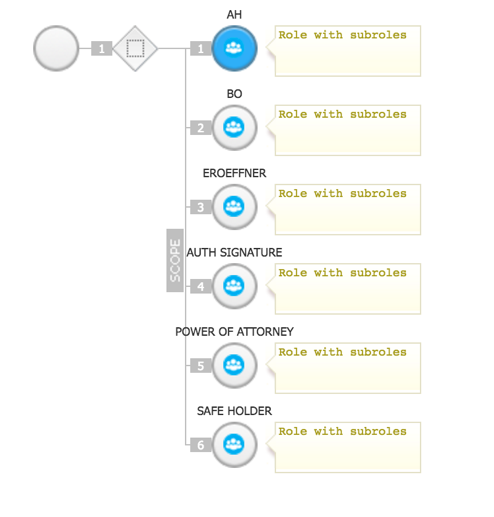
This is a Rule where a complex structure is defined using the Complex Role action, so every one of them will have a nested structure defined. Here’s the detail of the Account Holder action configuration:
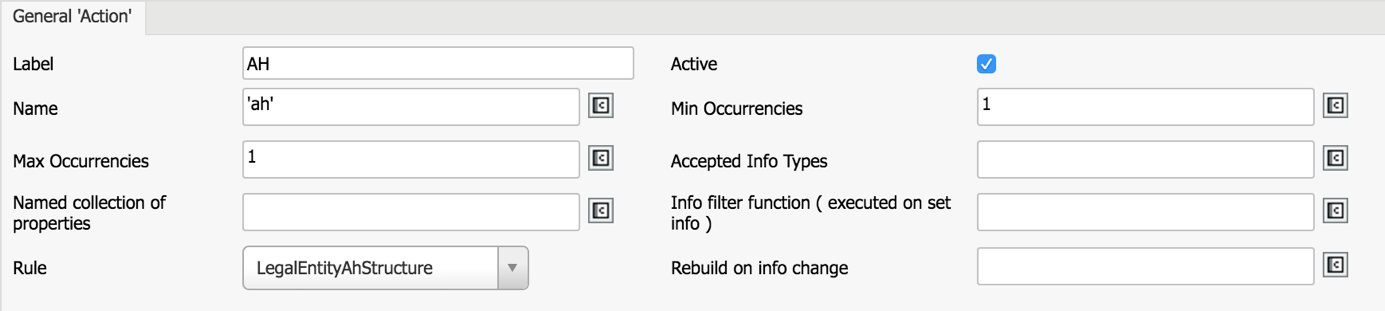
Basically, this defines a role in the structure which name is ah and there should be only one of it ( Min occurrencies = 1 and Max occurrencies = 1 ). The field Accepted info types being blank, means that every kind of object can be assigned to this role. The inner structure of this role will be defined by the Rule LegalEntityAhStructure which is shown below:
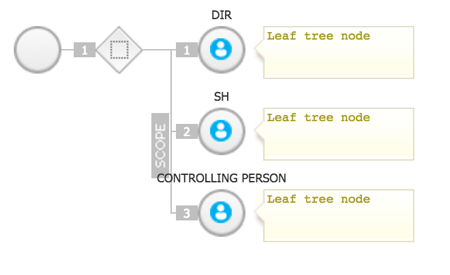
In this Rule, the Role action is used since the listed roles do not have an inner structure. The configuration of these actions is very similar to the previous one:

There are two main differences:
- You cannot select a Rule that defines an inner structure.
- The only objects that are accepted for this role are the instances of PhysicalParty.
To use the full potential of this sub-rule, it is recommended to define these inherited variables in its scope:
- info as HTNodeInfo
- node as HTNode
In this way it is possible to access the info of the node this Rule belongs to, as well as the node itself.
First, there needs to be an implementation of the interface method getRoleActions that returns the result of the evaluation of the Rule, like this:
Function getRoleActions() : Indexed Action Begin
   Return EVALUATERULE('RoleManagerExample:TestRoleManager');
End
Here is a code example on how to initialize the Role Manager and be ready to use it:
$roleManager.init();
Or
RoleManager:RoleManager $roleManager := NewObject('RoleManager:RoleManager');
Another important point is to replace two Script Functions that handle the possible errors that can occur when setting the info into a node: HTHandleFilterExpressionError and HTHandleValidateInfoError.
Here’s a possible implementation of those two Script Functions:
Function RoleManagerExample:MyHTHandleFilterExpressionError(RoleManager:HTNode $node, RoleManager:HTNodeInfo $info) : RoleManager:HTValidationError Begin
   FAIL('Could not set ' & $info.toString() & ' in role ' & $node.name & ' filter expression raised an error');
   Return null;
End
Function RoleManagerExample:MyHTHandleValidateInfoError(RoleManager:HTNode $node, RoleManager:HTNodeInfo $info) : RoleManager:HTValidationError Begin
   FAIL('Could not set ' & $info.toString() & ' in role ' & $node.name & ' info validation raised an error');
   Return null;
End