How do Screen Tasks behave in conjunction with other tasks that make the Process Engine move the token as a result of completion of a background activity (e.g. the completion of an async Integration Link Task)? How are Screen Task tokens initialized and moved to the 'Active' state?
First of all, see the Integration Link: Avoiding Lock and Long-running Service Conflicts article for an overview of the possible combinations of Integration Link Task, CallIntegrationLink Function and their execution modes.
Moreover, the following sections illustrate how Screen Tasks behave in conjunction with other tasks that make the Process Engine move the token as a result of completion of a background activity (e.g. the completion of an async Integration Link Task).
A token on a Screen Task gets the 'Active' state only after the scope for the target screen has been initialized. In turn, the scope for the target screen is initialized only when the screen is rendered for the first time, that is, when the user "visits" this workitem for the first time.
The main reason for "deferring" the initialization of the scope until the screen is rendered is that we want to have access to the 'current user' when evaluating the assignment and default expressions for the scope.
Imagine a situation with two Screen Tasks, in two different Swimlanes, where the completion of Screen Task 1 moves the token to Screen Task 2 in Swimlane 2.
When User 1 in Swimlane 1 clicks Next (or any other action that completes the task), the Process Engine moves the token forward through the process (synchronously in the context of User 1), until it reaches Screen Task 2. Since Screen Task 2 is assigned to another user (User 2), the process engine stops here, and User 1 is redirected to the Inbox.
If the Process Engine immediately initialized the scope for Screen Task 2, functions such as User:CurrentUserId() would still return User 1's ID. To avoid this, the Process Engine only moves the token to Screen Task 2 and then mark it as 'Ready'. This makes the token already visible as a workitem in User 2's Inbox.
When User 2 now opens the workitem, the Screen Task takes care of initializing the screen's scope. If this now triggers the execution of a function such as User:CurrentUserId(), this function returns User 2's ID.
If the two Screen Tasks were in the same Swimlane, the Process Engine would not stop after setting the token to 'Ready'. Instead, the Process Engine would redirect the user to the URL for this token; the token would trigger the rendering of the screen; and the screen would initialize the scope and then set the token to 'Active'.
Now imagine the following scenario:
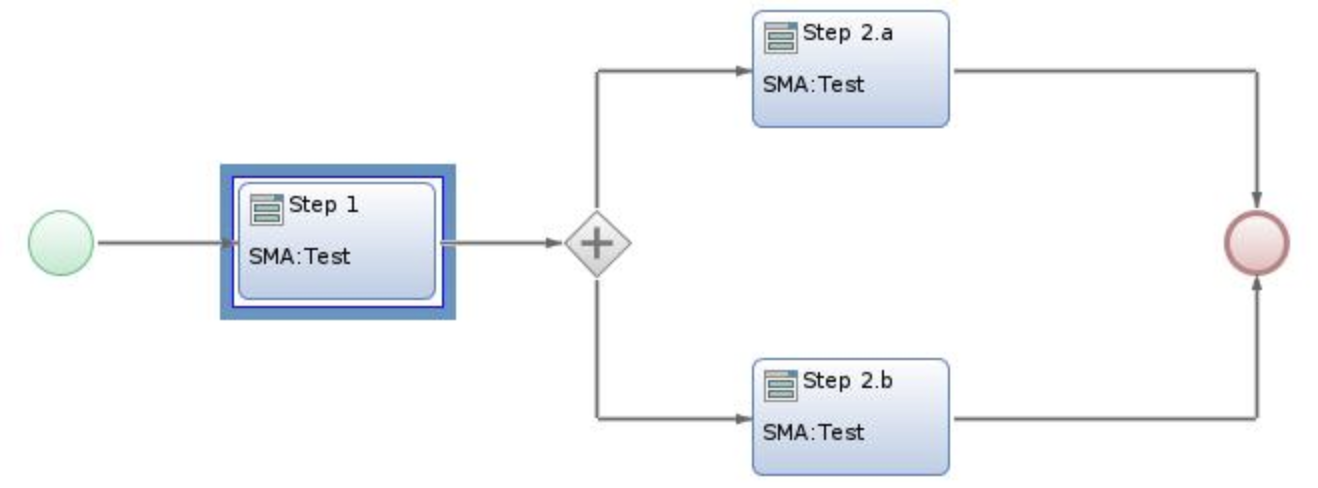
After completing step 1, the AND gateway makes the Process Engine place a token to both screen Tasks:
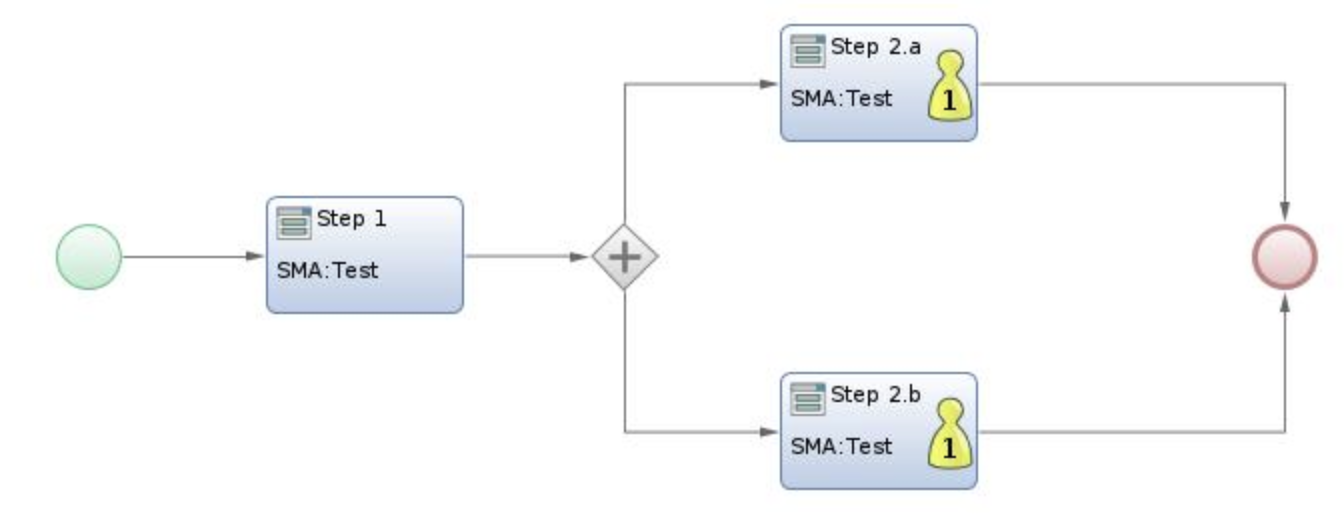
The Process Engine then "decides" which screen to show to the user first. When the user looks at this screen, the token on this screen Task becomes 'Active', while the token on the other (not yet rendered) screen is still in state 'Ready':

In short, a token on a Screen Task only becomes 'Active' when it is "visited" by a user for the first time, where "visited" means that the screen is rendered.
But, how do Integration Links have an impact on this?
- An async execution of an Integration Link makes the Process Engine stop moving the token when it reaches the Integration Link. The Integration Link is then executed in the background, outside of the context of the HTTP request that started the process (or completed the previous process task). If the Integration Link execution completes, the Process Engine is notified, and it takes care of moving the token forward through the Process Model. However, this is now a background activity. The original HTTP thread/request is probably long gone. Therefore, there is no way to do an HTTP redirect for the user onto the next screen. If the token reaches a Screen Task, it only gets to state 'Ready' because the transition to state 'Active' only happens when the screen is rendered for the first time.
- A sync execution of an Integration Link behaves differently because all the work is done "in-line" in the same thread by the Process Engine, usually the HTTP request that was used to complete the previous process step (e.g. the click on Next" in the previous screen). If the same user has access to the next Screen Task, the Process Engine redirects the user to this screen directly, the scope gets initialized, and the token state becomes 'Active'.
In general, consider that this problem is not specific to Integration Links, as it is, basically, a timing issue. When is the screen rendered the first time?
The screen is rendered when the token becomes 'Active'. If, at some point, the process execution "goes in the background", there is no automatic redirect of the user to the next screen (because background processing could take minutes or even hours). Instead, the user is sent to the Inbox.