I'm using an Integration Link with several long-running services. Are there any examples of good practice I should know so that I avoid problems with locking?
This recipe outlines the benefits and drawbacks of configuring Integration Link service calls synchronously or asynchronously, when dealing with long-running services. To help avoid conflicts between write locks and long-running service calls, we recommend that an asynchronous configuration be used.
For information on Asynchronous and Synchronous Behaviors in the Process Engine, see the related
recipe.
In order to ensure consistency in a concurrent system, Appway uses a locking mechanism with exclusive write locks. When a thread holding a lock invokes a long-running service, Appway force-unlocks the object held by this blocking thread after a certain period of time (120s + maximum 119 s) has elapsed.
After the long-running service completes, the thread may commit changes to the object - but the thread no longer holds a lock on the object. This may lead to lost update situations: In the meantime, other threads may have acquired a lock on the same object, performed changes to that object and then already committed the changes.
As a consequence, service calls should be configured in an asynchronous way, trying to avoid conflicts between write locks and long-running (and thus blocking) service calls.
Whether Integration Links (ILs) run synchronously or asynchronously requires configuration at the Integration Link level (see Figure 1), and at the process task level (see Figure 2).

Figure 1: Integration Link configured to run asynchronously on the Integration Link level, defining a thread pool of 5
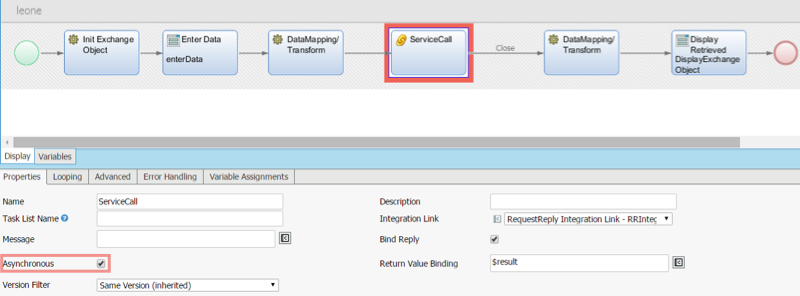
Figure 2: Integration Link configured to run asynchronously on the Integration Link Process task level
Based on these two levels of configuration, four combinations are possible.
The table below provides an overview of the different configuration combinations. The quadrants specify the thread usage, and characteristics of the various combinations.
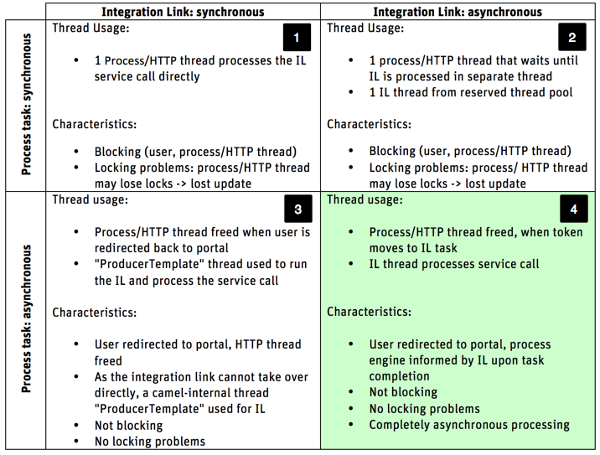
Table 1
Quadrant 1: Synchronous / Synchronous
When the IL, and IL Process task, run synchronously, the Process/HTTP thread processes the Integration Link directly. The service call therefore blocks the thread and the user, and may lead to locking problems in cases where the service call takes too long.
Quadrant 2: Synchronous / Asynchronous
Here the Process task is configured to run synchronously but the IL is configured to run asynchronously. This means that the Process/HTTP thread is waiting for the IL thread to complete the service call and return, thus blocking the user and reducing thread availability. Also, the Process/HTTP thread may lose their locks if the service call takes too long. As a consequence, lost update situations may occur.
Quadrant 3: Asynchronous / Synchronous
The bottom left quadrant illustrates the scenario where the Screen task is processed asynchronously, while the IL is configured to run synchronously. The user is redirected to the portal and the HTTP thread is freed. As the IL cannot take over directly, a camel-internal "ProducerTemplate" thread is used to run the IL and process the service call. The ProducerTemplate thread pool has a size of 10.
Quadrant 4: Asynchronous / Asynchronous
The bottom right quadrant summarizes the characteristics of fully asynchronous service call invocation: The IL and the IL Process task are configured to run asynchronously, as illustrated by the settings in Figure 1 and Figure 2 above. This configuration is considered a best practice.
As soon as the token arrives on the IL Process task, an IL thread takes over and processes the IL components. As a consequence, the Process/HTTP thread is freed and, in case of a preceding Screen task, the user is redirected to the portal.
The lock on the Process Instance held by that thread is released when the IL thread takes over. The system's availability is improved and no conflicts between long-running operations and the locking mechanism occur. Note that the Process Instance is not locked while the IL is processed.
When the Integration Link is done processing a service call, the IL thread sends a notification to the Process engine: The token sitting on the IL Process task can be moved to the next task. The Process engine thus moves the token immediately after the service call is completed, with no delay or waiting time. This behavior balances out the general load on the Process engine, which, every 5 minutes, checks and then moves tokens if required.
As a best practice, the Integration Link defines assigned variables that are assigned in the Integration Link Process task. Mapping from/to the service message format is performed outside of the Integration Link (as shown in Figure 2) to ensure that the correct version of the mapping scripts is used. This is because all Process Instances use the same version of the Integration Link: See the recipe on Integration Link Versioning for more information.
Note: We do not recommend accessing the Process Instance within the IL, as the IL thread does not hold a lock for the Process Instance.
When calling Integration Links via the CallIntegrationLink($linkId, $params, $versionFilter, $waitForReply) function, the parameter $waitForReply defines whether or not the current thread waits until the Integration Link is executed.
If $waitForReply=true, the thread executing the Script task waits for the Integration Link call to return before proceeding.
If $waitForReply=false, the Integration Link is processed by a separate thread while the current thread continues processing the script. This is the default behavior.
Table 2 provides an overview of the different configuration combinations. The quadrants specify the thread usage, and characteristics of the various combinations.
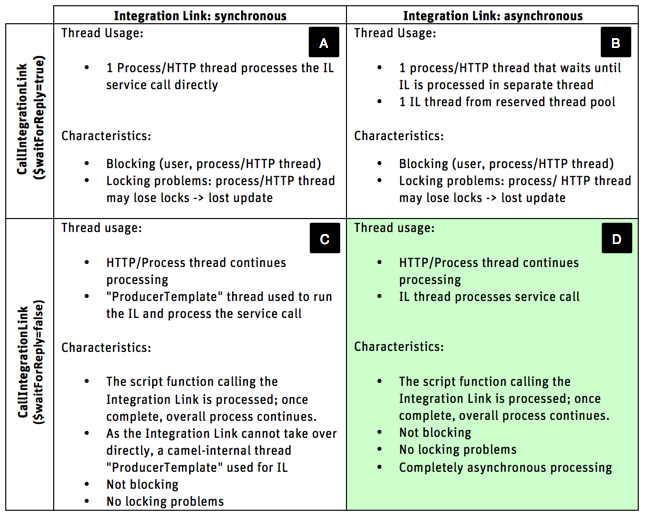
Table 2
Quadrant A: CallIntegrationLink ($waitForReply=true) / Synchronous
The thread usage and characteristics are the same as for Quadrant 1 in Table 1.
Quadrant B: CallIntegrationLink ($waitForReply=true) / Asynchronous
Thread usage and characteristics are the same as Quadrant 2 in Table 1.
Quadrant C: CallIntegrationLink ($waitForReply=false) / Synchronous
Thread usage and characteristics are the same as Quadrant 3 in Table 1, with one difference: The Script task / Script action calling the Integration Link is processed further; once completed, the Process continues according to standard Appway behavior.
Quadrant D: CallIntegrationLink ($waitForReply=false) / Asynchronous
Thread usage and characteristics are the same as Quadrant 4 in Table 1, with one difference: The script task / script action calling the Integration Link is processed further; once completed, the Process continues according to standard Appway behavior.
Note: If CallIntegrationLink(...).get is invoked, the thread waits for the integration task to complete (possibly in a separate thread) to access the returned object, so waitForReply has no effect.