Note that the Background Check Starter Kit is considered End of Support (EOS) starting from May 31, 2023. See full information in our
Support News.
A background check is the process of looking up criminal records, commercial records, and financial records of an individual or an organization. Financial service companies have the obligation to thoroughly check a client’s profile when onboarding, or whenever changes in a banking relationship occur. The task of checking a party’s background is typically carried out by a relationship manager, or a client advisor, and is reviewed by a compliance officer.
The Background Check Starter Kit features a typical use case of checking the background of one or several parties during an onboarding. The kit provides Solution projects a starting point for implementation. It includes:
- A user interface
- An extensible Data Model
- An integration with the Entity Search Package
- An integration with the WorldCheck Connector
The Background Check Starter Kit supports the task of checking the background of several selected parties. The task includes the following activities:
- Adding parties by submitting a search to select results.
- Verifying the status of the checks on the Background Check overview page.
- Opening an individual check to process it on the according detail screen:
- Browsing the matches of a source, and viewing a match detail, if needed.
- Marking a match as a positive hit, or resolve it.
- Resolving all matches except the positive one.
- Leaving comments for collaborators.
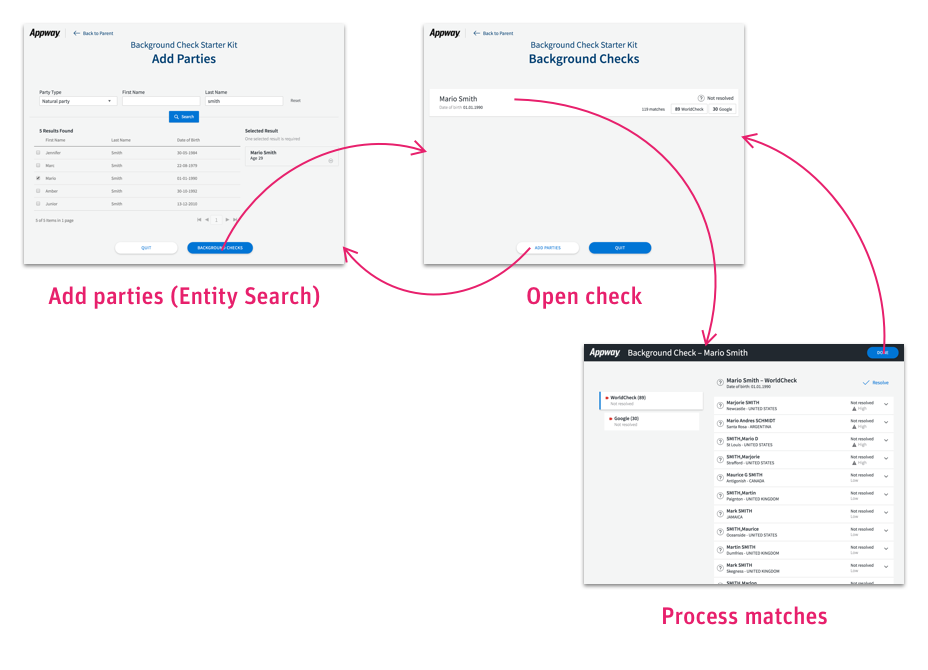
When incorporating a Background Check into an Application, there are certain guidelines to consider when taking design decisions. These design guidelines are structured by the main parts of the task:
- Integrating a background check into a larger task.
- Adding parties to a background check.
- Managing background checks.
- Browsing and processing a background check.
The Background Check is designed to be integrated into a larger task flexibly, so as to fit the Application-specific requirements. The Background Check modular structure allows using only the necessary parts. Answering the following questions help combine a Background Check with your Application task flow:
1 At which stage should the Background Check be introduced?
The point in time the background check is performed during a flow might impact liability. A background check at an early stage of an onboarding (for example, during data gathering) can be considered as optional, while it becomes mandatory to be completed before submitting the request for approval.
2 Where does the Background Check belong in the task flow?
The scope of the background check influences the task flow structure: to include the background check in a party’s detail, add it to the party’s profile. If a large number of checks needs to be performed together, combine the checks into a dedicated step.
To run a background check, one or a number of parties need to be selected first. The Background Check Starter Kit incorporates the Entity Search Business Component, allowing users to select existing parties from a predefined data source. As soon as one party has been selected, proceeding to the next step is enabled.
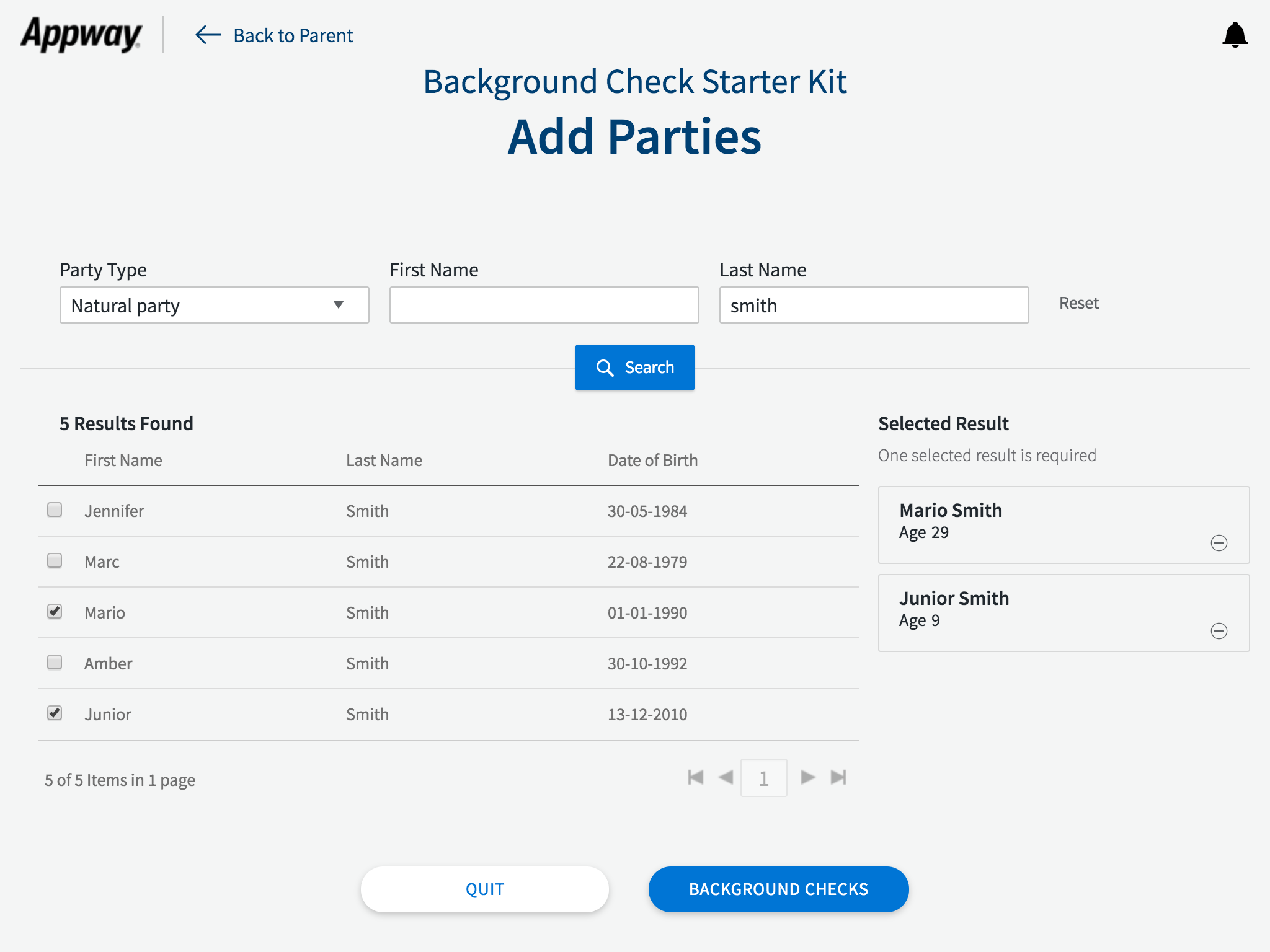
Adding parties to a background check
Refer to the Entity Search Business Component documentation for more information.
If multiple parties are to be checked, users need an overview of the checks to be performed. Each check is then represented as a Microtask Entity, showing the overall check status and the total number of matches, as well as the number of matches per source, and the occurrence of a positive match. Each Entity leads to the detail screen of the respective check.
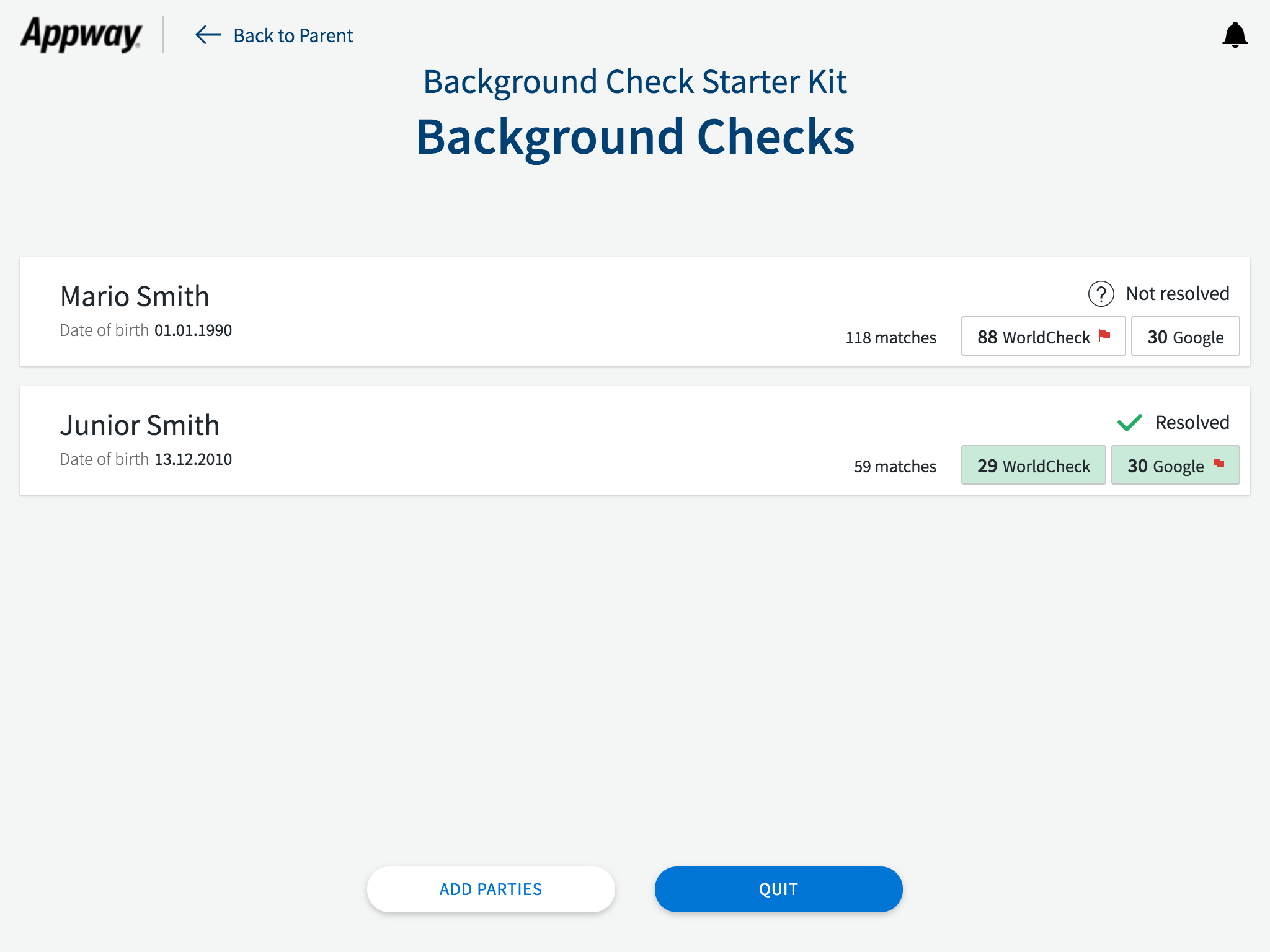
Managing background checks
The overview of background checks also serves as a summary in case of escalation: an identified positive match might require the task to be reviewed, for example by a compliance officer. The reviewer needs to quickly spot the issue causing the escalation; for this reason, the source containing a positive match is prominently highlighted with a red flag icon.
Consider the following recommendations when designing an overview of background checks:
- The mandatory status of the background check task defines whether users can continue to the next step without completing all checks.
- When using multiple sources in a check, represent each source as a token:
- Clicking on a token opens the respective source in the Background Check.
- Clicking the entire entity opens the first source by default.

- The loading of matches can take a noticeable amount of time (i.e. more than 3 seconds):
- Provide a clear loading feedback to inform users about the system state.

- Minimize the waiting time by loading matches asynchronously, so users can start working on the completed checks while others are still loading. See section Package Interface and How the Main Parts Work Together.
In the background check of a party, users browse and process the returned matches. Since a number of different sources are typically looked up, the sources are represented as a Master-Detail List:
- Select a source to display the corresponding matches in the right-hand detail column. The list of matches is headed by the information identifying the checked source: the party name passed to the check, and additional parameters, if applicable.
- Click on the Resolve button to declare all matches (or all but the true hits) as false positives.
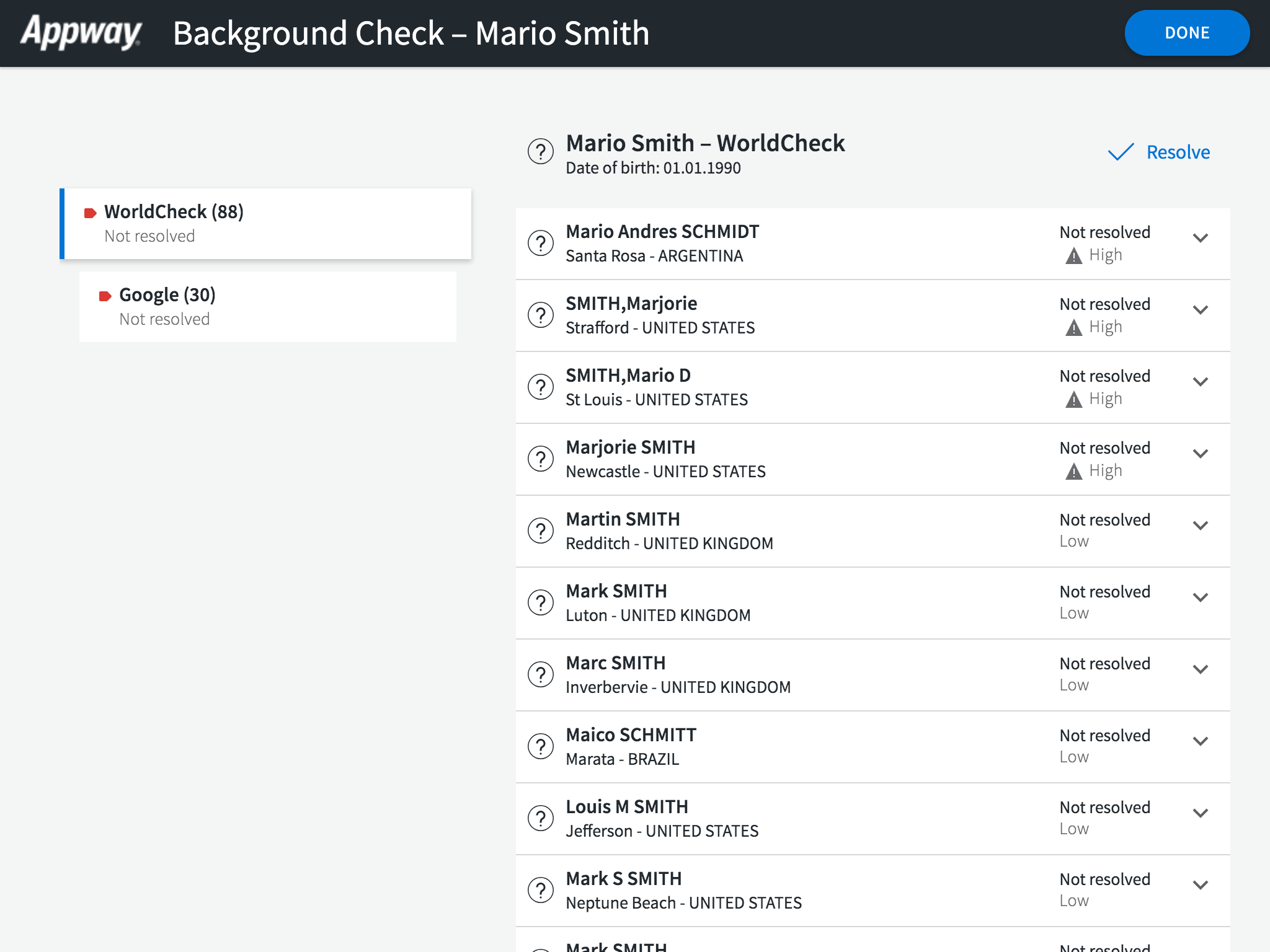
Background check: initial state of a source - Match items contain an expandable detail of the entire set of properties, which vary depending on the source. Click on the match header to display or hide the details.
- Once a match detail is expanded, you can add a comment, and either resolve the match, or mark it as positive. Positive matches are flagged by a red warning icon on the header both in the Master-Detail Entry and in the Microtask Entity on the parent screen.
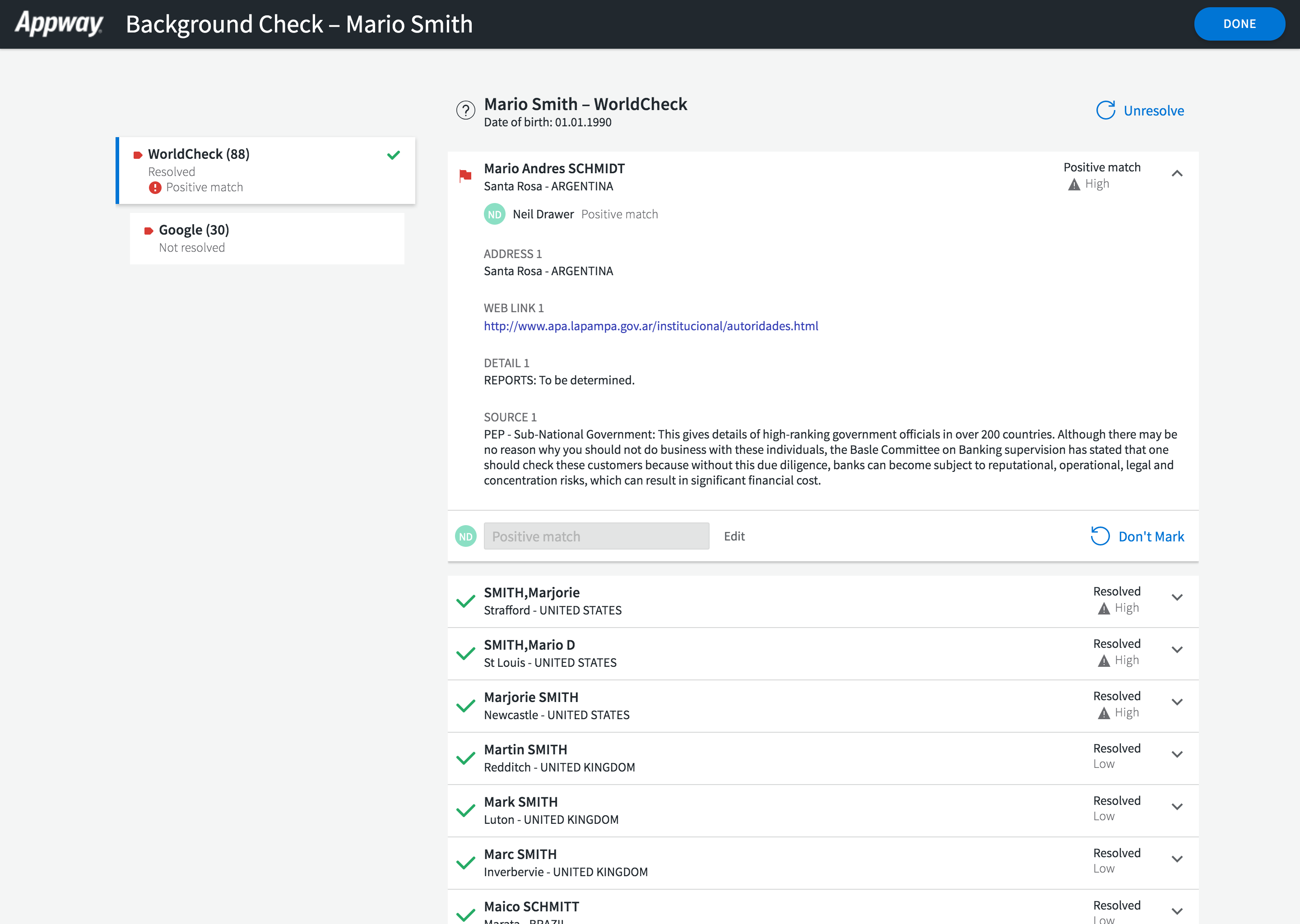
Background check: expanded detail of a positive match
Consider the following recommendations when designing a background check End Screen:
- Mark mandatory sources in the Master-Detail Entry. If a source is mandatory, all the matches of a source must be resolved, giving proof of the checking.
- Show the source progress status in the Master-Detail Entry. A source is complete once all its matches have been resolved.
- Show the information passed to the check in the source header of the match list. This allows users to easily compare the returned matches against the input.
- Sort the matches by the likelihood of a positive match, so users see the most critical matches first.
- Present the most important information in the match header and show the full set of properties in the expandable match detail.
- Separate matches into pages to prevent performance issues with loading.
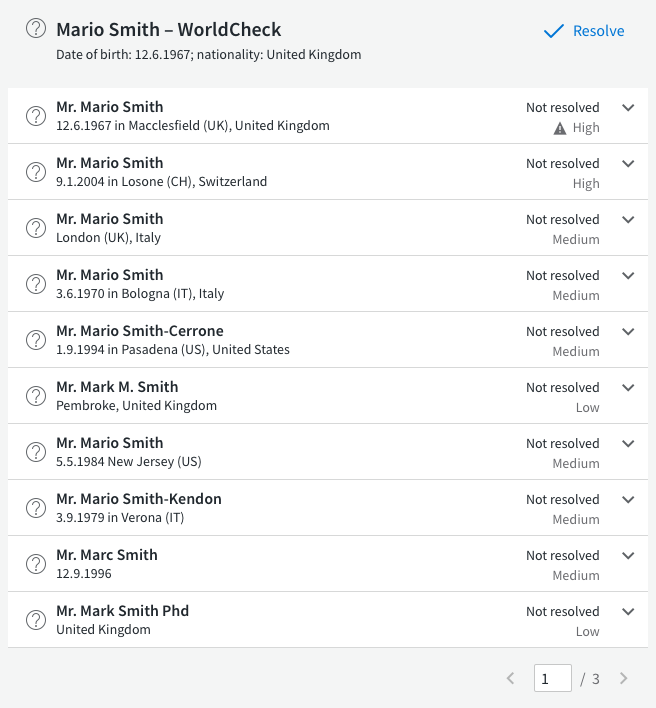
The Background Check Starter Kit includes the integration with the World-Check, which provides the ready-made Data Classes, logic and Screen flows for a basic background check scenario.
For the integration with the Google Custom Search API, the following content configurations are needed. For more information about the API, please refer to the Custom Search page.
###Background Check
##Google API
background.search.google.cx=015927927900505036763%3Axv6eftfhlgo
background.search.google.api.key=AIzaSyCfelN1z8UtoyrE79QPpC37lYIrZNnXVrU
background.search.google.defaultQuery = AND (launder OR fraud OR bribe OR corrupt OR arrest OR blackmail OR breach OR convict OR court case OR embez OR extort OR felon OR fined OR guilt OR illegal OR impris OR jail OR kickback OR litigat OR mafi OR murder OR prosecut OR terroris OR theft OR unlawful OR verdict)
#Proxy
background.search.proxy.enabled=false
background.search.proxy.host=proxy1.mpreads.com
background.search.proxy.port=8080
background.search.proxy.user=mpreads\\
The Background Check Starter Kit includes the following user flow:
- On the PartySearch Screen, add the parties, and then click on the Background Checks button.
- Once on the BackgroundChecks Screen, after the data has been collected, click on one of parties to view its records.
- You can:
- Click on one of the records to view its details, mark its status and enter comments.
- Click on the Resolve/Unresolve button to resolve or unresolve all records in bulk and add comments to the party.
The Background Check Starter Kit requires Appway Core 9.0 or higher.
The following extensions must be installed:
- DataTable 2.1 or higher
- DefaultIcons (version compatible with Appway Core)
- WorldCheckConnector 1.0.0 or higher.
- EntitySearch 2.0.0 or higher
- DesignSystem 6.0 or higher
- WorldCheck Connector 1.0.0 or higher
The Background Check Starter Kit is delivered through the BackgroundCheck Package. This Package contains Processes, Screens, Data Classes, Script Functions, Catalogs, Style, Style Value and Label Business Objects. It requires the integration with the Entity Search Package as well as the World-Check Extension.
See the Background Check Minimum Requirements and Dependencies section for details.
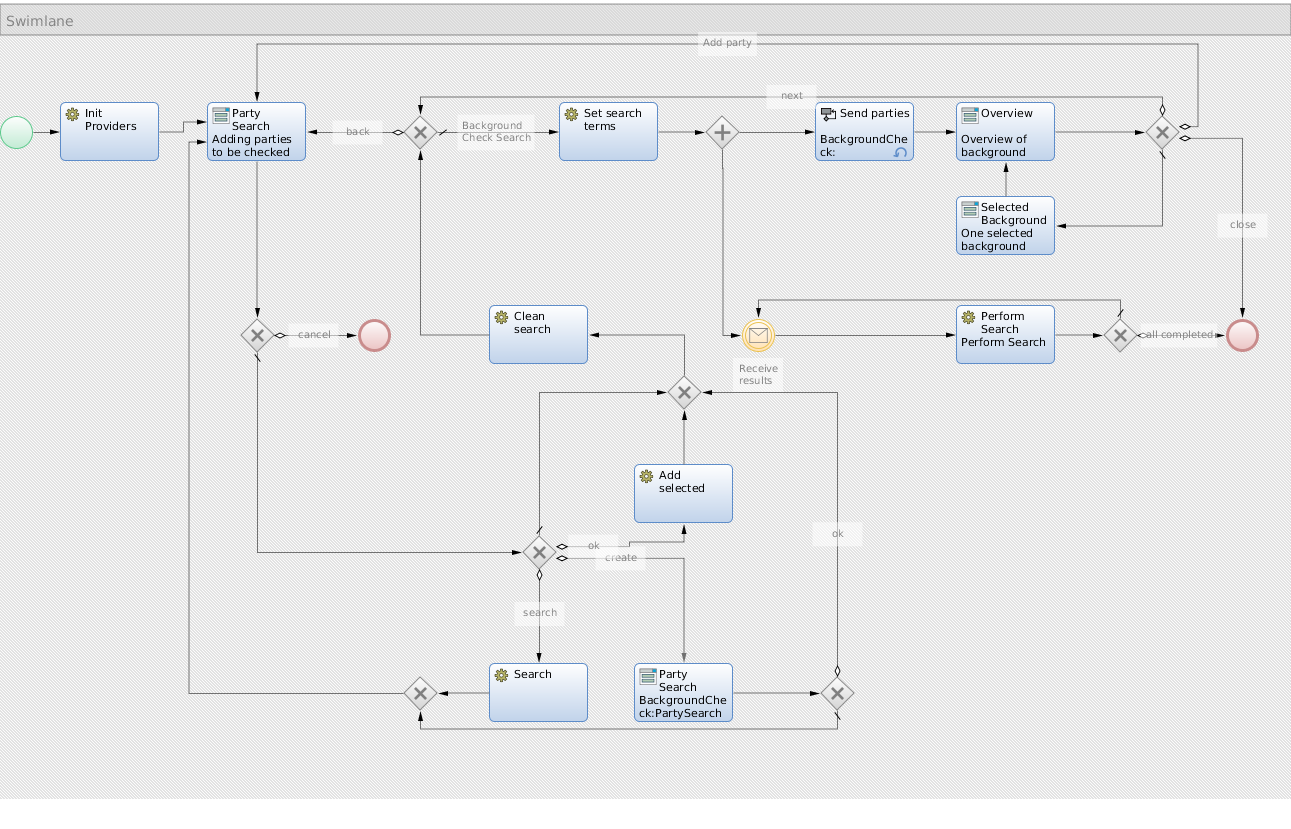
- After selecting the party to be checked within your Process Business Object (in this example, the Demo Process), the workflow splits the Process into two parallel Sub-Processes:
- One branch displays the background check result overview.
- The other branch sends a signal to the ProviderLogicExecutor Process through a Process Message, which triggers the World-Check background check and Google Custom Search service calls.
- Once all results are returned, the BackgroundChecks Screen gets updated with the result counts.
- Click on a party for the background check results to be displayed in the BackgroundCheck Screen.
- Resolve or flag either an individual result or all results in bulk.
The diagram below describes the main Data Classes and their relationships:
BackgroundCheckDiagram.pdf
BackgroundCheckProviderManager
The BackgroundCheckProviderManager is the main Data Class of this Package:
- The property Providers stores information about the background check providers in the process flow. By default, World-Check and Google providers are included as examples. To add more providers, call the addProvider(BackgroundCheck:BackgroundCheckProvider $provider) method in the Init Providers script component of the Demo Process.
BackgroundCheckProvider
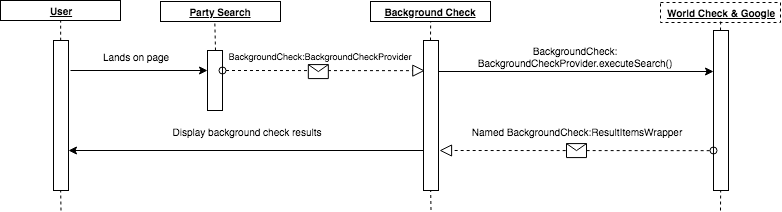
- executeSearch() is the method used for retrieving background check results, which is a named collection of BackgroundCheck:ResultItemsWrapper. In the Demo Process, it is integrated with the WorldCheck service (direct connection) and Google API (Integration Link).
- The isCompleted() and isInProgress() methods make it possible to have several parallel Processes that retrieve background check results from the World Check service and then display the obtained results.
BackgroundCheckScreenHelper
The BackgroundCheckScreenHelper Data Class manages the display of the background check results.
- ResultItemsWrapper provides party-related information, comments related to the source and the background check results for the party.
- ResultItem contains detailed information of one result record. It is extended by WorldCheckResultItem for specific properties of the World-Check background check service.
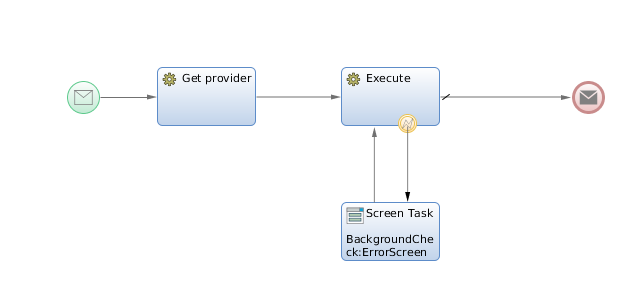
TriggerProviderExecution is a Sub-Process of the main process, which starts the World-Check and Google Custom Search API Web Service call by sending a message signal to the ProviderLogicExectureIn message queue. Once the results are returned from the WorldCheck Extension or Google API via an Integration Link, another signal is sent via a different message to the ProviderLogicExecutorOut message queue, which has a listener that is included in the main Demo Process. After the results are generated, the BackgroundCheck Screen is updated with the counts of the records that have been returned and the background status of the party in contest.
The ProviderResultData Data Class contains the providerId, providerResultItems, and requestTerms properties, which are the necessary data points for Background Check Demo Process to be consumed.
- The named collection of providerResultItems enables sending multiple parties at the same time in a single Web Service call.
- The request terms are the party names or the keys to the collection.
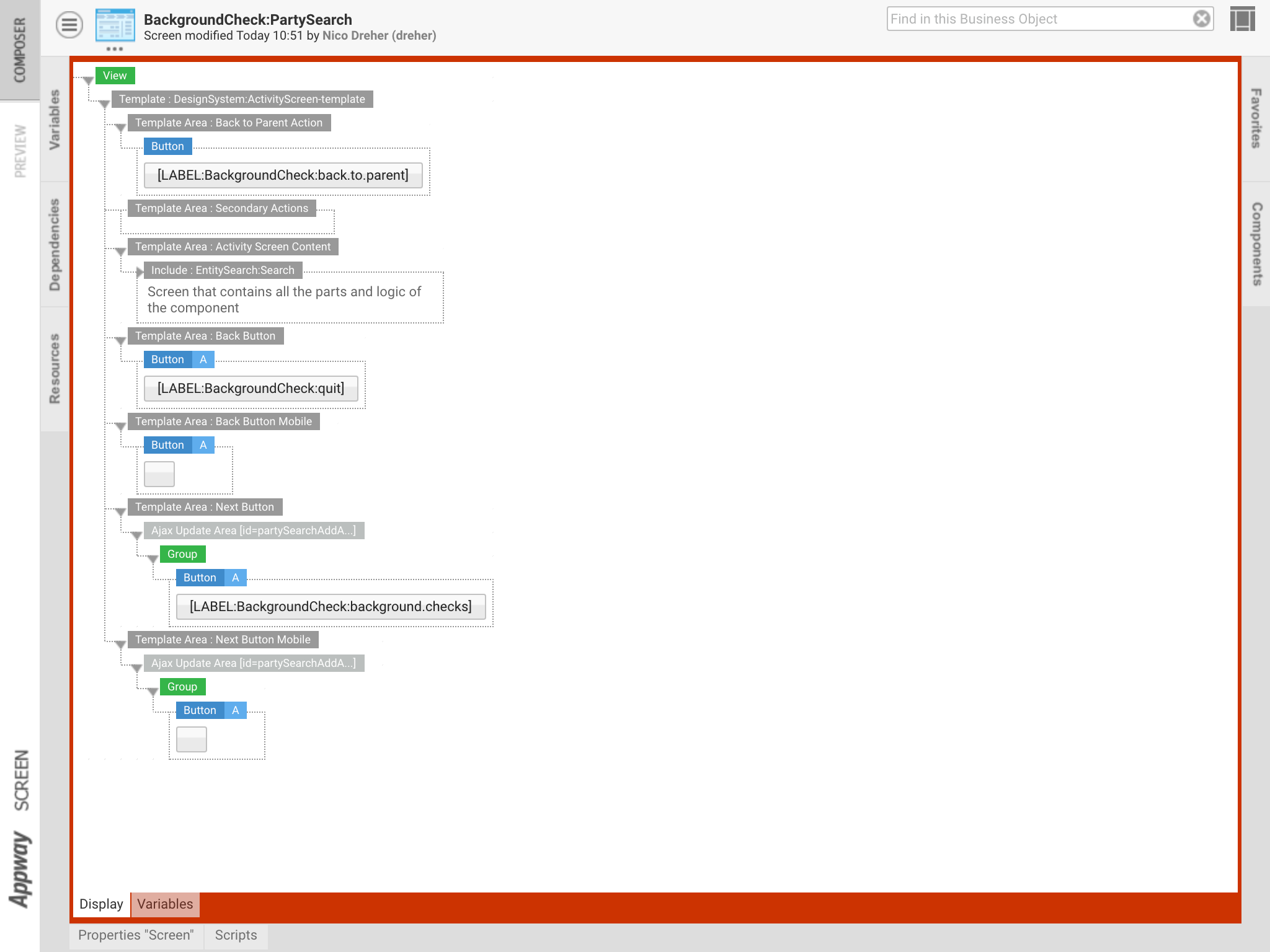
The Entity Search supports the task of searching for an existing party. It returns the parties for which background check needs to be performed. In the BackgroundCheck:PartySearch Screen, the EntitySearch:Search Screen Include is used to list parties that are searched by the users.
Below is a sequence diagram describing how the Business Component main parts interact with each other:
Defines the model of a provider manager
| Property | Description |
|---|
| Providers | Named collection. It contains all background check providers. |
| Method | Description |
|---|
| addProvider | Method to add a provider to the collection. |
| areAllCompleted | Flag that shows if all parties’ providers are populated with the background check results. |
| areAllCompletedForParty | Flag that shows if a specific party’s provider is populated with the background check results. |
| areAllInProgress | Flag that shows if all parties’ providers are being populated with the background check results. |
| getMetaData | Retrieves the metadata tag for the source header on the BackgroundCheck Screen. |
| getProviderIds | Retrieves all possible background check provider IDs for the Solution. |
| getSelectedProvider | Retrieves the selected background check provider. |
| getTitle | Retrieves the title of the source header on the BackgroundCheck Screen. |
| isProviderSelected | Flag that shows if a background check provider is selected. |
| selectProvider | Method to select a background check provider. |
Defines the model of a provider
| Property | Description |
|---|
| id | The id of a provider. |
| isSelected | Flag that shows if a provider was selected. |
| processInstanceId | The ID of the current Process Instance. |
| requestTerms | An indexed collection of request terms. |
| status | The status of the provider. |
| syncStatus | The status that was syncing with the background check service. |
| type | The type of provider. |
| Method | Description |
|---|
| executeSearch | Method to perform the Background Check search. |
| getResultItemDetail | Method to retrieve the result item details. |
| getResultItemType | Method to retrieve the result item type. |
| isCompleted | Flag that shows if the provider search is completed. |
| isInProgress | Flag that shows if the provider search is in progress. |
| isPartySearchCompleted | Flag that shows if a specific party search is completed. |
| isRequestTermCompleted | Flag that shows if a specific request term search is completed. |
WorldCheckProviderDefines the model of the World-Check provider that is extended from Background Check provider.
| Method | Description |
|---|
| executeSearch | Method used to perform the World-Check background check. |
| getResultItemDetail | Method used to retrieve the result item details. |
| getResultItemType | Method used to retrieve the result item type. |
Defines the model of the Google Provider that is extended from Background Check Provider
| Property | Description |
|---|
| executeSearch | Method used to perform the Google Custom Search. |
| getResultItemDetail | Method used to retrieve the result item details. |
| getResultItemType | Method used to retrieve the result item type. |
Defines the model of the result data of a provider.
| Property | Description |
|---|
| providerId | The ID of the provider. |
| providerResultItems | A named collection of results for the provider. |
| Requestterms | An indexed collection of request terms. |
| Method | Description |
|---|
| getProviderResultItems | Method used to populate the result items of the provider from the World-Check. |
Defines the model of a screen helper.
| Property | Description |
|---|
| resultItemsWrapper | A named collection of the wrapper Data Class for the result items. |
| Method | Description |
|---|
| applyResultsDetail | Method used to retrieve the results details from a provider. |
| getOverallStatusByParty | Method used to retrieve the overall status of a specific party. |
| getResultCount | Method used to retrieve the number of results. |
Defines the model of a request term.
| Property | Description |
|---|
| _term | The term of a request. |
| status | The status of a request term. |
| Method | Description |
|---|
| getTerm | Method used to retrieve the request term. |
| isCompleted | Flag that shows if a request term was searched for. |
| setComplete | Method used to set the request term status to complete or when it was already searched for. |
| setInProgress | Method used to set a request term to ‘In progress’ or when it is in the process of being searched for. |
| setNotTriggered | Method used to set a request term to ‘Not triggered’ or when it has not yet been searched for. |
Defines the model of the wrapper for Result Item Data Class.
| Property | Description |
|---|
| _bulkcomments | An indexed collection of comments for a party. |
| _results | An indexed collection of results. |
| bulkStatus | The status of the results for a party. |
| Method | Description |
|---|
| containsResultsByType | Flag that shows if results were generated with a given provider. |
| getComments | Method used to retrieve the comments for all results. |
| getEntryStatusLabel | Method used to retrieve the status label for one result. |
| getFlagByType | Method used to retrieve a collection of results that share the same provider type: positive match, high likelihood, resolved, and not resolved. |
| getLatestComment | Method used to retrieve the latest comment for a party. |
| getPositiveMatchByType | Method used to retrieve all positive matches of a party by the type of provider. |
| getProviderTitle | Method used to retrieve the title that forms with the provider ID and its results count. |
| getResolvedResultsCount | Method used to retrieve the number of resolved results. |
| getResolvedResultCountByType | Method used to retrieve the number of resolved results by type of provider. |
| getResultCount | Method used to retrieve the number of results. |
| getResults | Method used to retrieve all results. |
| getResultsByType | Method used to retrieve all results by type of provider. |
| getResultsCountByStatus | Method used to retrieve the number of results by status. |
| getResultsCountByStatusType | Method used to retrieve the number of results by status and type of provider. |
| getResultsCountByType | Method used to retrieve the number of results by type of provider. |
| isBulkResolved | Flag that shows if the results are resolved in bulk. |
| markAllResolved | Method used to mark all results as resolved. |
| markAllUnresolved | Method used to mark all results as unresolved. |
| setBulkStatus | Method used to set a bulk status. |
Defines the model of Result Item.
| Property | Description |
|---|
| _comments | An indexed collection of comments for a result. |
| _status | The status of a result. |
| details | The detailed information of a result. |
| isSelected | Flag that shows if a result is selected. |
| type | The type of result. |
| Method | Description |
|---|
| addComment | Method used to add a comment to the result. |
| getComments | Method used to retrieve the comments for a result. |
| getDetails | Method used to retrieve the detailed information for a result. |
| getDetailsSummary | Method used to retrieve the summary detail for a result. |
| getLatestComment | Method used to retrieve the latest comment for a result. |
| getLatestUserComment | Method used to retrieve the latest comment for a result that is entered by a specific user. |
| getResultIconId | Method used to retrieve the icon ID showing the status of a result. |
| getResultIconStyle | Method used to retrieve the icon style of a result status. |
| getSectionMetadata | Method used to retrieve the metadata of a result. |
| getSectionTitle | Method used to retrieve the title of a result. |
| getSeverity | Method used to retrieve the severity of a result: high, medium or low. |
| getSource | Method used to retrieve the source or provider of a result. |
| getStatus | Method used to retrieve the status of a result. |
| getStatusDesc | Method used to retrieve the description of the status of a result. |
| isFalsePositive | Flag that shows if the result is a false positive. |
| isResolved | Flag that shows if the result is resolved. |
| setDetails | Method used to set the details of a result. |
| setStatus | Method used to set the status of a result. |
Defines the model of the World-Check Result Item Data Class, which is extended from Result Item.
| Property | Description |
|---|
| detailReferenceId | The reference ID of a World-Check result. |
| matchedName | The name of a matched record. |
| matchedStrength | The severity of a matched record. |
| referenceCaseSystemId | The reference case system ID of a record. |
| Method | Description |
|---|
| getReferenceCaseSystemId | Method to retrieve the reference case system ID. |
| getSectionMetadata | Method used to retrieve the metadata of a result. |
| getSectionTitle | Method used to retrieve the title of a result. |
| getSeverity | Method used to retrieve the severity of a result. |
| getSeverityIconId | Method used to retrieve the severity icon ID of a result. |
| getSource | Method used to retrieve the source of a result. |
Defines the model of the World-Check detail.
| Property | Description |
|---|
| text | The detail text. |
| type | The type of detail text. |
| Method | Description |
|---|
| toString | Method used to retrieve the detail in a string. |
Defines the model of the World-Check Detail.
| Property | Description |
|---|
| city | The city of the party as obtained from the World-Check service. |
| country | The country of the party obtained from the World-Check service. |
| street | The street of the party obtained from the World-Check service. |
Defines the model of the World-Check Configuration, which is extended from the WorldCheck:Configuration Data Class.
| Method | Description |
|---|
| getEndPoint | Method used to retrieve the end point of the WorldCheck service. |
| getGroupId | Method used to retrieve the group ID of the WorldCheck service. |
| getKey | Method used to retrieve the key of the WorldCheck service. |
| getSecret | Method used to retrieve the password of the WorldCheck service. |
Defines the model of the GoogleResultItem Data Class, which is extended from ResultItem.
| Property | Description |
|---|
| link | The link of a matched record. |
| matchedStrength | The severity of a matched record. |
| referenceCaseSystemId | The reference case system ID of a matched record. |
| snippet | The snippet of a matched record. |
| title | The title of a matched record. |
| Method | Description |
|---|
| getDetailsSumary | Method used to retrieve the detail summary. |
| getReferenceCaseSystemId | Method used to retrieve the reference case system ID. |
| getSectionTitle | Method used to retrieve the section title. |
| getSeverityIconId | Method used to retrieve the icon ID of the severity. |
Defines the model of the Google Result Item Detail Data Class, which is extended from Result Item Detail.
| Property | Description |
|---|
| link | The link of a matched record. |
| snippet | The snippet of a matched record. |
| Method | Description |
|---|
| getDetails | Method to get the details of a result item. |
Defines the model of the Google Background Search Data Class.
| Property | Description |
|---|
| currentPageNumber | The current page number of the list of results. |
| query | The query for making the API call. |
| results | The results that are returned from the service. |
| totalResults | The total number of results. |
| Method | Description |
|---|
| getGoogleApiKey | Static method used to retrieve the key to call the Google API. |
| getGoogleBackgroundSearch | Static method used to retrieve the background search results. |
| getGoogleCx | Static method used to retrieve the identifier of the custom search engine. |
| getGoogleDefaultQuery | Static method used to retrieve the default query from the configuration file. |
| getRequestParams | Method used to retrieve the request parameters. |
| parseFromResponse | Method used to parse the response. |
Defines the model of the Google Advanced Background Search Data Class, which is extended from Google Background Search. For additional parameters, please refer to CSE: list
| Property | Description |
|---|
| anyOfTheseWords | The phase to be searched. |
| cr | It restricts search results to documents originating in a specific country. |
| fullName | The full name of a party. |
| lastUpdated | It restricts results to URLs based on dates. Supported values include:- d[number]: it goes back to a specific number of days.
- w[number]: it goes back to a specific number of weeks.
- m[number]: it goes back to a specific number of months.
- y[number]: it goes back to a specific number of years.
|
| lr | It restricts the search to documents written in a specific language (e.g., lr=lang_ja). |
| Method | Description |
|---|
| getBaseUri | Static method used to retrieve the base URL. |
| getRequestParams | Static method used to build the request parameters. |
| GetResourceUri | Static method used to retrieve the resource URL. |
| IncreasePageNumber | Method used to increase the page number. |
Defines the model of the GoogleAdvancedBackgroundSearchResultSearchInfo Data Class.
| Property | Description |
|---|
| formattedSearchTime | The formatted time spent to perform the search. |
| formattedTotalResults | The formatted results of a search. |
| totalResults | The total number of results. |
Defines the model of the GoogleBackgroundSearchResponse Data Class.
| Property | Description |
|---|
| items | Indexed collection of Google background search results. |
| searchInformation | The information returned by Google Advanced Search. |
Defines the model of the GoogleBackgroundSearchResponse Data Class.
| Property | Description |
|---|
| link | The link of the Google search result. |
| snippet | The snippet of the Google search result. |
| title | The title of the Google search result. |
Defines the model of the GoogleProxyHandler Data Class.
| Property | Description |
|---|
| getProxyHost | Static method used to retrieve the proxy host name. |
| getProxyPassword | Static method used to retrieve the proxy password. |
| getProxyPort | Static method used to retrieve the proxy port. |
| getProxyUser | Static method used to retrieve the proxy user. |
| isProxyRequired | Static method used to determine if the proxy is required. |
Defines the model of the Comment Data Class.
| Property | Description |
|---|
| dateTime | The timestamp of a comment. |
| isAdd | Flag that shows if the comment is to be added. |
| resultStatus | The status of the result when the comment was added. |
| Text | The text of the comment. |
| userId | The ID of the user who entered the comment. |
| Method | Description |
|---|
| getStatusDesc | Method used to retrieve the status of the result when the comment was entered. |
Contains static methods for different status of a provider
| Method | Description |
|---|
| COMPLETED | Static method that returns the COMPLETED status for a provider. |
| IN_PROGRESS | Static method that returns the IN_PROGRESS status for a provider. |
| NOT_TRIGGERED | Static method that returns the NOT_TRIGGERED status for a provider. |
Contains static methods for different status of a result
| Method | Description |
|---|
| ERROR | Static method that returns the ERROR status of a result. |
| FALSE_POSITIVE | Static method that returns the FALSE_POSITIVE status for a result. |
| HIGHLIKELIHOOD | Static method that returns the HIGHLIKELIHOOD status for a result. |
| NONE | Static method that returns the NONE status for a result. |
| POSITIVE | Static method that returns the POSITIVE status for a result. |
| POSITIVE_MATCH | Static method that returns the POSITIVE_MATCH status for a result. |
| RESOLVED | Static method that returns the RESOLVED status for a result. |
| TRUE_HIT | Static method that returns the TRUE_HIT status for a result. |
| UNRESOLVED | Static method that returns the UNRESOLVED status for a result. |
| UNSPECIFIED | Static method that returns the UNSPECIFIED status for a result. |
| WARNING | Static method that returns the WARNING status for a result. |
Contains static methods for different levels of severity for a result.
| Method | Description |
|---|
| HIGH | Static method that returns a HIGH severity level for a result. |
| LOW | Static method that returns a LOW severity level for a result. |
| MEDIUM | Static method that returns a MEDIUM severity level for a result. |
Contains static methods for different types.
| Method | Description |
|---|
| Google | Static method that returns Google as the type of provider. |
| Link | Static method that returns Link as the type of source. |
| Manual | Static method that returns Manual as the type of provider. |
| PackageName | Static method that returns the Package name, BackgroundCheck. |
| ResultItem | Static method that returns the text ResultItem. |
| WorldCheck | Static method that returns WorldCheck as the type of provider. |
Contains static methods for different levels of match strength for World-Check results.
| Method | Description |
|---|
| EXACT | Static method that returns EXACT strength. |
| MEDIUM | Static method that returns MEDIUM strength. |
| STRONG | Static method that returns STRONG strength. |
| WEAK | Static method that returns WEAK strength. |
Contains static methods for actions.
| Method | Description |
|---|
| ADD | Static method that returns the ADD action. |
BackgroundCheck:BuildResultItemTypeStr
The method to build the Result Item type.
BackgroundCheck:ChangeLabelToUpperCase
The method to change the label to be upper case.
BackgroundCheck:GenerateResultItemsKey
The method to generate the result items key, which is formed by the provider ID and request term text.
BackgroundCheck:GetUserInitials
The method to retrieve the initials of a user.