The Design System is undergoing a constant evolution, thanks to your feedback. This can in some cases require manual steps when upgrading to a higher version. This article gives you an overview of the steps you need to be aware of when upgrading the Design System.
Note: For full documentation of the latest Design System version, see
design.appway.com.
Detailed information regarding changes in this release can be found in Package Release: Design System 8.0.1.
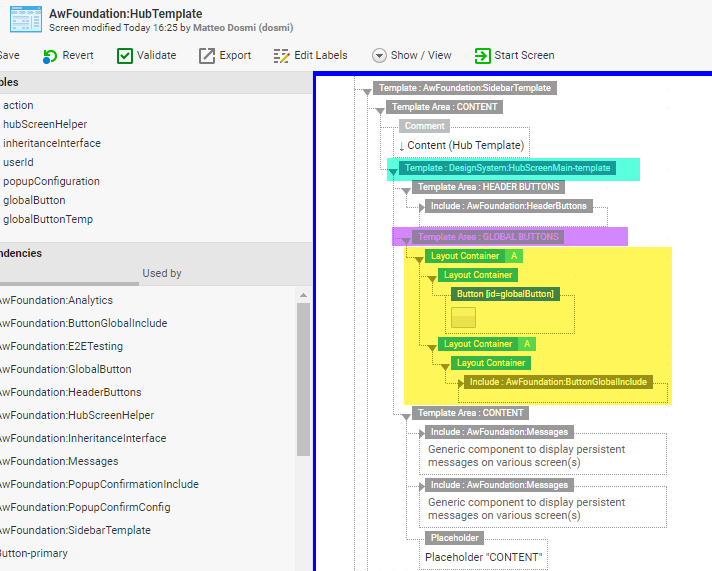
The following change in Design System 8.0.1 requires an adaptation of existing Solutions, specifically, in the DesignSystem:HubHeader Screen and the GLOBAL BUTTONS Template Area:
Global buttons are now provided as full placeholder area to allow for better flexibility in UI design.
Please, follow the steps below when upgrading to Design System 8.0.1:
- Copy the content of the existing version of
DesignSystem:HubHeader Screen contained in the IF condition
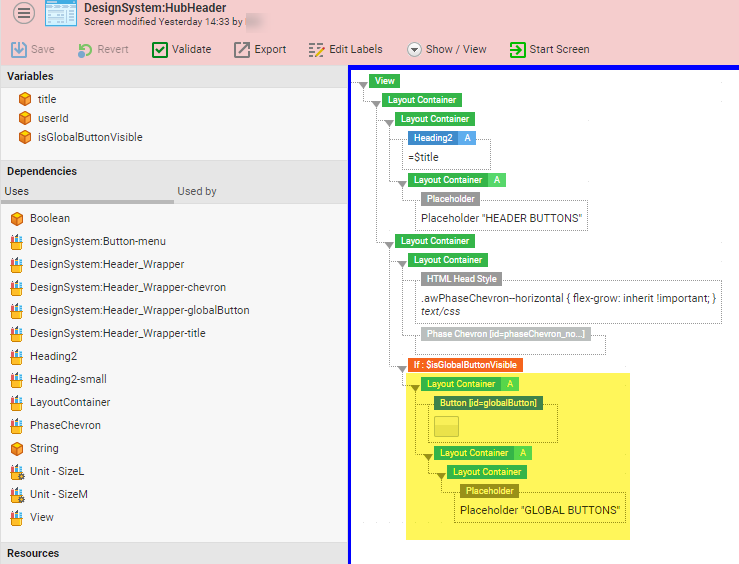
- Paste such content to the Template containing the GLOBAL BUTTONS Template Area. Then replace the GLOBAL BUTTONS placeholder with the content provided in the corresponding template area.
Detailed information regarding features and changes in this release can be found in Package Release: Design System 8.0.0.
There are no specific upgrade notes for upgrading from 7.2.x to 8.0.0.
The detailed information regarding features and bugfixes in this release can be found in Package Release: Design System 7.2.
There are no specific upgrade notes for upgrading from 7.1 to 7.2.
See the information on bugfixes available in Package Release: Design System 7.2.
The detailed information regarding features and bugfixes in this release can be found in Package Release: Design System 7.1.
There are no specific upgrade notes for upgrading from 7.0.0 to 7.1.
See the information on bugfixes available in Package Release: Design System 7.1.
The detailed information regarding features and bugfixes in this release can be found in Package Release: Design System 7.0.0.
There are no specific upgrade notes for upgrading from 6.1.3 to 7.0.0
See the information on bugfixes available in Package Release: Design System 7.0.0.
The detailed information regarding features and bugfixes in this release can be found in Package Release: Design System 6.1.3.
There are no specific upgrade notes for upgrading from 6.1.2 to 6.1.3.
See the information on bugfixes available in Package Release: Design System 6.1.3.
The detailed information regarding features and bugfixes in this release can be found in Package Release: Design System 6.1.2.
Notes for users updating their Solutions to the Design System 6.1.2:
- The Package was built and optimized for Appway 9.1+ and Component Extension 9.1+
- The Design System version 6.1.2 can be styled with the help of Style Packages:
- NEW Styles and Style Values found in the Design System 6.1.x and in the Base Package for Appway 9.1.x have been modified for improved accessibility.
There are no mandatory upgrade steps associated with this release of the Design System.
See the information on new features available in Package Release: Design System 6.1.2.
The detailed information regarding features and bugfixes in this release can be found in Package Release: Design System 6.1.1.
Notes for users updating their Solutions to the Design System 6.1.1:
- The Package was built and optimized for Appway 9.1+ and Component Extension 9.1+
- The Design System version 6.1.1 can be styled with the help of Style Packages:
- NEW Styles and Style Values found in the Design System 6.1.x and in the Base Package for Appway 9.1.x have been modified for improved accessibility.
There are no mandatory upgrade steps associated with this release of the Design System.
See the information on new features available in Package Release: Design System 6.1.1.
The detailed information regarding features and bugfixes in this release can be found in Package Release: Design System 6.1.0.
Notes for users updating their Solutions to the Design System 6.1.0:
- The Package was built and optimized for Appway 9.1+ and Component Extension 9.1+
- The Design System version 6.1.0 can be styled with the help of Style Packages:
- NEW Styles and Style Values found in the Design System 6.1.x and in the Base Package for Appway 9.1.x have been modified for improved accessibility.
There are no mandatory upgrade steps associated with this release of the Design System.
See the information on new features available in Package Release: Design System 6.1.0.
The detailed information regarding new features, changes, and bugfixes in this release can be found in Package Release: Design System 6.0.0.
The following notes are intended for users updating their Solutions to the Design System 6.0.0:
- The Package was built and optimized for Appway 9.0+ and Component Extension 9.0+.
- The Design System version 9.0.0 can be styled with the help of Style Packages.
Mandatory upgrade steps from Design System 5.1 to Design System 6.0.
- Styling the Master-Detail Screens
The MasterDetail-layout Screen is now using additional and modified Style Business Objects for the Master Detail Entry List and the Master Detail Content area. If your Solution is using Style Packages, follow these steps:
- Remove the
ScrollPane-MasterDetailSidebar style from your Style Package. - Add the new Styles from the DesignSystem Package to your Style Package using the Style Package Tools.
- Ajax Update Areas on the Master-Detail Screens
To use the new Master-Detail on mobile devices, it is necessary to wrap the whole template around an Ajax Update Area Screen Component and trigger when navigating across the different entries. - Link Container for Master Detail Entries
To enable tab navigation, it is necessary to wrap the Master-Detail Entries around a Link Container Screen Component and assign any Process Action, Script Action, Ajax Update Trigger, and so on to the Link Container component. - Case Entity deprecated
The Case Entity should not be used, since it will be deprecated for Design System 7.0.0. Instead, developers should replace the Case Entity with a Space Entity and assign 'ext.defaulticons.entitytask' as the $entityTypeIconID variable.
Adding Sidebars to Existing Screens
If you need to use a template with a Sidebar instead of a preexisting one, you can easily do it in 3 steps. The following example shows how to do it with an ActivityScreen-template:
- Click on the Template Screen Component that has the ActivityScreen-template assigned to it and replace it with the ActivityScreenWithSidebar-template.
- Drag a new Template Area Screen Component inside this new Template Screen Component and name it 'Sidebar Content'.
- Assign a string value which is relevant to 'Sidebar Content' to
$sidebarTitle.
In case the sidebar trigger requires a glyph different than the burger Icon, an IconComponentExtension Icon can be assigned to the $sidebarTriggerIcon variable.
Detailed information regarding the bugfixes in this release can be found in Package Release: Design System 5.1.3.
Note: There are no upgrade steps associated with this release of the Design System.
Notes for users updating their Solutions to the Design System 5.1.3:
- The Package was built and optimized for Appway 8.1+ and Component Extension 8.1+
- The Design System version 5.1.3 can be styled with the help of Style Packages
Detailed information regarding the bugfixes in this release can be found in Package Release: Design System 5.1.2.
Note: There are no upgrade steps associated with this release of the Design System.
Notes for users updating their Solutions to the Design System 5.1.2:
- The Package was built and optimized for Appway 8.1+ and Component Extension 8.1+
- The Design System version 5.1.2 can be styled with the help of Style Packages
Detailed information regarding new features, changes, and bugfixes in this release can be found in Package Release: Design System 5.1.0.
Notes for users updating their Solutions to the Design System 5.1.0:
- The Package was built and optimized for Appway 8.1+ and Component Extension 8.1+
- The Design System version 5.1.0 can be styled with the help of Style Packages
Mandatory upgrade steps from Design System 5.0 to Design System 5.1.
DesignSystem:LaunchScreen-template
The following steps are required:
- Add the Search Field Sidebar Template Area to the screens using the Screen LaunchScreen-template
- If you would like to make use of the sidebar on mobile view, you need to add a second Search Field Screen Component dedicated to the new Template Area if using the sidebar for the mobile view.
An overview of the release can be found in the Release Notes.
Notes for users updating their Solutions to the Design System 5.0.0:
- The Package was built and optimized for Appway 8.0+ and Component Extension 8.0+
- The Design System version 5.0.0 can be styled with the help of Style Packages
Mandatory upgrade steps from DS 4.5 to DS 5.0 are the following.
Style BOs and Style Value BOs have been moved to DesignSystem Package
Please contact the Components Team or UX Team in case of questions.
Solution Components and Screen Templates
Before updating to DS 5.0 the following changes need to be applied to all Project Screens which use the Design System's Screen Templates or Solution Components:
- ActivityHeader, ActivityScreen-template, ActivityScreenWithMasterDetail-template & ActivityScreenWithSummary-template
- Rename "Header Secondary Actions" Template Area to "Secondary Actions"
- Remove "Back to Parent Action Scrolled" Template Area
- Remove "Header Secondary Actions Inverted" Template Area
- Remove
$showSummaryLabel variable
- SpaceHeader, SpaceScreen-template & SpaceScreenWithSummary-template
- Rename "Header Secondary Actions" Template Area to "Secondary Actions"
- Rename "User Menu" Template Area to "User Menu Actions"
- Rename "Header Navigation" Template Area to "Navigation Menu"
- Move the actions used in "DesignSystem:UserMenu" to the new "User Menu Actions" Template Area in your screen. Remove "DesignSystem:UserMenu" Business Object.
- Make use of the new Actions Template Areas. Components placed inside "Primary Actions" are always displayed in the header. Components placed inside "Secondary Actions" get moved to the sidebar on mobile.
- EndScreenHeader, EndScreen-template & EndScreenWithMasterDetail-template
- Rename "Done Button" Template Area to "Primary Action"
- Rename "Secondary Actions" Template Area to "Secondary Action"
- LaunchScreenHeader & LaunchScreen-template
- Rename "Header Secondary Actions" Template Area to "Secondary Actions"
- Rename "User Menu" Template Area to "User Menu Actions"
- Move the actions used in "DesignSystem:UserMenu" to the new "User Menu Actions" Template Area in your screen. Remove "DesignSystem:UserMenu" Business Object.
- Make use of the new Actions Template Areas. Components placed inside "Primary Actions" are always displayed in the header. Components placed inside "Secondary Actions" get moved to the sidebar on mobile.
- Enable
$enableSidebarOnMobile to move the "Search Field" Template Area to the sidebar appearing on mobile
New Logo in Headers
We have added two new variables to Header Solution Components:
$showLogo (Boolean) shows or hides the Resource set on DesignSystem:Logo Screen Business Object.
$showLogoMinimized (Boolean) shows a smaller version of the Logo on mobile devices. This variable is enabled only if $showLogo is set to true and the desktop version of the logo is also visible.
$showInvertedLogo (Boolean, only on End Header) shows the inverted version of the Logo ($showLogo) and Minimized Logo ($showLogoMinimized).
Integrated sidebar appearing on mobile
The following variable has been added:
$enableSidebarOnMobile (Boolean): If set to true, a Launch or Space Screen provides a sidebar containing the specified User Menu Actions, and Secondary Actions on mobile.
The following changes are related to the introduction of the sidebar:
- 'Primary Actions' : This new Template Area is meant for actions that are required to be always shown in the header.
- 'Secondary Actions' : This new Template Area is meant for actions that are shown on the header on desktop and later added to the top of the sidebar on mobile.
- 'Search Field': This new Template Area is reserved for Search Field Screen Component. If
$enableSidebarOnMobile is set to true; the Search Field will be rendered in the sidebar on mobile. - 'User Menu': This Template Area has been removed. The menu can now be constructed with the help of 'User Menu Actions'.
- 'User Menu Actions': This new Template Area is meant to accommodate the user menu items
Chevron on Activity Header
The value set on $progressBarDisplayedProcess will be used to display the type of Chevron on the top of the Header.
End Screen Header Redesign
Additionally to the possibility to display a logo, the End Screen Header offers the option use an inverted logo with the variable $invertedLogo. When this variable is set to true, the logo set on the Logo-inverted Screen (or its replacement) will be shown on the End Screen.
SingleFileUpload Solution Component and MultipleFileUpload Solution Component
This Solution Component proposes an encapsulated way to perform file uploads. The developer will have to pass a string path $targetPath to indicate the file system folder where a single file or multiple files will be uploaded to.
Afterwards, at process level, the developer can perform any action to move, merge, duplicate, delete the file or any other action, as soon as the uploaded file(s) is now available on the given folder path $targetPath.
$displaySummaryContentAsFullWidth on Screen Template with Summary
With setting this variable to true, the width of the summary content area of a Screen Template doesn't get restricted anymore. Instead, the content can potentially be shown across the whole width of the browser.
There are no mandatory upgrade steps required when upgrading from Design System 4.4.0 to the Design System 4.5.0. However, we recommend that you review the new features and apply them to your Solution if appropriate.
Official Release Notes with a summary of new features, changes, and bugfixes: Package Release: Design System 4.5.0.
Notes for users updating their Solutions to the Design System 4.5.0:
- The Package was built and optimized for Appway 7.2+ and Component Extension 7.2+
- If your Solution was branded using the DesignSystemStyles Package:
- Before upgrading, create an
.awexport file of the Business Objects (BOs) contained in the 'Changes in Current Package Version' Smartlist. - After upgrading, import the BOs to the new Package version.
- The Design System version 4.5.0 is compatible with the Style Packages feature available in Appway 7.2+.
None
Microtask Entity
This Solution Component has evolved to provide enhanced visual cues for displaying information. You can make use of the following variables:
$mandatory – Microtask Entities have been enhanced to show a mandatory state if necessary. When this variable is set to true, a red mandatory badge is displayed between the Entity icon and the Entity Title.$entityTypeResourceBO – Allows assigning an image Resource Business Object to replace the icon of the Entity. An example of a Business Object assignment:
GETBUSINESSOBJECT('Resource','DesignSystemExamples:Entity_ImageExample')
We recommend the following specifications for the image file attached to the Resource Business Object: Use a square image (64px x 64px) of the type PNG with a transparent background.
Detailed information regarding new features, changes, and bugfixes in this release can be found in Package Release: Design System 4.4.0.
Notes for users updating their Solutions to the Design System 4.4.0:
- The Package was built and optimized for Appway 7.2+ and Component Extension 7.2+
- If your Solution was branded using the DesignSystemStyles Package:
- Before upgrading, create an
.awexport file of the Business Objects (BOs) contained in the 'Changes in Current Package Version' Smartlist. - After upgrading, import the BOs to the new Package version.
- The Design System version 4.4.0 is compatible with the Style Packages feature available on Appway 7.2+.
There are no mandatory upgrade steps required when upgrading to the Design System 4.4.0. However, we recommend that you review the new features and apply them to your Solution if appropriate.
Task Entity
This Solution Component has evolved to provide enhanced visual cues for displaying information. You can make use of the following variables:
$entityTypeResourceBO – Allows assigning an image Resource Business Object to replace the icon of the Entity. An example of a Business Object assignment:
GETBUSINESSOBJECT('Resource','DesignSystemExamples:Entity_ImageExample')
We recommend the following specifications for the image file attached to the Resource Business Object: Use a square image (64px x 64px) of the type PNG with a transparent background.$slaStatus – The visual representation of the SLA has been enhanced. Instead of a simple colored circle, a bigger colored icon is displayed.$readOnly – A "read only" badge + an icon is displayed in the top right corner of the entity if $readOnly is set to true.$processName and $phaseName – Display the Process and Phase Names the Task Entity navigates to. If these variables are filled, the Link Template area is overwritten by them.$userTagLabel and $invertedUserTag – Display the Task Entity ownership (either user or group of users). If $invertedUserTag is set to true, it provides a visual cue for highlighting the active user.$flagEntity – Displays the Entity Type icon in a striking color to direct attention to the entity. The Style Business Object of this icon is changed to Entity_Icon-typeFlag & Entity_Icon-typeFlag-mobile. This setting does not have an effect if $entityTypeResourceBO is defined.
Space Entity
This Solution Component has evolved to provide enhanced branding capabilities by allowing the use of image resources instead of default Appway icons. The following variable has been added:
$entityTypeResourceBO – Allows assigning an image Resource Business Object to replace the icon of the Entity. An example of a Business Object assignment:
GETBUSINESSOBJECT('Resource','DesignSystemExamples:Entity_ImageExample')
We recommend the following specifications for the image file attached to the Resource Business Object: Use a square image (64px x 64px) of the type PNG with a transparent background.
End Header & End Screen Template
The variables and template areas in these Prebuilt Modules have not changed. The End Header design has been adjusted to provide a notable difference to other Screen Template Headers and emphasize the Design System's landmarking principle. The End Header consists of two parts:
- A bar with a dark background which is located at the top of the screen and is always visible. This is where the Screen actions (mainly the Done button) are displayed and where the Anchor Bar appears (if enabled).
- The title of the Screen which visually appears as part of the content.
$displayContentAsFullWidth on Screen Templates
When this variable is set to true, the width of the main content area of a Screen Template is no longer restricted. Instead, the content can grow to fill the whole width of the browser if necessary.
This functionality was added to the following Template Areas:
- ActivityScreen-template
- ActivityScreenWithSummary-template
- EndScreen-template
- LaunchScreen-template
- SpaceScreen-template
- SpaceScreenWithSummary-template
Note: Currently, this configuration option is not available for Screen Templates using Master Detail.
Detailed information regarding new features, changes, and bugfixes in this release can be found in Package Release: Design System 4.3.0.
Notes for users updating their Solutions to the Design System 4.3.0:
- The Package was built and optimized for Appway 7.2+ and Component Extension 7.2+
- If your Solution was branded using the DesignSystemStyles Package:
- Before upgrading, create an
.awexport file of the Business Objects (BOs) contained in the 'Changes in Current Package Version' Smartlist. - After upgrading, import the BOs to the new Package version.
- The Design System version 4.3.0 is compatible with the Style Packages feature available on Appway 7.2+.
Launch Header Logo
By default, the Launch Header uses the image found in the DesignSystemStyles:InboxHeader_CompanyLogo Resource Business Object which is found inside the DesignSystem:Logo Screen. To assign your own logo without requiring a manual update for new Design System versions:
- In your Solution-specific Package, add a Resource Business Object containing an image; either as a .gif, .png, or .jpg (recommended image dimensions are 90px width & 30px height).
- In your Solution-specific Package, create a Screen and set it up as a Replacement in the Package properties.
- To this new Screen, add an Image Screen Component using the Resource Business Object added in step 1.
- Assign the style DesignSystemStyles:InboxHeader_CompanyLogo to this Image Screen Component.
- In the configuration of the DesignSystem Package, replace the Logo Screen with your newly created Screen.
Note: This Screen can also be used for Solutions that require multi-branding by adding in-screen logic to decide which image to return.
End Screen Template & Microtask Entity Providing Validation Status
This new feature enables users to leave an End Screen with Validation errors and provides a Validation Status on the corresponding Microtask Solution Component.
See the Flexible Navigation: Allowing Users to Leave Screens Incomplete article for more information.
Detailed information regarding new features, changes, and bugfixes in this release can be found in Package Release: Design System 4.2.0.
Notes for users updating their Solutions to the Design System 4.2.0:
- The Package was built and optimized for Appway 7.2+ and Component Extension 7.2+
- If your Solution was branded using the DesignSystemStyles Package:
- Before upgrading, create an
.awexport file of the Business Objects (BOs) contained in the 'Changes in Current Package Version' Smartlist. - After upgrading, import the BOs to the new Package version.
- The Design System version 4.2.0 is compatible with the Style Packages feature available in Appway 7.2+.
Using Style Packages
If your Solution is currently being customized using the Style Packages functionality (e.g. BrandIdentity), add the following 'Style' Business Objects and 'Style Value' Business Objects to the Style Package:
Screen Template content backgrounds:
- Color - ActivityScreenBg
- MainContent_Wrapper-activityScreen
- Color - EndScreenBg
- MainContent_Wrapper-endScreen
- Color - LaunchScreenBg
- MainContent_Wrapper-launchScreen
- Color - SpaceScreenBg
- MainContent_Wrapper-spaceScreen
- Color - SummaryAreaBg
Header backgrounds:
- Color - ActivityHeader
- Color - EndHeader
- Color - Header_AnchorBar
- Color - SpaceHeader
Follow these steps to add these Business Objects:
- Download the Design System Packages to a controlled/local environment.
- Move the Business Objects mentioned above from the DesignSystemStyles Package to the Style Package (e.g. BrandIdentity).
- Modify the dependencies between the Business Objects so that they do not have dependencies on the Base Package.
- Create an
.awexport with the new Business Objects; these will contain the ID of your Style Package (e.g. BrandIdentity:MainContent_Wrapper-activityScreen). - Import the
.awexport to your development environment.
Important notes on background colors:
- Both Activity and Space Headers are considered interactive content areas and their background color comes from the InteractiveContentBg Style Value.
- The PageBg Style Value BO is able to change the Launch, Activity, and End Screen backgrounds since MainContent_Wrapper-launchScreen, MainContent_Wrapper-activityScreen, and MainContent_Wrapper-endScreen are set to transparent by default.
- The Header_AnchorBar Style Value BO changes the background color of the integrated Anchor bar for both EndScreen Header and Activity Header.
Detailed information regarding new features, changes, and bugfixes in this release can be found in Package Release: Design System 4.1.0.
Notes for users updating their Solutions to the Design System 4.1.0:
- The Package was built and optimized for Appway 7.2+ and Component Extension 7.2+
- If your Solution was branded using the DesignSystemStyles Package:
- Before upgrading, create an
.awexport file of the Business Objects (BOs) contained in the 'Changes in Current Package Version' Smartlist. - After upgrading, import the BOs to the new Package version.
- The Design System version 4.1.0 is compatible with the Style Packages feature available on Appway 7.2+.
The following steps only need to be performed if you want to take advantage of the new functionality added in this version of the Design System.
ActivityScreenWithMasterDetail-template & EndScreenWithMasterDetail-template
- Entry Messages: To make use of the new Entry Messages, pass a string containing validation information to the
$validationWarning variable and a string containing non-blocking warnings to the $potentialConflicts variable. - Mobile enhancements: To make use of the new Mobile Layout, pass the title of the current entry to the
$currentEntryTitle variable to display it at the top of the screen when going through the active entry content.
Detailed information regarding new features, changes, and bugfixes in this release can be found in Package Release: Design System 4.0.
Notes for users updating their Solutions to the Design System 4.0.0:
- The Package was built and optimized for Appway 7.2 or greater and Component Extension 7.2 or greater.
- If your Solution was branded using the DesignSystemStyles Package:
- Before upgrading, create an
.awexport file of the Business Objects (BOs) contained in the 'Changes in Current Package Version' Smartlist. - After upgrading, import the BOs to the new Package version.
- The Design System version 4.0.0 is compatible with the Style Packages feature available in Appway 7.2 or greater.
Perform these migration tasks before upgrading:
A. Refactor Screen IDs
The following Screen IDs need to be refactored.
| ID in Design System 3.3.0 | ID in Design System 4.0.0 |
|---|
| DesignSystem:ProcessEntity | DesignSystem:MicrotaskEntity |
| DesignSystem:MasterDetailScreen-template | DesignSystem:ActivityScreenWithMasterDetail-template |
| DesignSystem:MasterDetail__Section | DesignSystem:MasterDetail_Section |
| DesignSystem:LaunchHeader_UserTooltip | DesignSystem:UserMenu |
| DesignSystem:CollaboratorWidget-template | DesignSystem:CollaboratorWidget |
B. Add the Phase Chevron Template Area
If your solution is already using the ActivityScreenWithMasterDetail-template & ActivityScreenWithSummary-template:
- Go to the Screen where this Template is being used.
- Drag a 'Template Area' Screen Component to where the 'Template: ActivityScreenWithSummary-template' structure is located.
- Rename the Template Area from "CONTENT" to "PhaseChevron".
C. Replace ProcessEntity-client
This Solution Component has been removed. To reproduce this Solution Component: Replace the Screen where it is being used with MicrotaskEntity. By default, it will have the ID 'ext.defaulticons.entityclient' selected.
Download the Design System 4.0.0 and import it to your Solution
If the following Screen Templates or Solution Components are being used, change the Template Area "User Tooltip" to "User Menu":
- DesignSystem:LaunchHeader
- DesignSystem:LaunchScreen-template
- DesignSystem:SpaceHeader-layout
- DesignSystem:SpaceScreen-template
- DesignSystem:SpaceScreenWithSummary-template
- DesignSystem:SpaceHeader
Detailed information regarding new features, changes, and bugfixes in this release can be found in Package Release: Design System 3.3.0.
Notes for users updating their Solutions to the Design System 3.3.0:
- The Package was built and optimized for Appway 7.2+ and Component Extension 7.2+
- If your Solution was branded using the DesignSystemStyles Package:
- Before upgrading, create an
.awexport file of the Business Objects (BOs) contained in the 'Changes in Current Package Version' Smartlist - After upgrading, import the BOs to the new Package version
- The Design System version 3.3.0 is compatible with the Style Packages feature available on Appway 7.2+
There are no manual steps to follow when upgrading from Design System 3.2.0 to Design System 3.3.0.
Detailed information regarding new features, changes, and bugfixes in this release can be found in Package Release: Design System 3.2.0.
Notes for users updating their Solutions to the Design System 3.2.0:
- The Package was built and optimized for Appway 7.1.3+ and Component Extension 7.1.4+
- If your Solution was branded using the DesignSystemStyles Package:
- Before upgrading, create an
.awexport file of the Business Objects (BOs) contained in the Changes in Current Package Version Smartlist. - After upgrading, import the BOs to the new Package version.
There are no manual steps to follow when upgrading from Design System 3.1.0 to Design System 3.2.0.
Detailed information regarding new features, changes, and bugfixes in this release can be found in Package Release: Design System 3.1.0.
Upgrade notes for users of the Design System 3.1.0:
- The Package was built and optimized for Appway 7.1+ and Component Extension 7.1+
- If your Solution was branded using the DesignSystemStyles Package:
- Before upgrading, create an .awexport file of the BOs contained inside of the Changes in Current Package Version Smartlist.
- After upgrading, import these BOs to the new version of the Package.
There are no manual steps to follow when upgrading from Design System 3.0.2 to Design System 3.1.0.
Detailed information regarding new features, changes, and bugfixes in this release can be found in Package Release: Design System 3.0.2.
Upgrade note for users of the Design System 3.0.2:
- The Package was built and optimized for Appway 7.1+ and Component Extension 7.1+
- If your Solution was branded using the DesignSystemStyles Package:
- Before you upgrade, create an .awexport file of the BOs contained inside of the Changes in Current Package Version Smartlist.
- Afterwards, import these BOs to the new version of the Package.
There are no manual steps to follow when upgrading from Design System 3.0.1 to Design System 3.0.2.
Detailed information regarding new features, changes, and bugfixes in this release can be found in Package Release: Design System 3.0.1.
- The Package was built and optimized for Appway 7.1+ and Component Extension 7.1+
- Some of the Screens using the Prebuilt Modules may contain missing Template Areas after the upgrade (green areas). Test on an Appway Standalone or pre-dev environment before upgrading in order to be aware of the migration tasks required.
- If your Solution was branded using the DesignSystemStyles Package: Before you upgrade create an .awexport file of the BOs contained inside of the Changes in Current Package Version Smartlist. Afterwards, import these BOs to the new Package version.
This is a reminder from Design System Package 3.0.0 Upgrading instructions:
- After importing the Design System Package 3.0.1 to your Solution, add the Header Secondary Actions Template Area wherever the DesignSystem:SpaceScreen-template or DesignSystem:SpaceScreenWithSummary-template are used.
- You are notified by the appearance of a green area in the Workspace screen if this Template Area has not been added.
Detailed information regarding new features, changes, and bugfixes in this release can be found in Package Release: Design System 3.0.0.
- The Package was built and optimized for Appway 7.1+ and Component Extension 7.1+
- Some of the Screens using the Prebuilt Modules may contain missing Template Areas after the upgrade (green areas). Test on an Appway Standalone or pre-dev environment before upgrading in order to be aware of the migration tasks required.
- If your Solution was branded using the DesignSystemStyles Package: Before you upgrade create an .awexport file of the BOs contained inside of the Changes in Current Package Version Smartlist. Afterwards, import these BOs to the new Package version.
Perform these steps when upgrading:
- After importing the Design System Package 3.0.0 to your Solution, add the Header Secondary Actions Template Area wherever the DesignSystem:SpaceScreen-template or DesignSystem:SpaceScreenWithSummary-template are used.
- You are notified by the appearance of a green area in the Workspace screen if this Template Area has not been added.
Detailed information regarding new features, changes, and bugfixes in this release can be found in Package Release: Design System 2.1.2.
There are no manual steps to follow when upgrading from Design System 2.1.1 to Design System 2.1.2.
Inbox Package 1.0.2 or later
Appway 7.0.3 or later
Detailed information regarding new features, changes, and bugfixes in this release can be found in Package Release: Design System 2.1.1.
There are no manual steps to follow when upgrading from Design System 2.1.0 to Design System 2.1.1.
- Works with Inbox 1.0.2 or later
- Appway 7.0.3 or later is required
Detailed information regarding new features, changes, and bugfixes in this release can be found in Package Release: Design System 2.1.0.
Upgrade note for users of the Design System Package 2.0.0:
- We recommend upgrading to Appway 7.0.4 as soon as possible, as it contains several important bugfixes.
- Some of the Screens using the modules can present missing template areas after the update (green areas). Please test on a standalone or pre-dev environment before upgrading to be aware of the migration tasks required on production.
Follow these steps when upgrading from Design System 2.0.0 to Design System 2.1.0:
-
EndScreen-template: New Template Area
Add a new template area named Secondary Actions wherever the EndScreen-template or DesignSystem:EndHeader is being used.
-
New Navigation buttons for the Activity Screens
Assuming that you have been using an Activity Screen with Navigation Buttons, the current Style BOs are:
- for «Previous» Button: Base:Button-navigationInverted and DesignSystemStyles:Button-navigationInverted-mobile
- for «Next» Button: Base:Button-navigation and DesignSystemStyles:Button-navigation-mobile
To make sure that you use the latest Design System styles, please update the Style BOs like follows:
- for «Previous» Button: DesignSystemStyles:Activity_Button-navigationInverted instead of Base:Button-navigationInverted
- for «Next» Button: DesignSystemStyles:Activity_Button-navigation instead of Base:Button-navigation
-
Master Detail Page: No longer uses the Master Detail Module inside an Activity Screen. In this case, the Activity Screen template got replaced with the DesignSystem:MasterDetailScreen-template.
To use the full capabilities of this new Screen Template, it's required to rebuild the screen where the Master Detail is contained. Previously the MasterDetail Solution component was used inside an Activity Screen. Due to the changes in lay-outing/interaction it is required to start screen building using DesignSystem:MasterDetailScreen-template. This new Screen Template will contain the same Template Areas found in DesignSystem:ActivityScreenWithSummary-template and legacy DesignSystem:MasterDetail-template.
-
Added a new template area for the Launch Header
A new Template Area named Navigation Menu must be added wherever the DesignSystem:LaunchScreen-template or DesignSystem:LaunchHeader is being used. Also, if this template area is used the variable $containsNavigation must be set to true to display this Template Area.
-
Main Container Max Widths for the Launch Screen different than for Activity/End screen
-
New Template Areas regarding Secondary Actions
Users are required to add two Templates Areas Header Secondary Actions and Header Secondary Actions Inverted to the screens that contain the following modules:
- DesignSystem:ActivityScreen-template
- DesignSystem:ActivityScreenWithSummary-template
- DesignSystem:ActivityHeader
- DesignSystem:SpaceScreen-template
- DesignSystem:SpaceScreenWithSummary-template
- DesignSystem:SpaceHeader
- Works with Inbox 1.0.2 or later
- Appway 7.0.3 or later is required