The request-reply scenario for JMS is a standardized pattern to use a synchronous call over asynchronous infrastructure.
How do I create a JMS request-reply message exchange using ActiveMQ as the message broker?
This recipe starts with general background information on request-reply message patterns, including a discussion of the more technical aspects. I then describe how to implement this pattern using an Integration Link, and provide an example of how to use this Integration Link in a process.
The request-reply message pattern supports quasi-synchronous message exchange. The pattern is realized with a single request queue and temporary reply queues. Request-reply calls are processed by an Integration Link. When calling the Integration Link, an input, i.e. the message, is passed to the Integration Link. The Integration Link returns an output message. In this example, input and output messages are represented by an instance of the class serviceMsg.
Figure 1 illustrates an object, $in, that is passed to the Request-Reply Integration Link. The Request-Reply Integration Link returns a serviceMsg, $out.

Figure 1: Integration Link Input/Output
How message processing works:
- The Integration Link sends a serialized version of the serviceMsg instance within the body of the Camel Exchange Message to a specified message queue
- Behind the scenes, Camel/Active MQ generates a temporary queue for the reply, and registers a listener for that queue
- The reply message is sent back within the Camel Exchange message body
- Once the reply is received, the Integration Link proceeds with its execution of de-serializing the XML into a serviceMsg instance
These operations are all handled inside the Integration Link, and do not have to be configured or changed when doing message exchange.
A request/reply service call makes use of a number of threads: one thread for the process user/task (HTTP) and one thread for the Integration Link. As the Integration Link is configured to work asynchronously with a pool of x workers, additional x-1 more threads will be used. The configuration should be tested under load with five workers. The number of workers should be increased if needed (inspection using Camel JMX).
The performance of this approach is better than making use of a dedicated reply queue. With the approach outlined here, each call gets its own (temporary) reply queue and, as a consequence, does not have to wait in a general reply queue.
In the case of long-running or slow service calls, the service call may stall. To prevent the operation from blocking the user, the task should be configured as "asynchronous".
The integration link configuration displayed below makes use of the request-reply message pattern. Select this pattern from the Message Pattern dropdown list (shown at the bottom left of the image).
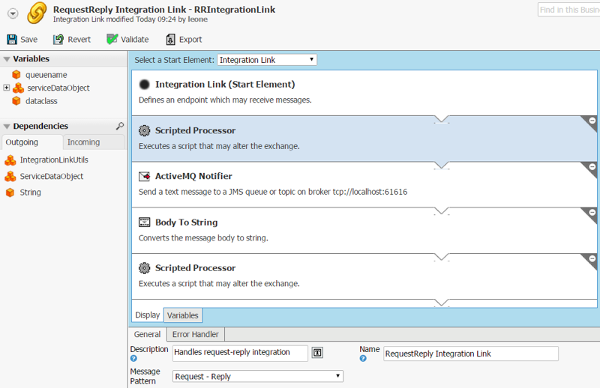
Figure 2: Request/Reply Integration Link Configuration
The request/reply Integration Link consists of five Integration Link components. Each Integration Link component takes an $in variable from the preceding component, and each component’s return value is passed to the component that follows it.
- The Integration Link "start" element is configured to work asynchronously with a pool of five workers, and a timeout of 30000ms. In case of heavy load, the worker pool can be increased.
- The scripted processor component converts the incoming object
$in into a serialized representation, such as XML, as shown below.
Named String $prefixes := new Named String;
$prefixes['http://appway.com/nsexample'] := 'APP';
SOAPConvertToXML($in, $prefixes, false, false, false, 'http://appway.com/nsexample');
- The ActiveMQ notifier is configured to listen to a specific queue or topic. The topic can either be fixed or dynamic (that is, based on a variable).
- The ActiveMQ notifier produces output consisting of the Camel Exchange message body. This output is transformed to a string by the BodyToString component.
- The scripted processor component transforms the XML string received by the previous component into the appropriate data entity, as shown in the code snippet below.
XmlNode $node := ParseXmlDocument($in, true);
Named String $prefixes := new Named String;
$prefixes['http://appway.com/nsexample'] := 'APP';
SOAPConvertToDataEntity($node, $prefixes, false);
Note:
The Integration Link only commits (to Hazelcast) once the complete chain of Integration Link components has been processed. For operations within the Integration Link that require a commit prior to Integration Link completion, a manual commit operation has to be invoked.
Parameterization
Data exchange is based on predefined well-structured XML messages. There are two options available as to how to apply the presented pattern: A dedicated Integration Link could be used for each message exchange type within an Appway solution, or a generic Integration Link could be used for all types of message exchanges defined for a specific solution. With a generic Integration Link, there is a single point responsible for message exchange-related integration, allowing reuse while minimizing maintenance efforts.
Execution
The Integration Link can either be called programmatically, or embedded into a process. To call the Integration Link programmatically, use this script:
Named Any $params := new Named Any;
$params['serviceMsg'] := $in;
CallIntegrationLink('RRIntegrationLink', $params, $versionFilter, true);
To embed the Integration Link into a process, follow the steps outlined below in "Integration Link Task Configuration".
An Integration Link can be embedded into a process using an Integration Link Process Task configured according to the screenshot in Figure 3. The Integration Link defines an assigned variable of type, serviceMsg. This assigned variable has to be defined on a Process level, then assigned during Integration Link process task configuration.
The configuration defines:
- Which Integration Link is invoked
- The version filter that should be employed
- The variable to which the result should be bound
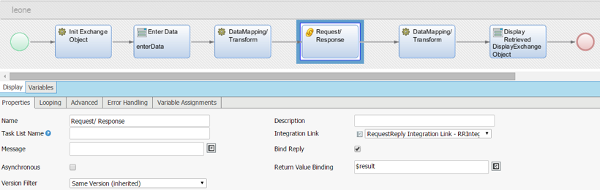
Figure 3: Process with embedded Integration Link
Note:
In my example, the data mapping script task precedes and follows the Integration Link task, where the mapping from process domain data classes to serviceMsg instance and back is performed. Depending on process complexity, it may make sense to create a subprocess consisting of the mapping script tasks and the Integration Link task to decrease visual process complexity.
In order to execute an integration link asynchronously, the asynchronous checkbox in the Integration Link task process element can be checked. The user is then redirected to the portal, and a new work item can be generated on the fly. Alternatively, a "wait" screen task with auto-submit may precede the tasks to inform the user about a long-running operation.
For more information about this, see the recipe on "Handling Slow Services".