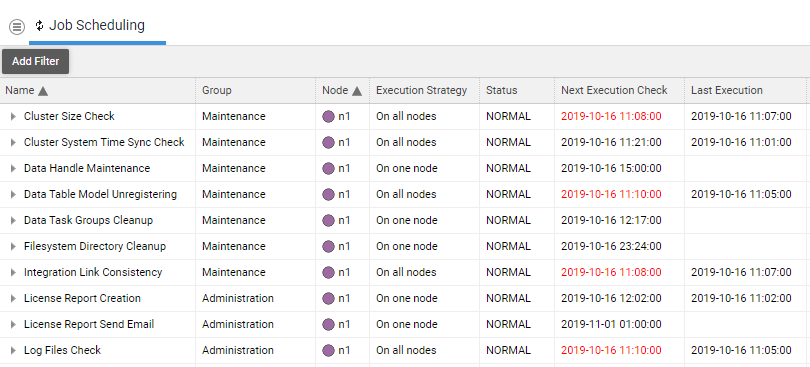
Scheduled background jobs are no longer executed on my system. The Job Scheduling table, which can be found in the Studio at System Maintenance > System Overview > Job Scheduling, shows overdue jobs with dates in the past written in red in the column Next Execution Check. What is going on?
There are two possible scenarios:
- The main job scheduler thread Scheduler-1_QuartzSchedulerThread has crashed. This thread is responsible for assigning a job to a job scheduler worker thread when a job has to be executed.
- All job scheduler worker threads have either crashed, or they have ran into a deadlock or endless loop.
In both cases, scheduled jobs can no longer be executed. Their Next Execution Check date shows a value in the past (in red) because execution failed at that time.
You should first take a look at the active Java threads. In the Studio, go to Solution Maintenance > Processes > Java Threads. You should see five threads with names like SchedulerThread-1-1, SchedulerThread-1-2 etc. and one thread with the name Scheduler-1_QuartzSchedulerThread:
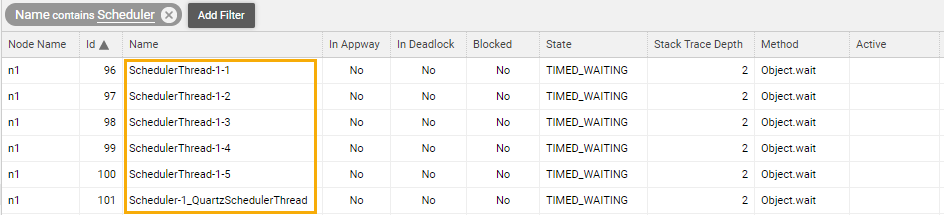
The first five threads are the job scheduler worker threads. They are used to execute jobs. Check the values in the State, Method, and Active columns to understand whether these threads are currently executing a job or not. In the screenshot above, all threads are currently waiting for a new job.
If a thread is currently active, the Active column shows how long the thread has already been working on the current job. You can right-click on a thread to get a context menu with a View Stack Trace command. The stack trace can help you diagnose where the thread is losing time, or where it is blocked. If one or more of the worker threads is blocked, you most likely will have to restart Appway.
If the main job scheduler thread Scheduler-1_QuartzSchedulerThread is not listed anymore, it has crashed. This thread can crash if an OutOfMemoryError or other unexpected exception is thrown during its execution. Restart Appway in order to restart the job scheduler.
Note: The number of job scheduler worker threads can be configured using the configuration property nm.scheduler.threadpool.size. The default value is "5". If you change this configuration property, restart the job scheduler by restarting Appway for the change to take effect.
Note: For more detailed information about the Job Scheduler tab, see the
Job Scheduler article.