The Data History provides features to track and retrieve changes performed by users on Data Class instances in the context of a Process Instance. It is delivered as an extension and has been designed to replace the Data Audit Trail extension with improved functionality and performance, as well as enhanced developer experience thanks to a streamlined user interface in the FNZ Studio Composition.
The Data History provides features to track and retrieve changes performed by users on Data Class instances in the context of a Process Instance.
The Data History allows the FNZ Studio developer to track changes performed on a desired set of Data Class instances in a Process Instance.
Whenever a change is made to such tracked Data Class instances, the change is collected and persisted for the duration of the Process Instance. The collected changes can then be retrieved by using dedicated functions (see the Data History Script Functions section) which are used as a basis for the Business Data Comparison Business Component.
The main features of the Data History, therefore, are:
- Change tracking: you can select which Data Classes and related properties are tracked.
- Initial state persistence: the initial state represents the values of a Data Class instance/collection when tracking was started for the first time in the Process Instance. It can be used for audit purposes.
- Savepoints: a savepoint represents a specific point in the process used to retrieve only a subset of changes performed on a Data Class instance/collection.
The Data History Studio module allows the user to select which Data Classes and which related properties can be tracked.
These Data Classes are referred to as trackable. The user can start tracking the changes made to a given instance of a trackable Data Class at any time during the execution of a Process Instance.
The target of a change is identified using the entity Id. This is an FNZ Studio id which uniquely identifies Data Class instances and collections. Consider the following information on the entity Id:
- Changes to Data Class instance properties whose type is a Primitive Type are tracked as changes of the 'container' Data Class instance (entity Id of the Data Class instance whose property was changed).
- The assignments of a Data Class instance or collection to a property of a Data Class instance are also tracked as changes of the 'container' Data Class instance (entity Id of the Data Class instance whose property was changed).
Consider the following information:
- Changes to a Data Class instance are always tracked as changes of that instance even if this it is included in a property of another Data Class instance.
- Changes to a collection such as adding elements, removing elements, assigning a new value to an element and similar changes are tracked as changes of the collection (entity Id of the collection).
Finally, consider the following cases in which no change is tracked:
- If you reassign the same value for Primitive Types.
- When you assign a Data Class or Collection, and the entity Id (of the Data Class or Collection that you are assigning) is the same.
Only a subset of the Primitive Types available in FNZ Studio are supported by the Data History. These are:
- String
- Long
- Integer
- Float
- Double
- BigInteger
- BigDecimal
- Boolean
- Date
- Money
If a Data Class contains a property whose type is not among the supported FNZ Studio Primitive Types, that property is not tracked (that is, it is ignored when tracking changes). However, it is still possible to track the other properties of the Data Class.
During the execution of a Process Instance, the user can start or stop tracking the changes made to a given instance of a trackable Data Class at any time:
- By using the DataHistoryStartTracking function to start tracking. You can also use this function to resume tracking. In this case, all the changes occurred in the interval between the invocation of DataHistoryStopTracking and DataHistoryStartTracking are not tracked.
- By using the DataHistoryStopTracking function to stop tracking. In this case, previously tracked changes are not discarded.
See the Data History Script Functions article for more information.
Both functions act recursively. Specifically, the DataHistoryStartTracking starts tracking changes performed not only on the provided Data Class instance or collection, but also recursively on the three following categories, known as tracking candidates:
- Contained Data Class instances whose type is a trackable Data Class.
- Contained collections of supported Primitive Type values.
- Contained collections of Data Class instances whose type is a trackable Data Class.
The same recursive behavior is obtained when invoking the DataHistoryStopTracking function.
In addition, whenever a tracking candidate is assigned to a property of a tracked Data Class instance or added to a tracked collection, tracking is started recursively on the tracking candidate as well.
If necessary, the Data History can compact multiple changes on the same property or collection element. To enable this, set the Data History configuration property compacting.enabled to true (default is false).
If this feature is enabled, the following applies:
- Data Class properties:
- Multiple changes to the same property of a Data Class instance are compacted into one single change which has (see Data History Data Model chapter for detailed information about each change property):
- oldValue, oldDisplayValue, oldValueType of the oldest change
- newValue, newDisplayValue, newValueType of the newest change
- dateTime of the newest change
- userId of the newest change
- If the oldest and newest values are the same, no change is returned
- Collections
- Multiple Update operations on the same collection element are compacted into a single change with the same logic as for Data Class Properties.
- If the oldest and newest values are the same, no change is returned.
- If a given collection element is added and then removed, those two changes and all the intermediate updates to that element are not returned.
- If a given collection element is added and then updated (once or more times), a single change of type add is returned and its value is the one set by the latest update.
- If a given collection element is updated (once or more times) and then removed, only the removal of its initial value is returned.
- If a collection element at a given position is removed and then added again with the same value, no change is returned.
- If a collection element at a given position is removed and then added again with a different value, a single change of type update is returned.
- If a collection element at a given position is added and then another collection element in the subsequent position is removed with the same value, no change is returned.
- If a collection element at a given position is added and then another collection element in the previous or subsequent position is removed with a different value, a single change of type update is returned.
This compacting logic is executed when reading changes using the provided Script Functions: DataHistoryGetChangesFor, DataHistoryHasChanges (see the Data History Script Functions article).
Technical note: Changes that are deemed unnecessary according to the logic above are:
- Removed from the distributed maps (see note) if the changes to be compacted occur without any Savepoint (see Savepoints section) in between them.
- Kept in the distributed maps (see note) if the changes to be compacted occur with at least one Savepoint (see Savepoints section) in between them.
For each tracked Data Class instance and collection, an Initial State is also persisted for the whole duration of the Process Instance in addition to the changes performed on the instance itself.
The Initial State contains a representation of the values of a Data Class instance or collection at the time at which its tracking was started for the first time in the Process Instance.
The Initial State can therefore be created for a given Data Class instance or collection when:
- The DataHistoryStartTracking function is invoked on that Data Class instance or collection.
- The DataHistoryStartTracking function is invoked on a 'container' Data Class instance or collection that includes that Data Class instance or collection.
- That Data Class instance or collection is assigned to an already tracked Data Class instance or collection.
The Initial state can be used for auditing purposes to check the Data Class instance or collection content before any change was made.
In order to persist Initial States, set the Data History configuration property save.initial.state to true.
In some circumstances, it is necessary to retrieve only a subset of the changes performed on a given Data Class instance or collection. Consider, for example, a process where a Data Class instance goes through multiple rounds of changes and those changes must be reviewed after each round.
In this case, the reviewer only wants to visualize those changes that have not been reviewed yet, and therefore expects that previously reviewed changes are hidden. To achieve this result, the Data History provides the concept of Savepoint. A Savepoint defines a specific point in the process that can be used as a 'marker' to indicate when the Data History should stop fetching changes.
When fetching changes for auditing or data comparison, the FNZ Studio developer can specify a Savepoint (see the Data History Script Functions article). In that case, only the changes occurred after the provided Savepoint are returned.
To define a Savepoint in your Process, drag a Data History Savepoint process component onto the process diagram in the Process editor.
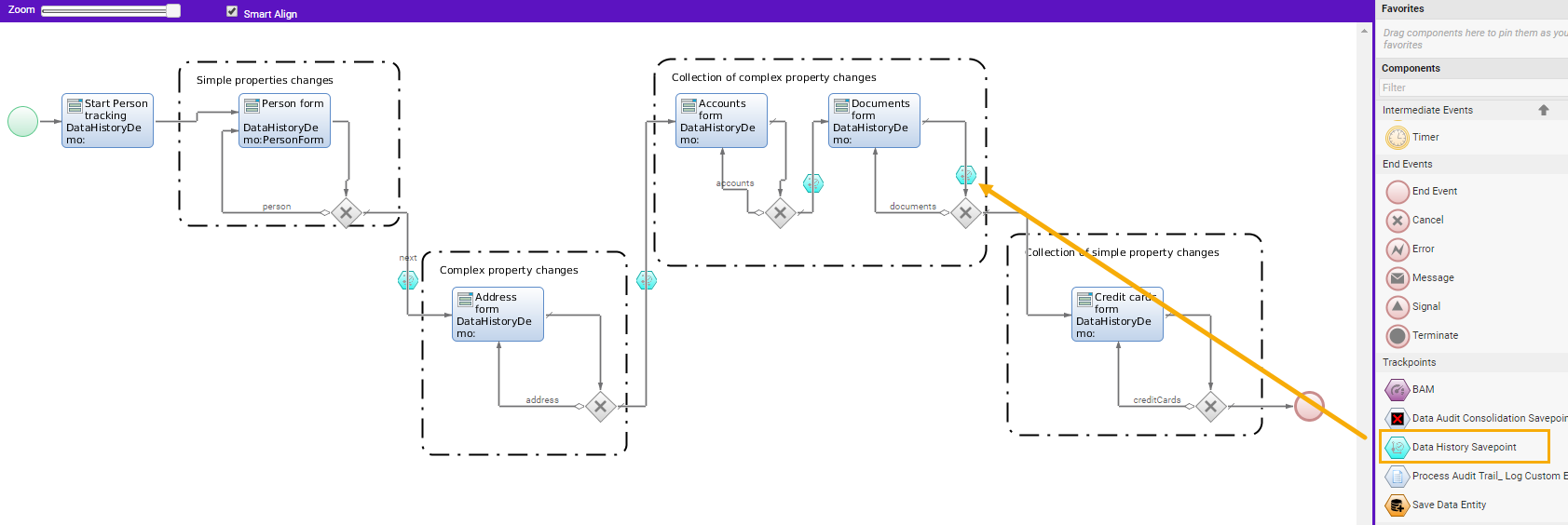
Each Savepoint in a Process Instance is identified by a unique ID automatically generated by the Data History. Moreover, it has:
- A name, provided by the FNZ Studio developer when configuring the trackpoint
- A timestamp, i.e., the date and time at which it was encountered during the execution of the Process Instance
If the Data History extension is installed, the Data & Integration module of FNZ Studio Composition displays the Data History > Tracked Data Classes submodule.
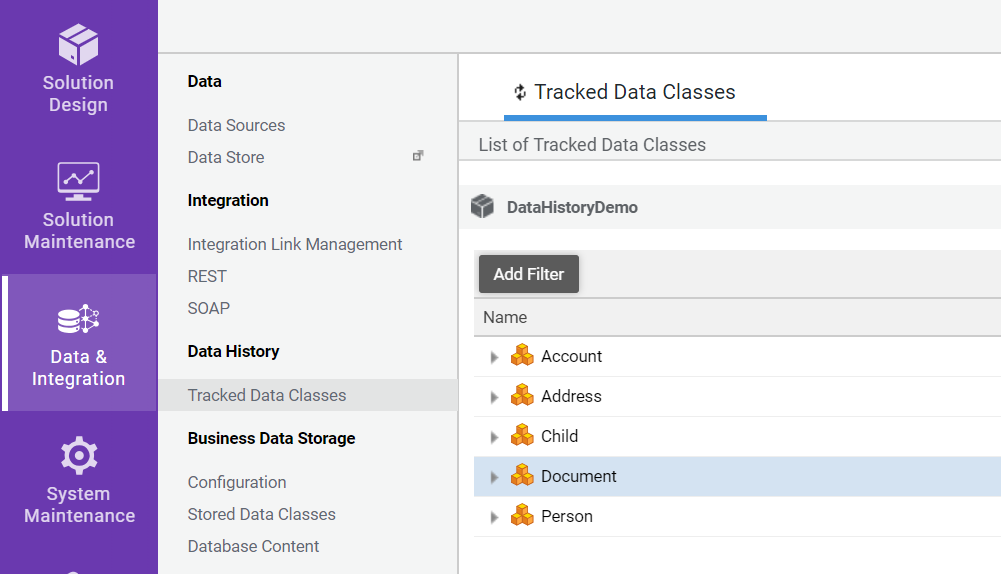
On this screen, the Studio user can configure which Data Classes and related properties are to be tracked by the Data History ('trackable' Data Classes).
Follow these steps to add or remove a Data Class, or disable tracking:
- To add a new trackable Data Class, click on the Select a Data Class... Business Object selector at the bottom of the page, select the desired Data Class, and then click on the Add Data Class button. When adding a new trackable Data Class, all its properties are tracked by default. In this case, the Tracking Status column in the List of Tracked Data Classes table displays All.
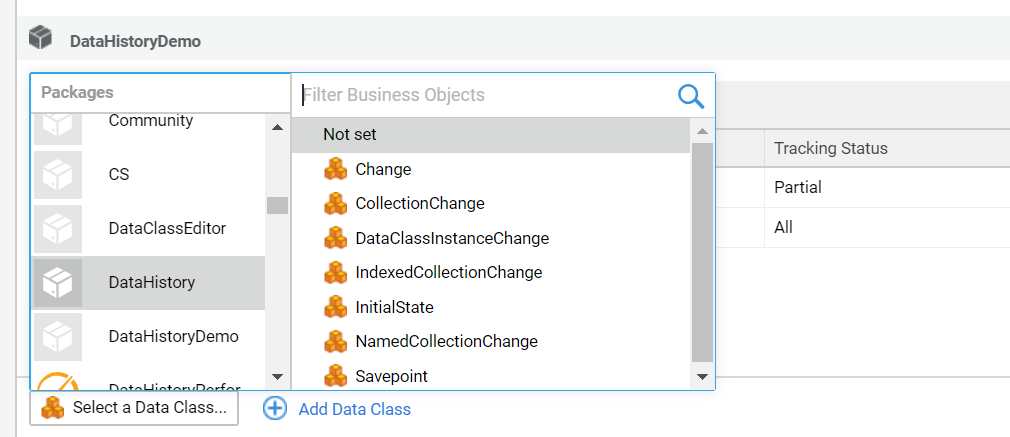
- To disable the tracking of a subset of properties, open the Data Class interline and deselect the Tracking Status checkbox for the relevant properties. The Tracking Status column in the List of Tracked Data Classes table displays Partial.
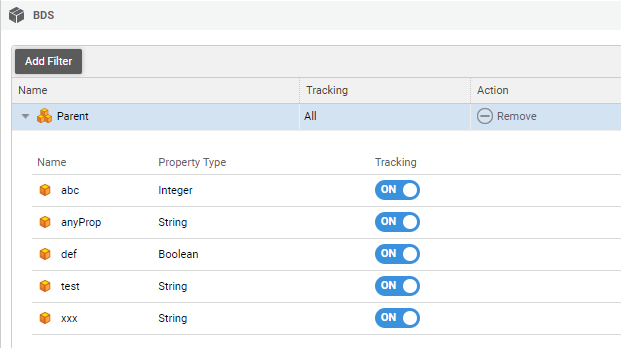
- Finally, to remove a previously added Data Class, open the Data Class interline and click on the Remove button. Consider that this operation does not remove any changes tracked for that Data Class, it only stops tracking any further changes on instances of that Data Class.
Consider the following information on Tracked Data Classes:
- Data Classes contained in the Base Package cannot be tracked using the Data History. Such Data Classes are not shown in the Business Object Selector.
- It is not possible to enable tracking of Simple properties and Collection of Simple Values properties whose type is not a supported Primitive Type.
Technical Note on Tracked Data Classes:
- The tracking settings on each Data Class are stored, transparently, in the Package Configuration of the Package to which the Data Classes belong. The settings are therefore exported and imported together with the Package Configuration. Note that once a Data Class has been committed, any changes to the tracking settings are auto-committed to the Package Configuration.
What follows is a representation of the Data Model describing changes, Savepoints and Initial States. This Data Model is used when invoking the Script Functions described in Data History Script Functions.
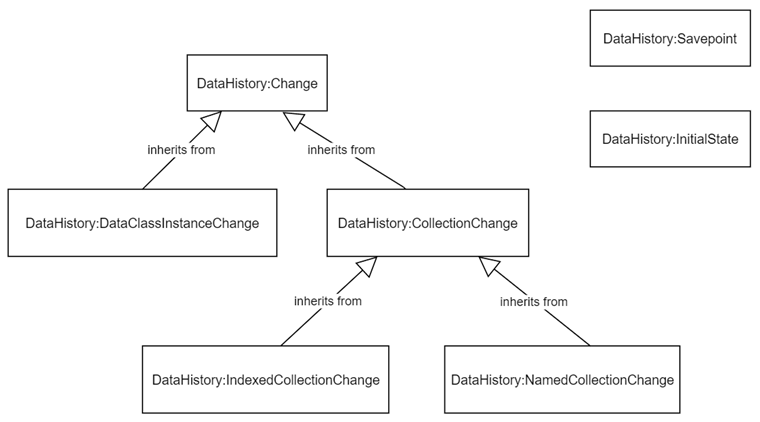
All classes in the image are provided to the FNZ Studio developer as Data Classes, delivered in the DataHistory sealed Package.
Note that the DataHistory Package is therefore necessary for the correct functioning of the Data History extension.
It represents a change performed on a Data Class instance or Collection. This is the parent Data Class for all the following Data Classes describing changes. Actual change instances are never of type DataHistory:Change, but always of one of the types inheriting from it.
Properties:
- processInstanceId (String): the id of the Process Instance on which the change was performed.
- dateTime (Date): the date and time at which the change was performed.
- userId (String): the ID of the user who performed the change.
- entityId (String): the entity ID of the Data Class instance or collection on which the change was performed.
- entityType (String): the run-time type of the Data Class instance (e.g. MyPackage:Client, MyPackage:Account..) or collection (e.g. Indexed String, Named MyPackage:Client, Indexed MyPackage:Account..) on which the change was performed.
- oldValue (String): the value before the change. For Primitive Types, it is the actual value (e.g. 'New York', 431..). For Data Class instances and collections, it is the entity ID.
- oldDisplayValue (String): see the Display Value section.
- oldValueType (String): the run-time type of the value before the change (e.g. MyPackage:Client, Indexed String..).
- newValue (String): the value after the change. For Primitive Types, it is the actual value (e.g. 'New York', 431..). For Data Class instances and collections, it is the entity ID.
- newDisplayValue (String): see the Display Value section.
- newValueType (String): the run-time type of the value after the change (e.g. MyPackage:Client, Indexed String..).
(inherits from DataHistory:Change)
It represents a change performed on a Data Class instance.
Properties:
- propertyName (String): the name of the property on which the change was performed.
- propertyType (String): the design-time type of the property on which the change was performed (e.g. String, MyPackage:Client, MyPackage:Account..).
- propertyCollectionType (String): the collection type of the property on which the change was performed (Indexed or Named; None if the property is not a collection).
Each DataClassInstanceChange is always an update of one of its properties.
(inherits from DataHistory:Change)
It represents a change performed on a Collection. This is a parent Data Class for DataHistory:IndexedCollectionChange and DataHistory:NamedCollectionChange.
Actual collection change instances are never of type DataHistory:CollectionChange, but always of one of the two types inheriting from it.
Properties:
- action (String): the type of change performed on the collection:
- adding an element to the collection ("ADD")
- changing the content of an existing element of the collection ("UPDATE")
- removing an element from the collection ("REMOVE")
Functions:
- isAdd, returns true if the action is "ADD", false otherwise.
- isUpdate, returns true if the action is "UPDATE", false otherwise.
- isRemove, returns true if the action is "REMOVE", false otherwise.
(inherits from DataHistory:CollectionChange)
It represents a change performed on an Indexed Collection.
Properties:
- position (Integer): the position in the collection at which the change was made, starting from 1 (e.g. 3).
(inherits from DataHistory:CollectionChange)
It represents a change performed on a Named Collection.
Properties:
- key (String): the key in the collection at which the change was made (e.g. 'main').
It represents a Savepoint defined in a Process Instance.
Properties:
- savepointId (String): an automatically-generated, unique ID of the Savepoint.
- processInstanceId (String): ID of the Process Instance to which the Savepoint was added.
- dateTime (Date): date and time at which the Savepoint was encountered during the execution of the Process Instance.
- name (String): name of the Savepoint as provided by the user.
It represents the Initial State of a tracked Data Class instance or collection.
Properties:
- processInstanceId (String): the ID of the Process Instance in which the Data Class instance or collection was tracked.
- dateTime (Date): the date and time at which the tracking was started for the Data Class instance or collection.
- userId (String): the ID of the user who started tracking the Data Class instance or collection.
- entityId (String): the entity ID of the Data Class instance or collection.
- entityType (String): the run-time type of the Data Class instance (e.g. MyPackage:Client, MyPackage:Account..) or collection (e.g. String, MyPackage:Client, MyPackage:Account..)
- entityCollectionType (String): the type of the collection (Indexed or Named; None if the object is not a collection)
- displayValue (String): see the Display Value section.
The displayValue property of the InitialState Data Class and the oldDisplayValue and newDisplayValue properties of the Change Data Classes contain a representation of the entity value before or after the changes.
By default, this display value is computed as follows:
- for Data Class instances, it contains:
- for each Simple Value property of a supported Primitive Type, the property name and its value e.g. "name": "Mario".
- String properties are truncated to the maximum length specified in the extension configuration property display.value.property.max.length (default is 255 characters).
- Simple Value properties of unsupported Primitive Type are not represented.
- for each Complex Value property, the property name and the reference to the contained Data Class instance e.g. "account": "@ref=MyPackage:Account:23456".
- for each Collection of Simple Value property of a supported Primitive Type, the property name and its values e.g. "names": {"father": "Mark, "uncle": "John", "child": "Joe"}.
- String values are truncated to the maximum length specified in the extension configuration property display.value.property.max.length (default is 255 characters).
- Collection of Simple Value properties of unsupported Primitive Types are not represented.
- for each Collection of Complex Value property, the property name and the references to the contained Data Class instances e.g. "relatives": {"father": "@ref=MyPackage:Person:23456", "uncle": "@ref=MyPackage:Person:17899", "child": "@ref=MyPackage:Person:62456"}
- similarly, for collections, it contains:
- for each element of a supported Primitive Type, the key/index and the value e.g. {"father": "Mark, "uncle": "John", "child": "Joe"}.
- String values are truncated to the maximum length specified in the extension configuration property display.value.property.max.length (default is 255 characters).
- collections of unsupported Primitive Types cannot be tracked.
- for each element containing a Data Class instance, the key/index and the reference to the contained Data Class instance e.g. {"father": "@ref=MyPackage:Person:23456", "uncle": "@ref=MyPackage:Person:17899", "child": "@ref=MyPackage:Person:62456"}
Example
Given the FNZ Studio Data Model:
MyPackage:Person DataClass
- String country
- Named Address addresses
MyPackage:Address DataClass
The display value of a MyPackage:Person instance may look as follows:
{ "country": "Switzerland", "addresses": {"main": "@ref=MyPackage:Address:23456", "work": "@ref=MyPackage:Address:17899"} }
The FNZ Studio developer can customize the value to be used for Data Class instances instead of the technical reference. This is achieved by implementing the function getDataHistoryDisplayValue on each Data Class whose display value needs to be customized.
The function should not have any input parameter and should return a String. The returned String is used in the Display Value to represent the instance of the Data Class. The String is truncated to the maximum length specified in the extension configuration property display.value.property.max.length (default is 255 characters).
Performance Note: since the getDataHistoryDisplayValue function is invoked by the Data History each time a change is made for a related Data Class instance, it is important that its execution time is kept low. This guarantees that the function does not have any impact on the solution performances. If the execution time of the getDataHistoryDisplayValue function of any Data Class goes above an acceptable threshold (0.5s), a sensor notifies the FNZ Studio developer and suggests appropriate correction actions.
Example
Given the same FNZ Studio Data Model as in the previous example, but assuming that the following getDataHistoryDisplayValue function is implemented on the MyPackage:Address Data Class:
Function getDataHistoryDisplayValue() : String Begin
Return $this.street & ', ' & $this.city;
End
The display value of a Person instance may look as follows:
{ "country": "Switzerland", "addresses": {"main": "Limmat St. 5, Zurich", "work": "Reuss St. 10, Luzern"} }
In the Data History Examples section, you can find examples describing possible changes and how they are mapped to the Data Model described above.
-
Persistence of changes
Changes, Initial States and Savepoints are persisted using dedicated distributed maps. The entries are kept in the maps for the whole duration of the Process Instance in which they were generated.
When the Process Instance is completed, all the related entries are removed from the maps. The DataHistory Cleanup Maintenance Job cleans up entries associated to Process Instances that have been deleted by an administrator.
Long-term persistence of Changes and Initial States beyond the lifetime of the Process Instance is achieved with custom solutions, for example by persisting the DataHistory:Change and DataHistory:InitialState instances using the Business Data Storage or other custom Databases or storage frameworks.
-
Caching
Data History provides a caching functionality that speeds up the retrieval of changes. The cache can be enabled by setting the Data History configuration property read.caching.enabled to true.
Cache entries are invalidated after 10 minutes or when the token is moved to the next Process step. Therefore, if the cache is enabled and if multiple users can read and execute changes at the same time, not all changes could be immediately visible.
For example, when a user is reviewing changes in a Screen, if another user is making changes at the same time, those additional changes are visible only when the corresponding cache entry reaches the 10-minute expiration or if the user reviewing the changes moves to another Process step and then back to the change review Screen. In other words, the user entering the review Screen sees a "snapshot" of the changes tracked at the time at which the change review Screen was first loaded.
Starting from FNZ Studio version 2023, you just need to upload the DataHistory Extension and restart FNZ Studio (as for any other plugin extension). The DataHistory Package is installed automatically.
The tasks you need to perform to update the Cluster Storage to store the additional distributed maps depend on the shared storage strategy you are using:
- Relational database – No action needed if your system is configured to allow automatic table creation. If this is not the case, you have two alternatives:
- See the Installation Guide and configure your system to allow automatic table creation.
- Create the
dhsavepointlists, dhstates, and dhdataentitytostates tables manually as described below.
- Apache Cassandra database – No action needed if the user performing the installation has privileges to create tables. If this is not this is not the case, create the
dhsavepointlists, dhstates, and dhdataentitytostates tables manually as described below. - Amazon Web Services (AWS) S3 – No action needed.
- MS Azure Blob Storage – No action needed.
- Shared file system – No action needed.
If automatic table creation is not available for your scenario, manually create the following tables:
dhsavepointlistsdhstatesdhdataentitytostates
Script examples for creating new tables on different databases are provided below. The examples below create the dhsavepointlists table, but can be reused for creating the other new tables by replacing the table name in the script:
- MySQL
CREATE TABLE dhsavepointlists (id VARCHAR(4000) NOT NULL, data LONGBLOB NOT NULL, INDEX USING BTREE(id(255))); - Oracle
CREATE TABLE dhsavepointlists (id VARCHAR(4000) NOT NULL, data BLOB NOT NULL); CREATE INDEX dhsavepointlists_idx ON dhsavepointlists (id); - DB2
CREATE TABLE dhsavepointlists (id VARCHAR(4000) NOT NULL primary key, data BLOB (1G) INLINE LENGTH 28600 NOT NULL COMPACT LOGGED) in tspc_data index in tspc_index long in tspc_long; - Cassandra
CREATE TABLE dhsavepointlists (id ascii PRIMARY KEY, data blob); - MS SQL Server
CREATE TABLE dhsavepointlists (id VARCHAR(4000) NOT NULL PRIMARY KEY, data varbinary(max) NOT NULL);
Given the following FNZ Studio data model:
Client
- String name
- Indexed String countries
- Address mainAddress
- Named Address addresses
Address
And assuming that both Data Classes are configured to be tracked with the Data History and do not have an implementation of the function getDataHistoryDisplayValue)
The mapping between different possible changes and how they would be represented by the Data History assuming that the function DataHistoryStartTracking($client) is invoked is illustrated in this PDF DataHistoryExample.pdf.