
"Web accessibility is the inclusive practice of ensuring there are no barriers that prevent interaction with, or access to, websites on the World Wide Web by people with physical disabilities, situational disabilities, and socio-economic restrictions on bandwidth and speed. When sites are correctly designed, developed and edited, generally all users have equal access to information and functionality" (Web Accessibility).
Appway is putting constant effort in making its products accessible to the widest audience possible. This blog post aims at guiding you through the main theoretical concepts of web accessibility, why accessibility is crucially to us, and finally provide details on how Appway is actually working to meet accessibility requirements:
According to the World Health Organization (WHO)’s World Report on Disability (2011), "about 15% of the world's population lives with some form of disability, of whom 2-4% experience significant difficulties in functioning" (WHO 1).
The report states that "[while] automation is often promoted as a cost-saving measure by dispensing with human interfaces, yet this can disadvantage those persons with disabilities – and others – who will always need personal assistance with some tasks. […] When designing and distributing ICT equipment and services, developers should ensure that people with disabilities gain the same benefits as the wider population and that accessibility is taken into account from the outset." (WHO 183).
However, accessibility is not only about people's functional limitations (such as visual or hearing impairments, limited motor control, or cognitive difficulties).
First, we need to consider that some functional disabilities may be temporary (e.g., an arm injury or temporary sight loss).
Second, we should there are also provisional restrictions caused by specific "situations that limit [people’s] ability to hear, see, use their hands, concentrate, understand instructions [or by] using devices that have limitations in size, input interface, etc." (E. K. MIT). Such situational limitations may vary from a person being in a crowded room needing subtitles to watch a video, to a worker with a slow Internet connection.
The EU’s European Accessibility Act takes all these aspects into consideration when stating that "the concept of 'persons with functional limitations' […] includes persons who have any physical, mental, intellectual or sensory impairments, age related impairments, or other human body performance related causes, permanent or temporary, which, in interaction with various barriers, result in their reduced access to products and services, leading to a situation that requires those products and services to be adapted to their particular needs" (EU).
This variety of limitations or impairments should be considered by the ICT industry. For example, users with severe visual impairments might not be able to access displays at all and may need alternatives such as screen readers, audio files, or braille transcriptions, while other users with low vision may need font type or size rearrangements, or color contrast adjustments.
On the other hand, users with limited dexterity may experience difficulties with devices requiring fine manipulation. In this case, possible aids are represented by switch interfaces, adaptive keyboards, or eye movement recognition software.
Finally, other resources such as captioning, or subtitling services, by-design features (e.g., a clear web page structure), plain language and simplified instructions may be valuable for users with permanent or situational disabilities (WHO 183-186).
As illustrated above, accessibility in the ICT industry is a complex and wide-ranging topic.
The W3C Web Accessibility Initiative (WAI) provides a set of guidelines that are internationally recognized as the standard for web accessibility, which include the Web Content Accessibility Guidelines (WCAG) (Henry, Web Content Accessibility Guidelines (WCAG) Overview).
"Web accessibility means that websites, tools, and technologies are designed and developed so that people with disabilities can use them". (Henry, Introduction to Web Accessibility)
Web accessibility is based on four principles stating that web content should be:
- Perceivable: Information and user interface elements must be presented in a way that users can identify. This means, for example, that text content can both be seen and heard, or, on the other hand, that text alternatives are available for non-text content.
- Operable: Information and navigation can be used, meaning that users can actually perform the required actions, such as filling data, proceeding to the following step of a process and so on. This means, for example, that functionalities are available from a keyboard or that the interface can be easily and clearly navigated.
- Understandable: Information and interfaces can be understood. This means, for example, that texts are clearly readable and understandable, content is displayed and behaves in predictable ways, and users are guided in avoiding and correct mistakes.
- Robust: Content must be interpreted by all users and technologies (including assistive technologies), meaning that compatibility with current and future user tools should be maximized. (E. K. MIT)
Accessibility is a broad and sensitive topic, and meeting accessibility criteria is not an easy task. Therefore, why should the ICT industry promote and foster accessibility?
First and most importantly, accessibility is a human right as recognized by the UN Convention on the Rights of Persons with Disabilities, an international treaty "intended as a human rights instrument with an explicit, social development dimension. It adopts a broad categorization of persons with disabilities and reaffirms that all persons with all types of disabilities must enjoy all human rights and fundamental freedoms" (UN, United Nations Convention on the Rights of Persons with Disabilities (CRPD)).
Specifically, the UN Convention on the Rights of Persons with Disabilities "promotes access for persons with disabilities to new information and communications technologies and systems, including the Internet" (UN, Convention on the Rights of Persons with Disabilities (CRPD) Article 9 – Accessibility).
Accessibility standards are adopted by several national governments and international organizations, and web accessibility is enforced in their public websites, as well as in an increasing number of private companies.
A remarkable example of this in the European Union legal framework is the EU Web Accessibility Directive, which became law in 2019 with the name of European Accessibility Act. This Act is based on the above-mentioned UN Convention on the Rights of Persons with Disabilities and its main goal is to "promote full and effective equal participation by improving access to mainstream products and services that, through their initial design or subsequent adaptation, address the particular needs of persons with disabilities" (EU).
All EU Member States are bound to take the administrative measures to comply with this Act by mid-2022 and implement such regulations by 2025. Such regulations will apply to the public sector, including consumer banking services placed on the market after 28 June 2025, as stated in the General Provisions (provisions 39 and 40), "with a view to enabling persons with disabilities to use [banking and financial] services throughout the Union, including where provided through websites and mobile device-based services including mobile applications, to make well-informed decisions, and to feel confident that they are adequately protected on an equal basis with other consumers, as well as ensure a level playing field for service providers, this Directive should establish common accessibility requirements for certain banking and financial services provided to consumers. The appropriate accessibility requirements should also apply to identification methods, electronic signature and payment services, since they are necessary for concluding consumer banking transactions" (EU).
Moreover, Annex 1 clearly states that such services should meet the WCAG accessibility criteria mentioned above and "[should be] perceivable, operable, understandable and robust" (EU).
While accessibility is essential to some, it is, in fact, valuable to all.
From a business point of view, accessibility has a positive impact on the private sector overall, which benefits from the harmonization of regulations and allows ICT enterprises to access international markets with their products and services by complying with their accessibility standards. Moreover, such products and services have a wider potential consumer audience.
From a social point of view, all individuals can benefit from enhanced accessibility, whether they cope with any temporary or situational impairments, or, in general, through easier access to content. Clear and consistent web design or layout, for example, may dramatically reduce frustration for the end user while making content fully usable and functional.
Appway’s latest Application Business Components (ABCs) have been designed with special attention to accessibility criteria and follow the latest Web Content Accessibility Guidelines (WCAG).
As part of its ABC implementation, Appway has worked on a new category of Process Tasks, defined as App Tasks, which come with their own User Interface (UI) built as a single-page application. Such UI is not based on Screen Business Objects but, rather, is entirely generated based on the Data Class and Data Logic Business Objects.
Currently, there are two available App Tasks, and both have been designed following the WCAG 2.1 Success Criteria:
The following sections will guide you through the criteria followed by Appway to make its products as accessible as possible:
- Accessibility by design
- Implementation for accessibility
- Configuration for accessibility
Although the latest Appway products have been designed with special attention to accessibility and following Web Content Accessibility Guidelines (WCAG), Appway currently does not hold a WCGA certification.
The main reason for this choice is that our products are highly configurable, therefore, we cannot guarantee the full and continuous compliance of Appway-built Solutions with accessibility criteria.
However, Appway is keen on providing support to those customers who wish to ask for such a certification.
Product design is a key aspect of accessibility. At Appway we have put in a great deal of effort to make our software easily accessible to the widest possible audience, with special attention to three main design areas:
- Hierarchy and structure — A clear data structure makes it easier for the user to navigate through a screen and understand its content fully.
- Colors and visuals — Our color palette meets the minimum recommended contrast ratio to ensure font visibility. Moreover, other visuals constantly guide the user while navigating the page.
- Responsiveness — Screen responsiveness ensures that the same quality of experience is provided to the user independently of the device and of its screen size.
Full details are provided in the following sections.
Our App Tasks have been designed with careful attention to easy navigation through a clear and consistent data structure. This:
- Helps better understand the hierarchy of data
- Helps users understand where they are in the task itself
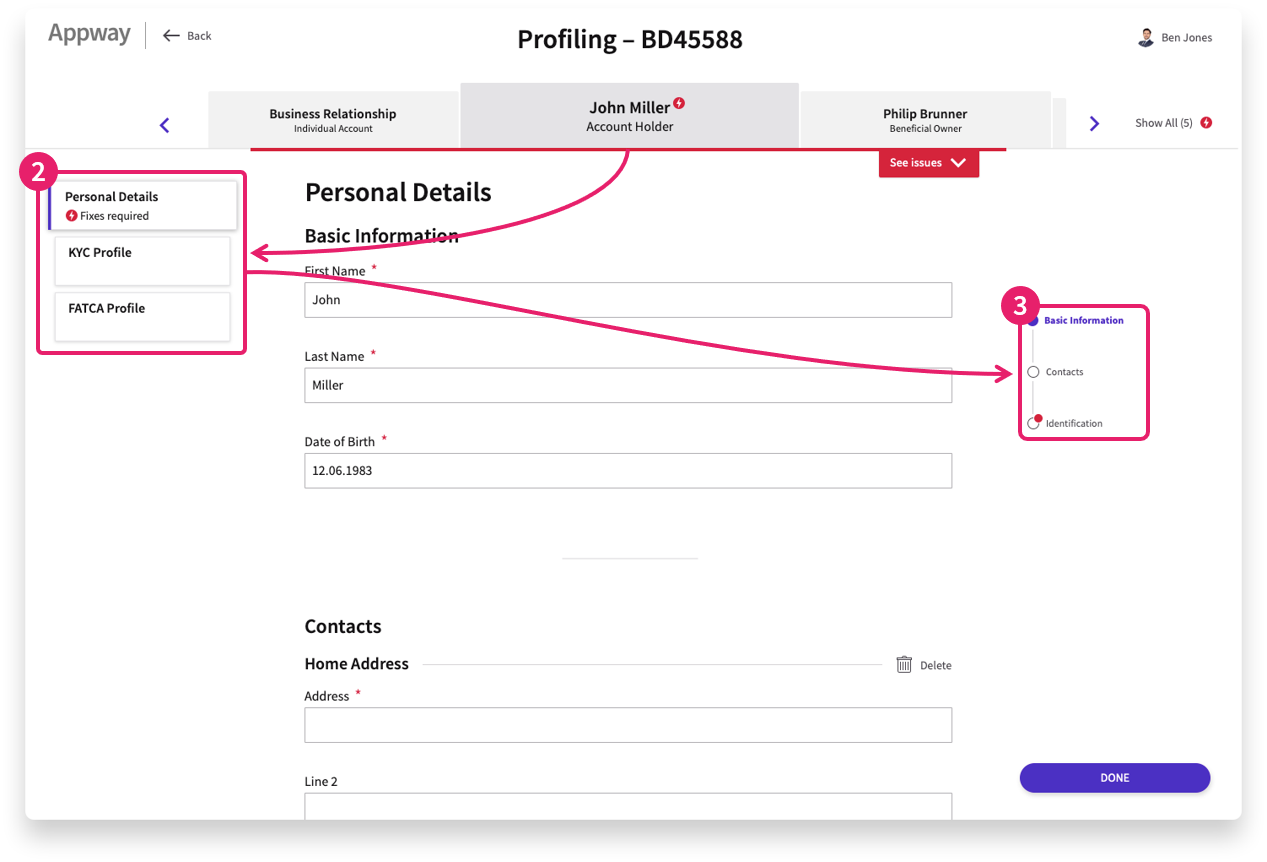
Moreover, content is organized to allow for easier and faster readability through the three following elements:
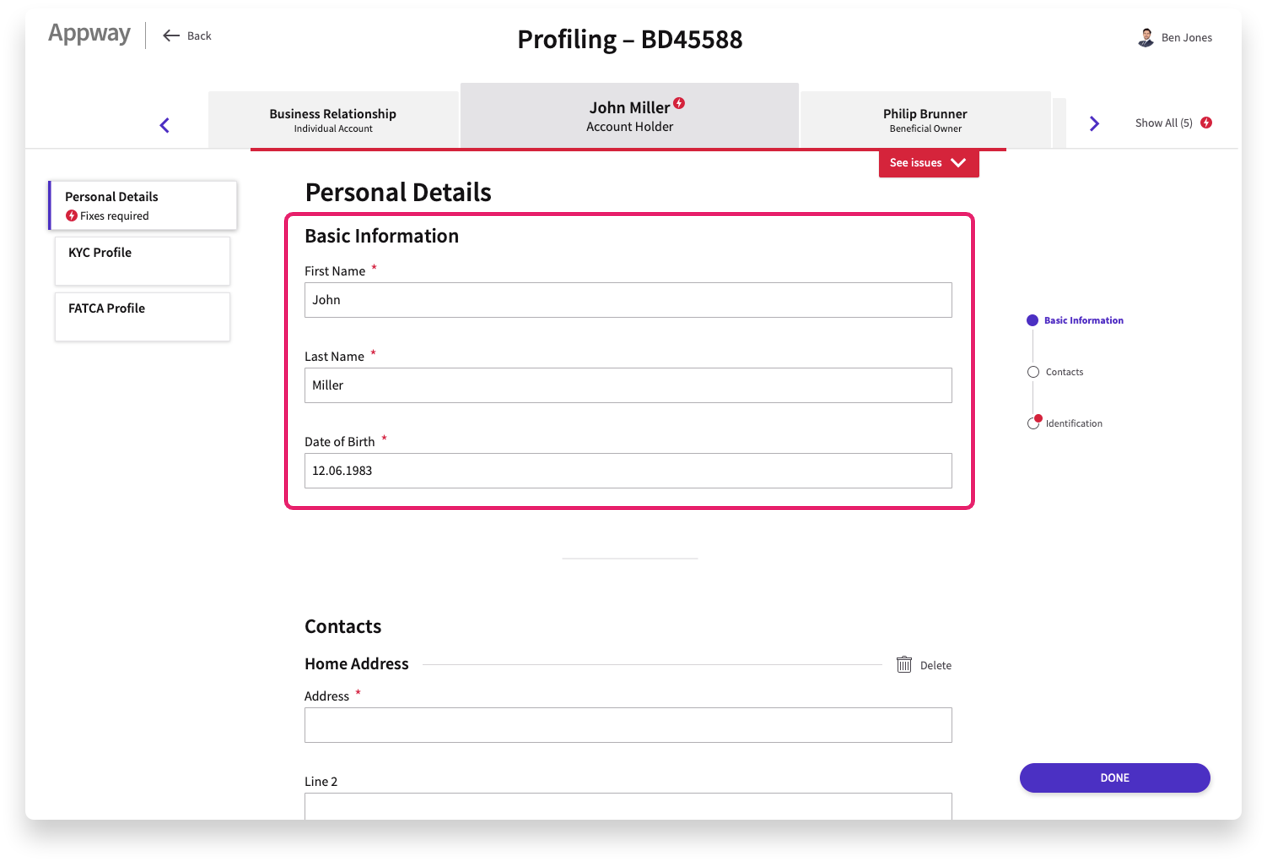
- Grouping: data is grouped in clear and consistent sections.
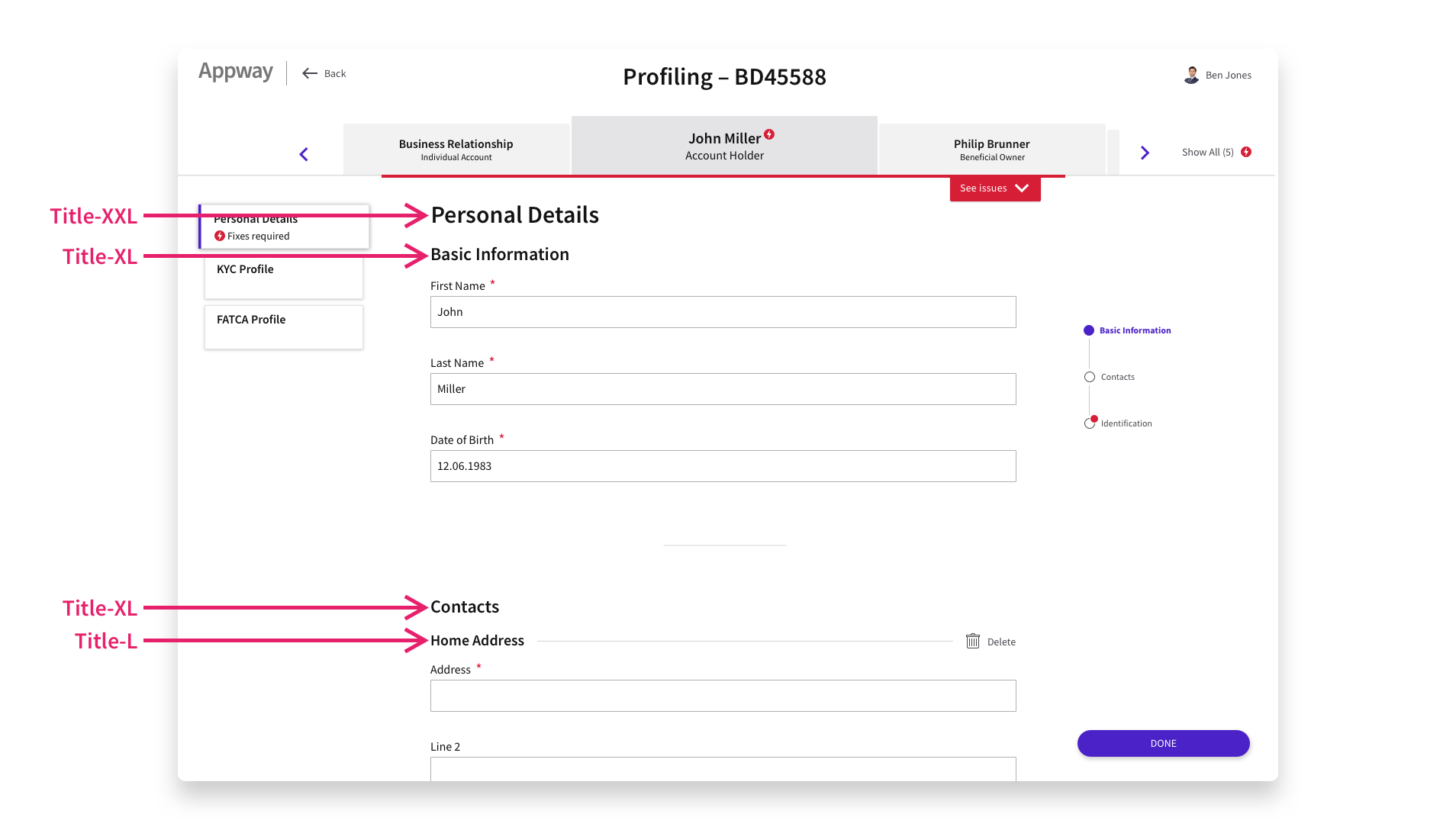
- Typography: the font system is built logically to help understand the data structure.
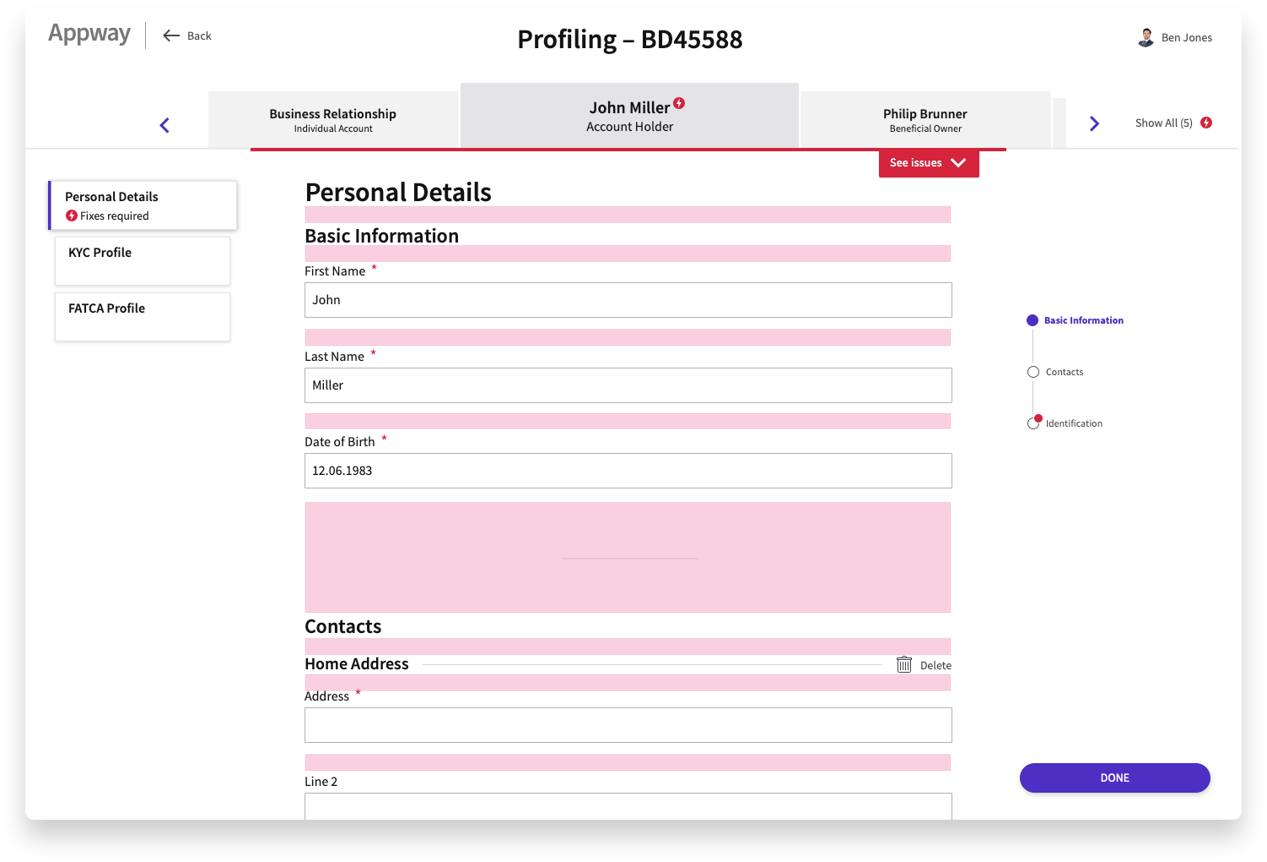
- Spacing: Different spacing allows grouping sections consistently.
Appway's App Tasks come with the so-called Theme Editor, a tool available in the workspace side of the App Tasks out-of the-box, which allows editing the look-and feel of the workspace itself to achieve the desired branding.
In our Theme Editor, base colors calculate the rest of colors automatically and, therefore, the relation among all colors is controlled by Appway itself.
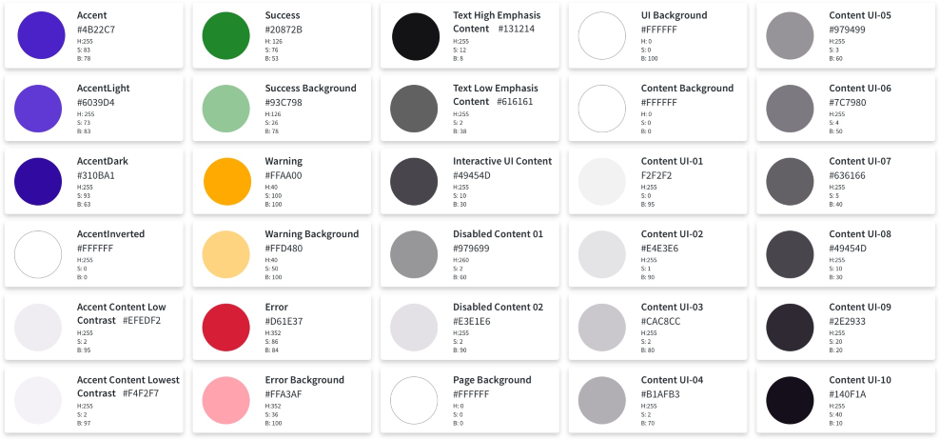
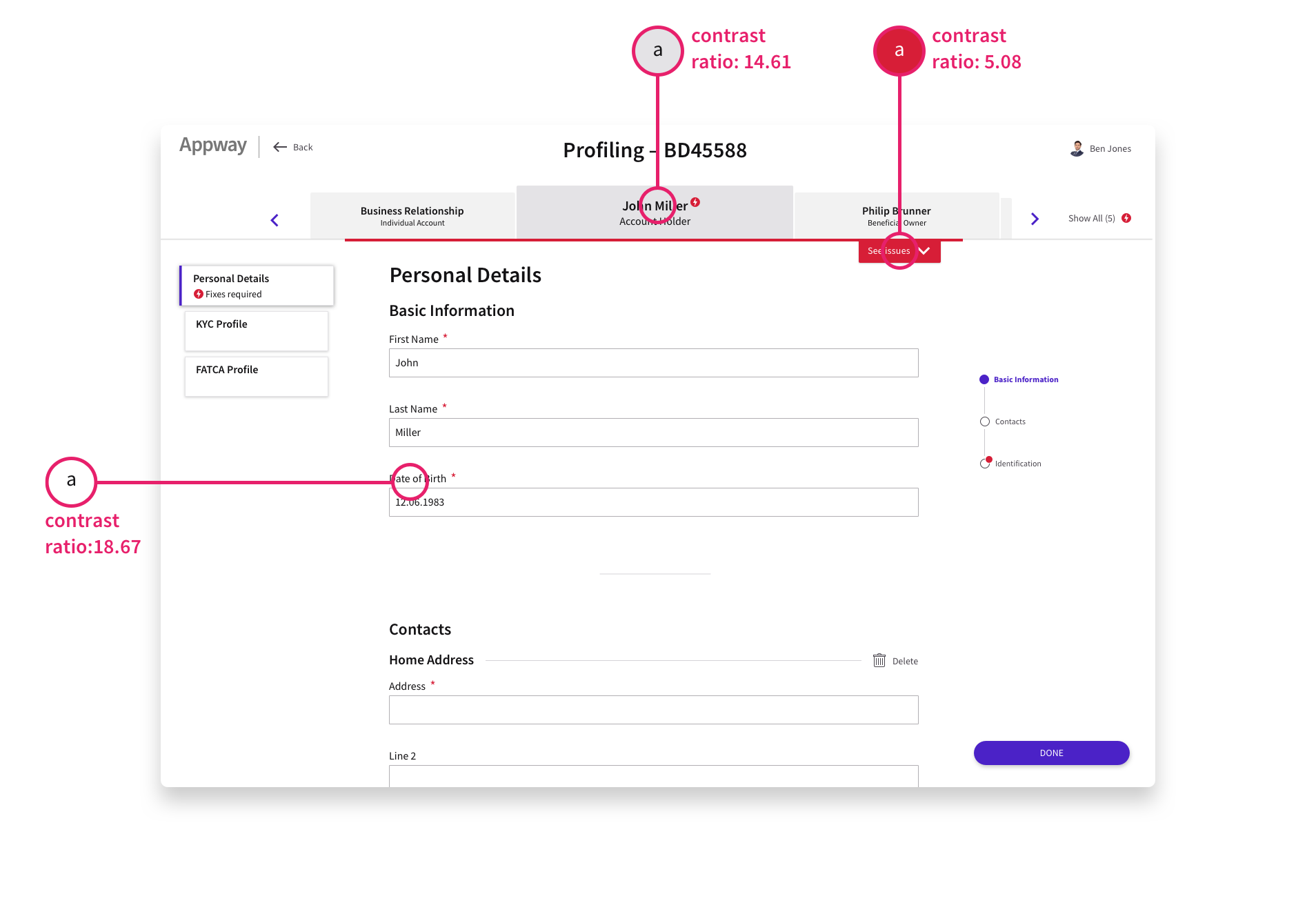
In the default Theme provided by Appway, base colors and their combinations are conceived to provide enough contrast between text and background and meet the minimum contrast ratio of 4.5 recommended by WCAG 2.0 guidelines. Sufficiently-contrasting colors, in fact, are key to font visibility, thus ensuring that content can be accessed by the widest audience possible.
Note that Theme colors are configurable by developers. Make sure you check the
details in the Appway Configuration section below.
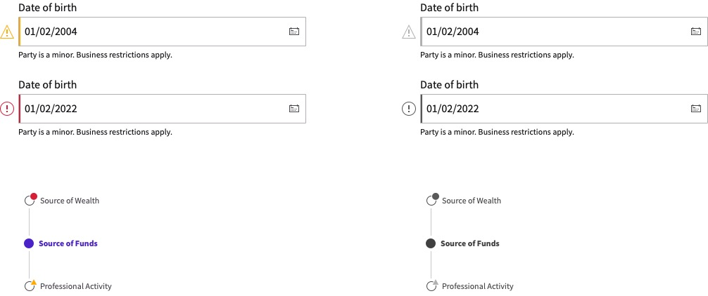
Finally, other visual elements are used in combination with colors to convey and emphasize some information, such as icons and markers.
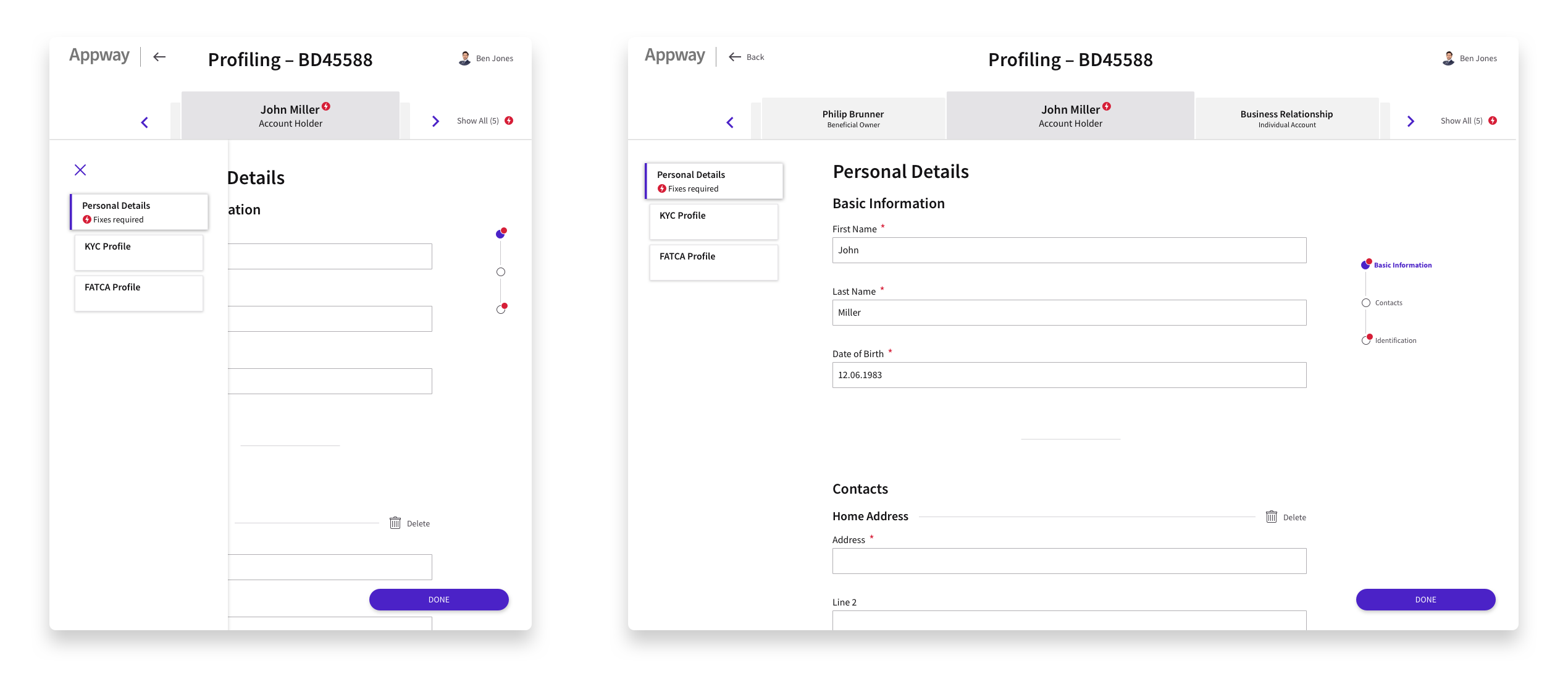
As illustrated in the image below, icons may allow users with color vision impairment to distinguish between a warning and an error message. On the other hand, anchor navigation makes use of markers that help understand which element is currently selected.
Responsive design ensures that the same quality of experience is provided to all users regardless the device they are using and their screen size.
In our App Tasks, some components change their behavior depending on screen size. For example, header navigation adapts to a smaller screen size by changing the structure of its elements. The same operations can thus be performed on all devices by adapting to users’ interactions.
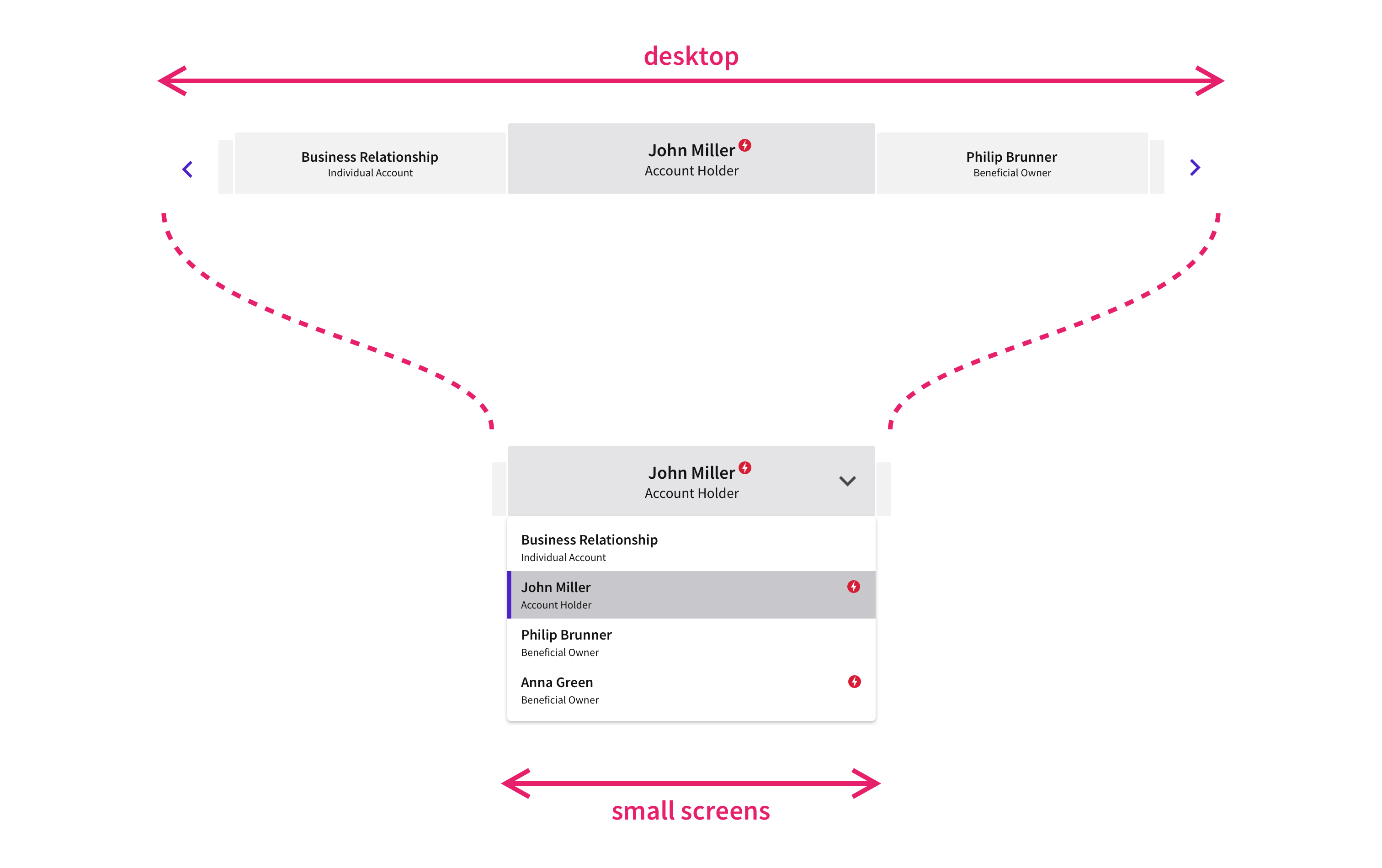
However, to guarantee consistent UX, screen responsiveness is applied in different ways depending on each use case. In anchor navigation, for example, navigation elements are kept in the same place regardless of the size of the screen (e.g., in a sidebar), so that users do not need to cope with unexpected behavior and are able to "recycle" their previous experience.
Several assistive technologies allow users with disabilities to access the web. For example, braille readers for blind people, browser-embedded tools for low- vision impairments, eye trackers for motor impairments, or captions for hearing-impaired users.
However, at Appway, we are committed to doing our best to implement accessibility in our software directly instead of relying solely on third-party assistive technologies.
For this reason, while developing our software, we abide by the following implementation principles:
- Adaptable design and responsiveness: Visual elements and text must be flexible on every screen size and zoom, so that users can zoom in on a page while preserving an acceptable layout.
- Keyboard navigation: Interactive elements should always be reachable through the keyboard to allow users with limited dexterity avoid using the mouse.
- Clear navigation: Our pages provide shortcuts to allow users to jump easily from one section to another.
- Semantics and labeling: Code is expressed in a meaningful way to work with assistive technologies, e.g., input fields contain labels, so that screen readers can inform visually impaired users what they must fill into the field.
Other tools are used in our code to enhance the accessibility of our software:
- Relative units: Text is sized according to another customizable value, depending on the user's needs.
- HTML5 semantic tags: HTML elements clearly describe their meaning in a human and machine-readable way. Using tags meaningfully allows screen readers to work correctly, e.g., if you use list tags, the screen reader can interpret such information and provide it to the user ("This is a list if two elements, you are on the first one").
- HTML attributes: They provide additional information on visual elements. If the user cannot see an image, the screen reader can interpret the image alt text and describe what the image represents ("This is an image of pancakes with sugar").
- WAI-ARIA attributes: This is a WAI specification for Accessible Rich Internet Applications (WAI-ARIA), which include dynamic content and advanced user interface controls developed with Ajax, JavaScript, and related web technologies. It adds further semantics to the code for better support in assistive technology. For example, if some information appears on a popup, the screen reader can inform the user ("This new element has appeared with this content").
Finally, Appway puts great effort in product configuration. Good configuration plays a pivotal role in making our ABCs accessible.
In Appway’s App Tasks, the Data Model-Driven configuration is centered around the Data Logic Business Object, and especially Data Rules, Controls, and Data Logic Includes.
We are providing just some examples of Data Logic configuration below. However, you can see all the details of App Task configuration in our documentation.
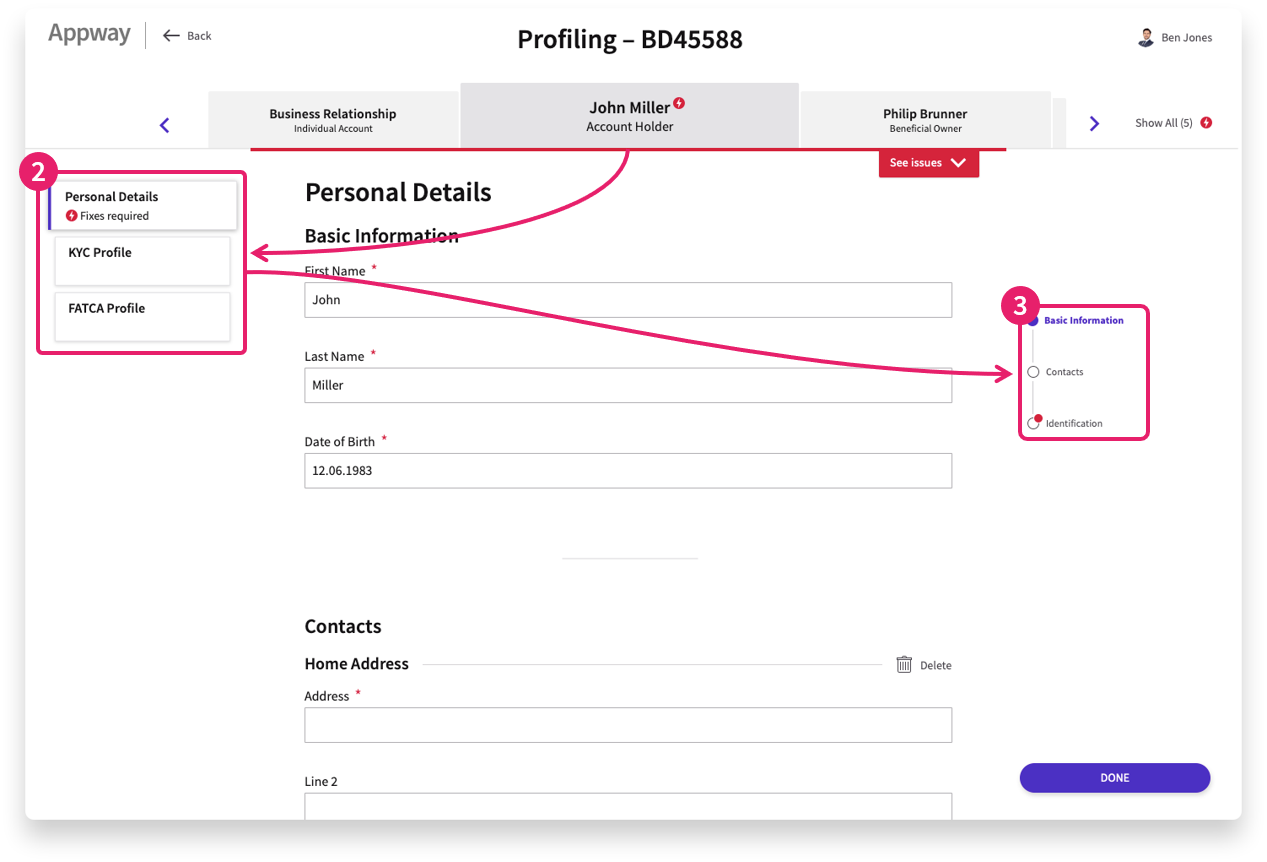
Page navigation and page layout in our App Tasks are based on Data Logic Group Controls. Grouping allows configuring the UI in a way that makes it easy for a user to find information where expected. Moreover, it manages page hierarchy automatically so that the developer does not need to take care of it.
There are two Data Logic Group Controls responsible for page layout:
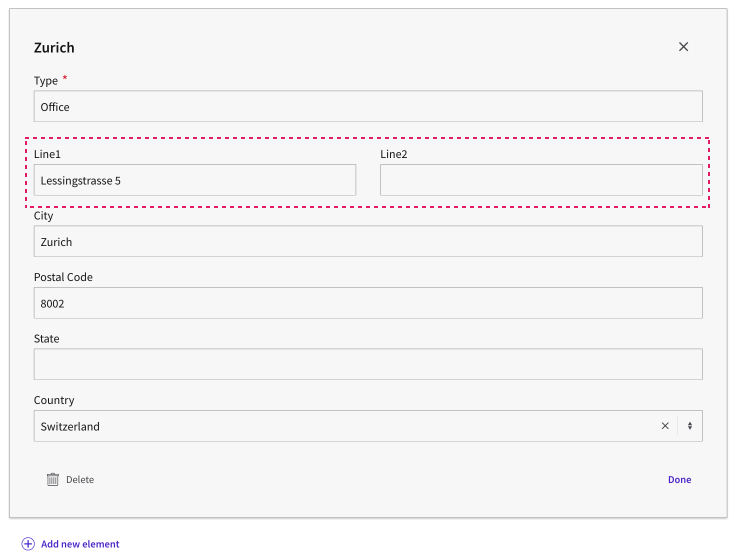
- Field Set Group — Allows grouping fields that are strongly correlated semantically and can be shown on the same row at the same time. Such elements are represented as part of the same group, such as start date / end date, zip code / city, street / street number.
- Section Group — Allows defining sections to group specific Controls together, e.g., all the fields for the KYC, or all the fields regarding the family of a party (marriage status, name of husband, number of children, and so on). Section Groups are used to structure page navigation.
You can see all the details on Data Logic Group configuration in our
documentation.
Appway’s App Tasks provide continuous guidance to users on the data that must or should be filled through an exhaustive information framework. Clear instructions are a key aspect of accessibility.
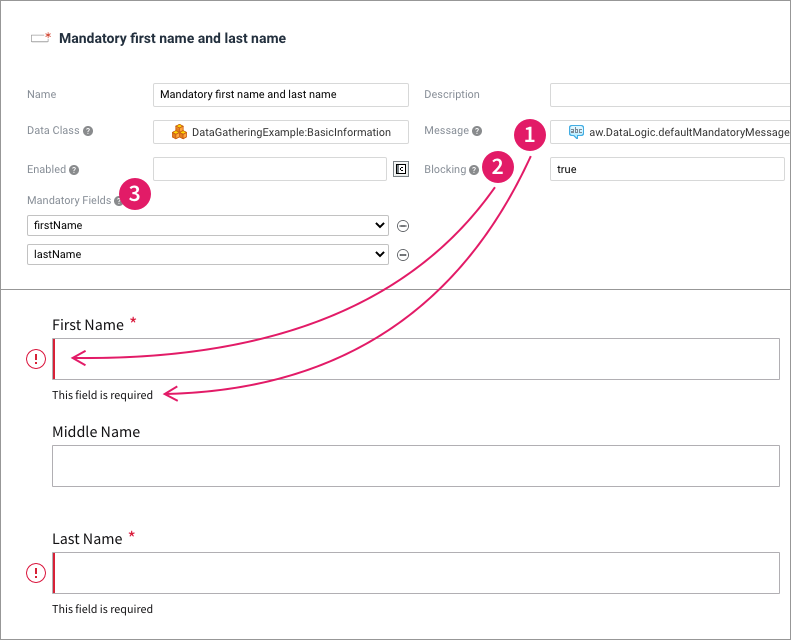
The user is guided to understand what is missing precisely through visual indications and warning messages at all levels of navigation.
You can see all the details on continuous guidance in our
documentation.
The mandatory fields to be filled are configured through Data Logic Rules. On the one side, Data Logic Rules can be configured to highlight existing violations through visual indications and messages. On the one side, some Data Logic Rules can also be configured to prevent violations in the first place, e.g., by allowing users to select only valid values from a dropdown, or by defining additional constraints on strings representing phone numbers or email addresses.
You can see all the details on Data Logic Rule configuration in our
documentation.
A further aspect of accessibility is having the adequate input elements for the content presented on the page. For example, a radio button component should be used for answering a "Yes/No" question, while a dropdown list component would be more suitable for an answer allowing multiple values.
This aspect is also configurable in our App Tasks through Data Logic Controls. Primitive Types are mapped into input control elements such as text, date picker and so on.
Different components are displayed depending on the selected Primitive Types and Data Rule configuration. For example, when a field is of type String (or Integer, Date, Float etc.):
- A radiobutton is displayed when a Catalog Values Rule with the ‘Size’ property is set to ‘small number of results’

- A dropdown list is displayed when the Catalog Values Rule with the ‘Size’ property is set to 'large number of results'.
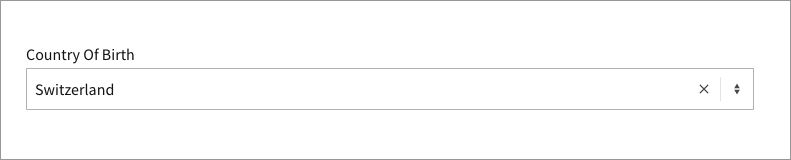
You can see all the details on Data Logic Control configuration in our
documentation.
As previously mentioned, our code should be expressed in a meaningful way to work with assistive technologies, and labeling plays an important role in this respect. For example, input fields should contain meaningful texts, so that screen readers can provide clear information to visually impaired users about the data they need to fill into the form.
The Appway Platform provides several Label creation functionalities, which allow you to create Label Business Objects while working in Appway Studio.
Moreover, Appway provides an efficient tool for label translations, the Overriding Translations functionality, which allows managing translations efficiently from a central location in situations where you want to customize the UI text of your Solution. This way, Labels are translated to the user's language on-the-fly when the user accesses the Solution in the Workspace if the according translation is available.
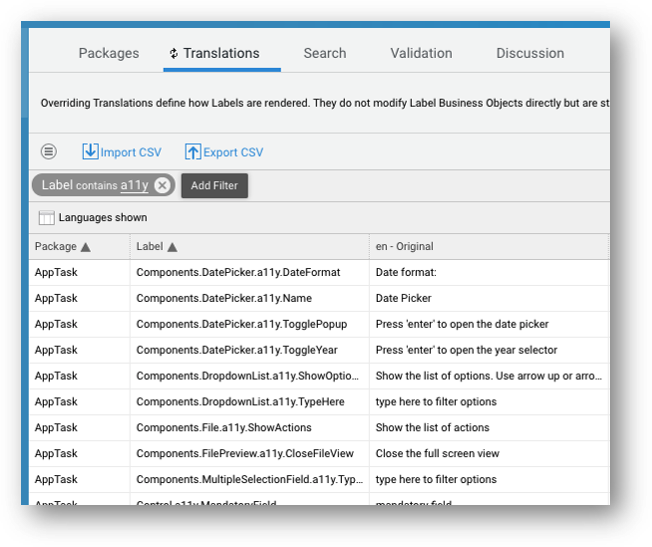
In the specific case of App Tasks, all basic Labels are already included in our Platform Packages and can be translated using the Overriding Translations functionalities.
Moreover, we have created some specific accessibility labels, which are used, for example, for screen recording. Therefore, make sure you translate such Labels if you want your Solution to be fully accessible. They can be easily searched for in Appway Studio Translations tab (Package Configuration module) by the a11y string, as illustrated in the image below:
You can read all the details on:
- Label creation and translation functionalities in our Languages, Labels and Translations documentation
- Localization in App Tasks in our App Task Configuration documentation
Finally, as previously mentioned in our Color and Contrast section, our out-of-the-box Theme Editor allows editing the look-and feel of the Workspace itself to achieve the desired branding.
Trough the Theme Editor, the end user is exposed to a set of master style elements. Behind the scenes, all the elements required to style the entire Solution are consistently auto-generated according to those values.
In the default Theme provided by Appway, colors are devised so as to guarantee the minimum contrast ratio between text and background recommended by WCAG 2.0 guidelines.
However, you need to be aware that Appway developers can create their own Themes and, therefore, choose colors that differ from the default ones. Appway cannot guarantee that such custom Themes comply with accessibility criteria. In the next releases, we are planning to provide on-screen guidance to our developers, so as to make sure that high configurability is maintained while avoiding Themes that do not abide by accessibility guidelines.
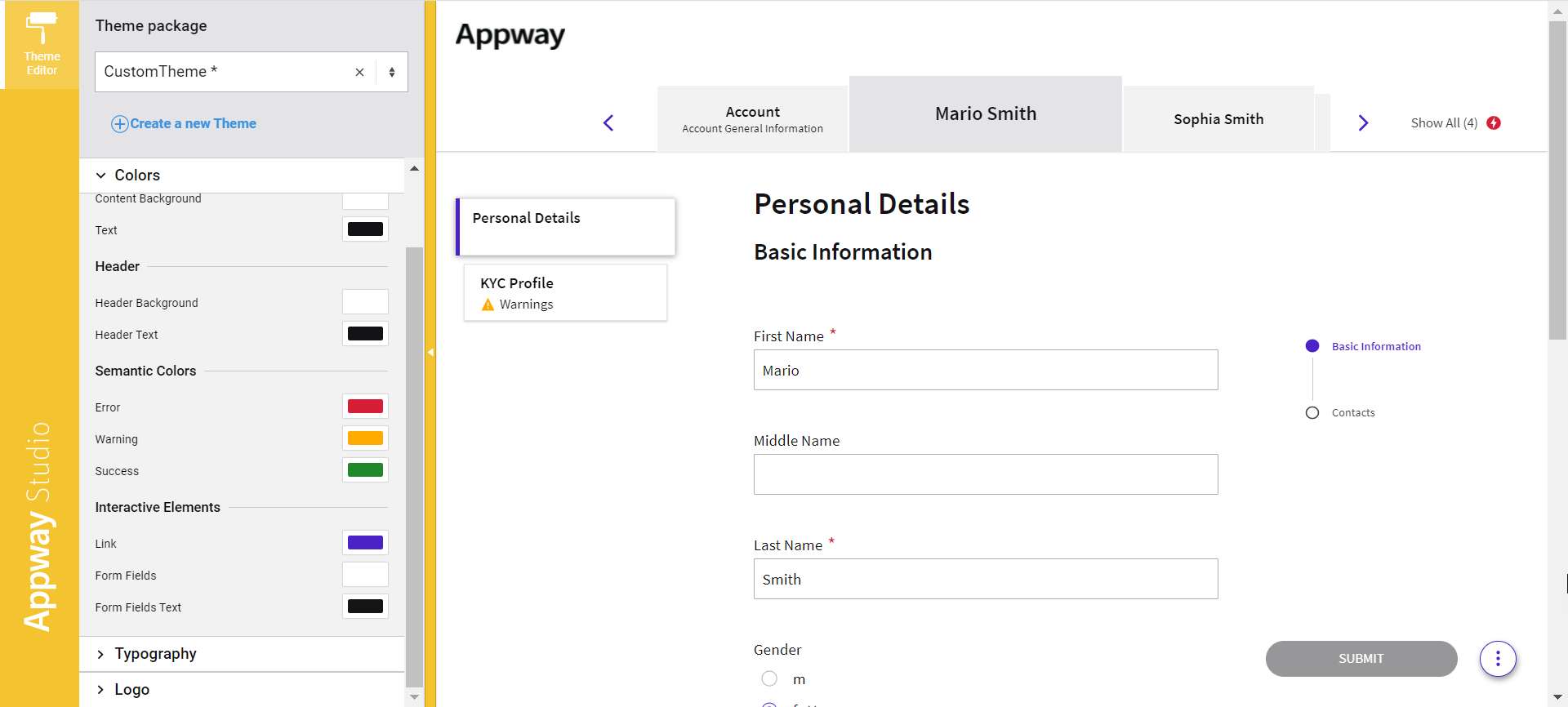
See all details on branding and the Theme Editor in our App Task Configuration
documentation.
- EU. Directive (eu) 2019/882 of the European Parliament and of the Council. Official Journal of the European Union, 19 April 2019. 14 July 2021. Link.
- Henry, Shawn Lawton. Introduction to Web Accessibility. 19 July 2019. 19 May 2021. Link.
- Henry, Shawn Lawton. Web Content Accessibility Guidelines (WCAG) Overview. 29 April 2021. Link.
- MIT, Ercim, Keio. Introduction to Understanding WCAG 2.1. n.d. 19 May 2021. Link.
- MIT, ERCIM, Keio. "Web Accessibility Initiative (WAI) - Terminology." 29 April 2015. W3C® . Link.
- UN. United Nations Convention on the Rights of Persons with Disabilities (CRPD) Article 9 – Accessibility. 2006. Document. Link.
- UN. United Nations Convention on the Rights of Persons with Disabilities (CRPD). 2016. 13 July 2021. Link.
- Web Accessibility. 14 July 2021. Web page. 29 July 2021. Link.
- WHO. "World Report on Disability." 2011.