If you need to restart the WebServices extension, be sure to first shut down the IntegrationLinks containing the web service components to avoid unexpected issues.
The two industry-standard Web Service types are Simple Object Access Protocol (SOAP) and Representational State Transfer (REST). Both are supported by Appway using the WebServices extension.
Web Services are generally used to integrate with a third-party application. This can be either as a host or a client. Currently, Appway only supports the latter. For example, in a corporate environment where numerous applications need to use customer information, it would be very difficult to maintain this information if each application were to keep its own copy. If a customer changes address, it would be necessary to make the amendments in multiple times. Using Web Services, a single application could be the owner of that data and all of the other applications request the information from that application through a web service interface, likewise for updating that data.
SOAP is a formal specification/contract between two communicating parties that defines the structure of the data flowing back and forth in XML. SOAP Services are defined using a Web Service Definition Language (WSDL) file. In SOAP, a service exposes a series of operations/actions. Each of these operations may expect different data and the format of that data is specified in the WSDL or associated XSD files. The messages that flow back and forth contain an Envelope in which is kept the body of the message, the data expected by the operation or the response expected from the operation.
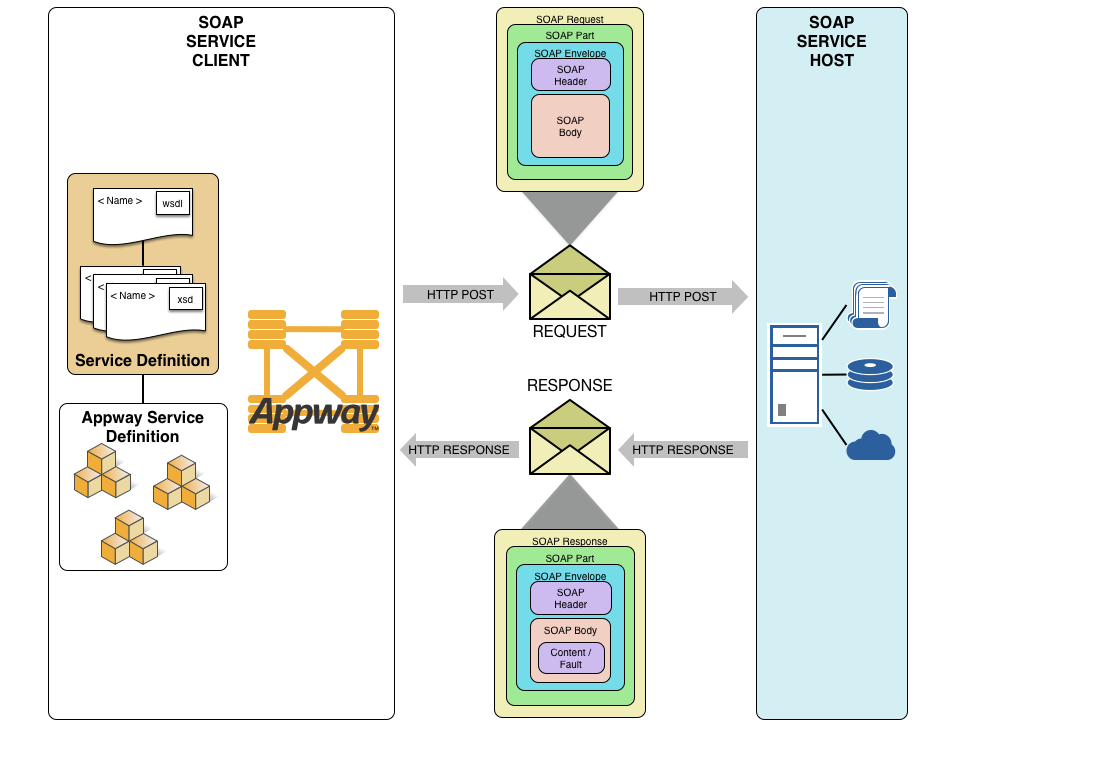
Figure 1: SOAP Service
REST, however, doesn't have any particular constraints on the data format. In that respect, it should be considered more as an architecture than a formalization. Generally speaking, the data structures used are either JSON or XML but could equally be any data format. The REST architecture is based upon the HTTP 1.1 specification which offers a series of methods for interrogating (GET), adding (PUT), updating (POST) and deleting (DELETE) records/data from a host as well as some additional utility methods.
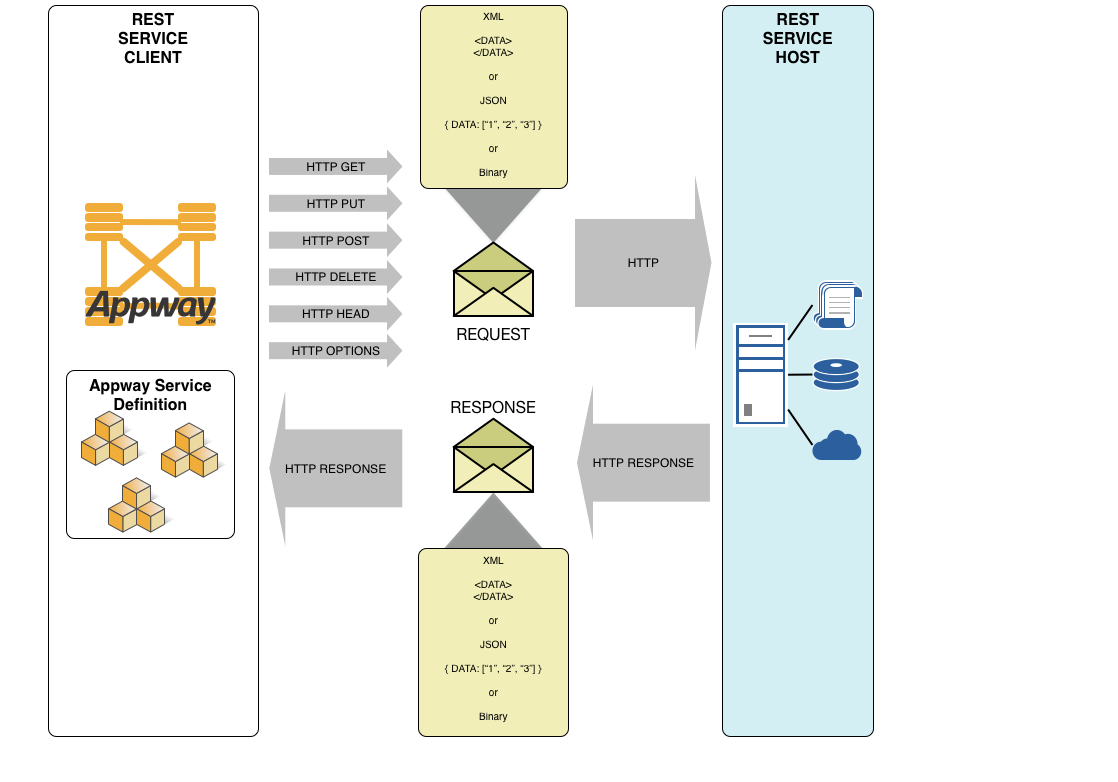
Figure 2: REST Service
The SOAP extension allows you to call a web service based on the Simple Object Access Protocol (SOAP) through an Integration Link or a script.
An import wizard lets you import Data Classes and service definitions from a WSDL file. A service client is created as a Data Class (name ending in "CLIENT"). This service client contains the methods that can be used to call the corresponding service. A SOAP service can either be called through the Integration Link's "SOAP Client" component, or through a script.
The extension also contains a service testing tool and an exception browser for diagnosis and debugging.
Before reading this section, familiarize yourself with the SOAP standard (Wikipedia article on SOAP) and the WS-I Basic Profile v1.1.
To install SOAP, follow the product documentation on installing regular Appway extensions. Once started, the extension adds the following functionality to the Appway Platform:
- Import wizard to handle import tasks
- "SOAP Client" Integration Link component to call services from Integration Links
- Data Classes representing the base service client and SOAP elements:
ServiceClient – Base Data Class for all service clients created when importing a WSDL file.Fault – Base Data Class for the SOAP "Fault" element.SOAP11_Fault – SOAP "Fault" element for SOAP version 1.1 services; extends the "Fault" Data Class.SOAP12_Fault – SOAP "Fault" element for SOAP version 1.2 services, extends the "Fault" Data Class.SOAPHeaderElement – Allows the definition of SOAP headers, for example for cookie handling.
- Set of functions to execute, test and debug service calls:
SOAPCall() – Used by the service client Data Class to execute a SOAP call. Do not use this function directly. Instead, use the service client methods to invoke a service method.SOAPConvertToDataEntity() – Converts the body of a SOAP response into a data entity; useful for testing.SOAPConvertToXML() – Converts a data entity to XML using the mappings defined by the Data Class created by a service; useful for testing.SOAPGetMessage() – Method to create and retrieve a message as would be created using SOAPCall().SOAPThrowBusinessException() – Throws a com.nm.extensions.webservices.soap.BusinessException; useful for exception handling in Integration Links and Processes.XSDToDataClass() – Imports an XML Schema Definition (XSD) and creates Data Classes based on that XSD; useful for debugging.
- Service test tool for script-based testing of imported services
- Exception browser listing the last exception to occur during each service function call within the last 30 minutes.
The SOAP extension uses and creates namespace-aware XML documents. For namespace handling, it uses namespace prefixes which are prepended to the ID of the Data Classes generated.
It is up to the user to define the proper namespace prefixes in case a service is re-imported.
The WSDL importer allows you to import service descriptions referencing the XML schemas used in the service with xsd:import or xsd:include.
The schemaLocation property is mandatory for custom schema references. These must, however, be included in the types section of the WSDL. Recursive import and include are supported.
<xsd:import namespace="myURI" schemaLocation="/my/loation/myschema.xsd"/>
Code 1: Example import
A top-level complex type definition or a top-level element definition with an embedded anonymous complex type triggers the creation of a Data Class with the corresponding name.
<xs:complexType name="ClientRelationship">
	<xs:sequence>
		<xs:element name="team" type="Team" minOccurs="0" maxOccurs="1"/>
		<xs:element name="name" type="xs:string" minOccurs="1" maxOccurs="1"/>
		<xs:element name="client" type="Client" minOccurs="1" maxOccurs="unbounded"/>
	</xs:sequence>
</xs:complexType>

<!-- equivalent definition -->
<xs:element name="ClientRelationship">
<xs:complexType>
		<xs:sequence>
			<xs:element name="team" type="Team" minOccurs="0" maxOccurs="1"/>
			<xs:element name="name" type="xs:string" minOccurs="1" maxOccurs="1"/>
			<xs:element name="client" type="Client" minOccurs="1" maxOccurs="unbounded"/>
		</xs:sequence>
	</xs:complexType>
</xs:element>

	<!-- equivalent definition -->
	<xs:element name="ClientRelationship" type="ClientRelationship"/>
<xs:complexType name="ClientRelationship">
	<xs:sequence>
		<xs:element name="team" type="Team" minOccurs="0" maxOccurs="1"/>
		<xs:element name="name" type="xs:string" minOccurs="1" maxOccurs="1"/>
		<xs:element name="client" type="Client" minOccurs="1" maxOccurs="unbounded"/>
	</xs:sequence>
</xs:complexType>
Code 2: XML type definition
The definitions above trigger the creation of a Data Class called "ClientRelationship":
Class ClientRelationship Begin
	Property['team', Team, 'none'];
	Property['name', String, 'none'];
	Property['client', Client, 'indexed'];
End
Code 3: Data Class definition
A nested / anonymous complex type triggers the creation of a new Data Class whenever a definition of that style is found. The name of the new "anonymous" class is derived from the property name.
<xs:complexType name="ClientRelationship">
	<xs:sequence>
	<xs:element name="team" type="Team" minOccurs="0" maxOccurs="1"/>
	<xs:element name="name" type="xs:string" minOccurs="1" maxOccurs="1"/>
		<xs:element name="client" minOccurs="1" maxOccurs="unbounded">
			<xs:complexType>
			...
			</xs:complexType>
		</xs:element>
	</xs:sequence>
</xs:complexType>
Code 4 : XML nested anonymous complex type definition
Class ClientRelationship Begin
	Property['team', Team, 'none'];
	Property['name', String, 'none'];
	Property['client', ClientRelationship_Client, 'indexed'];
End
Code 5: Data Class anonymous complex type definition
Using xsd:extension triggers the creation of a Data Class extending the related base type.
<xsd:complexType name="AddressValidationRequest">
	<xsd:complexContent>
		<xsd:extension base="awPostal:ServiceRequest">
			<xsd:sequence>
				<xsd:element name="clientPostalAddress" type="awCore:ClientPostalAddress" minOccurs="0" maxOccurs="1"/>
			</xsd:sequence>
		</xsd:extension>
	</xsd:complexContent>
</xsd:complexType>
Code 6: XML extended type definition
Class AddressValidationRequest extends ServiceRequest Begin
...
End
Code 7: Data Class extending a base type
Simple type definitions generate new primitive types which extend the corresponding base type translated to a Data Class name.
<xsd:simpleType name="guid">
	<xsd:restriction base="xs:string">
		<xsd:pattern value="[0-9a-fA-F]{8}-[0-9a-fA-F]{4}-[0-9a-fA-F]{4}-[0-9a-fA-F]{4}-[0-9a-fA-F]{12}"/>
	</xsd:restriction>
</xsd:simpleType>
Code 8: Simple type definition
Type guid extends String Begin
  JavaType java.lang.String;
End
Code 9: Primitive Type definition
Note: Patterns or enumerations defined in the XSD simple type are not enforced or checked by the SOAP extension.
The anyType is also supported to allow for runtime defined types to be supplied as the value for an element. Below are examples of both the schema definition for this and the XML that is represents.
<s:complexType name="quotes">
 <s:sequence>
   <s:element minOccurs="0" maxOccurs="1" name="client" type="s:anyType"/>
 </s:sequence>
</s:complexType>
<s:quotes>
  <s:client xsi:type="xsi:physicalPerson">
    <s:firstName>John</s:firstName>
  </s:client>
</s:quotes>
Nillable elements are frequently used in XML lists either to create NIL placeholder elements if the index of an element in a list is important, or to emphasize that a value has been set to NIL.
<xs:element name="Folder">
	<xs:complexType>
		<xs:sequence>
			<xs:element name="file" nillable="true" type="xs:string" minOccurs="0" maxOccurs="unbounded"/>
		</xs:sequence>
	</xs:complexType>
</xs:element>
Code 12: Schema defining a nillable element
There is no special handling for nillable in the class definition. When creating a document, however, the nillable element will result in a tag with the attribute xsi:nil if the corresponding data entity property is NULL.
Class Folder Begin
		Property['file',String','indexed'];
	End

	Folder $f:=new Folder;
	$f.file:=['a',null,'b']:String
Code 13: Example data class definition
// xml output for $f
<Folder>
	<file>a</file>
	<file xsi:nil="true"/>
	<file>b</file>
</Folder>
Code 14: Example nillable output
Note: An empty collection does not trigger any tag creation.
Complex Types with xs:attribute definitions trigger the creation of Data Class properties for each attribute.
<xs:complexType name="Message">
	<xs:sequence>
		<xs:element name="listOfAccounts" type="aw:ListOfAccounts" minOccurs="0"  maxOccurs="1"/>
	</xs:sequence>
	<xs:attribute type="xs:string" name="MessageId"/>
	<xs:attribute type="xs:string" name="MessageType"/>
	<xs:attribute type="xs:string" name="IntObjectName"/>
	<xs:attribute type="xs:string" name="IntObjectFormat"/>
</xs:complexType>
Code 15: Example Complex Type with attribute definitions
Class Message Begin
	Property['listOfAccounts', ListOfAccounts, 'none'];
	Property['MessageId', String, 'none'];
	Property['MessageType', String, 'none'];
	Property['IntObjectName', String, 'none'];
	Property['IntObjectFormat', String, 'none'];
End
Code 16: Data class properties for the complex type
In the Extensions menu, right-click on the SOAP extension to open its configuration dialog. The following properties can be configured:
| Configuration Property | Description |
mandatory.elements.enforce | Set to true to throw an exception if a mandatory property is missing when creating the SOAP message's XML body.
Default: false |
Debug | Set to true to create verbose log output when sending and receiving messages.
Default: 'true'
Note: To dump responses/requests into the debug.log, additionally set soap.dumpRawRequest=true in the server configuration ( System Configuration > Configuration Properties) and set Level=DEBUG for com.nm.extensions.webservices.soap.functions.SOAPCallFunction ( System Maintenance > Logging > Loggers). Also consider that com.nm.extensions.webservices.rest.beans.RestClient allows you to change log levels ( System Maintenance > Logging > Loggers). Be aware that logger level changes are reset to default on relaunch of the server. To make this change permanent, configure log4j accordingly. |
Normalize | Set to true to normalize the w3c document for the SOAP body before it is added to the SOAP envelope.
Default: false |
soap.connectionTimeout | Defines the timeout in milliseconds when connecting to the server.
This property can also be defined as a general Appway configuration, in which case it overrides the extension configuration. These values can also be defined at method level for each service when imported or subsequently through the administration UI.
Default: 5000 |
soap.readTimeout | Defines the timeout in milliseconds when waiting for a response after connecting to the server
This property can be defined as a general Appway configuration, in which case it overrides the extension configuration. This value can also be defined at the method level for each service when imported or subsequently through the administration UI.
Default: 10000 |
soapExtension.clientVersion | Sets a default SOAP extension version for service clients which do not have a version defined. This property is not set by default. It can be defined as a general Appway configuration, in which case it overrides the extension configuration. |
soap.includeEmptyTag | If minOccurs for an element is zero, setting to true adds an empty node in the output XML even if the value was not defined.
Default: false |
webservices.multipart.post.boundary.charset.enabled | If true, RestClient will encode Multipart Post Boundary filename as charset UTF-8.
Default: false |
webservices.payload.logging.enabled | As a security measure, the payloads of WebServices calls are no longer logged by default. This property overrides the default behavior, thus logging the payload if set to true. This property applies only if the extension is in debug mode (see the Debug configuration property), and the logger level is set to 'Debug'. See also the attached PDF for more information on payload logging behaviors (the information contained in the PDF file is relevant for Appway 11.1.3 and higher). |
webservices.translateTo.json.sortPropertiesByName | If set to false, the default order of the properties rendered to JSON in the TranslateTo function is the same as the order defined in the Data Class. If set to true the order of properties is alphabetical. See also System Upgrade: 9.1. to 10. |
webservices.multipart.post.mode | If present, the RestClient executes the POST multipart request with the specified mode. This can be used to eliminate 'Content-Transfer-Encoding' header for multipart POST requests. Allowed values: STRICT, BROWSER_COMPATIBLE, RFC6532 (default value = null). |
New SOAP extension versions maintain compatibility with previous imported services by adding the version used for the import in the service client definition.
For more information about versioning, see the SOAP Version Compatibility section.
If the SOAP extension version cannot be found in the service client, then Appway will look for the property soapExtension.clientVersion in the following configurations:
- Service Client ENV property
- Workflow instance attribute
- Appway configuration property
- Extension configuration property.
The WSDL Import Wizard allows you to import a new service definition or overwrite an existing one.
The wizard can be accessed under Data & Integration > Integration > SOAP and clicking on the menu and selecting Import WSDL. It will guide you through the following steps:
- Import a WDSL file
- Set any optional settings
- Upload any required XSD files
- Select a service and the corresponding port
- Define namespace aliases
- Define connection and read timeouts
- Import Data Classes and create a service client
WSDL files contain service definitions as well as the definitions of the XML structures used by each service. XML structures may be referenced using xsd:import or xsd:include statements. The Import Wizard analyzes the WSDL and asks for any missing files.
To start importing a service definition:
-
Data & Integration > Integration > SOAP. Click on the Import WSDL button (a wizard opens).
-
Set the import options:
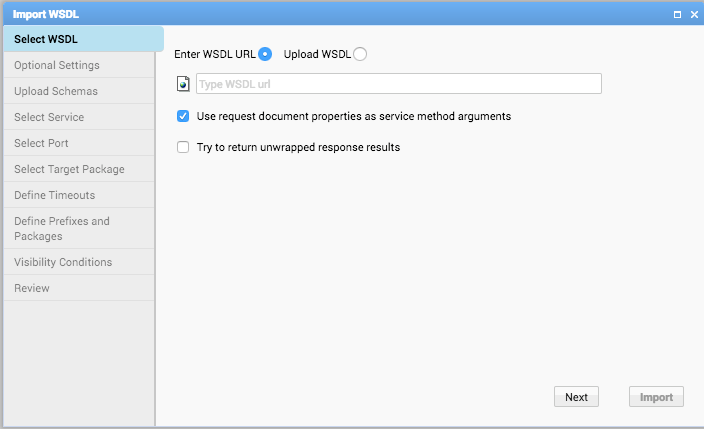
Figure 4: Import Options
| Parameter | Description |
| Upload WSDL | Upload a WSDL file |
| Download WSDL (URL) | Enter a URL to download a WSDL file. It may use the HTTP.
For example:http://myservice.com/VisibilityService?WSDLhttps://theserviceX.com/Quotes.asmx?WSDLfile:///local/servicedefs/QOD.wsdl
The file protocol references a file that is located on the file system where Appway is installed. |
| Use request document properties as service method arguments | Document literal services define a root element wrapping all service method arguments. If this flag is checked, the client service method will have the root element's child elements as parameters instead of the root element itself.
Example XML definition of the request element:
<AccountRequestDoc>
<AccountId>123</AccountId>
<AccountantName>Jack</AccountantName>
</AccountRequestDoc>
If checked, the service client method will have two parameters:
ServiceClient.accountRequest(String $accountId, String, $accountantName);
If unchecked, the service client method will have one parameter:
ServiceClient.accountRequest(AccountRequestDoc $request); |
| Try to return unwrapped response results. | Many services define a response with a root element containing a single child element. Check this flag to create client service methods which return the wrapped child element.
<AccountResponseDoc>
<Account>...</Account>
/AccountResponseDoc>
If checked, the service client method will return an "Account" structure instead of the "AccountResponseDoc" structure. |
Table 4: Import WSDL Options
-
Set the optional settings:
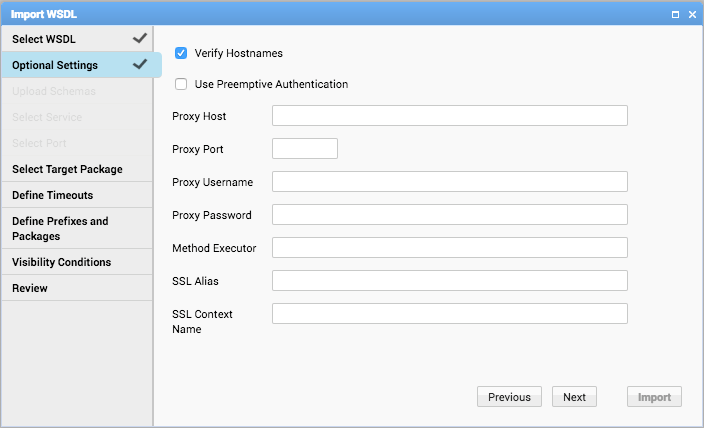
Figure 5: Optional Settings
| Parameter | Description |
| Verify Hostnames | When using SSL and you do not want the service to check that the certificate matches the host, then this must be disabled. This leaves you open to man-in-the-middle attacks. For this reason, it is active by default. |
| Use Preemptive Authentication | This option allows you to force the authentication to happen on the first connection to the server, instead of waiting for the server to request the authentication and carry out all the negotiations. |
| Proxy Host | If to connect to the host of a service and you need to go through a proxy server, you can specify the name of that server here. This setting is on a service-by-service basis in the event that you use different proxy servers for internal and for external connections. |
| Proxy Port | The port used for connecting to the proxy server. |
| Proxy Username | The username to use if the proxy server requires authentication. |
| Proxy Password | The password to use if the proxy server requires authentication. |
| Method Executor | By specifying the Method Executor, you can use a custom HTTP Client or Security Model. This is an interface that can be implemented using the Integration SDK that accepts an Apache HTTP Components RequestMethod. These Method Executors can be registered with Appway using the HttpClientRegistry. |
| SSL Alias | If you want to override the SSL Alias of the key to use for a particular host just for a particular service, enter the alias you want to use. |
| SSL Context Name | In the event you are using SSL at the application server layer and require different SSL Contexts for different services, enter the name by which you registered the context. |
Table 5: Optional Settings
After choosing a WDSL file, the Upload Schemas dialog allows you to upload any missing imported or included XML schema.
- If any schema files are missing, upload them or enter a URL where they can be found.
- Click Upload missing XSD to load the selected schema files.
- Once all schema files are loaded, the service can be imported. Click Next.
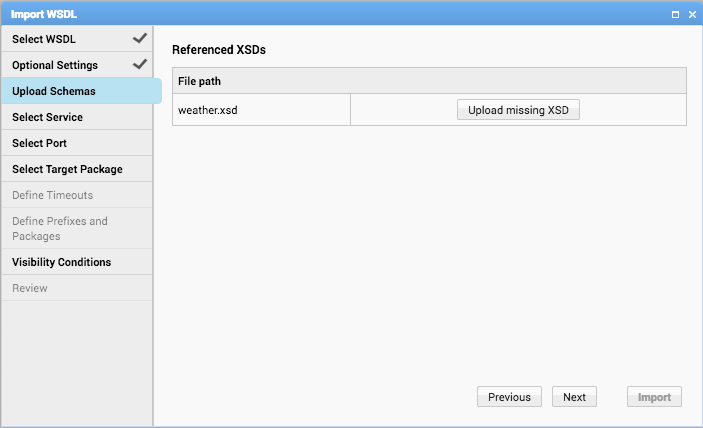
Figure 6: Missing Referenced XSDs
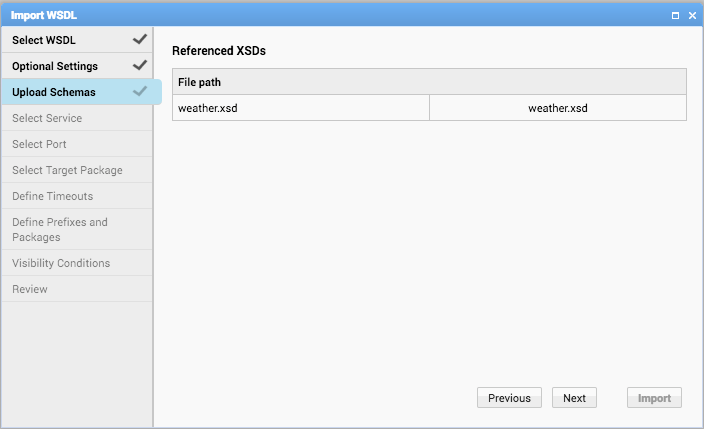
Figure 7: Complete Referenced XSDs
While a WSDL may contain many different service definitions, the WebServices extension allows you to import one service at a time. One service may have many service methods, which will all be imported.
-
Select one of the services defined in the WSDL file to be imported.
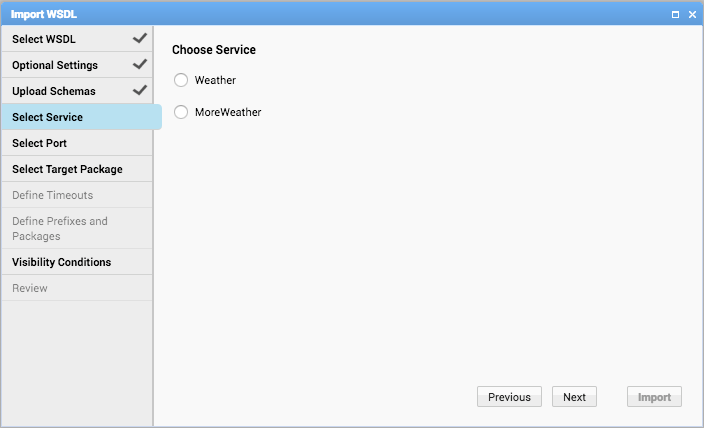
Figure 8: Select Service
-
Click Next.
-
Choose the SOAP port to be used.
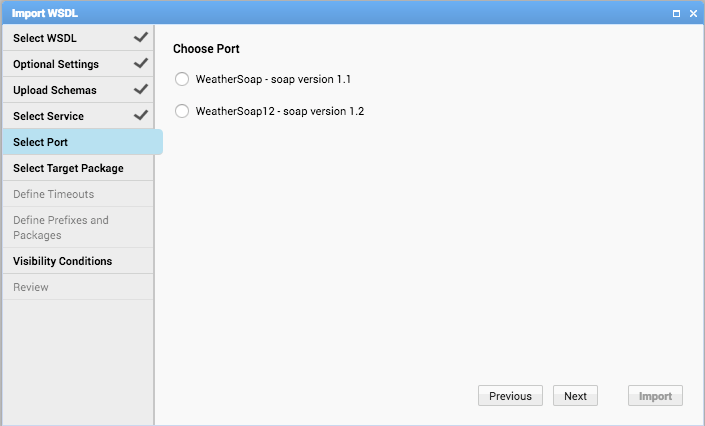
Figure 9: Choose Port
-
Click Next.
All the Data Classes imported for the SOAP Web Service can be placed in a Package. The target Package always includes the service client Data Class, while there is a further step where Data Classes from different namespaces can be assigned to alternative packages.
The target Package can be the Base Package.
- Select the Package Name input field to provide focus (a scrollable list of all the available Packages is shown).
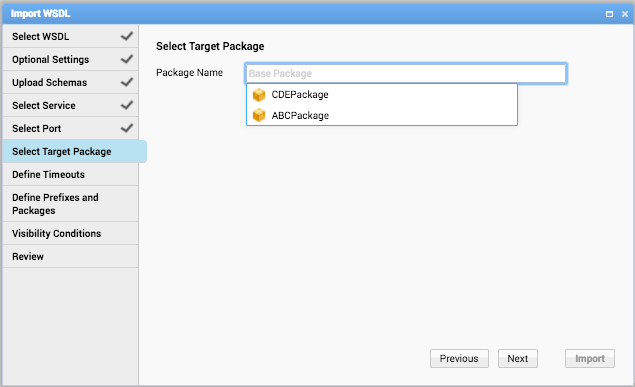
- Select a Package from the dropdown or start typing the Package name to filter the list.
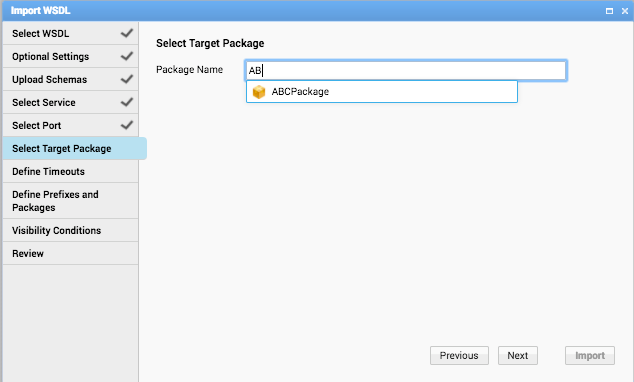
- Click Next.
Connection timeouts and read timeouts can be specified for each individual method, if the value is set to 0 then the value used will either be that set at the extension level as previously described or if they are not specified there, the extensions will use its default values which are 5000ms for connection timeout and 10000 for read timeout.
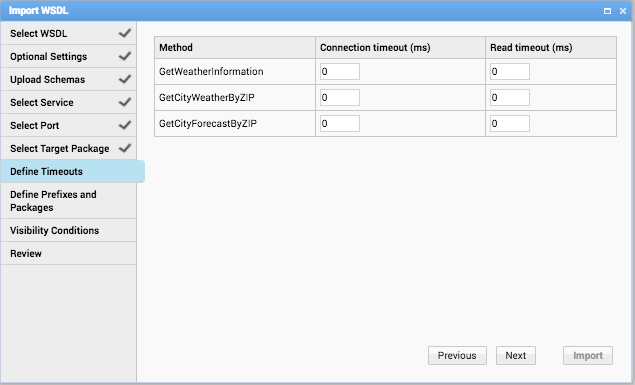
Figure 10: Connection and Read Timouts
A unique prefix per XML namespace must be defined. This prefix will be used for all Data Classes that have been imported from the same namespace.
- Define a prefix for each XML namespace. Each namespace will be assigned by default to the target Package defined two steps before.
- Optionally, specify a different Package per namespace (a scrollable dropdown appears when the input is in focus).
- Once namespace prefixes are defined, click Next.
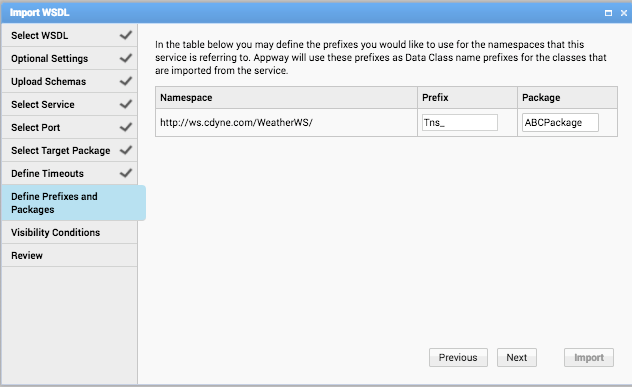
Figure 11: Define Namespace Prefixes
| Column | Description |
| Namespace | Full name of the namespace as defined in WSDL or XSD files |
| Prefix | Prefix used for automatically created Data Class IDs |
| Package | Package where the automatically created Data Classes are placed. |
Table 6: Namespace definition column headings
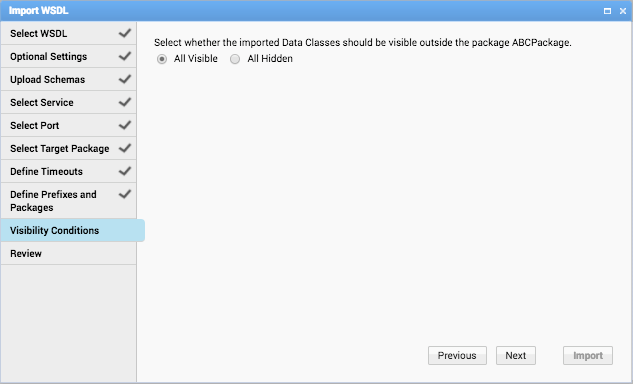
Whenever the 'namespace to Package' mapping provided in the previous step points to the target Package, this step allows to define the Package-level visibility of the imported Data Classes. However, if a different Package is selected in the mapping or the Base Package is selected, then the visibility condition is set to visible by default and the step is skipped.
Note: Changing the 'namespace to Package' mapping or setting the target Package to the Base Package results in disabling this step.
-
Select the radio button corresponding to the desired visibility level for the Data Classes (All Visible or All Hidden)
-
Click Next to confirm the choice.
The Review dialog gives a preview of the classes that will be imported as Data Classes. The namespaces and the timeouts for the different service methods.
The first row listed is the service client Data Class. The following rows are the Data Classes that have been defined according to the WSDL file's type definition section.
- Click Import to update the repository with the new Data Class definitions.
- Click Previous prior to clicking Import to make changes to any of the choices made previously during the import.
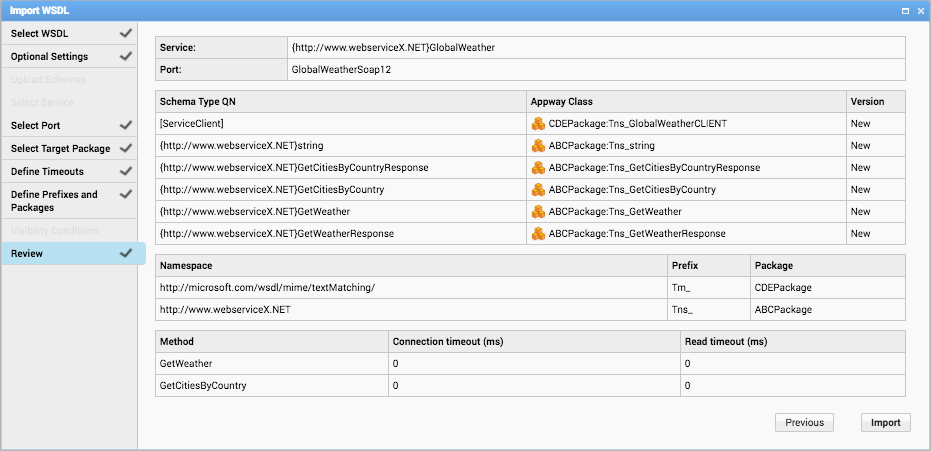
Figure 12: Example Defined Classes
| Column | Description |
| Schema Type QN | Fully qualified XML element name |
| Appway Class | Appway Data Class name |
| Version | Import date of previous repository versions. If no previous version exists, the value "New" is displayed. |
Table 7: Import data class column Headings
| Column | Description |
| Namespace | The full name of the namespaces as defined in the WSDL or XSD. |
| Prefix | The prefix to be associated with the namespace. |
| Package | The Package to be associated with the namespace. |
Table 8: Namespaces column headings
| Column | Description |
| Method | The name of the service method or operation. |
| Connection Timeout (ms) | The number of milliseconds to wait for a connection. |
| Read Timeout (ms) | The number of milliseconds to wait for a response after connection. |
Table 9: The service method timeouts column headings.
There are two ways to call a SOAP service: through an Integration Link (SOAP Client component), or through a Script.
-
Drag the SOAP Client component into the Integration Link's composition area.
-
Configure the component by choosing the service you wish to call and selecting one of its methods.
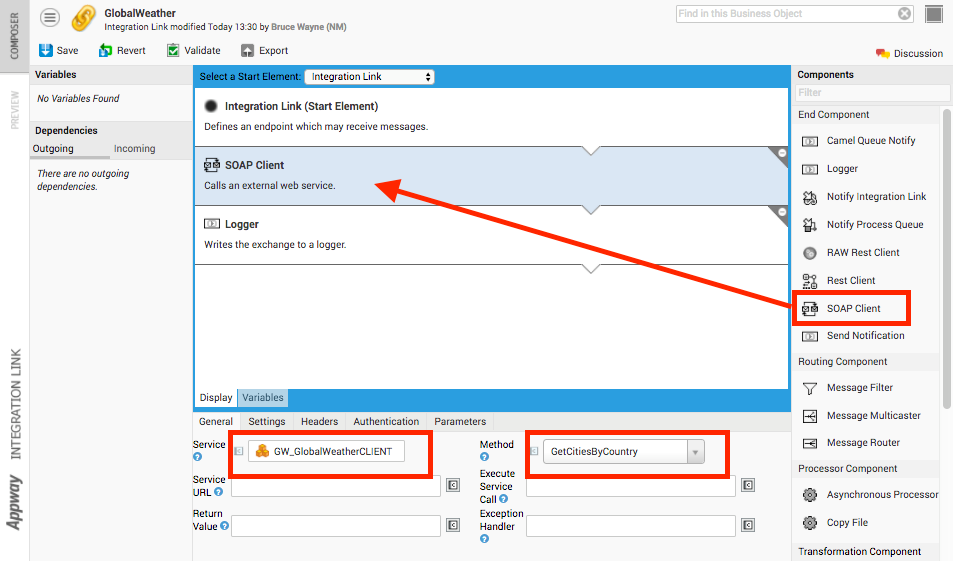
Figure 13: Choosing service and method
-
If the service method requires parameters, a new tab appears, allowing you to define the method's arguments.
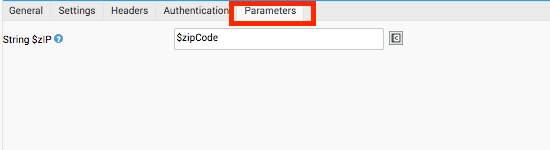
Figure 14: Setting service call parameters
-
The Settings tab allows you to define the fine-grained behavior of the SOAP extension.

Figure 15: Configuring the SOAP client
| Property | Definition |
| Wrap Text | Specify if text output in XML documents must always be wrapped in CDATA sections. |
| Initialize Primitives | Specify if Primitive Type values must be initialized when translating a response from XML to Data Entity. For example, Boolean properties that have not been found in the XML response will be initialized to 'false' if this property is set is 'true'. Otherwise, the property has the value NULL. |
| Skip Redundant Namespace | Set to 'true' to avoid repeating unnecessary namespace references for each XML element. |
Table 10: SOAP Client Settings
-
The Headers tab lets you define any SOAP envelope headers you wish to add to SOAP messages as an Indexed Collection of SoapHeaderElements.

Figure 16: Adding SOAP headers
-
Finally, the Authentication tab lets you define Username and Password to be used for authentication purposes.

When importing a service, a service client Data Class is created (name ending in "CLIENT"). Instantiate this Data Class and use its methods to call the corresponding service methods.
Consider a "Global Weather" service as an example being created in the Base Package. This service defines the method "GetCitiesByCountry" which takes a country name as parameter and returns the cities found for the given country. A script to call this service method would look like this:
String $serviceURL := '...URL to Global Weather service...';
String $countryName := null;
//
// Instantiate the service client Data Class
//
GW_GlobalWeatherCLIENT $gW_GlobalWeatherCLIENT := NewObject(GW_GlobalWeatherCLIENT, $serviceURL);
//
// Call the GetCitiesByCountry method
//
GW_GetCitiesByCountryResponse $ret := $gW_GlobalWeatherCLIENT.GetCitiesByCountry($countryName);
Code 21: Example scripted service call
Use the service client instance properties below to define additional settings for the service call.
| Property | Description |
| wrapTextInCDATA | Set to true to wrap all XML text values into CDATA sections. |
| initializePrimitiveValues | Specify if Primitive Type values must be initialized when translating a response from XML to Data Entity. For example, Boolean properties that have not been found in the XML response will be initialized to false if this property is set is true. Otherwise the property will have the value NULL. |
| skipRedundantNamespaceRefs | Set to true to skip redundant namespace references when creating the SOAP message XML body. |
Table 11: Service Client Instance Properties
Web service compatibility with SOAP standards is constantly improving. Sometimes, interface-breaking changes may be necessary to support new features.
The SOAP extension addresses this issue by versioning the XML translators and WSDL/XSD class import objects.
This extension-internal versioning mechanism makes sure that services which have been imported with a specific SOAP version will be allowed to run with the exact same version even after a new release of the SOAP extension has been uploaded.
The service client is marked with the extension version valid at the time of the client's creation.
For example, have a look at the GetQuote method below. The $env map contains a new key called 'clientVersion' pointing at the extension version which was used for creating the service client Data Class.
Function GetQuote() : qod.GetQuoteResponse Begin
	qod.GetQuote $qod_GetQuote := NewObject(qod.GetQuote);
	Named Any $env := {
	...
	'clientVersion'='1.11.1',
	...
	}:Any;
	Any $retValue := SOAPCall($this, $env, $qod_GetQuote, false);
	Return CAST(qod.GetQuoteResponse, $retValue);
End
Code 22 : Example use of extension version
When executing a SOAP call, the version for XML translators is resolved based on the following priorities:
- SOAP call environment map key
clientVersion, if defined in the client method - Workflow instance attribute
soapExtension.clientVersion, if available - Appway configuration
soapExtension.clientVersion, if available - Extension configuration
soapExtension.clientVersion, if available - Default (newest available version)
The Service Client Overview displays detailed information about each SOAP service. To access the list of Service Clients, go to the administration section of the studio and select Data & Integration > Integration > SOAP.
| Column | Description |
| Name | Data Class ID of the service client generated based on the WSDL definition |
| Creation Date | Date of the service definition's last update |
Table 12 : Service Client Overview
Select one of the imported services, details are displayed in three tabs.
The General tab contains general information about the service:
| Column | Description |
| Name | Local name of the service as defined in the WSDL file |
| Qualified Name | Fully qualified name of the service as defined in the WSDL file |
| Port | Name of the service port as defined in the WSDL file |
| SOAP Version | SOAP version to be used to invoke the service |
| Location | Default service URL |
| Imported | Date of the service import |
| Imported By | ID of the user who imported the service |
| SSL Alias | If you want to override the SSL Alias of the key to use for a particular host just for a particular service you should set this value to the alias you want to use. |
| SSL Context Name | In the event you are using SSL at the application server layer and require different SSL Contexts for different services, the name by which you registered the context should be used here to retrieve it. |
| Verify Hostnames | When using SSL if you do not want the service to check that the certificate matches the host then this must be disabled. This leaves you open to man-in-the-middle attacks. For this reason, it is active by default. |
| Use Preemptive Authentication | This option allows you to force the authentication to happen on the first connection to the server, instead of waiting for the server to request the authentication and carry out all the negotiation. |
| Proxy Host | If you need to go through a proxy server to connect to the host of a service, specify the name of the proxy server here. This setting is on a service-by-service basis in the event that you use different proxy servers for internal and for external connections. |
| Proxy Port | The port used for connecting to the proxy server. |
| Proxy Username | The username to use if the proxy server requires authentication. |
Table 13: General Service Settings
The Methods tab displays an overview of the methods available for a specific service:
| Column | Description |
| Methods | Name of methods delivered by the service |

Test Button | Click to open up a test script for executing calls to the service (see section 7.1 for more on testing) |
| Connection Timeout | Defines the timeout in milliseconds when connecting to the server.
This property can also be defined as a general Appway configuration, in which case it overrides the extension configuration. These values can also be defined at method level for each service when imported or subsequently through the administration UI.
Default: 5000 |
| Read Timeout | Defines the timeout in milliseconds when waiting for a response after connecting to the server.
This property can also be defined as a general Appway configuration, in which case it overrides the extension configuration. These values can also be defined at method level for each service when imported or subsequently through the administration UI.
Default: 10000 |
Table 14: Service Methods
The Classes tab gives an overview of all Data Classes imported for a specific service:
| Column | Column |
| Classes | Data Classes which have been imported and automatically created for this service |
| Prefix | Data Class prefix defined for the namespace to which the Data Class belongs |
| QN | Fully qualified name of the structure as defined in the WSDL type definition |
Table 15: Service Classes
- Go to the Studio and select Data & Integration > Integration > SOAP and click on the name of the service you want to test in the list.
- On the Methods tab, click Test next to the service method you wish to test. The Interactive Script Editor opens up, automatically pre-filled with a test script.
- Insert the required service method parameters. Initially, they are set to NULL.
- Run the script to execute the service method call. A report containing the SOAP request and response is created and appears in the Interactive Script Editor's output area.
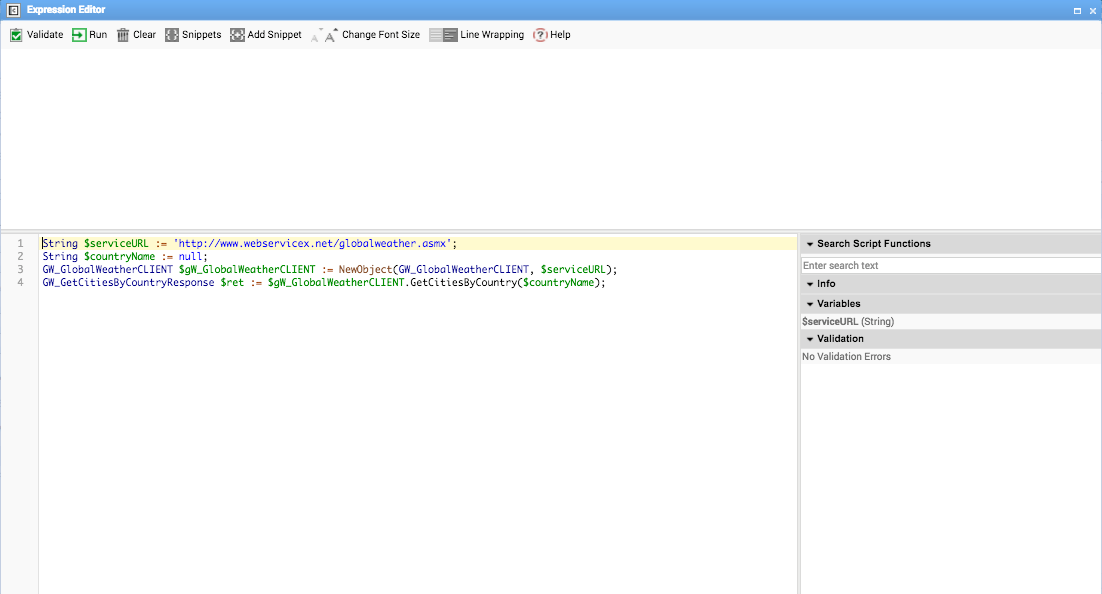
Figure 21: Expression Editor
If we modify the code, we can retrieve the Request and Response messages and output their content to the result to see exactly what was sent and received by the service call.
PRINTLN('SOAP Request: \n');
String $serviceURL := 'http://wsf.cdyne.com/WeatherWS/Weather.asmx';
Tns_WeatherCLIENT $tns_WeatherCLIENT := NewObject(Tns_WeatherCLIENT, $serviceURL);
Tns_GetWeatherInformationResponse $ret := $tns_WeatherCLIENT.GetWeatherInformation();
com.nm.sdk.utils.SerializableWrapper $content := CAST('com.nm.sdk.utils.SerializableWrapper', $tns_WeatherCLIENT.collaterals['requestMessage']);
javax.xml.soap.SOAPMessage $msg := CAST('javax.xml.soap.SOAPMessage', $content.getObject());
javax.xml.soap.MimeHeaders $headers := $msg.getMimeHeaders();
javax.xml.soap.MimeHeader $header;
java.util.Iterator $i := $headers.getAllHeaders();
PRINTLN('MimeHeaders:\n');
While $i.hasNext() Do
javax.xml.soap.MimeHeader $mh := CAST('javax.xml.soap.MimeHeader', $i.next());
PRINTLN($mh.getName() & ':' & $mh.getValue());
End
If $msg.getSOAPPart() != null Then
PRINTLN('\nSOAP Part: \n');
PRINTLN(PrintXmlDocument($msg.getSOAPPart().getDocumentElement(), false));
End
PRINTLN('\n\n====================================================================================\n\n');
PRINTLN('\nSOAP Response: ');
$content := CAST('com.nm.sdk.utils.SerializableWrapper', $tns_WeatherCLIENT.collaterals['responseMessage']);
$msg := CAST('javax.xml.soap.SOAPMessage', $content.getObject());
$headers := $msg.getMimeHeaders();
$i := $headers.getAllHeaders();
PRINTLN('MimeHeaders:\n');
While $i.hasNext() Do
javax.xml.soap.MimeHeader $mh := CAST('javax.xml.soap.MimeHeader', $i.next());
PRINTLN($mh.getName() & ':' & $mh.getValue());
End
If $msg.getSOAPPart() != null Then
PRINTLN('\nSOAP Part: \n');
PRINTLN(PrintXmlDocument($msg.getSOAPPart().getDocumentElement(), false));
End
PRINTLN('');
Code 23: Example service call test
Here, the content of the result window shows the headers and the SOAP Message used for the request.
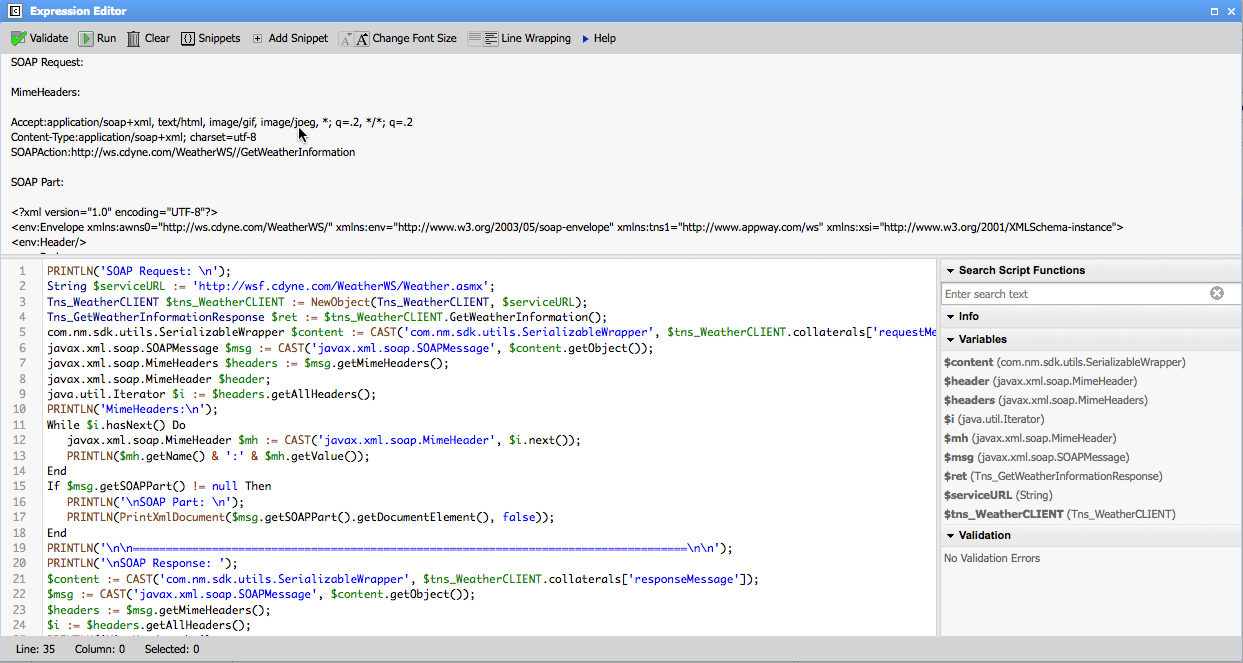
Figure 22: Service Test Example
The last occurrence of any runtime exception occurring while executing the service call is logged per invoked method in the SOAP extension's Exception Browser.
| Column | Description |
| Time | Time of the error's occurrence |
| User | ID of the user who called the service method |
| Service | Name of the service client |
| Method | Name of the service method |
| Error | Text summary of the exception |
Table 16: Runtime Exception List
Click on one of the exceptions to inspect more details. The detailed view contains information such as exception time, user, service, service method, stack trace, etc.
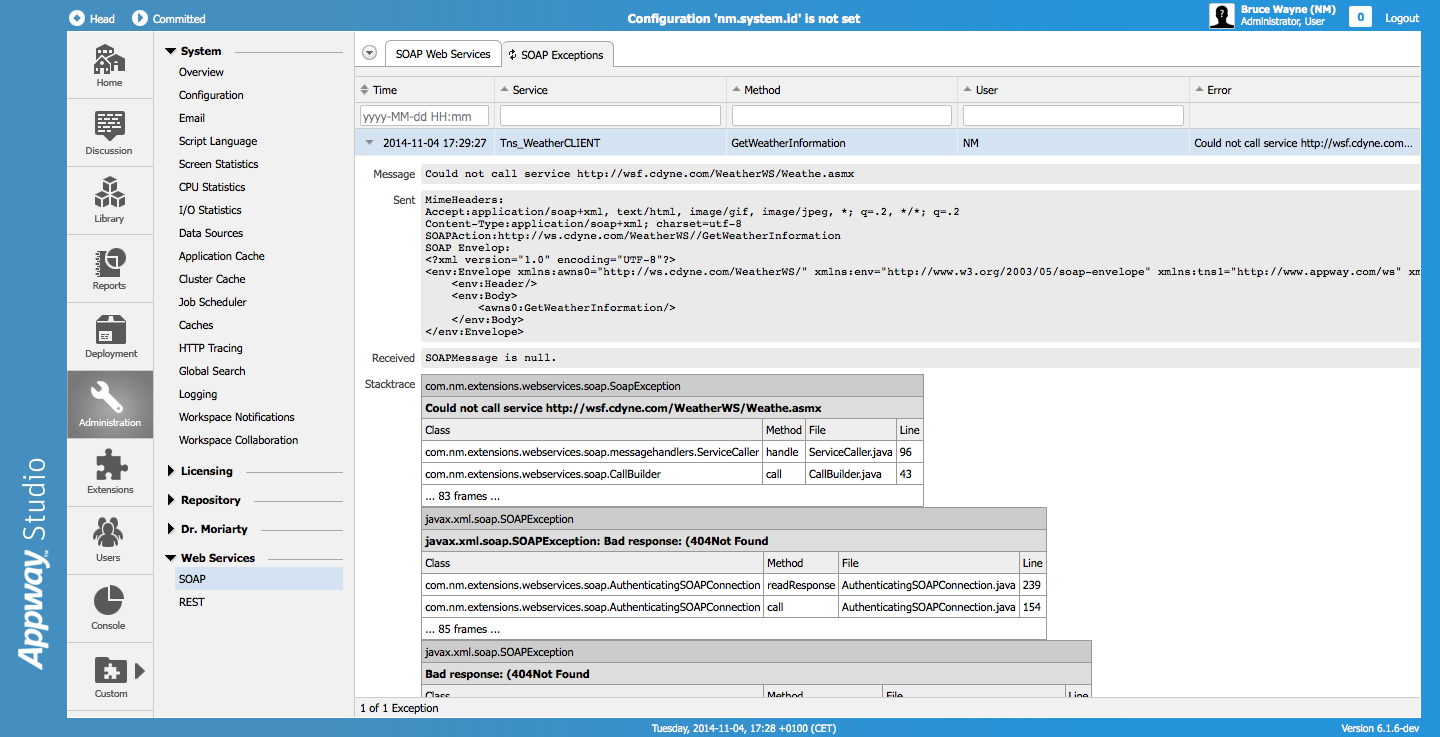
Figure 23: Exception Details
| Property | Description |
| Time | Time of the error's occurrence |
| User | User who executed the service call |
| Service | Name of the service client Data Class and method used for the call |
| Endpoint | URL of the endpoint called |
| Sent | SOAP request sent to the service, including request headers |
| Received | SOAP response received from the service, including response headers |
| Stacktrace | Stack trace produced by the service call |
Table 17: Exception Details
The Appway WebServices extension supports the W3C SOAP Message Transmission Optimization Mechanism (MTOM) standard as defined in the following specifications:
http://www.w3.org/TR/soap12-mtom/
http://www.w3.org/TR/SOAP-attachments
http://www.w3.org/Submission/WS-MTOMPolicy/
http://www.w3.org/TR/2005/REC-xop10-20050125/)
In a typical WSDL definition supporting MTOM, there are two key elements within the service definition:
- MTOM policy
- Policy reference
An MTOM policy is a SOAP policy that contains an OptimizedMimeSerialization element. The element specifies that the service may support MTOM for some of its operations. An example of an MTOM Policy is shown below:
<wsp:Policy wsu:Id="SOAPAttachmentServicePortBinding_MTOM_Policy">
  <ns1:OptimizedMimeSerialization xmlns:ns1="http://schemas.xmlsoap.org/ws/2004/09/policy/optimizedmimeserialization">
</ns1:OptimizedMimeSerialization>
</wsp:Policy>
An operation that supports MTOM needs to specify a policy reference within the binding definitions to enable MTOM for all its operations. For instance, the following binding defines two operations that support MTOM:
<binding name="SOAPAttachmentServicePortBinding" type="tns:AppwayAttachmentsWebService">
  <wsp:PolicyReference URI="#SOAPAttachmentServicePortBinding_MTOM_Policy"></wsp:PolicyReference>
  <soap:binding transport="http://schemas.xmlsoap.org/soap/http" style="document"></soap:binding>
  <operation name="operation1">
  </operation>
  <operation name="operation2">
  </operation>
</binding>
In the import wizard, Appway will automatically replace all the xs:base64Binary elements with SOAPAttachment primitive type.
SOAPAttachment is a new primitive type that is made available by the extension which represents a single SOAP binary attachment. The SOAPAttachment type provides the following methods:
- setPath: sets the path of the file to be used as attachment for the SOAP request.
- getContentBase64: returns the content of the attachment encoded with Base64.
- getContent: returns the content of the attachment with the default system charset.
- writeContentToPath: writes the content of the attachment (the binary data in it) to the specified file path.
The below sections specify how the WebServices extension supports the WS-I Basic Profile v1.1.
See here for general information on the Basic Profile.
The WebServices extension supports the following WS-I Basic Profile 1.1 complaint binding styles:
Other binding styles are not supported:
- Document/literal
- RPC/literal
See the following tables for an overview of XSD elements and restrictions and if the WebServices extension supports them:
XSD Elements
| Element Name | Supported |
| all | No |
| annotation | No |
| any | No |
| anyAttribute | No |
| appinfo | No |
| attribute | Yes |
| attributeGroup | No |
| choice | No |
| complexContent | Yes |
| complexType | Yes |
| documentation | No |
| element | Yes |
| extension | Yes |
| field | No |
| group | Yes (from v2.2.31 / v2.3.31) |
| import | Yes |
| include | Yes |
| key | No |
| keyref | No |
| list | Yes |
| notation | No |
| redefine | No |
| restriction | Yes |
| schema | Yes |
| selector | No |
| sequence | Yes |
| simpleContent | Yes |
| simpleType | Yes |
| union | No |
| unique | No |
XSD Restrictions/Facets for Datatypes
| Constraint | Supported |
| enumeration | No |
| fractionDigits | No |
| length | No |
| maxExclusive | No |
| maxInclusive | No |
| maxLength | No |
| minExclusive | No |
| minInclusive | No |
| minLength | No |
| pattern | No |
| totalDigits | No |
| whiteSpace | No |
| minOccurs | Yes |
| maxOccurs | Yes (but not enforced) – available in metadata only |
For more information on XSD elements and restrictions, see here.
Note: Not supported XSD restrictions are ignored by the WebServices extension. The only restriction which is enforced is minOccurs, but only if the extension configuration property "mandatory.elements.enforce” is set to true (default: false).
The Representational State Transfer (REST) extension allows the Appway Platform to communicate with RESTful web services in JSON or XML format. It is an architecture definition allowing two systems to communicate in an agreed data format and structure over HTTP.
For the original description of the REST architecture, see Hypertext Transfer Protocol -- HTTP/1.1 by the Internet Society (1999). Learn more about REST APIs via the tutorial Using HTTP Methods for RESTful Services by RestApiTutorial.com.
The REST extension allows you to convert a Data Class into XML or JSON data and vice versa, and to send or receive this data through HTTP requests.
For example, to display tweets posted by the company CEO in the Workspace, you can integrate Appway with Twitter through a REST interface. As depicted in the diagram below, Appway sends a request which is translated into JSON or XML format. Twitter receives the request and sends a corresponding response, again either in JSON or XML format. That response is finally translated back into an Appway Data Class instance.
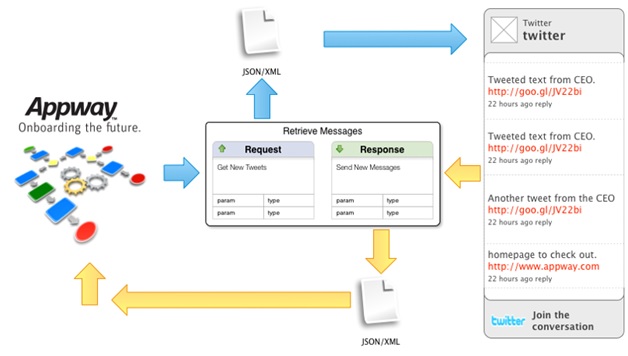
Figure 24: Diagram "Sending and receiving REST messages"
RestClient Integration Link component: can be set to re-use the same service configuration in multiple Processes. Contains properties to set the data interchange format, translate to and from Data Classes, and call HTTP request methods.RestClient Primitive Type: for scripted integration, it is configured for a particular service within a Process. Contains functions to set the data interchange format, translate to and from Data Classes, and call HTTP request methods.- Mutual Authentication extension (installed as part of the REST extension package): contains an SSL Trust Manager and SSL Key Manager to handle the handshake between the client and the server and verify that a trust relationship can be negotiated.
Note: For Appway release 6.0 and greater, the WebServices extension replaces the SOAP and REST extensions, and the Mutual Authentication extension's functionality is included in the Appway Platform's core.
REST communication with an external service can take place over normal HTTP or over HTTPS / SSL. Use SSL if a secure connection is required and the remote service supports this protocol.
Keys and certificates for an SSL connection can be added through the Mutual Authentication extension (included in the REST extension package). If you intend to use SSL for connecting to a service with server authentication, add a certificate for the Certificate authority that created the server's certificate, or any certificate in the chain, including the server certificate to your "Trust Store". If you intend to connect to a client authenticating service, a key is required in addition to the certificate. Add your key to the "Key Store" and associate this key with the given host in the extensions configuration.
See the Mutual Authentication Extension documentation for more on configuring secure connections.
The REST extension supports the HTTP request methods GET, POST, POSTXFORM, PUT, PATCH, DELETE, HEAD and OPTIONS. TRACE is not supported.
HTTP methods can be called through the "Rest Client" Integration Link component or the "RestClient" Primitive Type (see Chapters 5 and 6 below).
| HTTP Method | Description |
| GET | Retrieves data from the remote server using a given URL with criteria in the query string |
| POST | Updates an entry on the remote server using a given URL and a payload with criteria in the query string |
| POSTXFORM | Performs a POST request using XForm-encoded data |
| PUT | Adds an entry using a given URL and a payload with criteria in the query string; any current representation of the target entry is replaced |
| PATCH | Allows a user to send patch structures (difference structure) only containing changed data - instead of complete structures - to the service. |
| DELETE | Removes all current representations of the target entry, given a URL |
| HEAD | Retrieves the HTML header information available for a target resource, given a URL with criteria in the query string |
| OPTIONS | Interrogates a service to understand the methods available for a target resource (GET, POST, PUT, PATCH, DELETE, HEAD and OPTIONS) |
Table 20: Supported HTTP Methods
Jersey or Apache CXF services provide a WADL file which defines all of the operations available for a given service. This can be useful when defining your REST service client because it contains all the settings you require.
An example URL for Apache CXF where you can retrieve a WADL file is http://dev.numcom.local/myapp?_wadl.
A REST service defines its own interface and, in particular, which data interchange format it requires. If multiple formats are supported, the client can choose one of them, or list its preferences and get the first available match.
JavaScript Object Notation (JSON) is a data interchange text format based on a subset of the JavaScript Programming Language. It is built on two structures:
- Collection of name/value pairs, realized as Data Class in Appway
- Ordered list of values, realized as Indexed collection in Appway
For example, this is the JSON equivalent of a Data Class instance with three properties including an Indexed collection:
{
	'id': '1234',
	'name': 'Mister Fantastic',
	'contacts': ['Invisible Woman', 'The Human Torch', 'The Thing']
}
Code 26: JSON object example
When using JSON as your inbound or outbound format in Services you create using the wizard, data class instances will be converted automatically to JSON for you and the JSON is automatically converted into data class instances, respectively.
In the script language, you can use the TranslateTo() and TranslateFrom() methods to convert Appway data class instances both to and from JSON. This is explained later in this section.
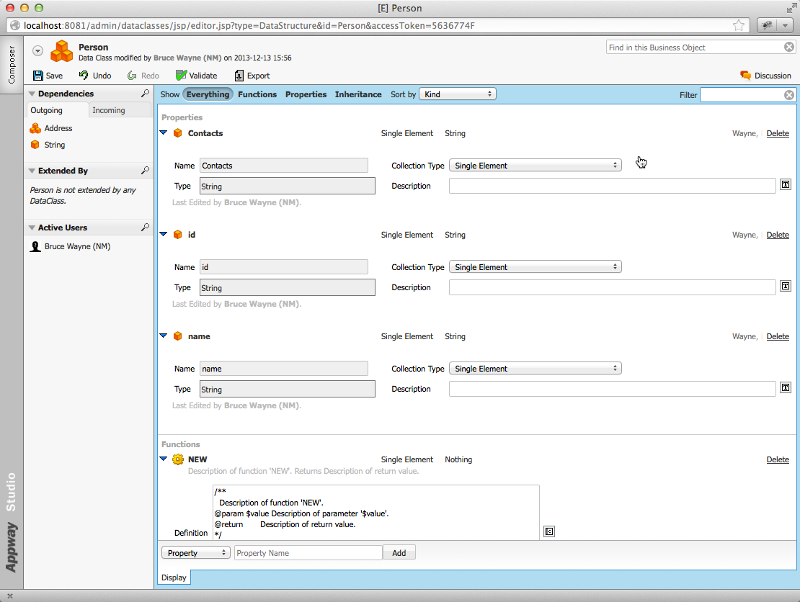
Figure 25: Corresponding Data Class
Read more about JSON at json.org.
Extensible Markup Language (XML) is a flexible text format derived from SGML. It is a markup construct consisting of a name/value pair which exists within a start-tag or empty-element tag.
For example, this is the XML equivalent of a Data Class instance with three properties, including an Indexed collection:
<?xml version="1.0" encoding="UTF-8" standalone="no"?>
<!DOCTYPE person SYSTEM "http://types.yourcompany.com/dtd/person.xsd">
<person>
	<id>1234</id>
	<name>Mister Fantastic</name>
	<contacts>Invisible Woman, The Human Torch, The Thing</contacts>
</person>
Code 27: XML object example
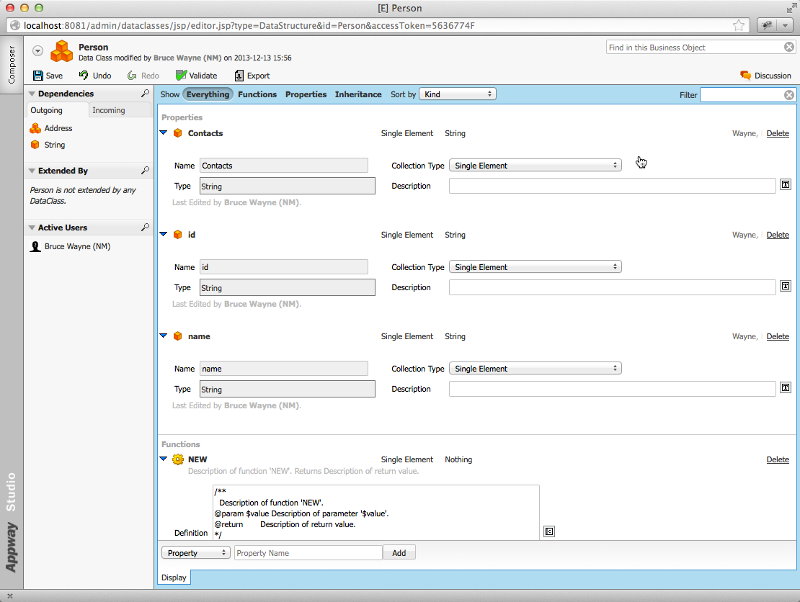
Figure 26: Corresponding Data Class
Read more about XML at www.w3.org.
If, in your XML elements, some of the DataClass properties should be represented as attributes of the tag, this can be achieved by editing the metadata of the data class. For example, to specify that the ID should be an attribute of the person tag, you would add an entry in the metadata like this:
| Name | Value |
property_<property name>
property_id | isAttribute=true |
If the format being used is XML or JSON, then for outgoing data, the data class instances will be automatically converted into their equivalent XML structures through calls to the function TranslateTo(). Incoming data will be converted into data class instances from the equivalent XML structures through calls to the function TranslateFrom().
Binary data is sent and received as an ISO8859-1 encoded String which allows a binary file to be stored as a series of bytes. The conversion into this format is not handled automatically and must be handled by the Appway developer.
If RAW is chosen as the inbound or outbound format, then whatever you pass to the service call or receive will be assumed to be a String and will be written onto the output stream or read from the input stream. How that is subsequently handled is up to the Appway developer.
If RAW_JSON is the outbound format, then the content type is automatically set to be JSON and the value passed is written directly to the output stream.
If RAW_XML is the outbound format, then the content type is automatically set to be XML and the value passed is written directly to the output stream.
The TranslateTo() function lets you convert Appway data structures into the required format before sending a request to the remote service. You can use it in the Payload field of the Rest Client Integration Link component or directly in a scripted call.
To convert a response back into a Data Class, use the Response Class field in the Rest Client component. For a scripted call, use the TranslateFrom() function.
The function TranslateTo() converts a Data Class or Primitive Type into a String in the format required by the REST service (JSON or XML).
TranslateTo($entity, $format, $patterns)
| Parameter | Description |
$entity
(Any) | The entity you want to convert, for example an instance of the "MyPackage:Person" Data Class |
$format
(String) | Format required by the remote service
Possible values: "json" or "xml" |
$patterns
(Named String, optional) | Format of dates and Boolean values; the expected keys are "date" and "boolean" and the values are the respective patterns for conversion. Custom Primitive Types backed by date or Boolean are also supported.
Default conversion patterns:
{date='yyyy-MM-dd'T'HH:mmZ', boolean='true:1,false:0', 'MyCustomDate'='yyyy-MM-dd'T'HH:mmZ'}:String
Note: Boolean properties are set to false by default, if you require NULL values, set them explicitly. {boolean=null}:String to avoid Boolean values being translated as String values. |
For more information on setting patterns, see the section Adding Patterns.
| Return value | Description |
| String | String in JSON or XML format
Example (JSON):
{
'id': '1234',
'name': 'Pluto',
'surname': 'Dog'
} |
Example in a scripted integration:
String $payload := TranslateTo($person, 'json')
String $payload := TranslateTo($person, 'xml')
Example in a "Rest Client" Integration Link component:

Figure 27 : REST Client Integration Link
The TranslateFrom() function converts the body of a JSON or XML response into an Appway entity. It returns a constructed and populated instance of the Data Class or Primitive Type specified.
TranslateFrom($responseBody, $dataclassId, $format, $patterns)
| Parameter | Description |
$responseBody
(String) | Response body received from the remote service in JSON or XML format
Example:
{field:"value"} |
$dataclassId
(String) | Type of the entity to be loaded, for example "MyPackage:Person" or "Date" |
$format
(String) | Format of the data received from the remote service
Possible values: "json" or "xml" |
$patterns
(Named String, optional) | Format of dates and Boolean values; the expected keys are "date" and "boolean" and the values are the respective patterns for conversion
Default conversion patterns:
{date='yyyy-MM-dd\'T\'HH:mmZ', boolean='true:1|yes|true,false:0|no|false'}:String
Additional patterns are available that explicitly handle null values for the following primitives: Boolean, Integer, Long, Float, Double (from versions 2.2.35 and 2.3.35).
The pattern for Integer, Long, Float, and Double is:
{number='Nullable:true'}:String
The pattern for Boolean is:
{boolean='Nullable:true'}:String
This pattern for Boolean can be combined with the original pattern, e.g.:
{boolean='Nullable:true,true:1|yes|true,false:0|no|false'}:String
The pattern to handle null values for Appway Entities is:
{DataEntity='Nullable:true'}:String
If Nullable:true, then entities missing in the JSON or XML are set to null objects, otherwise objects are instantiated with all properties set to null. Nullable:false is the default value for Appway Entities.
These patterns can be used with both JSON and XML text input, see the "Example Pattern Usage" sections below for more details. |
For more information on setting patterns, see the section Adding Patterns.
| Return value | Description |
| Any | Instance of the Data Class or Primitive Type specified, converted from the response body
Examples:
//One instance
Person {
id='1',
name='John',
surname='Doe'
}
//Collection
Person[
Person{id='2', name='Joe', surname='Bloggs'},
Person{id='1234', name='Pluto', surname='Dog'},
Person{id='1', name='John', surname='Doe'}
] |
Examples for TranslateFrom():
MyPackage:Person $person := TranslateFrom($return, 'MyPackage:Person', 'json')
TranslateFrom($client.httpGet('people', null), 'Indexed MyPackage:Person', 'json')
String $returnVal := $client.httpGet('people/person', 'id=1');
MyPackage:Person $p := TranslateFrom($returnVal, 'MyPackage:Person', 'json');
Example Pattern Usage – JSON
For JSON, use the patterns for handling null values in the $patterns parameter as follows:
Named String $patterns := NewNamed(String);
$patterns['number'] := 'Nullable:true';
TranslateFrom('[null, 123]', Indexed Integer, 'json', $patterns);
This returns an Indexed of Integer with values 'null' and '123'. Without the pattern, the default behavior is:
TranslateFrom('[null, 123]', Indexed Integer, 'json')
This returns an Indexed of Integer with values '0' and '123'.
The default value for Boolean values is 'false', for floating numbers it is '0.0'.
Example Pattern Usage – XML
Usage of the patterns for handling null values for XML in the $patterns parameter is similar to their usage for JSON.
For the sake of this example, let's assume we have a Data Class called 'TestDataClass' with the fields 'str', 'int', 'double' and 'bool' of the types String, Integer, Double, and Boolean respectively.
Use the new patterns as follows:
String $xml := '<?xml version="1.0" encoding="UTF-8" standalone="yes"?>
<TestDataClass xmlns="http://appway.com.com/hr">
<str></str>
<int></int>
<double></double>
<bool></bool>
</TestDataClass>';
Named String $patterns := NewNamed(String);
$patterns['number'] := 'Nullable:true';
$patterns['boolean'] := 'Nullable:true,true:1|yes|true,false:0|no|false';
TranslateFrom('[null, 123]', TestDataClass, 'xml', $patterns);
This returns the Data Class:
TestDataClass{bool=null, double=null, int=null, str=}
Note: 'str' becomes an empty string, not null.
The same XML, without the new patterns, returns the Data Class:
TestDataClass{bool=true, double=0.0, int=0, str=}
The default value for Boolean values is 'true' and not 'false' as it is for JSON. For floating numbers, it is the same as for JSON: '0.0'.
To create a preconfigured REST Service Client, go to the Data & Integration section of the Studio and select the menu item REST under the heading Integration. Click on the Add Service menu item.
After clicking on Add Service, you will be presented with a dialog where you should specify the necessary parameters to define a REST Client.
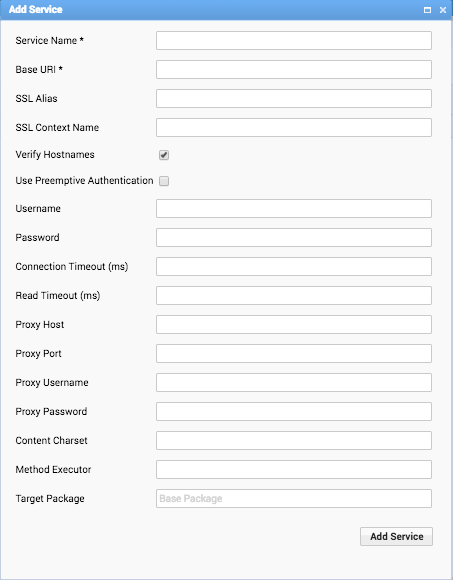
Figure 29: Defining the REST Service's properties
| Property | Description | Examples |
| Service Name | The human-readable name of the REST Service | 'People Search' |
| Base URI | Base URL of the remote service, ending with "/". | 'http://foo.com/bar/' |
| SSL Alias | The SSL Alias to override any other aliases used for a host for the private key entry in the key store. | 'myKey' |
| SSL Context Name | In some cases, you may need to register a specific SSL Context to be used when connecting to a specific service, one registered you can specify the name under which it was registered here. | 'internalSSLContext' |
| Verify Hostnames | This flag determines whether a check should be made to verify that the certificate name cn matches the hostname. | true | false (default = true) |
| Use Preemptive Authentication | This flag tells the WebServices extension to send the credentials directly without negotiating the type of credentials required. | true | false (default = false) |
| Username | Username for basic authentication | 'userone' |
| Password | Password for basic authentication | '123456' |
| Connection Timeout (ms) | The time to wait for a connection before throwing an error in milliseconds. | 5000 |
| Read Timeout (ms) | The time to wait for data on an open connection before throwing an error in milliseconds. | 10000 |
| Proxy Host | Hostname of the corporate proxy for accessing external resources | proxy.mycompany.com |
| Proxy Port | Port through which to connect to the corporate proxy server | 8080 |
| Proxy Username | Username to connect with the proxy server | 'proxyuser' |
| Proxy Password | Password to connect with the proxy server | '654321' |
| Content Charset | ISO character set name | 'UTF-8' |
| Method Executor | By specifying the Method Executor, you can use a custom HTTP Client or Security Model. This is an interface that can be implemented using the Integration SDK that accepts an Apache HTTP Components RequestMethod. These Method Executors can be registered with Appway using the HttpClientRegistry. |
| Target Package | Package name where the REST client Data Class is created. The Package name must be empty or the name of an existing Package. Whenever left empty, the REST client is put into the Base Package. A scrollable dropdown facilitates the selection of a Package from the list of existing Packages. |
Table 26: Add REST Service parameters
You can add headers that will be applied to all method calls on the service here. These headers could be cookies or any HTTP header, although the mime type headers are normally specified during the creation of methods and stored in the method definition.
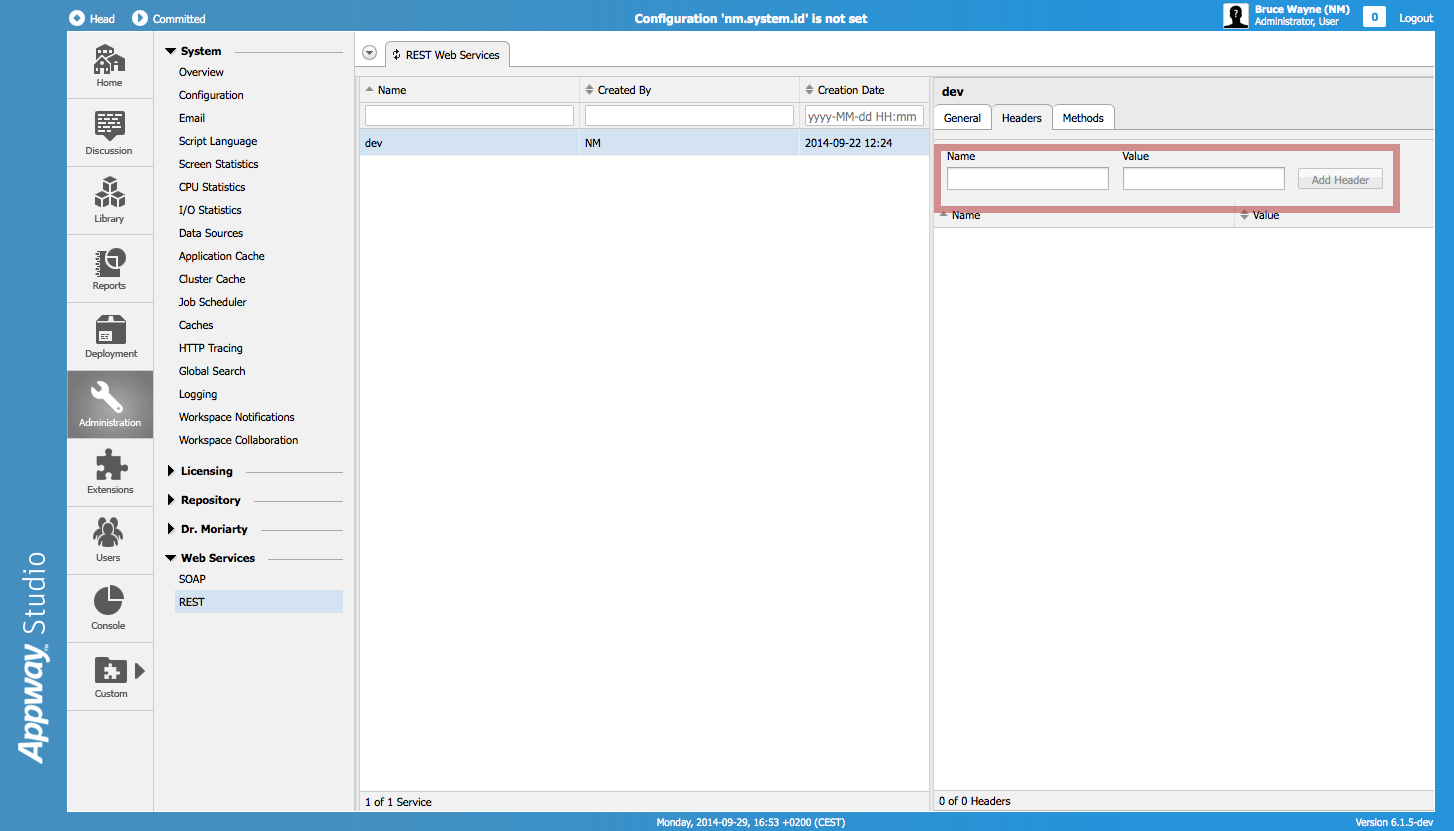
Figure 30: Adding headers global to all service methods
The headers can be overwritten by adding an additional header with the same key.
| Property | Description | Examples |
| Name | The name of the header to be set | ' Max-Forwards ' |
| Value | The value the header is to be set to | '10' |
Table 27: Header parameters
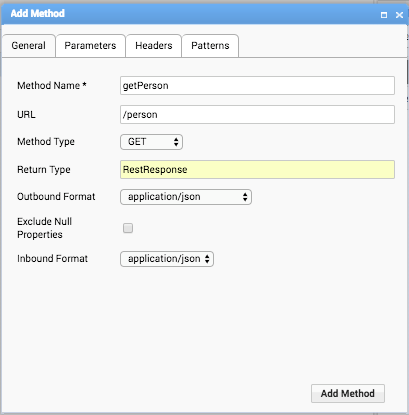
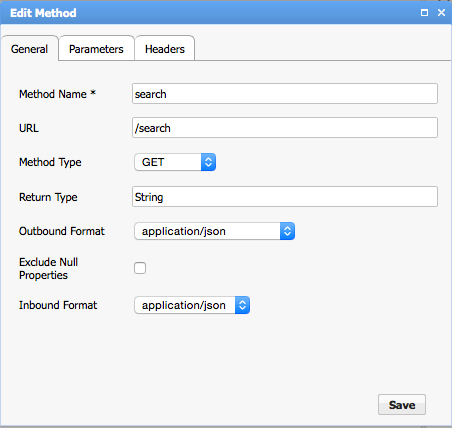
Figure 31: Creating a service method
| Property | Description | Examples |
| Method Name | The name the method will be called in the Data Class | 'search' |
| URL | A http address either fully qualified or relative to the base URL of the service. Method parameters names in curly braces may be used as part of the URL. When executing the method the parameterized part of the URL will be replace with the actual value of the parameter. | 'search'
'person/{id}'
(id must be the name of a parameter of the method) |
| Method Type | HTTP request method to execute | GET
POST
POSTXFORM
PUT
PATCH
DELETE
OPTIONS
HEAD |
| Return type | Type of Data Class into which the response should be converted. If it should not be converted, enter the value "String" | Indexed Person |
| Outbound format | HTTP mime type used to send data to the remote service ('Content-Type') | JSON
XML
BINARY
RAW
RAW_JSON
RAW_XML |
| Exclude Null Properties | JSON ONLY: Excludes empty properties and their labels from the JSON output | true / false |
| Inbound format | HTTP mime type used to receive data from the remote service ('Accept') | JSON
XML
RAW |
When adding parameters to methods it is useful to always specify a description so that other developers can later understand the intention of the parameter and also because this value is also visible as a tool tip, as you will see later in the section on integration links, which can be seen when clicking on the question mark next to a method parameter.
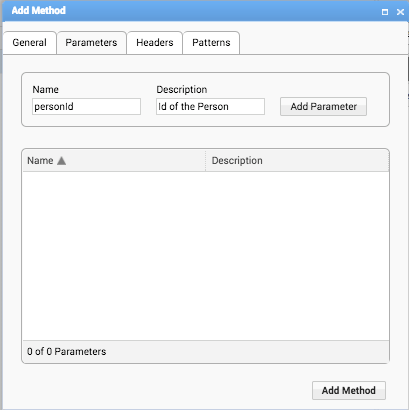
Figure 32: Adding a parameter definition to a service method
| Property | Description | Examples |
| Name | The name of the parameter. | ' api_key ' |
| Description | A description of what the parameter is or its intended use | 'the api key to be used' |
Headers defined in the method dialog will override header definitions on the service level. The generated REST method allows providing dynamic headers that will be merged with the default ones provided in the Add Method dialog. Dynamic headers override the default ones, in case the key names overlap.
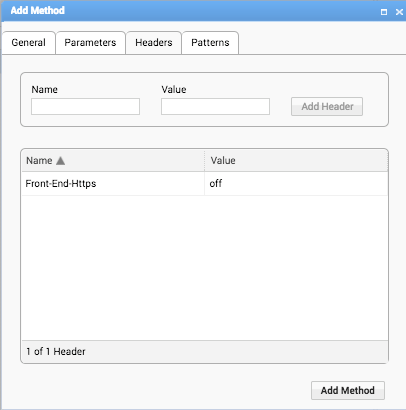
Figure 33: Adding a header definition to a service method
| Property | Description | Examples |
| Name | The name of the header to be set. | ' Max-Forwards ' |
| Value | The value the header is to be set to. | '10' |
Inbound and outbound patterns are provided to the TranslateFrom and TranslateTo Script functions, as described in the respective sections on these functions.
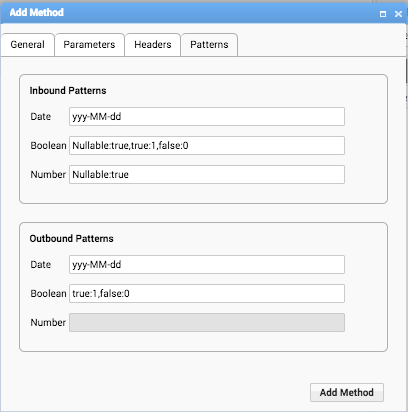
Figure 33b: Adding a header definition to a service method
| Property | Description | Examples |
| Date (Inbound) | The value of the Date pattern for the TranslateFrom function. | yyy-MM-dd |
| Boolean (Inbound) | The value of the Boolean pattern for the TranslateFrom function. | Nullable:true,true:1,false:0 |
| Number (Inbound) | The value of the Number pattern for the TranslateFrom function. | Nullable:true |
| Date (Outbound) | The value of the Date pattern for the TranslateTo function. | yyy-MM-dd |
| Boolean (Outbound) | The value of the Boolean pattern for the TranslateTo function. Does not support nullable values. | true:1,false:0 |
| Number (Outbound) | Not supported | Not supported |
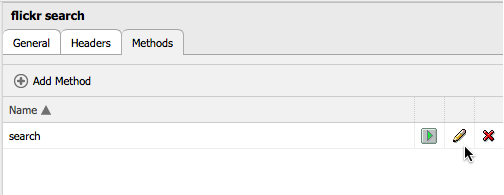
You can edit methods from the method tab of the chosen service. Simply click on the pencil button to the right of the method name as in figure 32.
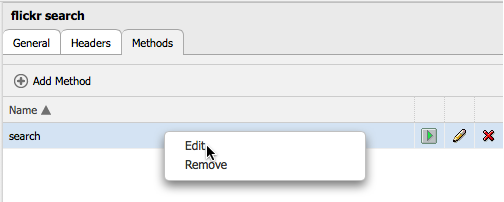
You could also right click and use the context menu as in figure 33.
The interface for editing a method definition, its parameters and its headers is identical to the one you used to create the method as you can see in figure 34.
The Rest Client Integration Link component lets you configure a REST call, including the data interchange format and translation to and from Appway data structures. You can then reuse this specific interface to a REST service in processes using the Integration Link Task or via script by using the CallIntegrationLink function
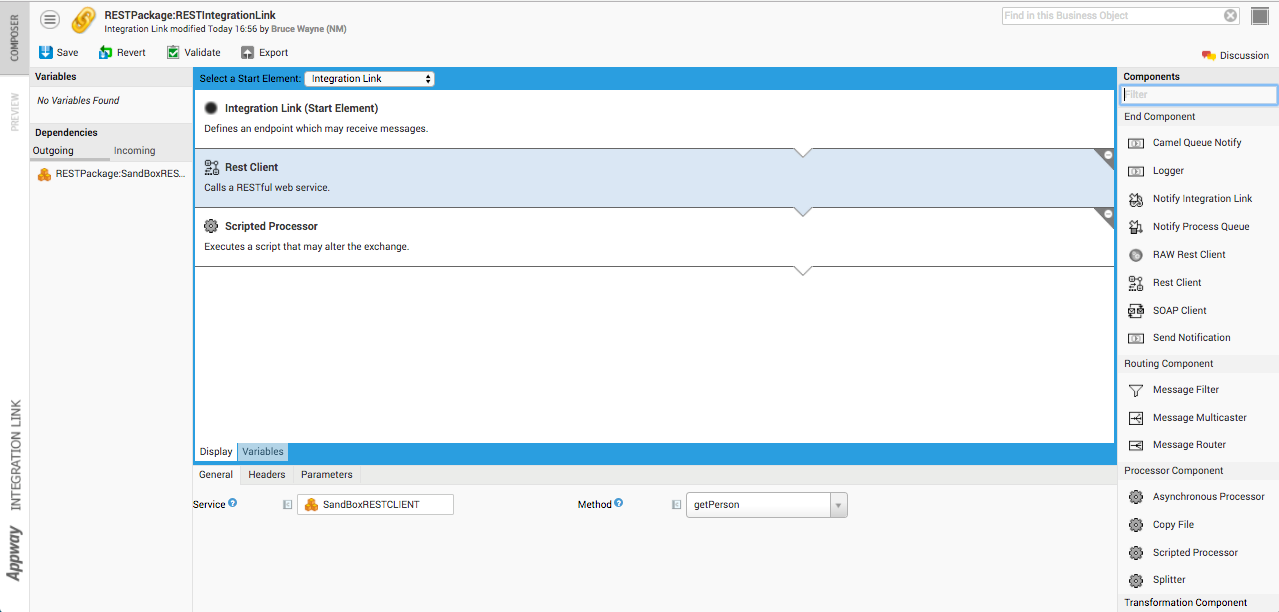
Figure 37: Using the REST Client integration link component
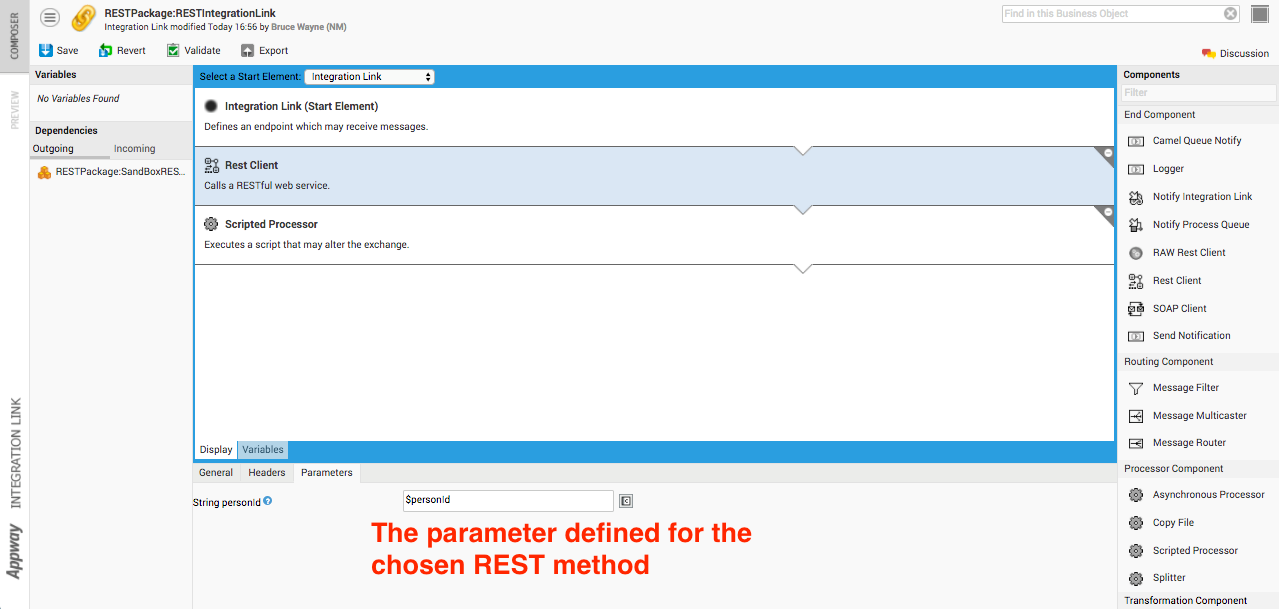
Figure 38: Setting the parameters for the service call
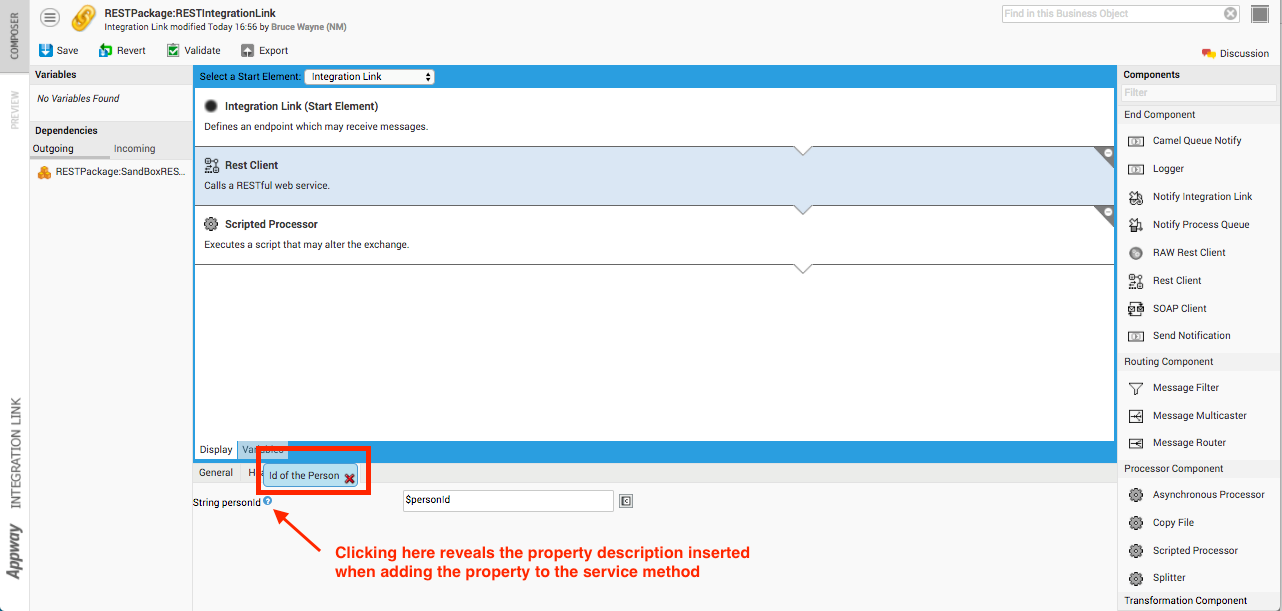
Figure 39: Context aware help from the definition of the service method parameters
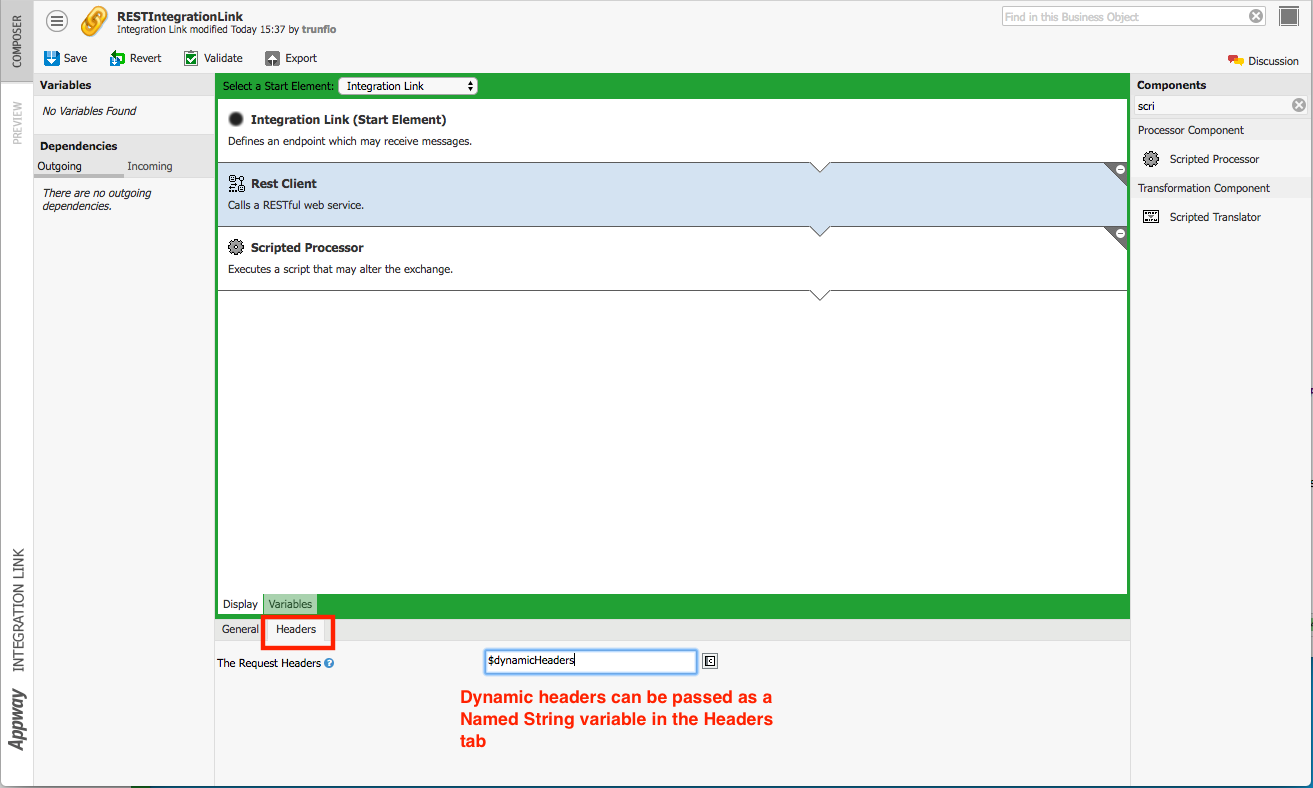
Figure 40: Headers tab for assigning a dynamic header to be used in the request of the REST method
For a more fine-grained control over REST calls executed from an Integration Link, there is a version of the Rest Client Integration Link component named RAW Rest Client.
The details of this component are given below:
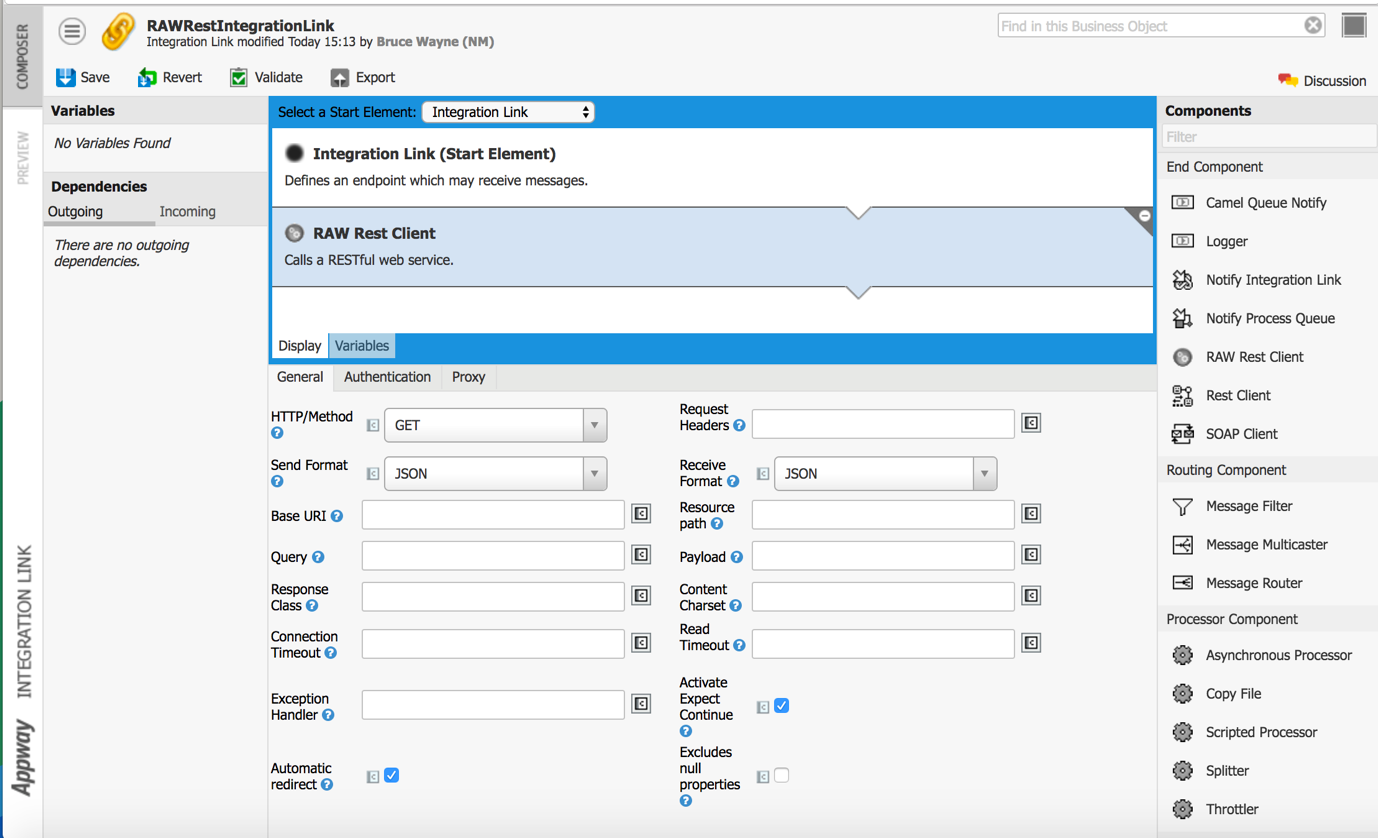
The following options are available on the General Tab:
| Property | Description | Examples |
| HTTP/Method | HTTP request method to execute. | GET
POST
POSTXFORM
PUT
DELETE
OPTIONS
HEAD |
| Request Headers | Additional http headers to be sent to the remote service. | {'MyHeader'='MyHeaderValue'}:String |
| Send Format | Output format used to communicate with the remote service. | JSON
XML
BINARY |
| Receive Format | Input format received from the remote service. | JSON
XML
BINARY |
| Base URI | Base URL of the remote service, ending with "/". | 'http://foo.com/bar/' |
| Resource path | Relative path to the target resource. | cars/ford |
| Query | Query string used as URL parameter for the service call. | id=1&name=Joe |
| Payload | Content sent to the remote service. | TranslateTo($person, 'json') |
| Response Class | Type of Data Class into which the response should be converted. If it should not be converted, enter the value "String". | Indexed Person |
| Content Charset | ISO character set name. | UTF-8 |
| Connection Timeout | Milliseconds until connection timeout | 10000 |
| Read Timeout | Milliseconds until read timeout | 3000 |
| Exception Handler | A script executed if an exception occurs during rest calls. | WorkflowMessage $message := new WorkflowMessage;
$message.setData($restClient.getStatusCode());
SendProcessMessage('myQueue', $message); |
| Activate Expect Continue | If enabled, activates 'Expect: 100-Continue' handshake for the entity enclosing methods. | true |
| Automatic Redirect | If enabled, a redirect is automatically performed. | false |
| Excludes null properties | If a payload's object property value is null, then the property will not be added to the final JSON payload. | true |
The following options are available on the Authentication Tab:
| Property | Description | Examples |
| Username | Username for basic authentication. | userone |
| Password | Password for basic authentication. | 123456 |
| SSL Alias | Alias for mutual authentication with SSL. |
| Preemptive Authentication | A Boolean value telling if the preemptive authentication should be applied or not in the current request. | true |
The following options are available on the Proxy Tab:
| Property | Description | Examples |
| Proxy Host | Hostname of the corporate proxy for accessing external resources. | proxy.mycompany.com |
| Proxy Port | Port through which to connect to the corporate proxy server. | 8080 |
| Proxy User | Username to connect with the proxy server. | proxyuser |
| Proxy Pass | Password to connect with the proxy server. | 654321 |
The Rest Client and the deprecated RAW Rest Client Integration Link components set the REST response headers returned by the REST service call into Exchange Message headers. To retrieve them, use the Exchange Message header 'restClientResponseHeaders'. To retrieve the REST response headers, the following code could be used from the exchange object returned by an Integration Link using the Rest Client component:
$exchange.getIn().getHeader('restClientResponseHeaders')
The value returned is a Named String collection and it contains all the headers returned by the REST call.
To set up a REST service interface with a script, use the RestClient Primitive Type. Instantiate it and configure it for a particular service before calling an HTTP method. An instance can be stored in a Process variable and then reused throughout that Process.
Each new instance of the RestClient object requires a base URL as parameter, from which relative URLs can be calculated.
RestClient $restClient := NewObject(RestClient, 'http://localhost:8080/myapp/')
Note that the "/" trailing on the base URL is mandatory. Use the NewObject() function as opposed to the "new" keyword, since a parameter must be passed to the constructor for the RestClient object.
Set the data interchange format for communication with the remote service. For more information, see Data Interchange Format.
Use either of the following methods on the RestClient instance:
- If the format is JSON:
.setJSONFormat() - If the format is XML:
.setXMLFormat()
Both methods take no parameters and return nothing. For example:
$restClient.setJSONFormat()
or
$restClient.setXMLFormat()
The set of methods in this section allow you to send an HTTP request to the service configured. See Supported HTTP Methods for an overview.
To convert a value to and from JSON or XML use the functions TranslateTo() and TranslateFrom() as described in Translating to and from JSON/XML.
The RestClient method .httpGet() retrieves data from the specified URL with the criteria specified in the query string or given a DataMap (Named Collection) of parameter name value pairs.
$restClient.httpGet($url, $queryString)
| Parameter | Description |
| $url String | Relative path to the resource you want to get. Can be absolute (overwrites base URI).
Examples:
'/example'
'http://www.appway.com/example' |
| $queryString String, can be null or '' | Collection of name-value pairs, URL-encoded
Example:
id=1234&name=Pluto |
| Return value | Description |
| String | JSON representation of the requested object, if a response is expected.
Example:
{
'id': '1',
'name': 'John',
'surname': 'Doe'
} |
Example: Request data corresponding to an instance of the Data Class "Person" with the id "1".
String $returnVal := $restClient.httpGet('people/person', 'id=1');
Person $p := TranslateFrom($returnVal, 'Person', 'json');
Alternative form of GET
$restClient.httpGet($url, $datamap)
| Parameter | Description |
$url
String | Relative path to the resource you want to get. Can be absolute (overwrites base URI). Can also contain placeholders for parameter values.
Examples:
'/people/{id}/address
'http://www.appway.com/example' |
$datamap
Named Collection of name value pairs for query string construction and placeholder substitution | Collection of name-value pairs, URL-encoded
Example:
{id=1234, name=Pluto}:Any |
| Return value | Description |
| String | JSON representation of the requested object, if a response is expected.
Example:
{
'id': '1',
'name': 'John',
'surname': 'Doe'
} |
Example: Request data corresponding to an instance of the Data Class "Person" with the id "1". The id parameter will be substituted in the URL. The name parameter will be sent as a part of the request formatted as a JSON structure.
Named String $datamap := {'id'='1', name=''Pluto'}:String
String $returnVal := $restClient.httpGet('people/person/{id}', $datamap);
Person $p := TranslateFrom($returnVal, 'Person', 'json');
The RestClient method .httpPost() modifies data in the target entry given the specified URL, conditions in the query string, and the content to be updated.
$restClient.httpPost($url, $query, $content)
| Parameter | Description |
$url
String | URL of the resource you want to update. Can be relative.
Examples:
'/example'
'http://www.appway.com/example' |
$query
String | Collection of name-value pairs, URL-encoded
Example:
id=1 |
| $content String | JSON, XML or XForm content to be updated, dependent on the mime content type specified Example:
{
'id': '1',
'name': 'John',
'surname': 'Doe'
} |
| Return value | Description |
| String | Example:
{
'id': '1',
'name': 'John',
'surname': 'Doe'
} |
Example:
$restClient.httpPost('people', '', $payload)
Alternative form of POST
$restClient.httpPost($url, $datamap, $content)
| Parameter | Description |
$url
String | Relative path to the resource you want to get. Can be absolute (overwrites base URI). Can also contain placeholders for parameter values. Examples:
'/people/{id}/address
'http://www.appway.com/example' |
$datamap
Named Collection of name value pairs for query string construction and placeholder substitution | Collection of name-value pairs, URL-encoded
Example:
{id=1234, name=Pluto}:Any |
$content
String | JSON, XML or XForm content to be updated, dependent on the mime content type specified
Example:
{
'id': '1',
'name': 'John',
'surname': 'Doe'
} |
| Return value | Description |
| String | JSON representation of the requested object, if a response is expected.
Example:
{
'id': '1',
'name': 'John',
'surname': 'Doe'
} |
Example:
$restClient.httpPost('people/person/{id}', $datamap, $content)
The RestClient method .httpPostBinary() performs an HTTP POST and stores the binary result in a file.
This method is available for Appway 10.1.6 and higher.
$restClient.httpPostBinary($url, $query, $content, $path)`
| Parameter | Description |
$url
String | URL of the resource you want to update. Can be relative.
Examples:
'/example'
'http://www.appway.com/example' |
$query
String | Collection of name-value pairs, URL-encoded
Example:
id=1 |
| $content String | JSON, XML or XForm content to be updated, dependent on the mime content type specified Example:
{
'id': '1',
'name': 'John',
'surname': 'Doe'
} |
The four RestClient methods .httpMultipartPost()perform an HTTP POST with a multipart message as the payload.
$restClient.httpMultipartPost(String,Named String,Named Any)
| Parameter | Description |
$url
String | URL extension to be called. Parameter encoded as path elements - {name} - will be replaced with their actual value. |
$params
Named String | Named String with key: parameter name, value: parameter value as String. |
$httpFileUploads
Named Any | HttpFileUpload Data Classes (may also include Strings for Text Body parts) to be included as parts of a multipart message submitted as the body of the post. |
| Return value | Description |
| String | The content of the HTTP response |
$restClient.httpMultipartPost(String,Named String,Named Any,Named String)
| Parameter | Description |
$url
String | URL extension to be called. Parameter encoded as path elements - {name} - will be replaced with their actual value. |
$params
Named String, | Named String with key: parameter name, value: parameter value as String. |
$httpFileUploads
Named Any | HttpFileUpload Data Classes (may also include Strings for Text Body parts) to be included as parts of a multipart message submitted as the body of the post. |
$httpFileUploadContentTypes
Named String | An optional DataMap with content types for Text Body part entries in httpFileUploads identified by the same key. Default: 'text/plain; charset=ISO-8859-1' |
| Return value | Description |
| String | The content of the HTTP response |
$restClient.httpMultipartPost(String,String,Named Any)
| Parameter | Description |
$url
String | URL extension to be called. Parameter encoded as path elements - {name} - will be replaced with their actual value. |
$queryString
String | A percent-encoded query string. |
$httpFileUploads
Named Any | A DataMap of HttpFileUpload DataClasses (may also include Strings for Text Body parts) to be used to create the multipart message. |
| Return value | Description |
| String | The content of the HTTP response |
$restClient.httpMultipartPost(String,String,Named Any,Named String)
| Parameter | Description |
$url
String | URL extension to be called. Parameter encoded as path elements - {name} - will be replaced with their actual value. |
$queryString
String | A percent-encoded query string. |
$httpFileUploads
Named Any | A DataMap of HttpFileUpload DataClasses (may also include Strings for Text Body parts) to be used to create the multipart message. |
$httpFileUploadContentTypes
Named String | An optional DataMap with character sets for Text Body part entries in httpFileUploads identified by the same key. Default: ISO-8859-1 |
| Return value | Description |
| String | The content of the HTTP response |
The PATCH method can be used to only update selected parts of specific data.
Assume you have a structure containing 30 properties. Using the PATCH method, you can create a structure that only contains the properties that have been changed, thus reducing the data sent to the service.
Please note that many REST services do not implement the PATCH feature since it is very difficult to implement on the client side (requires the client to keep track of changes) and on the service side (requires the service to implement partial update capabilities).
The PATCH method uses the same parameter and calling methods, including alternative URL parameters, as the POST method.
The RestClient method .httpPostWithXForm() modifies XForm-encoded data in the target entry given the specified URL, conditions in the query string, and the content to be updated.
$restClient.httpPostWithXForm($url, $query, $content)
| Parameter | Description |
$url
String | URL of the resource you want to update. Can be relative.
Examples:
'/example'
'http://www.appway.com/example' |
$query
String | Collection of name-value pairs, URL-encoded
Example:
id=1 |
$content
String | XForm content to be updated
Example:
{
'id': '1',
'name': 'John',
'surname': 'Doe'
} |
| Return value | Description |
| String | Structure returned in the specified mime type
Example:
{
'id': '1',
'name': 'John',
'surname': 'Doe'
} |
Alternative form of XForm
$restClient.httpPostWithXForm($url, $datamap, $content)
| Parameter | Description |
$url
String | Relative path to the resource you want to update. Can be absolute (overwrites base URI). Can also contain placeholders for parameter values.
Examples:
'/people/{id}/address
'http://www.appway.com/example'
|
$datamap
Named Collection of name value pairs for query string construction and placeholder substitution | Collection of name-value pairs, URL-encoded
Example:
{id=1234, name=Pluto}:Any |
| $content String | JSON, XML or XForm content to be updated, dependent on the mime content type specified
Example:
{
'id': '1',
'name': 'John',
'surname': 'Doe'
} |
| Return value | Description |
| String | JSON representation of the requested object, if a response is expected.
Example:
{
'id': '1',
'name': 'John',
'surname': 'Doe'
} |
The RestClient method .httpPut() adds an entry for the target resource, given the specified URL, conditions in the query string, and the content to be added. Any current representation of the target entry is replaced.
$restClient.httpPut($url, $query, $content)
| Parameter | Description and examples |
$url
String | URL of the resource you want to add. Can be relative.
Examples:
'/example'
'http://www.appway.com/example' |
$query
String | Collection of name-value pairs, URL- encoded
Example:
id=1 |
| $content String | JSON, XML or XForm content to be added
Example:
{
'id': '1',
'name': 'John',
'surname': 'Doe'
} |
| Return value | Description |
| String | Usually empty, but can be specified by the implementer of the remote service
Example:
$restClient.httpPut('people', '', $payload) |
Alternative form of PUT
$restClient.httpPut($url, $datamap, $content)
| Parameter | Description |
$url
String | Relative path to the resource you want to put. Can be absolute (overwrites base URI). Can also contain placeholders for parameter values.
Examples:
'/people/{id}/address
'http://www.appway.com/example' |
$datamap
Named Collection of name value pairs for query string construction and placeholder substitution | Collection of name-value pairs, URL-encoded
Example:
{id=1234, name=Pluto}:Any |
$content
String | JSON, XML or XForm content to be updated, dependent on the mime content type specified
Example:
{
'id': '1',
'name': 'John',
'surname': 'Doe'
} |
| Return value | Description |
| String | Usually empty, but can be specified by the implementer of the remote service
Example:
$restClient.httpPut('people', '', $payload) |
The RestClient method .httpDelete() removes the target resource.
$restClient.httpDelete($url, $querystring)
| Parameter | Description |
$url
String | URL of the resource you want to delete. Can be relative.
Examples:
'/example'
'http://www.appway.com/example' |
$queryString
String, can be null or '' | Collection of name-value pairs, URL-encoded
Example:
id=1234&name=Pluto |
| Return value | Description |
| Boolean | True if the operation was successful, false if it has failed |
Example:
$restClient.httpDelete('people', 'id=1234')
Alternative form of DELETE
The RestClient method ".httpDelete()" removes the target resource.
$restClient.httpDelete($url, $querystring)
| Parameter | Description |
$url
String | Relative path to the resource you want to delete. Can be absolute (overwrites base URI). Can also contain placeholders for parameter values.
Examples:
'/people/{id}/address
'http://www.appway.com/example' |
$datamap
Named Collection of name value pairs for query string construction and placeholder substitution | Collection of name-value pairs, URL-encoded
Example:
{id=1234, name=Pluto}:Any |
| Return value | Description |
| Boolean | True if the operation was successful, false if it has failed |
Example:
$restClient.httpDelete('people', 'id=1234')
The RestClient method .httpHead() gets the HTML header information available for the target resource.
$restClient.httpHead($url, $querystring)
| Parameter | Description |
$url
String | URL of the resource you want to get header information about. Can be relative.
Examples:
'/example'
'http://www.appway.com/example' |
$queryString
String, can be null or '' | Collection of name-value pairs, URL-encoded
Example:
id=1234&name=Pluto |
| Return value | Description |
| Named String | HTML header information for the target resource |
Example:
String {
	Content-Length=40,
	Content-Type='application/json',
	Date='Fri, 29 Nov 2013 10:16:39 GMT'
}
Example:
$restClient.httpHead('people/person', 'id=1234')
Alternative form of HEAD
The RestClient method .httpHead() gets the HTML header information available for the target resource.
$restClient.httpHead($url, $querystring)
| Parameter | Description |
$url
String | URL of the resource you want to get header information about. Can be absolute (overwrites base URI). Can also contain placeholders for parameter values.
Examples:
'/people/{id}/address
'http://www.appway.com/example' |
$datamap
Named Collection of name value pairs for query string construction and placeholder substitution | Collection of name-value pairs, URL-encoded
Example:
{id=1234, name=Pluto}:Any |
| Return value | Description |
| Named String | HTML header information for the target resource |
Example:
String {
	Content-Length=40,
	Content-Type='application/json',
	Date='Fri, 29 Nov 2013 10:16:39 GMT'
}
Example:
$restClient.httpHead('people/person', 'id=1234')
The RestClient method .httpOptions() requests a list of the HTTP methods available for the target resource.
$restClient.httpOptions('people', 'id=1234')
| Parameter | Description |
| $url String | URL of the resource for which you want a list of supported HTTP methods. Can be absolute (overwrites base URI).
Examples:
'/example'
'http://www.appway.com/example' |
| $queryString String, can be null or '' | Collection of name-value pairs, URL-encoded
Example:
id=1234&name=Pluto |
| Return value | Description |
| Indexed String | List of HTTP methods allowed on the target resource
Example:
String[POST, GET, DELETE, OPTIONS, HEAD, PUT] |
Example:
$restClient.httpOptions('people', null)
Alternative form of OPTIONS
The RestClient method .httpOptions() requests a list of the HTTP methods available for the target resource.
$restClient.httpOptions('people', 'id=1234')
| Parameter | Description |
| String | URL of the resource for which you want a list of supported HTTP methods. Can be absolute (overwrites base URI). Can also contain placeholders for parameter values.
Examples:
'/people/{id}/address
'http://www.appway.com/example' |
| $datamap Named Collection of name value pairs for query string construction and placeholder substitution | Collection of name-value pairs, URL-encoded Example: {id=1234, name=Pluto}:Any |
| Return value | Description |
| Indexed String | List of HTTP methods allowed on the target resource Example:
String[POST, GET, DELETE, OPTIONS, HEAD, PUT] |
Example:
$restClient.httpOptions('people', null)
Person $p := new Person;
$p.id := '1234';
$p.name := 'Pluto';
$p.surname := 'Dog';
//
//
RestClient $restClient := NewObject(RestClient, 'http://localhost:8088/myapp/')
$restClient.setJSONFormat();
//
//Update a resource
$restClient.httpPost('people', null, TranslateTo($p, 'json'));
- Create a "Person" Data Class with the following properties defined:
- id (String)
- firstname (String)
- surname (String)
- Create an instance of this Data Class, either through a script or in the Test Data editor:
Person $person := NewObject(
	'Person',   //The type of the new instance.
	'1234',     //Value of the id property of the new instance.
	'Pluto',    //Value of the name property of the new instance.
	'Dog'   //Value of the surname property of the new instance.
);
- Create a new REST client instance:
RestClient $restClient := NewObject(RestClient, 'http://localhost:8088/myapp/')
- Set the format of the data interchange with the remote service to JSON:
$restClient.setJSONFormat()
- Update the entry on the person with the ID "1234" on the target system:
$restClient.httpPost('people', null, TranslateTo($p, 'json'))
The following configuration parameters are available:
webservices.blank.as.plus
By default, white spaces in user defined query parameters are encoded with '%20' during a REST call. The encoded value for white spaces can be changed to '+' instead of '%20' for the Appway Rest Client. This can be configured with the extension configuration parameter named webservices.blank.as.plus. If set to 'false' or if absent, white spaces are encoded with '%20', otherwise with '+'.
You often need to provide users with detailed information about why a REST call failed. To extract more information from an exception thrown during a REST call, use the ExceptionRootCause function from the Try/Catch block in the Appway script language.
To get the specific status code returned by the server, use the getStatusCode() method from the REST client.
By default, the REST client always throws an exception if the response code returned by the service does not belong to the ranges 2xx or 3xx.
Example showing the usage of ExceptionRootCause and getStatusCode():
RestClient $restClient := new RestClient;
$restClient.setBaseURI('http://localhost');
Try
   Return $restClient.httpGet('/service', null);
Catch
   Integer $statusCode := $restClient.getStatusCode();
   PRINTLN($statusCode);
   Exception $rootException := ExceptionRootCause($exception);
   PRINTLN($rootException);
End
Oracle have their own implementation in WebLogic for the javax.xml.soap.MessageFactory and for the javax.xml.wsdl.WSDLFactory. Their implementations however are not compliant with standards and have a number of issues detailed here.
The Oracle WebLogic implementation doesn't conform to the specification for SOAPEnvelopes in SOAP 1.2. There is a workaround for this which involves telling the virtual machine which implementation to use for the MessageFactory interface. This can be done by setting a system property at startup of the application server.
This is done by using the following java runtime argument
-Djavax.xml.soap.MessageFactory=javax.xml.soap.MessageFactory
The Oracle WebLogic implementation for the WSDLFactory has a fundamental problem, when you pass an input source from which to retrieve WSDL and XSD files, it completely ignores this input source and tries to use the default URL input source regardless. In the case of the cluster we have to supply an input source capable of retrieving the cluster files instead of retrieving files directly from the filesystem and the WebLogic implementation doesn't allow this. There is a workaround for this which involves telling the virtual machine which implementation to use for the WSDLFactory interface. This can be done by setting a system property at startup of the application server.
This is done by using the following java runtime argument
-Djavax.wsdl.factory.WSDLFactory=com.ibm.wsdl.factory.WSDLFactoryImpl
The WebServices extension supports moving REST or SOAP services into Packages. Moving a REST or SOAP service created with the WebServices extension implies updating the metadata of Data Classes and Primitive Types created during the first import of the service.
Moving a REST or SOAP service created with the WebServices extension is seamlessly integrated with the Move Business Objects tool available on the Package Maintenance Tab. The extension participates in the move process in two phases:
- Initial validation
- Post-move changes
The initial validation phase verifies that the target Package of the service and its related Data Classes (for example the classes representing the SOAP model) satisfy a set of validation constraints. If any of these validation constraints are violated, an error message describes the error and prevents continuing with the next steps of the wizard.
The post-move changes operation updates the metadata of Data Classes and Primitive Types belonging to the service according to their target package.
Note that, while move operations are supported, renaming (i.e. refactoring) a REST o SOAP service Data Class is not supported. In that case metadata would not be updated automatically. We recommend that you avoid renaming such Data Classes.
Moving a REST service is performed by dragging and dropping the Data Class representing the service from Package A to Package B as you would normally do when moving another Business Object using the built-in Move Business Objects tool.
Moving a SOAP service in Appway requires the user to move Data Classes and Primitive Types connected to the service so that the following constraint is satisfied:
- All Primitive Types and Data Classes belonging to the same SOAP Client must be moved into the same target Package.
The initial validation step warns the user if the condition above is not satisfied and informs the user to change the move selection to satisfy the condition before proceeding.
Example:
You have a SOAP service (in the 'Base' Package) with the following Primitive Types:
- Tns1_MyPrimitiveType1 (namespace: domain.com/primitives)
- Tns2_MyPrimitiveType2 (namespace: domain.com/commons)
and the following Data Classes:
- Tns1_MyComplexType1 (namespace: domain.com/types)
- Tns2_MyComplexType1 (namespace: domain.com/commons)
- Tns3_MyComplexType1 (namespace: domain.com/types)
- Tns4_MySOAPServiceClient (namespace: domain.com/base)
A possible and valid move operation could result in the following configuration:
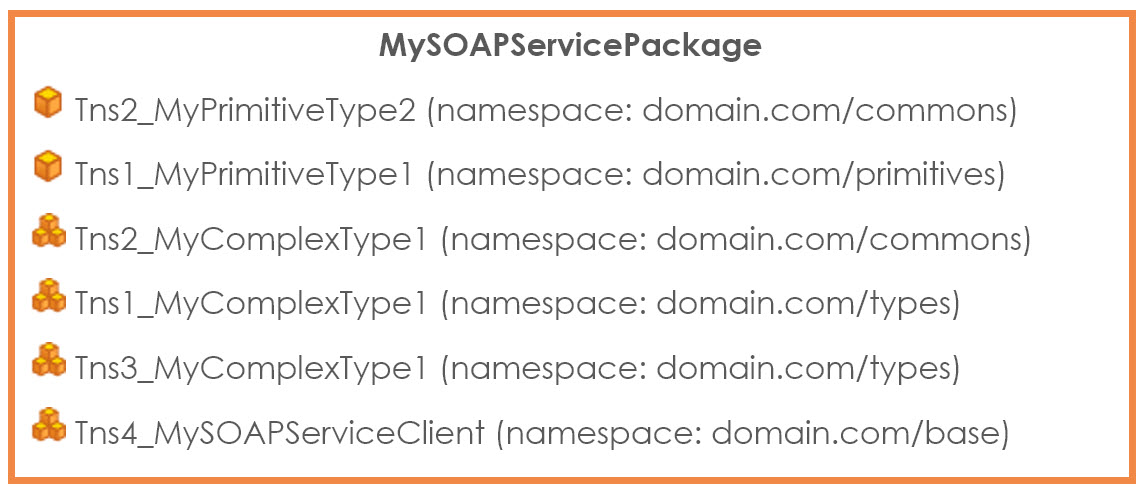
As the example shows, all Data Classes / Primitive Types belonging to the same SOAP Client are grouped together in the same logical Appway Package.
When defined as a property of a wrapping DataClass and persisted, the following Primitive Types that are exposed by the WebServices extension are serialized/deserialized as a null value when the Value Store Splitting feature is enabled:
- DataEntityConversionUtils
- RestClient
- SOAPAttachment
For this reason, ensure that all instances of any of the Primitive Types listed above are not null before using them in a Process.
The SOAP and the REST extensions have been replaced by the WebServices extension. This is a drop-in replacement for the latest versions of both extensions (SOAP 5.3 and REST 2.0). If the newest versions of the SOAP and REST extensions are installed on your system before upgrading, they should first be removed, then the WebServices extension should be installed, and all existing services should require no further action.