Follow the tasks outlined in this article to upgrade your Appway installation from version 9.1.x to 10.x.
You can use this checklist to track your progress and ensure you do not miss any steps:
-
Pre-upgrade, requires that you have:
- Verified technical requirements
- Cleaned the 9.1.x model
- Checked removed and deprecated features, and ensured you are not using features removed in Appway 10
- Verified changes in default behavior
- Prepared custom extensions (if applicable)
- Created a backup
-
Upgrade, requires that you have:
- Stopped Appway
- Updated Appway Core
- Updated / installed extensions
- Updated / installed Packages
- Verified
hazelcast.xml - Tested your installation
-
Post-upgrade, requires that you have:
- Reviewed changes in default functionalities ans changed features
- Verified moved features
- Verified new features
- (Optionally) Performed other recommended actions
Perform these steps while still running Appway 9.1.x, as a preparation before the actual upgrade. This is a major upgrade and requires careful preparation and planning.
Requirements with regards to browsers, Application Servers, and JDK have changed. Consult the Technical Requirements for Appway 10 and ensure your system complies before continuing with the upgrade.
Following is a list of library updates in Appway 10.0.0. Check also the related
section for library updates occurring in following Appway 10 patch versions.
The following libraries were added in Appway 10.0.0:
- com.fasterxml.jackson.module:jackson-module-jaxb-annotations 2.9.10
- com.google.guava:failureaccess 1.0.1
- com.sun.xml.bind:jaxb-core 2.3.0
- com.sun.xml.bind:jaxb-impl 2.3.0
- jakarta.annotation:jakarta.annotation-api 1.3.5
- jakarta.validation:jakarta.validation-api 2.0.2
- jakarta.ws.rs:jakarta.ws.rs-api 2.1.6
- org.apache.camel:camel-jaxb 2.24.2
- org.glassfish.hk2.external:aopalliance-repackaged 2.6.1
- org.glassfish.hk2.external:jakarta.inject 2.6.1
- org.glassfish.hk2:hk2-api 2.6.1
- org.glassfish.hk2:hk2-locator 2.6.1
- org.glassfish.hk2:hk2-utils 2.6.1
- org.glassfish.hk2:osgi-resource-locator 1.0.3
- org.glassfish.jersey.containers:jersey-container-servlet 2.30
- org.glassfish.jersey.containers:jersey-container-servlet-core 2.30
- org.glassfish.jersey.core:jersey-client 2.30
- org.glassfish.jersey.core:jersey-common 2.30
- org.glassfish.jersey.core:jersey-server 2.30
- org.glassfish.jersey.ext:jersey-entity-filtering 2.30
- org.glassfish.jersey.inject:jersey-hk2 2.30
- org.glassfish.jersey.media:jersey-media-json-jackson 2.30
- org.glassfish.jersey.media:jersey-media-multipart 2.30
- org.javassist:javassist 3.25.0-GA
- org.jvnet.mimepull:mimepull 1.9.12
The following libraries were upgraded in Appway 10.0.0:
- com.google.guava:guava from version 20.0 to 28.1-jre
- org.bouncycastle:bcmail-jdk15on from version 1.59 to 1.62
- org.bouncycastle:bcpkix-jdk15on from version 1.59 to 1.62
- org.bouncycastle:bcprov-ext-jdk15on from version 1.59 to 1.62
- com.sun.mail:javax.mail from version 1.5.6 to 1.6.2
- commons-codec:commons-codec from version 1.10 to 1.13
- commons-io:commons-io from version 2.4 to 2.6
- org.jabsorb:jabsorb 1.3.2 to com.appway:jabsorb 1.3.2-2 (custom patch)
- com.hazelcast:hazelcast from version 3.11.2 to 3.12.6 (See below fore more information on the manual update of deprecated configuration properties).
- com.hazelcast:hazelcast-client from version 3.11.2 to 3.12.6
- org.apache.camel:camel-core from version 2.17.7 to 2.24.2
- org.apache.camel:camel-jdbc from version 2.17.7 to 2.24.2
- org.apache.camel:camel-jms from version 2.17.7 to 2.24.2
- org.apache.camel:camel-jmx from version 2.17.7 to 2.24.2
- org.apache.camel:camel-jxpath from version 2.17.7 to 2.24.2
- org.apache.camel:camel-ldap from version 2.17.7 to 2.24.2
- org.apache.camel:camel-mail from version 2.17.7 to 2.24.2
- org.apache.camel:camel-soap from version 2.17.7 to 2.24.2
- org.apache.camel:camel-spring from version 2.17.7 to 2.24.2
- org.quartz-scheduler:quartz from version 2.2.0 to 2.3.2
- org.springframework:spring-aop from version 4.2.9.RELEASE to 5.1.9.RELEASE
- org.springframework:spring-beans from version 4.2.9.RELEASE to 5.1.9.RELEASE
- org.springframework:spring-context from version 4.2.9.RELEASE to 5.1.9.RELEASE
- org.springframework:spring-core from version 4.2.9.RELEASE to 5.1.9.RELEASE
- org.springframework:spring-expression from version 4.2.9.RELEASE to 5.1.9.RELEASE
- org.springframework:spring-jms from version 4.2.9.RELEASE to 5.1.9.RELEASE
- org.springframework:spring-messaging from version 4.2.9.RELEASE to 5.1.9.RELEASE
- Jackson Databind from version 2.9.10.2 to 2.9.10.4
The following libraries were removed from Appway 10.0.0:
- jstree
- aopalliance:aopalliance version 1.0
- org.springframework:spring-context-support version 4.2.9.RELEASE
- org.springframework:spring-jdbc version 4.2.9.RELEASE
- org.springframework:spring-orm version 4.2.9.RELEASE
- org.springframework:spring-web version 4.2.9.RELEASE
Review your Solution and verify that custom libraries and other extensions are compatible with the changes outlined above.
The following libraries were upgraded in Appway 10.0.2:
- Jackson Databind from version 2.9.10.4 to 2.9.10.5
The following libraries were upgraded in Appway 10.0.3:
-
jQuery from version 2.2.4 to 2.2.4-1
Consider the following information on this upgrade: The third-party JavaScript library jQuery has been patched to fix four known security vulnerabilities present in jQuery 2.2.4: CVE-2015-9251, CVE-2019-11358, CVE-2020-11022, and CVE-2020-11023. The fix for CVE-2015-9251 has an impact on an existing solution if it satisfies all of the following conditions:
- The solution contains custom JavaScript code.
- This JavaScript code sends an ajax request using jQuery's functions ""$.ajax"", ""$.get"", or ""$.post"".
- The ajax request is sent to a third-party system, not the Appway server.
- The JavaScript code does not set the ""dataType"" property on the ajax request.
- The response to the ajax request has the content type ""text/javascript"".
- The response contains JavaScript code.
- The solution expects from jQuery that it immediately executes the JavaScript code in the response.
Note that an upgrade to jQuery 3.0.0 or greater would have the same effect. This is not a special behavior of the patched jQuery version, but the official new behavior in jQuery. If a solution is affected by this change, the JavaScript code can be changed so that the ajax request have a ""dataType"" property set to ""script"". This tells jQuery that evaluation of the returned JavaScript code is intended.
To check whether a solution is potentially affected, run a global search for the jQuery functions ""$.ajax"", ""$.get"", or ""$.post"" in Appway."
The following libraries were upgraded in Appway 10.0.4 and 10.1.0:
- Jackson Databind from version 2.9.10.5 to version 2.9.10.6.
The following libraries were upgraded in Appway 10.1.3:
- Jackson Databind from version 2.9.10.6 to version 2.9.10.8.
Before upgrading, go to Solution Design > Validation and run a global validation. Solve any errors or warnings and ensure that the Appway 9.1.x model is clean before moving on.
It is especially important to make sure that the Appway model is error-free before upgrading. Issues without visible consequences in the current application can cause problems after upgrading.
With Appway 10, a number of Screen Components, Script Functions, and other features have been deprecated, as their use is discouraged. Features deprecated in Appway 10 will continue to work as before, we plan to remove these deprecated features in Appway 12 or later. For some specific cases, removal is already planned for Appway 13 or later.
In addition, a number of features deprecated in previous Appway versions have been removed in Appway 10.
What this means for you:
- Features removed in Appway 10.0 – Before upgrading, check if any of the removed features are used by your Solution and if so, modify your Solution to work without these features.
For some removed features, you can use the search functionality available at Solution Design > Search to search your Solution for occurrences. For other removed features, follow the explanations in the list of removed features. - Features deprecated in Appway 10.0 – These deprecated features do not require any action before upgrading to Appway 10. Deprecated features will continue to work as normal in Appway 10, we plan to remove them in Appway 12 or later. For some specific cases, removal is already planned for Appway 13 or later. This time frame gives you plenty of time to check your Solution and implement any needed changes.
Starting with Appway 10, data given to Integration Links (message parameter and variable assignments) is decoupled by default. This is done to avoid possible race conditions or unexpected side effects.
This behavior is managed by the nm.integrationlink.message.clone.enabled system property (true by default).
Important! Setting this property to false to use the previous, deprecated behavior to write-back to the calling side is potentially dangerous, and it is a highly unrecommended action.
In most cases, the new behavior is expected to be the assumed behavior. Therefore, it is highly likely that you do not encounter any issues.
To verify if your Solution is affected by this change, perform the following checks:
- CallIntegrationLink Function — Check if the
params or the initialMessage arguments are used on the receiving side to update the sender side. - Integration Link Process Element: Check if the Message property or the Variable Assignments are used on the receiving side to update the Value Store of the current Process.
- Integration Links Catalog Source: Check if the Message Script property or the Variable Assignments are used on the receiving side to update the variables in the Catalog.
If the code analysis of the points mentioned above is too demanding or time-consuming, a recommended alternative is to check all the places of your Solution where Integration Links are called to verify that everything still works as expected.
As part a project to remove dependencies from Appway solutions on Java code, several direct and indirect usages of Java in the Script Language generate validation warnings.
In Appway 10.1.6 and higher, as an evolution of this project, the following usages have been blacklisted:
- Java Reflection API classes (classes that reside in java.lang.reflect.* or sun.reflect.*) in the Script Language. Script Language code that uses such classes will now throw an exception during its execution.
Do not proceed to the Upgrade of your Solution if you are using such classes. If you need assistance, contact Appway Support.
If your Appway installation contains custom extensions, make sure that they are compatible with the Appway 10.x release before upgrading. Contact your Appway representative or Appway Support for more details.
Create a backup of the existing 9.1.x installation.
Follow the steps in this chapter to upgrade your system once it is ready.
You will need the following files:
- Latest Appway 10.x version
- Compatible Appway extensions, based on those available in the current environment and the list of mandatory extensions.
- Compatible Appway Packages, including all mandatory Packages for Appway 10 as well as any other Packages which you have licensed and which are provided by Appway, delivered as one or more AWDEPLOYMENT files.
Run a clean shutdown of the Appway installation to remove any files that are not required. For more information, see Shutting Down a Large Cluster.
To update Appway Core on your application server:
1 Open the control center of your application server
2 Deploy the new version of the WAR file
Note: For multi-node installations, deploy the WAR file on each node of the Cluster.
Important! If you have customized the
web.xml file, merge your custom
web.xml with the new
web.xml delivered with Appway 10. Make sure that your customized
web.xml includes all new entries delivered with Appway 10. Failure to do so can lead to unexpected behavior in the Appway Studio.
Contact
Appway Support if you require assistance when creating the updated custom
web.xml file.
You can find more information in the System Installation article.
You need to perform the following actions on extensions:
- Update all extensions currently running on your system.
Important! Update all of the extensions. Even if the version of an extension has not changed and it contains no new features, you must replace it with a version compiled against Appway 10.x.
- Newly install any mandatory extensions for Appway 10 currently not available on your Appway installation (see the list of mandatory extensions just below).
To update/install extensions, follow these steps:
- Install / update the extensions by adding them to the
<Local file system>/data-home/extensions directory. When updating extensions, make sure you update only the JAR files; any CFG files should remain the same as on your 9.1.x system, in case you made any custom configurations.
Note: For multi-node installations, install / update the extensions on each node of the cluster.
- Make sure every extension has the proper name and is unique:
- One JAR file per extension, with the proper file name of the type OfficialExtensionName.jar must be present.
- Any other redundant JAR files with custom prefixes or suffixes (such as OfficialExtensionName-1.2.3-10.0.0.jar or dev-OfficialExtensionName.jar and so on) must be removed.
- After starting Appway, ensure the extensions are started at System Configuration > Extensions in the Studio.
Mandatory extensions are an essential part of the platform and must be installed on every Appway instance. If these extensions are not installed and running, Appway itself is not considered correctly installed and set up. Mandatory extensions provide important features and strengthen the available analytical capabilities allowing you to tune your Appway installation and ensure maximum platform stability.
Ensure the following mandatory extensions are installed on your system:
- AppTask – Includes all the logic behind the autogeneration of the Data Driven UI and the logic to apply a Theme to such UI. This extension is used by the Data Gathering.
- AppTaskAPI – Exposes the API used to communicate with the backend (Data Logic, Theming, Process). This extension is used by the Data Gathering.
- ClusterTools – Provides insights into the internals of Appway Cluster and Hazelcast.
- Component – Contains most of the Screen Components available in Appway.
- DefaultIcons – Adds generic Workspace icons for use with Screen Components and in Solutions.
- Functions – Provides many additional functions vital to working in Appway.
- ProcessUsageTracker – Collects usage statistics (started, updated, stopped) for top-level Processes in Appway Solutions. These statistics can be accessed in the license report.
- StatisticsCollector – Collects statistics relevant for testing and tuning Appway installations.
- StylePackageTools – Enables a set of tools which support the definition and maintenance of Style Packages.
Note: Ensure the mandatory Style Package Tools Package is available on your Appway instance before starting this extension.
- SystemHealthSensors – Adds additional health sensors to the Appway Health Service.
- WorkitemFinder – Provides out-of-the-box filters as well as sorting, paging, and text-based searching capabilities for Workitems.
You need to perform the following actions on Packages:
- Install all mandatory Packages for Appway 10 (see the list of mandatory Packages just below). If the mandatory Packages are already installed, update them to versions compatible with Appway 10.
- Update all Packages which you have licensed and which are provided by Appway to versions compatible with Appway 10.
To update/install update Packages, follow these steps:
- Place the
AWDEPLOYMENT files containing the Packages into the packages folder in the Data Home (<Local file system>/data/packages). The Packages are then automatically installed when Appway is started. See Importing Packages for more details on installing Packages automatically. - If you prefer to install / update Packages manually, install / update them at Solution Design > Import in the Studio after starting Appway.
Note: Updating Appway Packages such as the Design System will overwrite any custom changes you have made for such a Package. In general, modifying Packages managed by Appway is not recommended, as upgrading becomes more difficult.
Mandatory Packages are an essential part of the platform and must be available on every Appway instance. If these Packages are not installed (or not updated to a version compatible with Appway 10), Appway itself is not considered correctly installed. Mandatory Packages provide important features and functionality allowing you to use your Appway installation more effectively.
Ensure the following mandatory Packages are installed on your system:
- Design System – Provides patterns, prebuilt modules, and styling to enable the straightforward implementation of a cohesive brand experience.
- Style Package Tools – Together with the mandatory Style Package Tools extension, enables a set of tools which support the definition and maintenance of Style Packages.
- Data Logic – Provides a Solution template and utility functions that enhance Appway's native Data Logic functionalities.
Download mandatory Packages from the
Products page on community.appway.
Hazelcast was updated to version 3.12.6 in Appway 10.
With this update, two configuration properties used in the default conf/hazelcast.xml file are deprecated:
hazelcast.memcache.enabledhazelcast.rest.enabled
Replace them as shown in the following figure (see the lines of code to be added in text format under the figure):
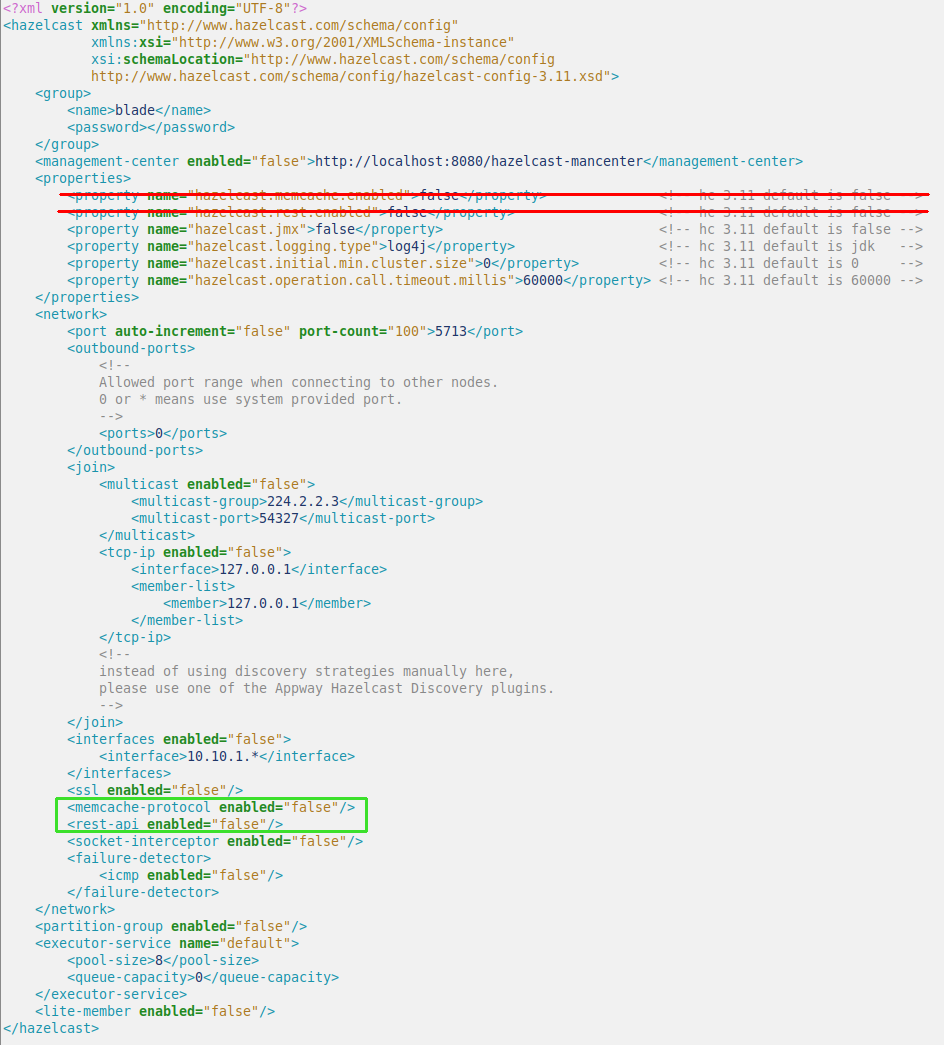
<memcache-protocol enabled="false"/>
<rest-api enabled="false"/>
Note: You can also perform these changes after upgrading to Appway 10, as the deprecated values still work.
Moreover, it is recommended that you change the value of the redo-operation in the default conf/hazelcast-client.xml file from true to false, since redoing operations cannot be safe in some situations. Please note, this file is only used when enabling Startup Files.
The default hazelcast.xml and hazelcast-client.xml hazelcast-client.xml provided with Appway 10 are also attached here for your reference.
After performing the actual upgrade, follow these steps to test your installation:
- Start Appway.
- When completely started, check the log output of the startup. Carefully examine all errors and warnings before continuing to the Studio.
- Check that the Appway version number has been updated in System Maintenance > Overview.
- Check that extension version numbers have been updated in the System Configuration > Extensions > Version column.
- Re-run the Validation report (Solution Design > Validation). Browse the validation logs (Show Validation Logs) and use its diff viewer to compare versions. Apply fixes for any new errors or warnings.
- Thoroughly test your Solution.
Perform the steps outlined in the following sections when Appway 10.x is running.
New default values have been defined for the following Style and Style Value Business Objects In Appway 10.0 and Appway 10.1 (see complete list below)
Important note! When upgrading to 10 from an 9.1.x installation, auto-migration applies for this change in the default value. The behavior is as follows:
- If you were using the original default values before upgrading, then the new default values are applied automatically when upgrading Appway. No manual action necessary.
- If you set custom values before upgrading, auto-migration is not applied and your custom values are kept. Apply the new default values manually if desired or skip this section.
New default values have been defined for the following Style Business Objects in Appway 10.0:
| Style BO | Previous Default | New Default |
|---|
| Unread Notification Badge (Notification Popup) | from Text-Inverted | TextSecondary-Inverted |
| Unread Message Counter (Chat Popup) | Text-Inverted | TextSecondary-Inverted |
New default values have been defined for the following Style and Style Value Business Objects in Appway 10.1:
| Style Value /Style BO | Previous Default | New Default |
|---|
| AuxiliaryBg | #E4E6EA | #F2F2F2 |
| CallToAction-default | #0065DA | #4B22C7 |
| CallToAction-effect | #004CA3 | #310BA1 |
| Destructive-default | #D93B34 | #D61E37 |
| Destructive-effect | #BF2A22 | #D61E37 |
| Disabled | #B4B5B5 | #979699 |
| DisabledBg | #E3EE4 | #E3E1E6 |
| DisabledBorder | #D7D8D8 | #979699 |
| Dividers | #D7D8D8 | #CAC8CC |
| Error | #D93B34 | #D61E37 |
| FormFieldsBg | #FFFFFF | #FFFFFF |
| FormFieldsBorder | #C6C7C7 | #B1AFB3 |
| FormLabels | #4D5358 | #131214 |
| FormValues | #21282E | #131214 |
| HighlightsBg | #E9E9EC | #EFEDF2 |
| HighlightsBg-inconsistency | #FFB11D opacity10% | #FFAA00 opacity 10% |
| Link-default | #343EB4 | #4B22C7 |
| Link-visited | #3D00B4 | #310BA1 |
| PageBg | #F1F1F3 | #FFFFFF |
| Positive | #1E854E | #20872B |
| PrimaryContent | #21282E | #131214 |
| ProgressActive | #0075D5 | #4B22C7 |
| ProgressCompleted | #C6C7C7 | #B1AFB3 |
| ProgressPending | #C6C7C7 | #B1AFB3 |
| SecondaryAction-default | #5E6266 | #49454D |
| SecondaryAction-effect | #21282E | #131214 |
| SecondaryContent | #4D5358 | #616161 |
| Selected | #0075D5 | #4B22C7 |
| SelectedBg | #0075D5 opacity10% | #4B22C7 opacity 10% |
| ShadowFocus | #0075D5 opacity 40% | #4B22C7 opacity 40% |
| Theme | #004073 | #131214 |
| Warning | none | #FFAA00 |
| Icon - Color | Theme | CallToAction-default |
The WebServices Extension 2.10.x introduced with Appway 9.1.x introduced standard Java date-parsing features (java.time) and removed the dependency on the Joda Time library. Specifically, the following changes were applied:
- max number of digits for years: 4
- digits for month and day: 1 or 2
- time is optional:
- if no time is provided, it is set to 00:00:00.000 and to the system default timezone;
- if time is provided: hours, minutes and seconds have 1 or 2 digits; milliseconds (optional) have 3 digits; time zone (optional) has the format 'Z', '+01', '+0130' and '+01:30' (if no time zone is provided, it is set to the system default timezone).
Therefore, the pattern applied is "uuuu-M-d['T'H:m:s[.SSS][XXX][XX][X]]"
Consider that, starting from WebServices Extension 2.10. 4 and 2.11.2, the following change to the above description applies:
- if time is provided: milliseconds (optional) have 1-9 digits
Therefore, the pattern applied is "uuuu-M-d['T'H:m:s[.SSSSSSSSS][.SSSSSSSS][.SSSSSSS][.SSSSSS][.SSSSS][.SSSS][.SSS][.SS][.S][XXX][XX][X]]"
Although the feature was implemented to ensure the highest backward compatibility possible, the new feature is stricter in parsing dates and times that do not match the predefined pattern. By default, ISO 8601-based dates are accepted.
With Appway 9.1, the compatibility with WebServices Extension 2.9.x was still maintained to support edge cases. However, the WebServices Extension 2.11.x compatible with Appway 10 is an evolution of the WebServices Extension 2.10.x and only supports the new date-parsing feature.
As a consequence, you need to verify that your Solution uses date formats which are compatible with the new date-parsing functionality and fix any inconsistencies.
Starting with Appway 10, several direct and indirect usages of Java in the Script Language generate validation warnings. This is part of a project to remove dependencies from Appway solutions on Java code. Execution, however, is not affected.
Tools to help removing dependencies on Java code from existing Solutions are planned to be provided in the near future. No action is required on your side at this stage.
If your solution contains Data Classes generated through the WebServices Extension, consider the following information:
- If you are using functions such as
TranslateTo or SOAPConvertoToXML, and you do not open and save again the Data Classes used by those functions, such Data Classes are serialized to XML as before. No action is needed on your side. - If you are using functions such as
TranslateTo or SOAPConvertoToXML, and you open and save again the Data Classes used by those functions (even if you do not explicitly modify them), consider that the order of the properties in the XML generated as an output is driven by the order in which properties appear in the Data Class Editor.
Therefore, if you do need to modify a WebServices Data Class, you may experience a different order in the output XML for Data Classes that inherit from another Data Class. We recommend that you check that the order of the properties in the output of the aforementioned functions matches the order of the properties that you had before editing them.
Editing Data Classes generated by the WebServices Extension is, in general, an unrecommended action.
Consider this important change in default functionality for large Values Stores.
Starting from SystemHealthSensors Extension version 5.1.2 (for 10.0.x, and 10.1.x), the 'Automatically pause too large Value Stores' functionality is enabled by default.
The following configuration property, therefore, is now set to true by default: SystemHealthSensors.ValueStoreSize.pauseprocessinstances.enabled
With Appway 10, the Htdocs feature has been moved from the Appway Core Platform into a new Extension named Htdocs Extension. Also consider that the configuration property nm.htdocs.root property is now a configuration property of the Htdocs Extension. When upgrading from Appway 9.1, you might need to follow some upgrade steps:
- Check if the configuration property
nm.htdocs.root has a non-empty value. This is an indication that the Htdocs feature may be used in your system. - If it is used, install the Htdocs Extension.
- Then, copy the value of the configuration property
nm.htdocs.root and set it in the extension configuration using the same property name.
Appway 10 brings a host of new features. Adopting these new features is not a prerequisite for successfully upgrading to Appway 10, but the use of these features is beneficial in the long run.
Following is a list of major new features in the Appway Core Platform. See more information in the related article:
- Improving how Solutions use memory and analyze memory allocation:
- Value Store Splitting: This is a tuning feature which improves the performance of managing Value Stores, especially of large ones.
- Memory Allocation Statistics: They provide information on the quantity of (short-lived) memory allocated to perform operations such as: running Processes and jobs, rendering Screens, executing Appway Script, and so on. See all the related information:
- Blob Storage API to handle binary Files:
- Improved experience and capabilities for data modeling:
The following sections outline further optional and recommended actions to be performed post-upgrade.
Appway 10 comes with a new logo. The new logo is always displayed automatically for new installations, and in most Screens for upgraded Solutions. However, in the latter case, you need to manually perform some steps to display the new logo in the following Static Pages:
- Portal page:
- Open the Portal screen and replace the old logo image with the
aw.defaultpages.portal.AppwayLogo resource. - Go to the Layout Container containing the resource, and set the following properties in the Layout tab:
- Width 100%
- Maximum width: 30μ
- Error page:
- Open the
aw.errorpage.ErrorPage screen and replace the old logo image with the aw.ErrorPage.AppwayLogo resource. - Go to the Layout Container containing the resource, and set the following property in the Layout tab:
- ChatChannel Extension (only if the extension was already installed and you have updated it):
- Remove the
aw.ChatChannel.appwayLogo.png Resource Business Object from the Base Package. - Restart the ChatChannel extension. Make sure you clear your browser cache.
For Solutions using the Data Logic, and Correctness Rules in particular, we recommend migrating such rules to the new Data Rules. This feature allows you to include rules in other Data Logic Business Objects by using the Data Logic Include rule. Also consider that Correctness Rules are planned to be deprecated in Appway 10.1 and removed in Appway 13 or later.
A migration tool is available under Solution Maintenance > Migration Tools > Data Logic Correctness Rules to support you in this process. The tool automates the migration of rules while providing detailed insight into any behavior changes to be expected after the migration. For detailed information, see the migration tool documentation.
To keep your Solution up to date and make sure it uses the recommended functions and methods, we strongly advise performing an automatic migration of functions and method calls as a further post-upgrade step. This is done through the Automigrator Tool described below.
If you have not run automatic migration before, consider that you might get a large number of changes.
Follow these steps:
- Execute
Migration:MigrateFunctions, and pass the Package ID as an argument, as the function executes migration on a per-Package basis.
Example: Migration:MigrateFunctions('ClientOnboarding') migrates all occurrences of deprecated and unrecommended functions and method calls in the Client Onboarding Package.
In detail, the migration function performs the following actions:
- The migration function finds all Business Objects using deprecated and unrecommended functions and method calls within the given Package.
Example – The Client Onboarding Package contains the Script Function Business Object "Test", which uses the deprecated USERROLES() function:
Function ClientOnboarding:Test(String $value) : Nothing Begin
   USERROLES();
End
- The migration function replaces all such occurrences with new and recommended functions and method calls; an uncommitted version of each Business Object with migrated code is created.
Example – The Script Function Business Object "Test" has been modified by the migration function to replace the deprecated function:
Function ClientOnboarding:Test(String $value) : Nothing Begin
   User:CurrentUserListRoleIds();
End
- The migration function returns a list of Business Object IDs that have been migrated.
Example:
String[ClientOnboarding:Test]
- Based on the list of migrated Business Objects, review the changes to the Business Objects and commit them.
Starting with Appway 10.1.0, the rule for assigning a Version Filter to a Process Instance has changed. New Process Instances still get a Timestamp Filter with a timestamp, but this timestamp is no longer the current date and time but, instead, the date and time of the latest commit operation on Business Objects or Packages on that Appway system. We say that this Version Filter is "aligned" with a commit timestamp.
To unlock the full potential of these caches, Appway provides a migration tool in the form of a script language function as part of the Functions Extension:
Migration:AlignTimestampFilters(Boolean $simulate) : String
This optimization step is optional. See all details in the
dedicated article to evaluate the benefits for your Solution before taking any actions.